Outline ·
[ Standard ] ·
Linear+
Unifi TMnet Streamyx/Unifi & IPv6, Now live!
|
kupang
|
 Aug 29 2014, 10:27 AM Aug 29 2014, 10:27 AM
|
Getting Started


|
hello guys my Dlink DSL-2730E modem really baffled me the PC is getting local IP from the modem but could not browse the web using IPv6 my connection says there is no IPv6 connectivity to the web everything will be fine if I connect to the web using bridge mode  This post has been edited by kupang: Aug 29 2014, 10:37 AM
 |
|
|
|
|
|
kupang
|
Sep 2 2014, 10:32 PM
|
Getting Started
|
what really went wrong with my settings for DLink DSL-2730E .. ? I don't see any settings that writes DHCPv6-PD my PC is getting the local IPv6 from the router but cannot connect the net using IPv6 

DHCPv6 

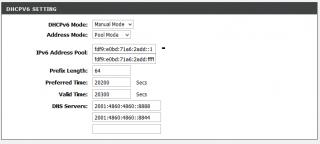
WAN IPv6 
|
|
|
|
|
|
kupang
|
Sep 3 2014, 06:55 PM
|
Getting Started
|
QUOTE(asellus @ Sep 3 2014, 01:35 PM) In the picture above, where did you get the 'IPv6 Address Pool' value? I got it through IPv6 generator website... am doing it the wrong way .. ? This post has been edited by kupang: Sep 3 2014, 06:57 PM |
|
|
|
|
|
kupang
|
Sep 4 2014, 06:53 PM
|
Getting Started
|
QUOTE(wKkaY @ Sep 4 2014, 02:52 PM) kupang I think you're very confused. IPv6 is nothing like IPv4 when it comes to LAN addressing so it's time to relearn this  1) You do not need to specify "private LAN IPs", because it's auto-generated by the operating system. 2) All your PCs on the LAN will get a public IP. 3) You do not necessarily need DHCPv6 to assign addresses, provided that the router announces its public IPv6 prefix using SLAAC. OK based on your advise.. I've tweaked the router settings LAN global address is randomly generated 

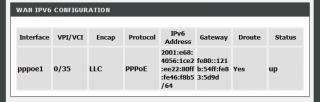
but now the ping 6 is giving the general failure message 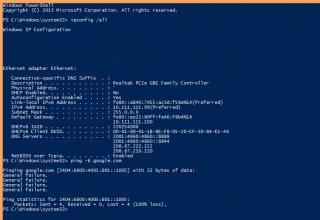 This post has been edited by kupang: Sep 4 2014, 07:01 PM
 |
|
|
|
|
|
kupang
|
Sep 4 2014, 10:11 PM
|
Getting Started
|
QUOTE(michaelkkl @ Sep 4 2014, 09:35 PM) How the result when the request address is ticked? the result still the same with both ticked or with either one ticked  |
|
|
|
|
|
kupang
|
Sep 5 2014, 09:15 AM
|
Getting Started
|
QUOTE(amirsubhi @ Sep 5 2014, 01:45 AM) I notice that DHCP is not being enable Do you assign your IP manually? as I dont see any DHCP Server inside your ipconfig result I've assigned IPv4 manually... Does DHCP (v4) being turned off affect DHCPv6 address assignment ..? This post has been edited by kupang: Sep 5 2014, 09:17 AM |
|
|
|
|
|
kupang
|
Sep 5 2014, 02:33 PM
|
Getting Started
|
QUOTE(amirsubhi @ Sep 5 2014, 10:02 AM) Just ensure at LAN Properties, Internet Protocol V6 is obtain an IPv6 automatically Yes, IPv6 is already set to obtain IP automatically... |
|
|
|
|
|
kupang
|
Sep 5 2014, 03:47 PM
|
Getting Started
|
QUOTE(wKkaY @ Sep 5 2014, 03:22 PM) I haven't used that router before so I can't advise what settings you should put. I have a feeling that it's easier to reset it to factory defaults and see if it works out of the box. Will try to set it up again using the setup CD... ----- well it seems the router is set to enable dual stack protocol by default with SLAAC and RA enabled but not DHCPv6. With this condition, the PC still cannot access the web using IPv6  This post has been edited by kupang: Sep 5 2014, 06:41 PM This post has been edited by kupang: Sep 5 2014, 06:41 PM |
|
|
|
|
|
kupang
|
Sep 5 2014, 10:05 PM
|
Getting Started
|
I'm beginning to suspect that the DHCPv6 feature for this Dlink's modem/router is the culprit as I can browse happily with IPv6 in bridge mode ..
|
|
|
|
|
|
kupang
|
Sep 6 2014, 06:07 PM
|
Getting Started
|
QUOTE(wKkaY @ Sep 6 2014, 12:03 AM) If you have SLAAC on the LAN side, you don't need DHCPv6. this is my current setup .. 
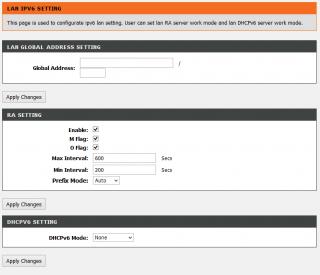

IPv6 properties for PC is set to automatic |
|
|
|
|
|
kupang
|
Sep 6 2014, 08:37 PM
|
Getting Started
|
QUOTE(raynman @ Sep 6 2014, 06:53 PM) IPv6 is not running on your system. You do not have the "ipv6" connection indicator in your above post, unlike mine. Here is my IPCONFIG and PING to google.com See the difference?  yes I noticed that, hence the "general failure" ping result I suppose this Dlink DSL-2730E modem is a half-baked product in terms of IPv6 features. My PC could only utilize IPv6 only in bridge mode. Every other connection methods failed to advertise / delegate the IPv6 to the PC. Be it SLAAC with/without DHCPv6 or RA  |
|
|
|
|
|
kupang
|
Sep 6 2014, 09:49 PM
|
Getting Started
|
QUOTE(raynman @ Sep 6 2014, 09:16 PM) Before I upgraded to Unifi, I was also using the TM-supplied DLink DSL-2730E. In Streamyx, I could not get IPv6 to work even though the firmware "supported" it. QUOTE(Psychosis @ Sep 6 2014, 09:30 PM) well when I was still on streamyx i did configure my router into bridge mode then setup pppoe from windows able to obtain ipv6 without any hassle I shall rest my case for now... hoping Dlink will issue a firmware update or perhaps I should get a new modem .. |
|
|
|
|
|
kupang
|
Feb 10 2017, 03:28 PM
|
Getting Started
|
QUOTE(raynman @ Feb 10 2017, 01:33 PM) Why suddenly this thread is inundated with non-IPv6 postings? might have to amend the topic .. because it says TMnet Streamyx/Unifi "AND" IPv6 |
|
|
|
|



 Quote
Quote

 0.0487sec
 0.47
0.47
 7 queries
 GZIP Disabled