Welcome Guest ( Log In | Register )

63 Pages « < 52 53 54 55 56 > » Bottom

Outline · [ Standard ] · Linear+

 Iconia W4 (W3-810 refresh) 8" tablet IPS screen, Baytrail Z3740 - Available Dec 6, 2013

views
     
Eiraku
post May 7 2014, 12:52 PM

Geeking since 1985!
*******
Senior Member
7,037 posts

Joined: Apr 2006


QUOTE(jeopardise @ May 7 2014, 12:32 PM)
My W4 fell on the road yesterday and lived.

Thanks for the 3rd party case cover.

I think can change the cover if I send to service center right? (Forget the price: can or not?)
*
Actually, my W4 just fell on the road and lived too... with just the crunch cover... for the second time... sweat.gif sweat.gif sweat.gif

Besides one semi deep gash and some scratches on the border at one corner (complementing the light scratches it already has on the other corner), it's still kicking fine.

I'm beginning to think that this is the reason why Acer put such a thick plastic border around this thing. And apparently that border is ALL plastic right to where it meets the screen area.

That said, does everybody's power button click like the volume and start buttons? Mine's all mushy and I'm actually not sure if its normally like that or if the fall did something. It still works like it used too though.

This post has been edited by Eiraku: May 7 2014, 12:58 PM
jeopardise
post May 7 2014, 01:39 PM

tidak memberi seketul tahi!
******
Senior Member
1,767 posts

Joined: Jan 2003
From: Bandar Seri Putra


With the same fall and impact, an iPad Air screen could be smashed.

Luckily its a W4.
Eiraku
post May 7 2014, 03:46 PM

Geeking since 1985!
*******
Senior Member
7,037 posts

Joined: Apr 2006


Anyway, anybody notice just how much of a drag it is to multiselect in Explorer? Turns out Acer knows this, and have even come up with a nice set of tools to help with touch: The Acer Touch Tools.

For those who haven't seen these yet, check them out here: http://bit.ly/1kVQTdU

I like the concept of these, but I wonder if there is a more customizable third party version out there? Like always on top floating buttons to simulate certain more important keys like tab and whatnot.

I mean the "system" layout on the modern keyboard is great and all, but it's very cramped for actual use.

As it is, it's plenty useful - if not to just make Photoshop *actually* usable with touch input alone.

This post has been edited by Eiraku: May 7 2014, 04:13 PM
jeopardise
post May 8 2014, 05:11 PM

tidak memberi seketul tahi!
******
Senior Member
1,767 posts

Joined: Jan 2003
From: Bandar Seri Putra


QUOTE(Eiraku @ May 7 2014, 03:46 PM)
Anyway, anybody notice just how much of a drag it is to multiselect in Explorer? Turns out Acer knows this, and have even come up with a nice set of tools to help with touch: The Acer Touch Tools.

For those who haven't seen these yet, check them out here: http://bit.ly/1kVQTdU

I like the concept of these, but I wonder if there is a more customizable third party version out there? Like always on top floating buttons to simulate certain more important keys like tab and whatnot.

I mean the "system" layout on the modern keyboard is great and all, but it's very cramped for actual use.

As it is, it's plenty useful - if not to just make Photoshop *actually* usable with touch input alone.
*
you are right.

i code a lot and can't rely with the touch functions. scrolling is a pain with the screen 'doesn't refresh' - i am not sure how to describe it.
xiphone4
post May 12 2014, 12:29 AM

Getting Started
**
Junior Member
147 posts

Joined: Nov 2010
Anyone know how to do screen capture on this w4 ?
marauderz
post May 12 2014, 01:33 AM

Windows Tablet War Veteran
*******
Senior Member
3,390 posts

Joined: Feb 2005


QUOTE(xiphone4 @ May 12 2014, 12:29 AM)
Anyone know how to do screen capture on this w4 ?
*
Press win+volume down to take screen shot. Saved to pictures\screen shot
azeemzuhair
post May 13 2014, 02:09 PM

Look at all my stars!!
*******
Senior Member
2,190 posts

Joined: Nov 2011


Already using this unit for more than 3 months accompanied by daily drive Lenovo P780, i have to admit that they both are the best combo for road warrior and on-the-go daily routine.

Hotspot via P780 for more than 12 hours on a single charge makes W4 without 3G is a value buy.

While receiving/making business and personal calls, Whatsapp, Viber, Skype, Tango and the like via P780 is a splendid experience; replying emails, watching YouTube, remote access and miscellaneous business activities make W4 the right tool for workaholic people (like me..... LOL)...

Many of my audience is shock to see me present PowerPoint via W4 thru micro-HDMI port. They never expected Windows 8.1 can run in such a small tablet.

Now, let's wait next week whether Microsoft Surface MINI is the right replacement for W4 later.
Source : http://www.trustedreviews.com/news/surface...-price-round-up

How I wish the MS Mini is a full Windows 8.1 having dual SIM capabilities with HSDPA+ or maybe LTE. Built-in Wacom technology as well as Qi charging & certified IP55/58 will make it a unicorn. Reliable camera with OIS is a bonus. Just take my money for whatever cost it may be... LOL...

This post has been edited by azeemzuhair: May 13 2014, 02:30 PM
mitodna
post May 13 2014, 11:00 PM

Getting Started
********
All Stars
14,039 posts

Joined: Jan 2003
hi, could use some help if this tablet can play https://apps.facebook.com/islesofwar , it is an FB games

Thanks
Eiraku
post May 13 2014, 11:19 PM

Geeking since 1985!
*******
Senior Member
7,037 posts

Joined: Apr 2006


QUOTE(azeemzuhair @ May 13 2014, 02:09 PM)
Already using this unit for more than 3 months accompanied by daily drive Lenovo P780, i have to admit that they both are the best combo for road warrior and on-the-go daily routine.

Hotspot via P780 for more than 12 hours on a single charge makes W4 without 3G is a value buy.

While receiving/making business and personal calls, Whatsapp, Viber, Skype, Tango and the like via P780 is a splendid experience; replying emails, watching YouTube, remote access and miscellaneous business activities make W4 the right tool for workaholic people (like me..... LOL)...

Many of my audience is shock to see me present PowerPoint via W4 thru micro-HDMI port. They never expected Windows 8.1 can run in such a small tablet.

Now, let's wait next week whether Microsoft Surface MINI is the right replacement for W4 later.
Source : http://www.trustedreviews.com/news/surface...-price-round-up

How I wish the MS Mini is a full Windows 8.1 having dual SIM capabilities with HSDPA+ or maybe LTE. Built-in Wacom technology as well as Qi charging & certified IP55/58 will make it a unicorn. Reliable camera with OIS is a bonus. Just take my money for whatever cost it may be... LOL...
*
Personally speaking, if you use Bluetooth tethering with your phone, both of them can very well go for even longer (as Bluetooth eats less power). And it isn't actually that slow actually vs WiFi tethering - it's just a bit more troublesome (a bit more steps to prepare and to connect).

Just consider it a little tip for when you really need the W4 + phone combo to last longer on a single charge.

About the Surface Mini... lets just hope Microsoft is NOT going to waste the opportunity by NOT releasing a "Pro" version of the Mini. Though unfortunately the rumours so far suggest that they ARE going to waste it and there will only be an RT version.

shocking.gif shocking.gif shocking.gif

Such a shame if its true.

This post has been edited by Eiraku: May 13 2014, 11:22 PM
leenux
post May 13 2014, 11:26 PM

Casual
***
Junior Member
416 posts

Joined: Jan 2003
From: Selangor


QUOTE(mitodna @ May 13 2014, 11:00 PM)
hi, could use some help if this tablet can play https://apps.facebook.com/islesofwar , it is an FB games

Thanks
*
never played this before but i tested and it's playable smile.gif
azeemzuhair
post May 14 2014, 01:37 PM

Look at all my stars!!
*******
Senior Member
2,190 posts

Joined: Nov 2011


QUOTE(Eiraku @ May 13 2014, 11:19 PM)
Personally speaking, if you use Bluetooth tethering with your phone, both of them can very well go for even longer (as Bluetooth eats less power). And it isn't actually that slow actually vs WiFi tethering - it's just a bit more troublesome (a bit more steps to prepare and to connect).

Just consider it a little tip for when you really need the W4 + phone combo to last longer on a single charge.
*
Oh... thanks for the tips. But I use the P780 as hotspots connecting 4 other devices simultaneously. Still, the mega-capacity of the P780 phone can last for more than 12 hours on a single charge...
Eiraku
post May 14 2014, 09:48 PM

Geeking since 1985!
*******
Senior Member
7,037 posts

Joined: Apr 2006


QUOTE(azeemzuhair @ May 14 2014, 01:37 PM)
Oh... thanks for the tips. But I use the P780 as hotspots connecting 4 other devices simultaneously. Still, the mega-capacity of the P780 phone can last for more than 12 hours on a single charge...
*
Yeah I heard, 4000mah is nothing to be sneered at. A shame I could never prolly live with the MTK processor - I'm too spoiled with the performance of Exynos and the fact that my N2 comes with the Wolfson DAC (audiophile preferences).

Anyhows, the Asus Vivotab Sudden Death Syndrome situation is becoming quite... acute. A shame because that's prolly the ONLY other tab I'm lusting over now that Dell is not doing ANYTHING about bring the V8P in officially. And that the chance that the MSM is gonna come with Win8 non-RT is becoming slimmer by the moment (Qualcomm processor rumours now).

I guess I'll just have to live with the W4 and fat capacitive stylii for my tablet note taking needs for now. Heeesh. That said I already have enough stylii to do a shootout review in a week or two, will post a linky here when I finish that later.

If anyone can live with a huge slate the ThinkPad 10 is coming though lol. I know I can't.

This post has been edited by Eiraku: May 14 2014, 09:50 PM
cphilip
post May 15 2014, 08:10 PM

Getting Started
**
Junior Member
106 posts

Joined: Jul 2007


Actually, I have very good results with Touchpal (swype system) keyboard on my Asus Note 8.

But I recommend going to the - setting>PC and devices>Typing to enable the full standard keyboard layout.

and then go to - Time and language>Region and language to remove the default english keyboard so that touchpal can takes its place.

The onscreen touchpal launcher widget has beeen very consistent on my full desktop. I also place the link to the launcher (C:\program Files\CooTek\TouchPal\TPKeyBoard.exe) on my desktop just in case i need to re start the touchpal launcher.

By doing it this way, Touchpal also works in Windows Metro desktop.

This post has been edited by cphilip: May 15 2014, 08:19 PM
jeopardise
post May 15 2014, 08:14 PM

tidak memberi seketul tahi!
******
Senior Member
1,767 posts

Joined: Jan 2003
From: Bandar Seri Putra


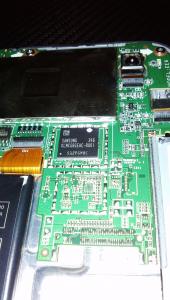
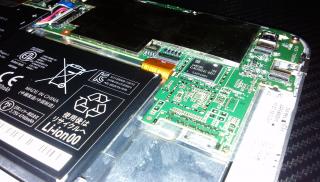
My W4 fell again but on soft carpet, the cover opened a small gap where I managed to 'kopek' and have a peek inside.

Attached Image
Attached Image
Attached Image
Attached Image
Attached Image

sweat.gif
mitodna
post May 15 2014, 09:10 PM

Getting Started
********
All Stars
14,039 posts

Joined: Jan 2003
QUOTE(leenux @ May 13 2014, 11:26 PM)
never played this before but i tested and it's playable smile.gif
*
Thanks. Much appreciated.
Eiraku
post May 15 2014, 10:37 PM

Geeking since 1985!
*******
Senior Member
7,037 posts

Joined: Apr 2006


QUOTE(jeopardise @ May 15 2014, 08:14 PM)
My W4 fell again but on soft carpet, the cover opened a small gap where I managed to 'kopek' and have a peek inside.

sweat.gif
*
Oh mai. Hope it's okay. That said, thanks for what may be the first disassembly pics of the W4 so far.

BTW, is it hard to pry open the back panel? I might have to do it to check out my sinking power button lol.
jeopardise
post May 16 2014, 07:52 AM

tidak memberi seketul tahi!
******
Senior Member
1,767 posts

Joined: Jan 2003
From: Bandar Seri Putra


its very easy. can use your fingernail.

won't tear any stickers inside - so warranty won't void

I was hoping if there's possible slot or port to upgrade... but i found non upgradable, as everything looked soldered.

This post has been edited by jeopardise: May 16 2014, 08:30 AM
Eiraku
post May 20 2014, 07:41 PM

Geeking since 1985!
*******
Senior Member
7,037 posts

Joined: Apr 2006


Now trying to run PCSX2 on this thing. Tried Front Mission 5 with it (with VirtualGamePad for controls) and OMG IT RUNS!!1111!

But like Doom 3 on my Note 2, it's more a proof of concept than anything truly playable at this point. Maybe after a few gens after Cherry Trail it would be fully usable but right now it's pretty choppy out-of-the-box and needs some serious optimizations.

On the other hand, Homeworld 2 works perfect, though I need to set it up to run in a window somehow so that I can use a custom VGP on it. It's either that or Gestureworks. Though I'd rather run things in a window and GW doesn't really support that.

At this point, if I run it in Portrait it defaults to some weird sort of semi-window anyway, and I could play well enough with the extended touch keyboard + TouchMouse in float mode.

But still, mobile Homeworld 2 woohoo. Maybe I should try Knights of the Old Republic next, if I can figure out how to control it lol. Sure, an external controller would work, but what's the fun in that?

This post has been edited by Eiraku: May 20 2014, 07:47 PM
marauderz
post May 20 2014, 09:56 PM

Windows Tablet War Veteran
*******
Senior Member
3,390 posts

Joined: Feb 2005


QUOTE(Eiraku @ May 20 2014, 07:41 PM)
Now trying to run PCSX2 on this thing. Tried Front Mission 5 with it (with VirtualGamePad for controls) and OMG IT RUNS!!1111!

But like Doom 3 on my Note 2, it's more a proof of concept than anything truly playable at this point. Maybe after a few gens after Cherry Trail it would be fully usable but right now it's pretty choppy out-of-the-box and needs some serious optimizations.

On the other hand, Homeworld 2 works perfect, though I need to set it up to run in a window somehow so that I can use a custom VGP on it. It's either that or Gestureworks. Though I'd rather run things in a window and GW doesn't really support that.

At this point, if I run it in Portrait it defaults to some weird sort of semi-window anyway, and I could play well enough with the extended touch keyboard + TouchMouse in float mode.

But still, mobile Homeworld 2 woohoo. Maybe I should try Knights of the Old Republic next, if I can figure out how to control it lol. Sure, an external controller would work, but what's the fun in that?
*
Don't try to run desktop games in portrait mode, most likely you'll end up confusing the game usually tongue.gif


Eiraku
post May 20 2014, 11:00 PM

Geeking since 1985!
*******
Senior Member
7,037 posts

Joined: Apr 2006


QUOTE(marauderz @ May 20 2014, 09:56 PM)
Don't try to run desktop games in portrait mode, most likely you'll end up confusing the game usually tongue.gif
*
If you run in full screen, definitely yes. Alpha Centauri wouldn't even run in portrait. However, running stuff in a 800x600 window (natively or otherwise) allows you to circumvent this - to a certain degree.

Unfortunately, VirtualGamePad doesn't properly support portrait-mode, so this point is moot unless you plan to play with TouchMouse and the Win8 OSK.

I need to hammer a long email to the dev about this, as having virtual controls at the bottom of a 800x600 window of anything in portrait = delicious, single-hand friendly, on-the-move PC (and emulated) gaming.

Mmmmmm.

This post has been edited by Eiraku: May 20 2014, 11:01 PM

63 Pages « < 52 53 54 55 56 > » Top
 

Change to:
| Lo-Fi Version
0.0347sec    0.91    6 queries    GZIP Disabled
Time is now: 4th December 2025 - 05:15 PM