Outline ·
[ Standard ] ·
Linear+
Google NEXUS 7 Official Thread @V6, V6!!Welcome Android 6.0 Marshmallow
|
briantwj
|
 Sep 25 2013, 09:57 AM Sep 25 2013, 09:57 AM
|

|
Guys, I have the N7C version running on 4.2.1 (JOP40D). How do I flash the wifi tethering feature into it? I downloaded the zip file from this site. http://forum.xda-developers.com/showthread.php?t=1995737I've tried rooting but i've never tried flashing zip files before. Any sifus can help? Editted. Done flashing.  This post has been edited by briantwj: Sep 25 2013, 10:15 AM This post has been edited by briantwj: Sep 25 2013, 10:15 AM |
|
|
|
|
|
briantwj
|
Sep 25 2013, 02:50 PM
|
|
|
QUOTE(JohnDiew0107 @ Sep 25 2013, 02:47 PM) anywhere I can still find new set of Nexus 7 2012 either 16GB or 32GB or 32GB 3G.. try SenQ or Hotspot in lowyat plaza.... |
|
|
|
|
|
briantwj
|
Sep 25 2013, 03:49 PM
|
|
|
QUOTE(JohnDiew0107 @ Sep 25 2013, 03:38 PM) any idea what's the price? if price good, might consider in getting as the 2013 version is over budget Not quite sure, but it's cheap now. New 32gb cellular version maybe around 800+. Not sure though. |
|
|
|
|
|
briantwj
|
Dec 17 2013, 11:13 AM
|
|
|
Guys, just yesterday when I was playing PvZ on my Nexus 7 (4.2.1, build number jop40d, rooted, stock rom), my N7 screen suddenly turn into brown colour (the in game colour for PvZ) then it turns off automatically. At first can't be turn on, so I start charging it, then it is able to be turned on. I left it unused for about half day, then when I check d battery, it dropped 10%! My N7 battery never had any issue b4. Then I check the battery setting, Google Service has been using 54% of it. Then I notice even my date and time has gone haywire. The date goes back to year 2000. Then I try opening Google Play, keep say can't connect. When I readjust the date, finally Google Play can work. And it automatically download updates for most of my apps again.  Does your N7 has this issue? Suddenly turn off itself, then when power it back on, the date and time setting gone haywire. Whats the problem?  |
|
|
|
|
|
briantwj
|
Dec 17 2013, 01:53 PM
|
|
|
QUOTE(lucaswjk @ Dec 17 2013, 12:09 PM) nope... did u recently install "certain" apps? hmmm...if u mean kerak app, nope. The latest app I installed was Injustice from Google Play. The latest kerak app i installed was Soul Calibur.  |
|
|
|
|
|
briantwj
|
Dec 17 2013, 08:12 PM
|
|
|
QUOTE(CyberKewl @ Dec 17 2013, 07:58 PM) date time reset is normal when your battery goes out. happens on my n7, nothing to feel weird about. just readjust the clock and you're done. the battery indicator for the n7 is not accurate, so while you may have say 20% left but in reality it is close to 0%. the only way to bring it back to "normal" levels is to turn it off, leave it for 3-5 hours to recalibrate, then turn it back on and charge it to full. this problem may occur again so dont be surprised that u need to repeat the process again. Thanks! I've been Google-ing this prob. Seems like this is a common prob for Nexus 7 running on 4.2. I was so worried that I almost wanted to remove the back cover, do a battery pull and plug out the battery connector and plug in back.  xda forum did taught a few ways to kinda fix this problem. 1) do a battery plug 2) remove battery connector and place it back, can use a tape to hold it in place more tightly 3) turn off Nexus 7 for a few hours, then it will calibrate the battery again. seems like for the 4.2 version, it causes our Nexus 7 battery to show the wrong percentage. source : http://forum.xda-developers.com/showthread.php?t=2090826 |
|
|
|
|
|
briantwj
|
Dec 18 2013, 06:06 PM
|
|
|
I'm still at 4.2.1 atm. haha. Coz my N7 has many kerak app. I rely heavily on Sygic. I'm afraid Sygic do not support 4.4 yet. Hence I maintain my N7 at 4.2.1 |
|
|
|
|
|
briantwj
|
Jan 11 2014, 02:56 PM
|
|
|
I rmb not long ago, I posted an issue which is Google Play Service is draining my battery a lot especially when I turn on gps location setting. For those who are experiencing short battery life and under the battery app, you see that the Google Play Service app is sucking a lot of juice from your battery. I found a solution to it. You need to update the new Google Play Service 4.1 version. I don't know why my N7 wasn't pushed into automatically updating this Google Play Service app. This is weird. After Google-ing a lot, I found out that many Android devices running on Google Play Service 4.0 suffers from battery drain from this app. And recently, androidpolice's website has a news on a new Google Play Service is updated, which is the 4.1 version. Perhaps most important to non-developers, Google appears to have "improved" battery life for users who have Location Reporting enabled. Readers may recall this was an issue with previous Play Services releases. source > http://www.androidpolice.com/2014/01/09/go...eview-and-more/related issue > http://www.androidpolice.com/2013/11/19/it...tery-hog-today/I've just updated my Google Play Service to the latest version by installing the apk. Let's hope it fixes the problem of Google Play Service being a battery hog. |
|
|
|
|
|
briantwj
|
Jan 12 2014, 01:09 PM
|
|
|
Update: Fully charged my tablet yday before I sleep. Unplug at 2am this morning. After 11 hours (today 1pm), the battery is still at 100%  If seems like the Google Play Service is really at fault previously.  |
|
|
|
|
|
briantwj
|
Jan 12 2014, 01:52 PM
|
|
|
QUOTE(ongweiping @ Jan 12 2014, 01:46 PM) Is that even possible?  When I first bought it, it was working like this. When the tab is idle (not in use), the highest consuming app is the 'tablet idle' app. Several times I have tried, before sleeping at night and after waking up the next day, the battery remains the same %. It's just last year the Google Play Service app got updated, which is causing it to consume battery even when the tab is in idle mode. I suspect its because I turn on the location setting and Google Play Service is working all the time to fetch data or searching for location. After updating the Google Play Service manually, my N7 battery life is returning to it's normal self when I first bought it. This post has been edited by briantwj: Jan 12 2014, 02:40 PM |
|
|
|
|
|
briantwj
|
Jan 12 2014, 01:53 PM
|
|
|
QUOTE(lucaswjk @ Jan 12 2014, 01:19 PM) 11hours?? u turn off all the wifi/3g issit? anyway sound great... Yup. No wifi and 3g. GPS turned on through out. This post has been edited by briantwj: Jan 12 2014, 01:59 PM |
|
|
|
|
|
briantwj
|
Jan 12 2014, 02:03 PM
|
|
|
Some reads regarding the Google Play Service issues. It has been around since last year November like that. http://androidcommunity.com/play-services-...s-why-20131120/We tested this out with our Nexus 4, just to be sure. We had all cellular connectivity and WiFi off. We also disabled location sharing and background app refreshing, basically making our device a dumb brick instead of a smartphone. The result? Nearly 10% battery drain in two hours. In that mode, we routinely get through a day with a 4% loss in battery.I think Google was testing something. More spying from them I would say, maybe trying to fetch more information from android device to learn the users' pattern and recommend apps in playstore. Just an example. Just try Google-ing 'Google Play Service battery drain'. U'll find plenty of complains from users about it. This post has been edited by briantwj: Jan 12 2014, 02:05 PM |
|
|
|
|
|
briantwj
|
Apr 2 2014, 10:53 PM
|
|
|
Help guys!!! My nexus 7 is originally rooted and running on 4.2.1, so today I decided to unroot and update to 4.4. I use the Wugfresh Nexus Root Kit, downloaded the 4.4.2 image from here https://developers.google.com/android/nexus...s#nakasigkot49hThen I just follow the guide, I clicked Flash Stock + Unroot. Chose the 4.4.2 image downloaded from Google's page. It went well. The command prompt was running. Then it succeed, too fast. But when i look at my N7, i press d power key which is showing 'start'. Then my laptop keep got d usb plugging n unplugging sound. Now my N7 is stucked with the only options being, start, restart bootloader,recovery mode and power off. I tried all option, but cant work. Only can power off. I tried to choose Flash Stock + Unroot again. but this time, the process is interrupted, saying ADB device not found...wad to do now!! I've tried Googling but to no avail. This post has been edited by briantwj: Apr 2 2014, 10:55 PM |
|
|
|
|
|
briantwj
|
Apr 2 2014, 10:57 PM
|
|
|
I can only power off, and restart bootloader. I'm stuck between power off, bootloader. The 'Start' and 'Recovery mode' option do not bring any effect.
|
|
|
|
|
|
briantwj
|
Apr 2 2014, 11:08 PM
|
|
|
So i tried doing this. Flash Stock + unroot. and choosing the option of softbrick/bootloop.  It was going well. until i noticed this. 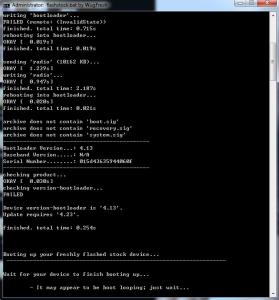
Is there anyway to update the bootloader when i'm stuck at the bootloader? my bootloader is on 4.13, but it requires 4.23 This post has been edited by briantwj: Apr 2 2014, 11:09 PM |
|
|
|
|
|
briantwj
|
Apr 3 2014, 11:17 AM
|
|
|
fixed. I uninstall all the drivers, reinstall back. Restore stock kernel, restore stock recovery. Then ticked forced flash, Flast Stock and Unroot. Chose the 4.4.2 as the stock and wahlah. Now running on 4.4.2 dy.  |
|
|
|
|
|
briantwj
|
Apr 8 2014, 03:47 PM
|
|
|
any1 having problem flashing wifi tethering after updated to kitkat?
after flashing, mine get stuck at the boot up screen (4 dots keep spinning in the middle). Spin damn long also can't start up. Have to flash stock and unroot. -.-
|
|
|
|
|
|
briantwj
|
Apr 8 2014, 04:44 PM
|
|
|
I've flash stock (4.4.2) + unroot. Lock bootloaders, unlock bootloaders, root, busybox is there, used root checker and confirmed that I am rooted. Then I tried again, using Wugfresh Nexus Root Toolkit function to boot temporary into custom recovery (TWRP). Selected install and choose the zip file for wifi tethering. Still the same result. It gets stucked when booting up at the 4 circles. Wait 5 min oso no diff. Lucky this time I backup nandroid. This post has been edited by briantwj: Apr 8 2014, 04:45 PM |
|
|
|
|
|
briantwj
|
Apr 8 2014, 09:12 PM
|
|
|
QUOTE(azlan79 @ Apr 8 2014, 07:38 PM) recheck busybox broken or not, I got the issue related to busybox on stock kot49h before, but root checker show "busybox installed" and fix with this https://play.google.com/store/apps/details?....busyboxonrails
I got diz...sysyem ok...means ntg is wrong with my busybox right? |
|
|
|
|
|
briantwj
|
Apr 9 2014, 01:42 AM
|
|
|
QUOTE(AmeiN @ Apr 8 2014, 11:39 PM) Anyone wanna let go nexus dock? or know where can i get 1? Duno he still have it anot. Last time I was also tempted to buy the dock, but realize I dun quite need it. |
|
|
|
|



 Quote
Quote

 0.0219sec
 0.47
0.47
 7 queries
 GZIP Disabled