Welcome Guest ( Log In | Register )

Outline · [ Standard ] · Linear+

 Google NEXUS 7 Official Thread @V6, V6!!Welcome Android 6.0 Marshmallow

views
     
briantwj
post Dec 17 2014, 08:55 AM

Pierluigi Collina
*******
Senior Member
3,968 posts

Joined: Sep 2012


QUOTE(Jay Chua CC @ Dec 17 2014, 04:08 AM)
Still not getting the 5.0 ota update on my nexus 2012 wifi version. Already cleared most of the apps cache. Any idea how to get the update?
*
Well, u can do a clean flash. dl the factory image from the link for Nexus 7 2012 wifi version and flash it.

If u juz wanna flash the OTA, refer to here

http://forum.xda-developers.com/showthread.php?t=1745781

what is ur current version? 4.4.4? if 4.4.4 means it's KTU84P. 5.0 is LRX21P. SO u nid to dl the link for 'LRX21P from KTU84P'.
briantwj
post Dec 17 2014, 12:58 PM

Pierluigi Collina
*******
Senior Member
3,968 posts

Joined: Sep 2012


QUOTE(Jay Chua CC @ Dec 17 2014, 12:48 PM)
Yeah,its 4.4.4 . So have to flash to get the ota? else cant get?
*
hmm, have u done these steps? Try to force update it.

Anything that you do is at your own risk:

Put your device into air-plane mode (i.e. disable all connectivity options)
Go to Settings -> Apps -> All (tab) -> Google Services Framework
Click on Clear cache (if enabled)
Click on Clear data (and OK the warning)
Click on Force stop (and OK the warning)
Disable air-plane mode (e.g. enable WiFI)
Check that you have access to the network
Wait (usually no more than a couple of minutes)
Optionally, go back to Settings -> About Phone/Tablet -> System Updates -> Check now
You should get a prompt to apply the new update (assuming there is one available for your device)

Btw, the xda link is the OTA files saved as zip file. So if u flash it, it actually serves the same function as an OTA update. nod.gif

This post has been edited by briantwj: Dec 17 2014, 01:05 PM
briantwj
post Dec 17 2014, 01:00 PM

Pierluigi Collina
*******
Senior Member
3,968 posts

Joined: Sep 2012


QUOTE(wonger @ Dec 17 2014, 12:55 PM)
No, what he meant was no need wait for OTA. Just flash straight to 5.0 yourself.

But I heard reports that 5.0 OTA was taken offline. Not sure if this is accurate. You may wanna wait for 5.0.1 OTA instead.
*
same here. I heard 5.0 update was put on hold bcoz of some reason. Not sure why though. But really unfair to those who owns the mobile version of Nexus 7 2012 and 2013. No update yet. sweat.gif
briantwj
post Dec 17 2014, 01:22 PM

Pierluigi Collina
*******
Senior Member
3,968 posts

Joined: Sep 2012


QUOTE(Jay Chua CC @ Dec 17 2014, 01:17 PM)
Too bad didnt work too. hmm.gif No update found.
*
then i guess u have to flash the OTA update. Just dl the update from 4.4.4 to 5.0 from the xda link. And flash it via twrp or cwm.

Just be sure of ur Nexus 7 version. nod.gif
briantwj
post Dec 17 2014, 01:33 PM

Pierluigi Collina
*******
Senior Member
3,968 posts

Joined: Sep 2012


QUOTE(Jay Chua CC @ Dec 17 2014, 01:31 PM)
Will i get the update later on if i waited? Not quite familiar in flashing. sweat.gif
*
eventually u'll get the OTA too. Google push out their updates in batch. Same thing happen to my gf's Nexus 4. Most ppl got the OTA update dy, then there are some that haven't got it. Until last last week, she finally got the Lollipop update.

Flashing is for those that can't wait. laugh.gif Like me. rclxm9.gif
briantwj
post Dec 19 2014, 07:36 AM

Pierluigi Collina
*******
Senior Member
3,968 posts

Joined: Sep 2012


QUOTE(letze @ Dec 18 2014, 11:31 PM)
My nexus 7 is fine until last two days, dead without inform me.  mad.gif
Cannot boot at all. Even with pwr + volume down button.

Tried different charger to charge - didn't work
I am very sure the tablet is not 0% (completely discharge) during it's death.
Even before, I never let battery reaches below 15%.

Sigh...now thinking of nexus 9...but the price is killing me...and no 64GB option  doh.gif
*
hmm.gif LCD prob?

It'll be nice if u can get Nvidia Shield Tablet. Stock android with Tegra K1. drool.gif
briantwj
post Dec 22 2014, 10:49 PM

Pierluigi Collina
*******
Senior Member
3,968 posts

Joined: Sep 2012


QUOTE(Jay Chua CC @ Dec 22 2014, 10:18 PM)
Mind explaining whats the difference between the nvidia shield tablet and the nvidia shield portable? aside from the attached gamepad lah. biggrin.gif
*
Well imho,

Shield portable is for the really hardcore gamer and those who invested in Shield/Nvidia ecosystem. Like u have a gaming rig with Nvidia GTX gpu, u can stream ur game with Shield portable. brows.gif and the controller is a must for those hardcore gamers. Do u ever see hardcore gamer use touch screen to game? laugh.gif

But datz d prob with it. It only appeals to hardcore gamer which is not the biggest market. Which is why Shield Tablet is created, to target wider variety of consumer. Ppl who wan some gaming on their tab can get it. And a lot of gud feature on this tab, front facing speaker, hdmi port, stock android, Tegra k1 chipset. All diz will appeal to wider type of consumer. I dun think it'll appeal a lot to hardcore gamers. Unless they buy the controller too. laugh.gif
briantwj
post Feb 5 2015, 02:38 PM

Pierluigi Collina
*******
Senior Member
3,968 posts

Joined: Sep 2012


QUOTE(de4thscythell @ Feb 2 2015, 03:49 PM)
Anyone try the new 5.0.2 for Nexus 7 2012 3G yet?
*
Finally!!! Now downloading the stock rom, will do a clean flash and update here. rclxms.gif
briantwj
post Feb 11 2015, 06:36 PM

Pierluigi Collina
*******
Senior Member
3,968 posts

Joined: Sep 2012


hmm.gif Weird. I flash to lollipop using Wugfresh NRT. But not bootloop. doh.gif

Guess I'm spending more time wif my Nexus 7 today.
briantwj
post Feb 11 2015, 06:49 PM

Pierluigi Collina
*******
Senior Member
3,968 posts

Joined: Sep 2012


QUOTE(nasrulafiq93 @ Feb 11 2015, 06:42 PM)
What u meant by "not bootloop"? rclxub.gif

Succesfully booted or not?
*
typo. shud be 'now bootloop'. Kip showing the Google word in the middle with the unlock icon below. Can't boot into the system laugh.gif

When I tried to go to recovery also can't. Recovery only works when I connect my N7 to my laptop. Guess I nid to flash again.

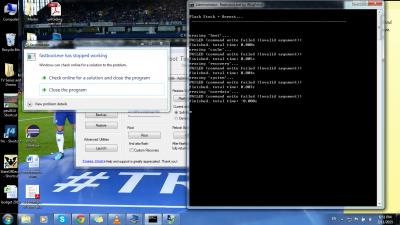
I kip getting this though. doh.gif

Attached Image

This post has been edited by briantwj: Feb 11 2015, 06:53 PM
briantwj
post Feb 11 2015, 07:41 PM

Pierluigi Collina
*******
Senior Member
3,968 posts

Joined: Sep 2012


QUOTE
Flash Stock + Unroot...
------------------------------------------------------------------


erasing 'boot'...
OKAY [  0.080s]
finished. total time: 0.090s
******** Did you mean to fastboot format this partition?
erasing 'cache'...
OKAY [  0.090s]
finished. total time: 0.090s
erasing 'recovery'...
OKAY [  0.030s]
finished. total time: 0.030s
******** Did you mean to fastboot format this partition?
erasing 'system'...
OKAY [  0.100s]
finished. total time: 0.110s
******** Did you mean to fastboot format this partition?
erasing 'userdata'...
OKAY [  4.931s]
finished. total time: 4.941s

sending 'bootloader' (2100 KB)...
OKAY [  0.270s]
writing 'bootloader'...
FAILED (remote: (InvalidState))
finished. total time: 0.410s
rebooting into bootloader...
OKAY [  0.020s]
finished. total time: 0.020s

sending 'radio' (16384 KB)...
OKAY [  1.987s]
writing 'radio'...
OKAY [  1.200s]
finished. total time: 3.187s
rebooting into bootloader...
OKAY [  0.020s]
finished. total time: 0.020s

sending 'boot' (5152 KB)...
OKAY [  0.630s]
writing 'boot'...
OKAY [  0.530s]
finished. total time: 1.170s
rebooting into bootloader...
OKAY [  0.010s]
finished. total time: 0.020s

sending 'recovery' (5688 KB)...
OKAY [  0.710s]
writing 'recovery'...
OKAY [  0.560s]
finished. total time: 1.270s
rebooting into bootloader...
OKAY [  0.020s]
finished. total time: 0.030s

erasing 'system'...
OKAY [  0.199s]
sending 'system' (649387 KB)...
FAILED (data transfer failure (Too many links))
finished. total time: 6.411s
rebooting into bootloader...
FAILED (command write failed (Too many links))
finished. total time: 0.010s

rebooting...

finished. total time: -0.000s
Any sifu can help? Why sending 'system' failed? I tried google-ing. Most ppl said it's cable prob, I use back my original cable, still the same. hmm.gif


briantwj
post Feb 11 2015, 11:51 PM

Pierluigi Collina
*******
Senior Member
3,968 posts

Joined: Sep 2012


Finally I see the 4 colored ball floating around! laugh.gif From 8 til now. sweat.gif

I duno what happen, juz kip flash stock + unroot. Then can dy. laugh.gif

First impression, the set up page looks so nice. Loving the material design.
briantwj
post Feb 13 2015, 10:55 AM

Pierluigi Collina
*******
Senior Member
3,968 posts

Joined: Sep 2012


QUOTE(normaron @ Feb 12 2015, 10:31 AM)
Hi, want to know any where I can send my Nexus 7 to repair? I think I some how brick my N7, cannot boot into recovery (dead android with red triangle),  can boot into bootloader/Fastboot unlock, problem is I cannot get my pc to recognize the device, hence cannot do anything from the bootloader =(

Feeling frustrated, thinking to see if there is any expert shop that I send to them and ask them help me fix this.
*
have u tried booting into fastboot? Power on ur device, when u c the google icon, straight away press power + volume down button. Do this while connecting ur tab to ur pc. If u can boot into fastboot, u still can use Rootkit to save ur tab.

Btw, I find that battery life is not so gud in 5.0.2 compared to 4.4.4. Nowadays I very seldom use my tab. On a full charge, when I keep it in my drawer and not use it at all, 100% charge can last me 1 week+ until it bcums 0%. Now, after 2 days, 100% drop to 60% dy. I didn't use it and just left it in my drawer. hmm.gif Too many wakelocks for 5.0.2?
briantwj
post Feb 13 2015, 12:35 PM

Pierluigi Collina
*******
Senior Member
3,968 posts

Joined: Sep 2012


QUOTE(normaron @ Feb 13 2015, 12:18 PM)
Hi, Yes, I can boot into fastboot, but due to pc cannot recognized (previously can before i mess up) I could not use the Rootkit due to cannot detect my device, tried many ways still cannot  cry.gif  cry.gif
*
Did u enabled USB debugging before this happened? If yes then it still can be saved. If no, then I think u nid to send to sifus dy. I've never tried fixing it in this type of situation, sorry......

Maybe other users can help u. nod.gif
briantwj
post Feb 13 2015, 02:08 PM

Pierluigi Collina
*******
Senior Member
3,968 posts

Joined: Sep 2012


QUOTE(normaron @ Feb 13 2015, 02:06 PM)
After trying around, plug in to a few colleagues' pc, then one of the pc can detect, then come back to my own pc and plug in, finally can be detected again, totally unpredictable  doh.gif

Thanks for replying me and get me try few more rounds.

Just used root tool kit to flash back to stock rom rclxm9.gif  rclxm9.gif
*
sometimes is the usb port's prob. Glad that u solved it. Enjoy ur lollipop! rclxm9.gif

4 Pages « < 2 3 4Top
 

Change to:
| Lo-Fi Version
0.0428sec    0.32    7 queries    GZIP Disabled
Time is now: 7th December 2025 - 06:07 AM