QUOTE(nitehawk @ Oct 11 2021, 05:43 PM)
Is this how it work? Where can I find any documentation/information?

Can start at herehttps://kb.synology.com/en-global/DSM/help/..._disk?version=7
NETWORK ATTACHED STORAGE (NAS) V2
|
|
 Oct 11 2021, 08:27 PM Oct 11 2021, 08:27 PM
Return to original view | Post
#161
|
 
Senior Member
5,261 posts Joined: Oct 2004 From: J@Y B33  
|
QUOTE(nitehawk @ Oct 11 2021, 05:43 PM) Is this how it work? Where can I find any documentation/information? Can start at herehttps://kb.synology.com/en-global/DSM/help/..._disk?version=7 WaNaWe900 liked this post
|
|
|
|
|
|
Oct 24 2021, 08:45 AM
Return to original view | Post
#162
|
|
Senior Member
5,261 posts Joined: Oct 2004 From: J@Y B33
|
QUOTE(WaNaWe900 @ Oct 24 2021, 12:45 AM)  wat an unfortunate 2nd RMA received after 15 days was DOA wat an unfortunate 2nd RMA received after 15 days was DOA  now do another RMA  well should I wait 3rd RMA, leave the NAS in degraded condition another few weeks or bought new unit well should I wait 3rd RMA, leave the NAS in degraded condition another few weeks or bought new unit   Yours is RAID-6 right? Maybe get another drive and after full scan put as cold spare. Can't trust the RMA drive as cold spare. |
|
|
Oct 26 2021, 09:54 PM
Return to original view | Post
#163
|
|
Senior Member
5,261 posts Joined: Oct 2004 From: J@Y B33
|
QUOTE(WaNaWe900 @ Oct 26 2021, 08:00 PM) Indeed Yes, can still use. Just the risk is there, if another drive fail then whole array gone. Yup on Raid-6  thanks for advice, will get 1 spare.. maybe pro unit thanks for advice, will get 1 spare.. maybe pro unit  But we can still use the degraded storage is it while waiting replacement  WaNaWe900 liked this post
|
|
|
Nov 3 2021, 10:26 AM
Return to original view | Post
#164
|
|
Senior Member
5,261 posts Joined: Oct 2004 From: J@Y B33
|
There's people posting that DSM version 7.0.1-42218 auto update failed to install. This version was release last month on 13th but later revised on 21st, might be revised again. I also just receive notification for the update today, better don't want install it for now.
|
|
|
Nov 15 2021, 07:19 PM
Return to original view | Post
#165
|
|
Senior Member
5,261 posts Joined: Oct 2004 From: J@Y B33
|
QUOTE(WaNaWe900 @ Nov 14 2021, 07:51 PM) Any of Synology user having problem disconnecting from TV to Media Server So far I didn't encounter such disconnection. But I still on version 7.0-41890 though. First time happened when taken out 3rd disk for RMA... so I thought the storage in degraded mode and couldn't access the Media Server... But after everything back to normal still the connection seems so - so... If connected can watch movies (no disconnection during play) but mostly will be disconnected at starting itself Had Google same issues but seems not related... is it because of DSM 7 ? What I do now are reduce the SSDP from 929 t0 909 and switching Network interface (Lan 1, 2, 3) several time and try load Media Server in TV... so far lucky can load after several try  sometime ok sometmes not ok sometime ok sometmes not ok Any recent changes that you did that maybe caused it problem to connect? Such as changing DNS server or firewall. |
|
|
Nov 16 2021, 07:39 AM
Return to original view | Post
#166
|
|
Senior Member
5,261 posts Joined: Oct 2004 From: J@Y B33
|
QUOTE(WaNaWe900 @ Nov 15 2021, 10:15 PM) No changes so far recall... DNS Server never set thou If already set at router or use pihole, not necessary to set NAS use different DNS server. do we need to set it But firewall not so sure because disable few things last time to reduce external access... even disable QuickConnect perhaps that may cause it  If never set anything it will use default ISP DNS server. Changing DNS server useful to avoid being blocked from certain site. I remember Media server is separate app? Maybe try uninstall and reinstall it. |
|
|
|
|
|
Dec 8 2021, 12:42 AM
Return to original view | Post
#167
|
|
Senior Member
5,261 posts Joined: Oct 2004 From: J@Y B33
|
Drive and Photos going to have some new features once Synology release the update. Drive new features really expand on it's functionality. Drive will index /home, so finally Drive can also index Photos folder. And it will be able to do 2 way sync with phone app, something that many people have request for. Also will have built in audio player and playlist creator. WaNaWe900 liked this post
|
|
|
Dec 28 2021, 11:20 AM
Return to original view | Post
#168
|
|
Senior Member
5,261 posts Joined: Oct 2004 From: J@Y B33
|
QNAP NAS devices hit in surge of ech0raix ransomware attacks
QUOTE Users of QNAP network-attached storage (NAS) devices are reporting attacks on their systems with the eCh0raix ransomware, also known as QNAPCrypt. The threat actor behind this particular malware intensified their activity about a week before Christmas, taking control of the devices with administrator privileges. eCh0raix strike again. |
|
|
Dec 29 2021, 05:00 PM
Return to original view | Post
#169
|
|
Senior Member
5,261 posts Joined: Oct 2004 From: J@Y B33
|
Synology Drive for Android v2.5 have been released at their forum on the day they held their 2022 Event, but until now not yet available at their website download center or Google Play Store. I check this version still using API level 29 while Google have made it mandatory that new update on Play Store from Nov onward must be at least API level 30. This level 30 have strict restriction on storage permission, such as can't set read/write at certain folder. So this version unlikely will ever appear in Play Store, Synology have to update it to at least API level 30 while at the same time find ways to overcome the strict restriction if want to get it into Play Store. The forum link https://community.synology.com/enu/forum/1/post/149404 App download link Synology Android-Drive/ It didn't say this is beta or anything. So far I use didn't encounter any issue. This still look like previous Drive. In their presentation, seem they mention the new mobile app is version 3, this is still version 2.5 It still doesn't have the new interface that they show in their presentation and no night mode. But now have additional Sync Tasks button 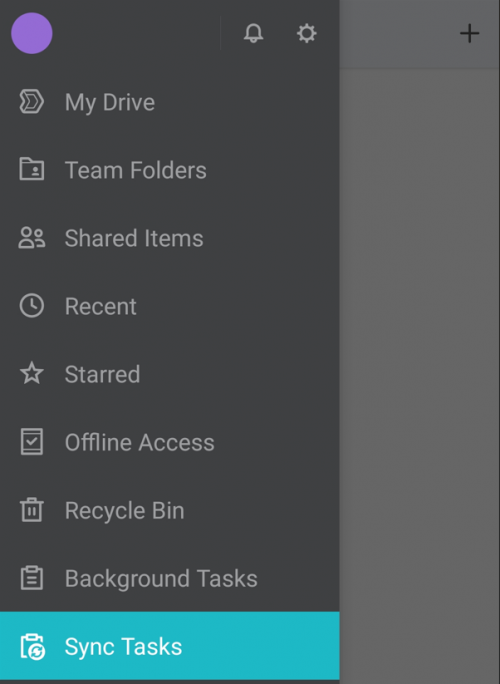 It can play mp3/flac file directly from Drive, but only appear in notification. Not sure previous version can play directly or not. Don't have playlist yet. 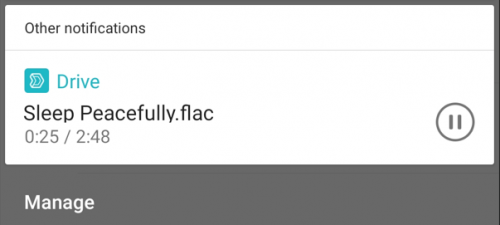 These are the options for sync task. It's limited to 2 way sync only. Set which folder to sync on your phone. If need more than 1 folder in root to sync, can create multiple sync task. If want manual sync also can. 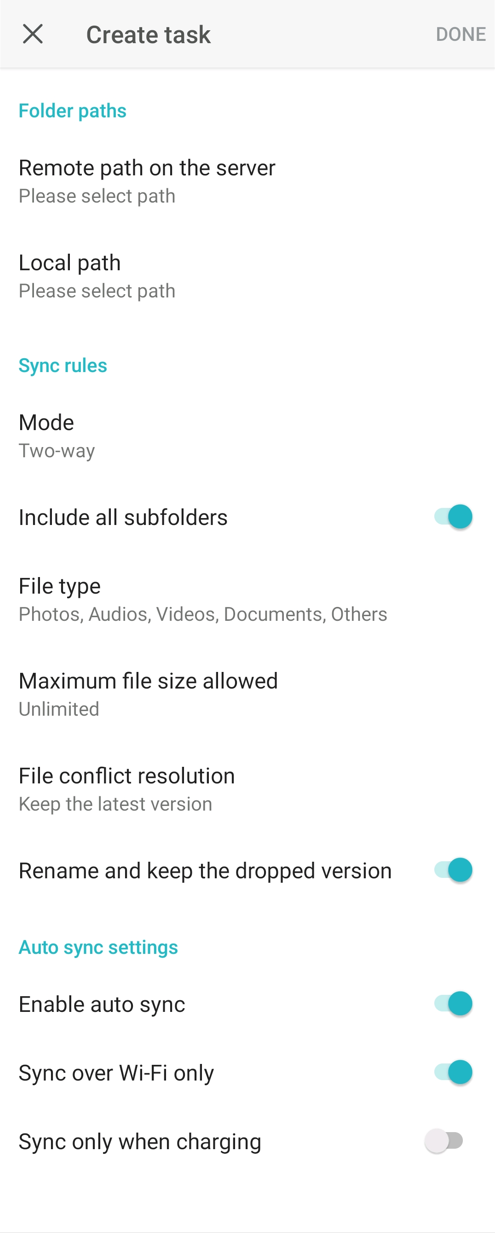 Can set which file type to sync 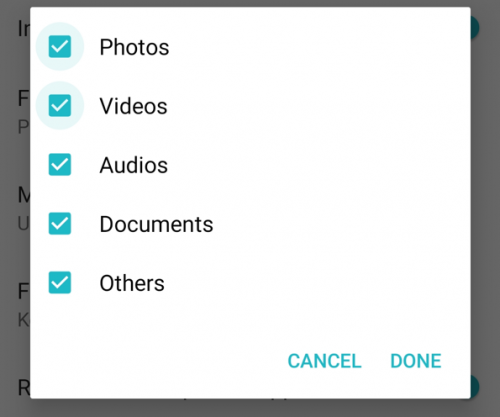 A lot option for maximum file size to sync 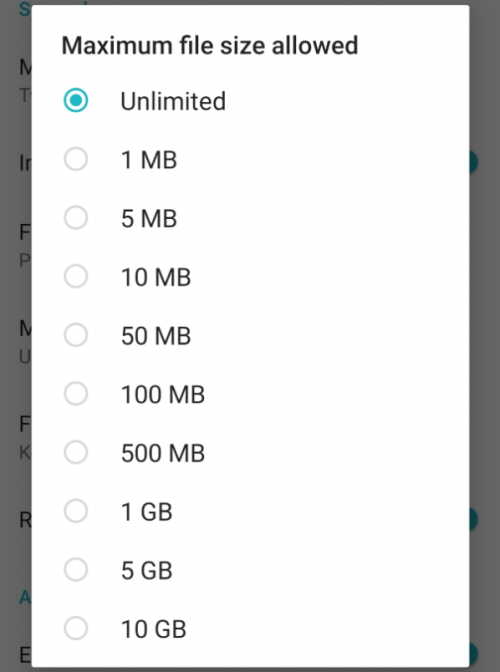 If sync conflict, can choose whether to keep latest version or keep the version on server. Can also set the toggle to keep older version by renaming it. 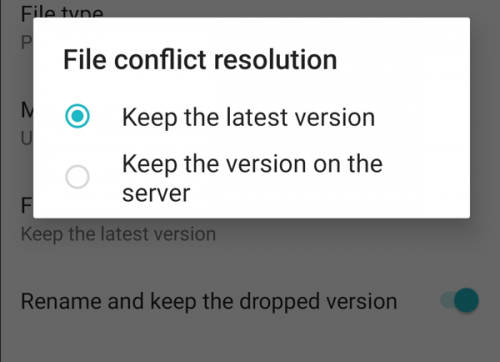 Now if delete or rename files in NAS, the changes will also reflect in the phone. No more after edit need to manually upload to NAS like before or need to manually delete on phone once files has been moved to archive.  This post has been edited by xxboxx: Jan 9 2022, 09:19 AM edmund_yung and WaNaWe900 liked this post
|
|
|
Jan 2 2022, 07:23 PM
Return to original view | Post
#170
|
|
Senior Member
5,261 posts Joined: Oct 2004 From: J@Y B33
|
QUOTE(calvin_ng @ Jan 2 2022, 04:39 PM) Apartment... uses Phone line DSL old apartment no fiber so max 30mbps here only In that case better to just use QuickConnect without port forwarding. It will tunnel through QuickConnect instead of direct connection.Tunnel through QuickConnect, the connection speed is capped at about 30mbps. But your DSL line upload speed is 1mbps only. You also no need to worry about risk with opening port. Make sure to enable 2FA for all account as additional security. Only use not default admin account for NAS and backup management while use normal user account for read/write data. |
|
|
Jan 20 2022, 11:21 PM
Return to original view | Post
#171
|
|
Senior Member
5,261 posts Joined: Oct 2004 From: J@Y B33
|
|
|
|
Jan 30 2022, 06:16 PM
Return to original view | Post
#172
|
|
Senior Member
5,261 posts Joined: Oct 2004 From: J@Y B33
|
Bit rot is real. Make sure to schedule scrub and invest on UPS. |
|
|
Feb 19 2022, 12:10 AM
Return to original view | Post
#173
|
|
Senior Member
5,261 posts Joined: Oct 2004 From: J@Y B33
|
https://www.synology.com/en-global/beta Synology released 5 beta programs Active Insight Synology Office 3.4 Synology Drive 3.1 Universal Viewer Surveillance Station 9.0 I'm most interested to try Drive since it have more functionalities now. It also change the indexing from "/home/Drive" to "/home", this means "/home/Photos" will also be indexed in Drive  Mobile app have new UI and easier to search files. Even have playlist for music and also dark mode. Mobile app have new UI and easier to search files. Even have playlist for music and also dark mode.The beta Office and Universal Viewer need beta Drive installed then only it can be used. There's a disclaimer though: Not downgradable - After installation of this beta application, you will not be able to downgrade to a previous official version of this software. So proceed at own risk. When install Drive beta, it will also install Office beta and Universal Viewer beta. 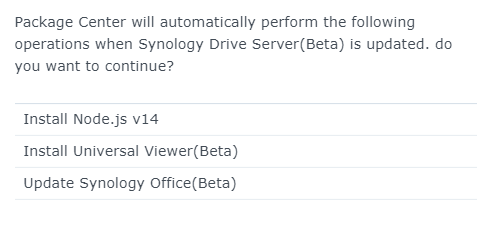 Unfortunately Drive Client v3.1 apk still haven't been released :/ I'm using Drive Client v2.5 and it can sync with Drive Server 3.1, all the functions still working as before. Only don't have 3.1 UI and functions. Drive Client for Windows automatically updated to 3.1 after it detect the server is 3.1 WaNaWe900 liked this post
|
|
|
|
|
|
Feb 24 2022, 09:08 AM
Return to original view | IPv6 | Post
#174
|
|
Senior Member
5,261 posts Joined: Oct 2004 From: J@Y B33
|
Synology launches DSM 7.1 beta with new features and upgrades
QUOTE DSM 7.1 brings key improvements, including the introduction of file aggregation portals and SMB DFS capability to enable administrators to link together multiple Synology systems for more convenient file access. In addition, the new UI introduced with DSM 7.0 has been further refined by consolidating background tasks into an admin-friendly overview that aims to give greater transparency into what is happening on the system across different user accounts. For Synology High Availability clusters, users can now view and manage drives on both systems from a single instance of Storage Manager for easier maintenance and management. On the performance side, DSM has long supported flash caching to boost random I/O performance but with the DSM 7.1 update, users will be able to speed up multiple storage volumes at the same time. The new features looks to be useful for those that have multiple Synology NAS and want all the data to be available in a single location / portal. |
|
|
Feb 24 2022, 09:41 AM
Return to original view | IPv6 | Post
#175
|
|
Senior Member
5,261 posts Joined: Oct 2004 From: J@Y B33
|
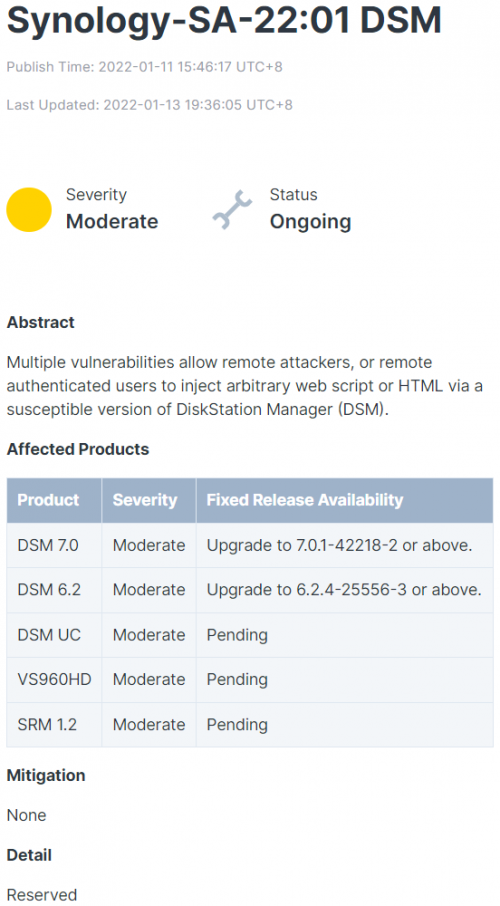
https://www.guru3d.com/news-story/vulnerabi...y-commands.html QUOTE On Synology NAS devices, attackers might execute unauthorized instructions. The manufacturer is currently working on and rolling out updates to address the issues. Synology has addressed a security flaw in its Disk Station Manager NAS operating system (DSM). The flaw allows authorized attackers to remotely execute any commands on the affected NAS. Because the issue exists in both DSM 6.2 and 7.0, this should apply to all current Synology NAS systems reports Germany based heise. The fault is classified as "critical" by the manufacturer. He has not yet offered any details on the chasm. [Revised] The attacker's login location is not provided by Synology. Based on the classification, a login to network shares is apparently sufficient. The DSM 6.2 operating system is delivered in versions 6.2.4-25556-5 and later. According to the security report, Synology is presently working on the DSM 7.0 upgrade, which should be ready soon. The available update should be shown on DSM-enabled NAS devices. Administrators should put it into action right away. Those that have their Synology NAS internet facing should immediately stop it for now. WaNaWe900 liked this post
|
|
|
Feb 24 2022, 10:46 AM
Return to original view | IPv6 | Post
#176
|
|
Senior Member
5,261 posts Joined: Oct 2004 From: J@Y B33
|
Asustor NAS owners hit by DeadBolt ransomware attack
QUOTE Owners of Asustor NAS drives have woken up to discover that data they believed was safe and sound on their network storage devices has instead been encrypted by ransomware, and that cybercriminals are demanding a ransom. Affected Asustor users have been posting on Asustor's support forum about how they discovered their NAS drives have been hit by the DeadBolt ransomware. While Asustor investigates what is clearly a serious problem, it says it has disabled functionality which can allow remote access to its NAS drives: ASUSTOR EZ-Connect, ASUSTOR EZ Sync, and ezconnect.to. In addition, the company has published the following recommendations for customers to protect themselves from the DeadBolt ransomware: Change default ports, including the default NAS web access ports of 8000 and 8001 as well as remote web access ports of 80 and 443. Disable EZ Connect. Make an immediate backup. Turn off Terminal/SSH and SFTP services. In addition, the company has linked to further advice about how to mitigate the risks of a ransomware attack. Asustor has advised that customers hit by the ransomware attack follow the steps listed below: Unplug the Ethernet network cable. Safely shut down your NAS by pressing and holding the power button for three seconds. Do not initialize your NAS as this will erase your data. Fill out their details in this online form, so support technicians can make contact with further guidance. Bad week for NAS owner this week, all 3 big brands are at risk to be hit by vulnerability. |
|
|
Mar 2 2022, 04:02 PM
Return to original view | Post
#177
|
|
Senior Member
5,261 posts Joined: Oct 2004 From: J@Y B33
|
Synology have released update to fix the previously mentioned vulnerability.
Version: 7.0.1-42218 Update 3 |
|
|
Mar 4 2022, 05:54 PM
Return to original view | Post
#178
|
|
Senior Member
5,261 posts Joined: Oct 2004 From: J@Y B33
|
QUOTE(WaNaWe900 @ Mar 2 2022, 05:26 PM) not yet available for my model Not available for your model or it haven't ask for update?Mine haven't ask for update, I'll wait first instead of manual download since my NAS not port forward to internet. |
|
|
Mar 6 2022, 12:49 PM
Return to original view | Post
#179
|
|
Senior Member
5,261 posts Joined: Oct 2004 From: J@Y B33
|
DS1520+ is 3k
If budget but new build Chasis RM530 CPU + mobo RM1200 RAM 8GB RM150 PSU RM300 SSD RM150 (for OS) Total RM2330 Pros: Cheaper, sleek casing, modularity, can choose what OS to put Cons: Have to manually install and configure OS, don't have first party integrated apps (depends on individual preference) If just for network storage with RAID, media server and backup functions, I think custom build will be better choice. If use a lot of apps, using first party means less time spent on finding the suitable app and tinker with it. A lot of open source apps is only on web browser, it didn't have mobile app. Enthusiast will get more satisfaction from custom build, if want something with less work and time tinkering, pre-built will be better. |
|
|
Mar 16 2022, 07:53 AM
Return to original view | IPv6 | Post
#180
|
|
Senior Member
5,261 posts Joined: Oct 2004 From: J@Y B33
|
QNAP warns severe Linux bug affects most of its NAS devices QUOTE Taiwanese hardware vendor QNAP warns most of its Network Attached Storage (NAS) devices are impacted by a high severity Linux vulnerability dubbed 'Dirty Pipe' that allows attackers with local access to gain root privileges. "Currently there is no mitigation available for this vulnerability. We recommend users to check back and install security updates as soon as they become available." Customers who have Internet-exposed NAS devices should take the following measures to defend from attacks: Disable the Port Forwarding function of the router: Go to the management interface of your router, check the Virtual Server, NAT, or Port Forwarding settings, and disable the port forwarding setting of NAS management service port (port 8080 and 433 by default). Disable the UPnP function of the QNAP NAS: Go to myQNAPcloud on the QTS menu, click the "Auto Router Configuration," and unselect "Enable UPnP Port forwarding." So far haven't heard this vulnerability affect other maker. WaNaWe900 liked this post
|
| Change to: |  0.0555sec 0.0555sec
 0.39 0.39
 7 queries 7 queries
 GZIP Disabled GZIP Disabled
Time is now: 5th December 2025 - 01:56 PM |
 Quote
Quote