Welcome Guest ( Log In | Register )

15 Pages « < 6 7 8 9 10 > » Bottom

Outline · [ Standard ] · Linear+

 NETWORK ATTACHED STORAGE (NAS) V2

views
     
xxboxx
post Jul 20 2021, 11:27 PM

The mind is for having ideas, not holding them
*******
Senior Member
5,261 posts

Joined: Oct 2004
From: J@Y B33


QUOTE(taqu @ Jul 20 2021, 03:55 PM)
I'm starting to use my Raspberry Pi 4, connected to 1 SSD & 1 HDD, as Samba server & Resilio Sync. Is this considered NAS?
*
NAS = NETWORK ATTACHED STORAGE
As long as the storage is accessible on network then it is NAS. If you plug thumb drive to router and enable SMB also can consider as NAS.
xxboxx
post Jul 28 2021, 09:49 PM

The mind is for having ideas, not holding them
*******
Senior Member
5,261 posts

Joined: Oct 2004
From: J@Y B33


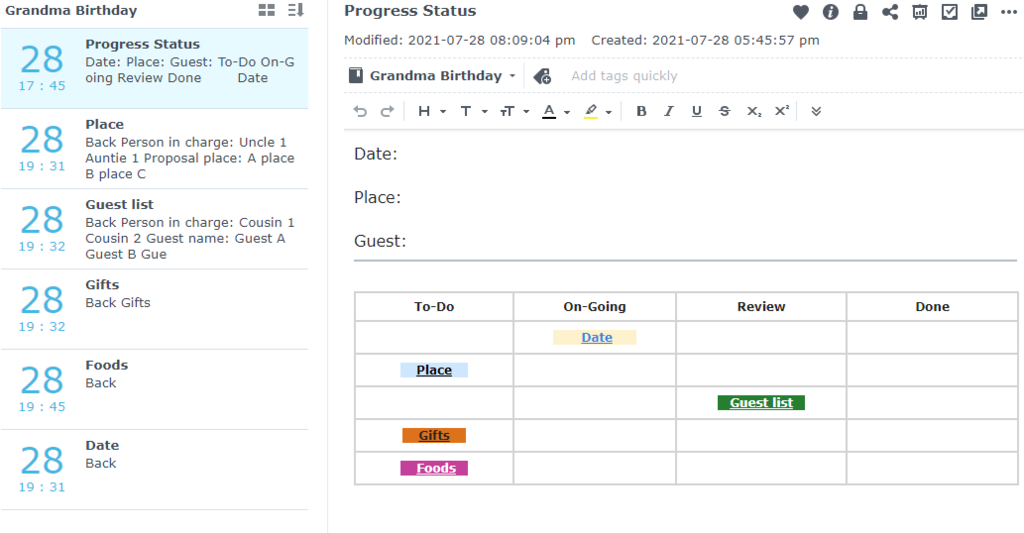
I just found out Synology's Note Station can make link from one note to another. blush.gif
Somehow I didn't manage to use "Copy note link" properly, only pasting the note's name instead of link. Until I use DS Note app and saw this user posted image button.
This open the app to a lot more possibilities. I do this simple mock project management as an example with Notebook for place to group all the tasks and kanban board to keep track of the progress and link to each task. The link also work for other user if all related notes were shared.

user posted image
xxboxx
post Aug 6 2021, 09:12 PM

The mind is for having ideas, not holding them
*******
Senior Member
5,261 posts

Joined: Oct 2004
From: J@Y B33


QUOTE(mitkey06 @ Aug 6 2021, 06:00 PM)
My synology DS414 drives indicated "Failing" on 2 of the 4 drives.

1. do I need to replace them immediately ?
2. can I replace the fail drive from WesternD to Seagate ?
*
If you don't want to risk losing the data, better replace immediately. How you configure for the 4 drive? Using RAID2?

Brand doesn't matter, can use any. As long the drive is not SMR.
xxboxx
post Aug 7 2021, 11:56 AM

The mind is for having ideas, not holding them
*******
Senior Member
5,261 posts

Joined: Oct 2004
From: J@Y B33


QUOTE(mitkey06 @ Aug 7 2021, 08:02 AM)
i use SHR. i will replace 1 at a time. my current installation is 4x3TB. i will replace with 1x8TB first right
*
WTH I wrote RAID2 laugh.gif
I mean RAID6

Ya, you need to replace 1 HDD at a time, wait for it to complete rebuild. Then only replace another HDD.
If both will be replaced by same size then no matter. If different size, example 1 is 6TB and another is 8TB, put the smallest first (6TB) and then only put the biggest (8TB).
xxboxx
post Aug 10 2021, 01:25 PM

The mind is for having ideas, not holding them
*******
Senior Member
5,261 posts

Joined: Oct 2004
From: J@Y B33


Synology warns of malware infecting NAS devices with ransomware
QUOTE
Taiwan-based NAS maker Synology has warned customers that the StealthWorker botnet is targeting their network-attached storage devices in ongoing brute-force attacks that lead to ransomware infections.

The NAS maker urges all system admins and customers to change weak administrative credentials on their systems, to enable account protection and auto block, and to set up multi-factor authentication where possible.

Synology rarely issues security advisories warning of active attacks against its customers. The last alert regarding ransomware infections following successful large-scale brute-force attacks was published in July 2019.

The company advised users to go through the following checklist to defend their NAS devices against attacks:
-Use a complex and strong password, and Apply password strength rules to all users.
-Create a new account in the administrator group and disable the system default "admin" account.
-Enable Auto Block in Control Panel to block IP addresses with too many failed login attempts.
-Run Security Advisor to make sure there is no weak password in the system.

"To ensure the security of your Synology NAS, we strongly recommend you enable Firewall in Control Panel and only allow public ports for services when necessary, and enable 2-step verification to prevent unauthorized login attempts," the company added.

"You may also want to enable Snapshot to keep your NAS immune to encryption-based ransomware."


If you still using admin account with the name "admin", better create new admin account and disable this admin account.
Use strong password. Use 2FA. Enable auto block. Change from default port number and don't port forward unnecessary port.
xxboxx
post Aug 10 2021, 09:23 PM

The mind is for having ideas, not holding them
*******
Senior Member
5,261 posts

Joined: Oct 2004
From: J@Y B33


QUOTE(WaNaWe900 @ Aug 10 2021, 09:17 PM)
..should I temporarily disable QuickConnect  hmm.gif
*
If you didn't encounter any login attempt recently then should be no need.
This is mostly on older DSM when initialized that didn't disable "admin" account.
xxboxx
post Aug 11 2021, 08:21 AM

The mind is for having ideas, not holding them
*******
Senior Member
5,261 posts

Joined: Oct 2004
From: J@Y B33


QUOTE(mitkey06 @ Aug 10 2021, 10:48 PM)
I run into a very complicated problem

Nas 1
[4TB 4TB 8TB 8TB)

Nas 2
[3TB 3TB 3TB 3TB)

my Nas 2 has disk 1 and disk 4 failing. So I buy 2 x 8TB. plug the 8TB into Nas 1, remove the disk 1 from Nas 2 and plug into disk 1 of Nas 2. then I got system partition error on all drives on Nas 2. what hav I done wrong ?
*
Do you wait until first 8TB finish rebuild before you insert second 8TB?

Edit: Oh your problem is with NAS 2. Maybe when you put in the HDD into NAS 2, since the HDD still have data from NAS 1, it confuse NAS 2 as now it see 2 different data set.

This post has been edited by xxboxx: Aug 11 2021, 08:26 AM
xxboxx
post Aug 11 2021, 05:16 PM

The mind is for having ideas, not holding them
*******
Senior Member
5,261 posts

Joined: Oct 2004
From: J@Y B33


QUOTE(mitkey06 @ Aug 11 2021, 12:20 PM)
can i just format the NAS HDD to NTFS file format using windows 10?

I manage to clone the HDD and insert into NAS 2. it ask me to confirm that I want to overwrite the data from another NAS (even though I already clone it). so now I just kept my finger cross. but truely life is really painful when 2 HDD is failing at the same time.

i am now rebuilding disk 1. I kept getting bad sector notice on disk 4. and the rebuilding process will take me 28 hours.
*
Need to make sure it will full wipe all partition and create 1 partition. Not sure Windows 10 can detect all partition. Your earlier post say DSM7 doesn't recognize the password, change HDD need password? You key in wrong password?

You just miscalculated 1 thing. From 1 NAS to another NAS of same brand, the NAS will recognize the data. And since each HDD will have a copy of DSM, the NAS doesn't know which one it should load.
xxboxx
post Aug 12 2021, 07:21 AM

The mind is for having ideas, not holding them
*******
Senior Member
5,261 posts

Joined: Oct 2004
From: J@Y B33


QUOTE(mitkey06 @ Aug 11 2021, 10:10 PM)
[4TB 3TB 3TB 3TB]

from above configuration my drive 4 is degraded and I want to replace drive 4 with 4TB. however, I understand its better to put the 2 units of 4TB side by side, right ? and how do I do it ?
*
No need put same size side by side.
xxboxx
post Aug 12 2021, 07:24 AM

The mind is for having ideas, not holding them
*******
Senior Member
5,261 posts

Joined: Oct 2004
From: J@Y B33


QUOTE(WaNaWe900 @ Aug 12 2021, 01:17 AM)
NAS 1
[4TB 4TB 8TB 8TB)

- Take out 4TB x2
  * if this the disk you want to insert in NAS 2 it should be remove properly from NAS 1
  * Deactivate, later better format as new drive before insert in NAS 2
- Plug new 8TB x2 (wait to rebuild)
NAS 2
[3TB 3TB 3TB 3TB)

- Remove Disk 1 & 4 (failing) "Replace disk"
- Insert 4TB x2 from NAS 1 (format as new disk) into Disk 1 & 4
- Wait rebuild  sweat.gif
*
If the 2 disk need to take out is in same pool, replace 1 only first and wait finish rebuild before replace second one.
xxboxx
post Aug 14 2021, 11:29 PM

The mind is for having ideas, not holding them
*******
Senior Member
5,261 posts

Joined: Oct 2004
From: J@Y B33


QUOTE(mitkey06 @ Aug 14 2021, 12:31 AM)
can I know what is the recommended backup of windows OS/system volume inc application (office and other software that comes with license keys). do we use microsoft system back up or synology active backup for business ?

e.g. if one of the client SSD burnt, then it wud be nightmare right ?
*
Try both see which one suitable for you.
Having OS/system backup is not good enough, more importantly is will it restore back correctly without issue? If you got device can use for test, try to backup and wipe the OS, then restore.

QUOTE(mitkey06 @ Aug 14 2021, 05:11 PM)
I detected bad sector on ironwolf drive which is under warranty, can i send for RMA ?
*
Check with Seagate if can send RMA.
xxboxx
post Aug 18 2021, 05:41 PM

The mind is for having ideas, not holding them
*******
Senior Member
5,261 posts

Joined: Oct 2004
From: J@Y B33


QUOTE(mitkey06 @ Aug 18 2021, 11:37 AM)
After all the Hoohaa, I rerun the SMART test on the HDD that reported bad sector and crash my pool. guess what, it says healthy. so I dont believe, rerun SMART overnight, still report healthy. the HDD is a WD 7years. how do I really check ? this HDD just screw up my entire NAS.

I run WINDOWS chkdsk /F also. surface scan. all ok. isnt that when there is bad sector, it will be reported ?
*
Try use CrystalDiskInfo to see if the HDD is healthy and see if got any of these
QUOTE
Reallocated sector counts. Reallocation happens when the drive's logic remaps a damaged sector, as a result of recurring soft or hard errors, to a new physical sector from its spare ones. This attribute reflects the number of times a remapping has happened. If its value increases, it's an indication of HDD or SSD wear.

Current Pending Sector Count. This counts the "unstable" sectors, meaning the damaged ones with read errors that are waiting for a remapping, a kind of "probation" system. S.M.A.R.T. algorithms have mixed understandings about this particular attribute, as it is sometimes unconvincing. Still, it can provide an earlier warning of possible problems.

Reported Uncorrectable Errors. It is the count of errors that are impossible to recover, and it is useful because it seems to have the same meaning for all manufacturers.

https://www.digitalcitizen.life/simple-ques...hat-does-it-do/

xxboxx
post Aug 30 2021, 12:40 PM

The mind is for having ideas, not holding them
*******
Senior Member
5,261 posts

Joined: Oct 2004
From: J@Y B33


QUOTE(mitkey06 @ Aug 30 2021, 09:33 AM)
yes crystaldiskinfo is good. it shows my nas hdd health info with CAUTION. there are more than 200 remap bad sectors and growing. time to discard the hdd ?
*
Ya, the HDD going to die.
xxboxx
post Sep 3 2021, 11:19 AM

The mind is for having ideas, not holding them
*******
Senior Member
5,261 posts

Joined: Oct 2004
From: J@Y B33


QUOTE(WaNaWe900 @ Sep 3 2021, 01:56 AM)
So now wondering why my SSD Cache Read/Write crashed and when check the SSD itself its ok  icon_question.gif

Now setting to Read Only... and see what will happen, does anyone had same Cache SSD crashed especially set in Read/Write ?  sweat.gif
*
Touch wood so far mine never crash before. sweat.gif
Any files or partition lost because of the crash?
Got power failure or spike that could cause it to error?

Don't know if this week solar flare could be the cause sweat.gif
https://www.forbes.com/sites/jamiecartereur...sed-by-the-sun/
xxboxx
post Sep 15 2021, 06:13 PM

The mind is for having ideas, not holding them
*******
Senior Member
5,261 posts

Joined: Oct 2004
From: J@Y B33


QUOTE(pandera999 @ Sep 15 2021, 03:15 PM)
just curious.. as for NAS alternative.. anyone know if there is such thing at the market where exHDD docking + ethernet network features.?

saw something like this: https://www.amazon.com/HighPoint-RocketStor...g/dp/B00PJO53VI
*
If you just want a storage that's accessible on network, plug external HDD or such dock to your router. Most router for past 10 years have USB port. It then can be configured for services such as Media Server, SMB, Time Machine.
xxboxx
post Sep 24 2021, 07:14 PM

The mind is for having ideas, not holding them
*******
Senior Member
5,261 posts

Joined: Oct 2004
From: J@Y B33


QUOTE(mostwanted82 @ Sep 24 2021, 04:13 PM)
Anyone upgraded to synology DSM 7? any issue?

Also, anyone can recommend IP camera that compatible with Synology surveillance station?
*
I upgraded to DSM7 2 months ago. I got write here some feedback.
https://forum.lowyat.net/index.php?showtopi...ost&p=101511491
xxboxx
post Sep 29 2021, 10:47 PM

The mind is for having ideas, not holding them
*******
Senior Member
5,261 posts

Joined: Oct 2004
From: J@Y B33


QUOTE(WaNaWe900 @ Sep 29 2021, 05:46 PM)
notworthy.gif  notworthy.gif I still waiting  sweat.gif  sweat.gif
*
Your model still haven't got DSM 7? Or you want to wait until it is more mature?
xxboxx
post Sep 30 2021, 04:55 PM

The mind is for having ideas, not holding them
*******
Senior Member
5,261 posts

Joined: Oct 2004
From: J@Y B33


QUOTE(waruna @ Sep 30 2021, 03:10 PM)
Hi guys and all the NAS experts. A very newbie here want to ask a question about NAS.

Can anyone recommend me one NAS server for my company use? The main purpose is only for file sharing.

Currenly I'm using oldschool method:
- Use a normal CPU
- create a root sharing folder,
- create sub folders for each user/dept.
- then copy the link for each subfolder and create a desktop shortcut to each user's pc. (for example, if HR dept staff, the desktop shortcut link will be something like "\\192.168.1.20\DESKTOP-1111222\shared\hr", and so on.

It's a very oldschool method, I know. And it becomes problem now since we're still in working from home schedule, so need to come to office first to copy the files and bring back to home. Later go back to office and replace the updated files. It's very tiring and ineffective.

So I think NAS is the solution. Based on the purpose mentioned above, anyone can recommend me which NAS should I buy?

A very thank you to everyone.
*
If just storage that's accessible by anyone over the network, almost any device can perform that. With NAS, there's more thing can be done. Such as quota for each user.
You should research and list out what you expect the NAS need do for you first. Network storage is a given.
How many GB or TB of space you need?
How many HDD to use?
Need versioning?
How about backup of each user pc?
Backup of the data on NAS?
Need collaborative applications such contacts, calendar, chat, mail, words, excel, slides?

xxboxx
post Oct 1 2021, 01:47 AM

The mind is for having ideas, not holding them
*******
Senior Member
5,261 posts

Joined: Oct 2004
From: J@Y B33


QUOTE(waruna @ Sep 30 2021, 05:05 PM)
Thank you sir for the response.

Yes I did the research and found that NAS can offer more.. But for the time being, I need a storage that can store files and can accessible anywhere. For unknown reason, I want to avoid using port forwarding or VPN tunneling. Plus the normal CPU I've used is already outdated in term of the hardware specs. So I think NAS can solve my problem.

As your questions:
- 10TB space is enough
- HDD to use --> this one I'm not sure. Maybe anyone can suggest.
- Versioning --> not quite sure but I think it's good for backup incase there are any accidental deleting and overwriting
- Backup foe each user pc --> not required
- Backup of the data on NAS --> I thought this one NAS has mirror HDD to copy everything from main disk to backup 2? Please correct me if i'm wrong.
- Collaborative applications --> Not required.

Thank you for your time sir.
*
Prebuilt NAS is easy in term of just need to add HDD and do the settings. I would suggest getting x86 CPU with at least 4 cores so it is powerful enough, 4 bays or more if you sees in future will need to expand the storage.

Mirror HDD I think you meant is RAID. It's actually more about uptime. Drive failure, change the drive and rebuild, all without the need to take system offline. It is not a backup.

Cloud storage also good option, but few TB the price won't be cheap. Also should still have another backup in case anything happen to the cloud storage or NAS, such as account got hacked and data wiped.
xxboxx
post Oct 4 2021, 09:20 AM

The mind is for having ideas, not holding them
*******
Senior Member
5,261 posts

Joined: Oct 2004
From: J@Y B33


QUOTE(WaNaWe900 @ Oct 3 2021, 10:35 PM)
Yes finally  rclxm9.gif  rclxm9.gif  rclxm9.gif  rclxm9.gif

https://www.synology.com/en-my/releaseNote/DSM - DSM Version: 7.0.1-42218  sweat.gif  sweat.gif  sweat.gif
*
Straight to updated version, maybe most bugs have been squashed. thumbup.gif
But I haven't receive notification about the update on my DSM, it says there might take few weeks.

15 Pages « < 6 7 8 9 10 > » Top
 

Change to:
| Lo-Fi Version
0.9031sec    0.39    7 queries    GZIP Disabled
Time is now: 8th December 2025 - 08:00 AM