Welcome Guest ( Log In | Register )

4 Pages < 1 2 3 4 >Bottom

Outline · [ Standard ] · Linear+

PC Audio Creative GigaWorks S750 7.1 speaker repair, A short guide and info with pictures...

views
     
asenrzhang
post Sep 4 2016, 04:18 PM

Getting Started
**
Junior Member
68 posts

Joined: Apr 2015
From: China
excl.gif Disclaimer: I'm not a professional electronic engineer, not even an amateur, so, take the advice at your own risk.

QUOTE(rsseco @ Sep 4 2016, 12:43 AM)
Hi, here I am again !

So, here's the results of tests you asking me to do :

In conclusion, for diodes, all seems to be fine/OK.
Okay

QUOTE(rsseco @ Sep 4 2016, 12:43 AM)
For Q6, I first done the test with the multimeter, as shown on the next picture :
The value gaves me 199 to 197. I don't know what it means. If I place the PNP in other way (E on C and C on E, it gaves me 0)
Then I measure it with the diode function, and the result is shown in the first picture.
Seems okay, but I'm not 100% sure, I didn't found a proper datasheet.

QUOTE(rsseco @ Sep 4 2016, 12:43 AM)
Question : if these values are correct, should I not rebuy some "real" capacitors ? It could be simply - are they seem to be fake ones - that they are the main problem ?
I'm not sure if it's capacitors' fault, that beyond my knowledge and skill to diagnose it.
All I can tell from your previous test result is:
  Vgs of Q3 & Q4 is either too low (0.285mV, not enough to open the gate) or tooooooooooo high (280V, it's just too high).

If it's not hurt, you can buy new capacitors and probably other components from a trusted supplier, and replace those capacitors onboard.

This post has been edited by asenrzhang: Sep 4 2016, 04:21 PM
asenrzhang
post Sep 5 2016, 02:36 AM

Getting Started
**
Junior Member
68 posts

Joined: Apr 2015
From: China
QUOTE(rsseco @ Sep 5 2016, 12:22 AM)
OK, what should buy finally ? And where ?
*
As OP(@lex) and others bought:
Replace all electrolytic capacitors on PSU board, and other failed components.

Several users in this thread had already made a buy-list, you may have a look and make some changes if components are out of market.

For other failed components, you may check others posts (one by one) in this thread to see which components they had replaced, and check yours to see if you need to replace them (or wait for a professional engineer to diagnose which components caused your IRF740 been burned).


You can buy fromThose are suggested suppliers by OP and others.

The price of components on their websites are expensive, but they guarantee components are genuine.

This post has been edited by asenrzhang: Sep 5 2016, 11:41 AM
asenrzhang
post Sep 5 2016, 02:43 PM

Getting Started
**
Junior Member
68 posts

Joined: Apr 2015
From: China
QUOTE(tezro @ Sep 5 2016, 02:03 PM)
asenrzhang, are you live in Malaysia?

You can also buy components from RS Malaysia  rclxms.gif  rclxms.gif  rclxms.gif
*
I live in China mainland as written in my profile.

It's actually @rsseco are going to buy components, not me.
Anyway, good to know RS Malaysia, now we have more choices. thumbup.gif thumbup.gif thumbup.gif

asenrzhang
post Sep 5 2016, 09:01 PM

Getting Started
**
Junior Member
68 posts

Joined: Apr 2015
From: China
QUOTE(tezro @ Sep 5 2016, 04:14 PM)
You live in China Mainland? That's much better. Most electronic components is manufactured in China.  rclxms.gif
Yes, it was world factory before (probably still is), and there're many capacitor suppliers on local internet market (taobao.com). But I had to bought from mouser to get a reliable supply, that is awkward mega_shok.gif .
asenrzhang
post Sep 6 2016, 12:08 AM

Getting Started
**
Junior Member
68 posts

Joined: Apr 2015
From: China
excl.gif Disclaimer: I'm not a professional electronic engineer, not even an amateur, so, take the advice at your own risk.

QUOTE(rsseco @ Sep 5 2016, 07:55 PM)
At the beginning, I was exited to began the repair process ; but with the time, I'm disappointed not able to found the problem. And more, as my capacities in electronica are limited.
I know how frustrated it is when get into puzzle. I was there before, I'm a beginner in electronic engineering too, I spent a year to find out what caused my fuse blown again and again.
But hey, we're not in AA meeting in Hollywood movies, "AA is for quitters cheers.gif ", said by Bubba J.

QUOTE(rsseco @ Sep 5 2016, 07:55 PM)
If you haven't no more idea from where's the matter could be (beware, it's not a reproach, I'm very happy you help me until now), I will try to reset all the components and do a new try !
*
You may read @lex (OP)'s posts 2.5 years ago. Those are two replies to another user's "resistor blew" issue after he replaced Q4,
I don't know if it can help, but you can have a look, and check the components listed in the posts.
- https://forum.lowyat.net/index.php?showtopi...post&p=66540534
- https://forum.lowyat.net/index.php?showtopi...post&p=66570064
asenrzhang
post Sep 10 2016, 10:51 PM

Getting Started
**
Junior Member
68 posts

Joined: Apr 2015
From: China
QUOTE(jsmars @ Sep 9 2016, 04:57 AM)
Just wanted to give an update on my progress. Got both sets working now! One has been running for a week, and the other just got finished and has been running for a half an hour or so, so it seems like they both got at least a bit more life!

Huge thanks and appreciation to everyone helping out in this thread! It's amazing that there are people like you smile.gif

It will be interesting to see if this "double click at start" error comes back, I've had it on both. So it will be interesting to see if the 63V instead of 25V helps as asenrzhang mentioned it could be.
*
Congratulations for the revival of your two sets! rclxms.gif

About the "double click" issue, I hope that article I mentioned is right. "double click" issue of my subwoofer get worse now, it happened almost each time on power resume operation in the past week. So, please let me know if the "double click" issue of your two sets does not happen anymore after 3 month using, so that I will replace it with a higher voltage rating capacitor.
asenrzhang
post Sep 14 2016, 06:19 PM

Getting Started
**
Junior Member
68 posts

Joined: Apr 2015
From: China
QUOTE(jsmars @ Sep 14 2016, 02:29 PM)
I guess my victory was short lived. I revived both sets and they worked fine for a few weeks now under continuous use of many hours every day. I unplugged first set and mainly used the second after I fixed the second one. Then today I hooked in the first set where it's meant to be set up. The green light turns on, standby on the control pad, powers on, everything seems fine, except that no sound is coming through at all. No noise or anything can be heard even if you turn up the volume a lot, and nothing is heard even if touching the input cables (usually some static can be heard).

I opened up the set and looked it over, but I can't find any damaged components at all. I changed pretty much all recommended components (all cheapo brand stuff, except the smallest ones which there are like 50 of on the amp boards).
The only thing I noticed is that the bigger heatsink on the powersupply (connected to the mosfets that I changed) was quite hot even after only testing out the system to try and get sound for a few minutes. Is this normal?

Any ideas on what is wrong and what I can do to fix it?
*
Sorry to hear that. I actually have same issue before, see my posts
https://forum.lowyat.net/index.php?showtopi...post&p=80007050
https://forum.lowyat.net/index.php?showtopi...post&p=80199476

When this issue happened, I can't hear the click sound of the relay, so, definitely no main power.
But if I plug the earphone to the control pod, I CAN hear the music, so standby part works.

It seems been self-healed now, but I don't know what caused this,
I just leave it for several days with power cord unplugged, then plug the power cord and then repeatedly power on / off.

This post has been edited by asenrzhang: Sep 14 2016, 07:05 PM
asenrzhang
post Sep 16 2016, 05:05 PM

Getting Started
**
Junior Member
68 posts

Joined: Apr 2015
From: China
QUOTE(jsmars @ Sep 15 2016, 01:26 PM)
Interesting! I will have to try this as well. In the same way you describe it having self healed - mine stopped working after being unplugged a few days, if something did not pop when I started it after plugging it in of course, but I had turned it on off atleast once or twice per day for a week or so. So hopefully mine will follow the same path as yours! Fingers crossed!
*
After I repaired the second power amplifier board (the one with 3 STA575 chips), and reviewed this phenomenon, it reminded me that there's a sign of capacitor leaking on one photo.
Attached Image
(I had replaced all electrolytic capacitors on this power amplifier board)

I don't know if it's the cause. Maybe, leave the issue there with back plate opened for several days, the leaked liquid may dry in those days, and hence self-healed? I don't know, just wild guess...

If my guess is right, maybe you can try
  • Unplug the CN4 & CN5 connector on power supply board (unload the load), they try power on to see if you can hear the click sound of relay. If you can hear the click sound, then the cause is located on power amplifier board(s).
  • Check signs of capacitor leaking on power amplifier boards like mine (It's hard to see these signs in dark environment, even in bright environment, you still need a angle of view to see it). If there's any sign, clean it, plug the power cord of AMP boards to PSU board, and try power on to see if you can hear the click sound of relay.


This post has been edited by asenrzhang: Sep 16 2016, 09:50 PM
asenrzhang
post Sep 19 2016, 02:45 AM

Getting Started
**
Junior Member
68 posts

Joined: Apr 2015
From: China
QUOTE(jsmars @ Sep 18 2016, 02:31 PM)
Thanks for the tips! I tried leaving it unplugged for a few days now and plugging it back in, at first again I was overjoyed - it worked! This time I was sure I had music streaming directly and heard it came through nicely, but after about 30 seconds there was same in-out fading, like a soft flicker, the music turned low for a half second or so, then dissapeared, then came back a second later, it did maybe 3-4 times before dissapearing completely.

I do hear the clicking noise when turning on & off, but I couldn't find any leakage on the amp boards.. but it's probably quite hard to see as you say, should I do a more throughout search maybe or what do you think it could be?
*
Sound fading in/out is new to me, I never heard this before.

I don't know if you should do a throughout search for leakage, because I'm just guessing here. (By the way, I leaved it unplugged for not just 3 days, but more, say one week or ten days or two weeks.)
But you can check the voltage of CN4 & CN5 connector to make it clear that which board is not working well.
  1. Unplug power cord
  2. Unplug the power cable from the CN4 & CN5, this make the power amplifier boards unloaded
  3. Plug power cord
  4. Power on, and as you say, you can hear the click sound of relay.
  5. Measure the voltage of CN4 & CN5
(1) (2) (3) (4) (5)RED wire
V21 should around 70V (or -70V, I don't remember which pin is high voltage)
V43 should around -24V
V53 should around 24V
  • If the reading values are all okay, it means the PSU board is okay.
    Then measure again after the power cable of AMP boards plugged to CN4 & CN5.
    • If the new reading values are all okay too, then I'm lost too. rclxub.gif
    • If the new reading values are not okay, it means the AMP board(s) is/are not working well
  • If the reading values are not okay, it means the PSU board does not work well.


This post has been edited by asenrzhang: Sep 30 2016, 01:39 AM
asenrzhang
post Sep 27 2016, 01:28 AM

Getting Started
**
Junior Member
68 posts

Joined: Apr 2015
From: China
QUOTE(KrazeyKami @ Sep 27 2016, 12:44 AM)
Where exactly is the connection pin for this center speaker?
*
It's located on audio I/O board, there're seven connectors in a row for audio output on audio I/O board, and the center one is for center speaker. See my photo:
Attached Image

By the way, the age of this thread is actually 3+ years, not fourteen years.
asenrzhang
post Sep 30 2016, 01:06 AM

Getting Started
**
Junior Member
68 posts

Joined: Apr 2015
From: China
QUOTE(kotek34 @ Sep 28 2016, 09:02 PM)
I replaced all electrolytic capacitors to new ones. Also I replaced D9 (shorted) and C62 (broken "leg") but when I checking the C62 solder points I got "short" I have mean the capacitor is shorted to ground. I tried to traced this short and the 1 leg of TOP 243Y (Control pin) has shorted to GND...

Do I need to replace TOP 243Y to new one?
May I ask where exactly you checked and got the short circuit to GND result?
And, do you follow @lex's guide to clean all degraded glues, especially the hard glue arround C62 & C7 in your case?
And the result you got is after you replaced C62, or before?
asenrzhang
post Sep 30 2016, 01:44 AM

Getting Started
**
Junior Member
68 posts

Joined: Apr 2015
From: China
QUOTE(kotek34 @ Sep 30 2016, 01:21 AM)
Hi again

I replaced the TOP 243Y and now there is no short and looks good. I connected power cord to PSU seems to be fine, green LED light, no blowing fuse. But I have measured the Voltage on C4 and C5 and I get abou 90V, Ithink this is too high because on the scheme is 70V.

I am not connecting the amplifier boards yet.

What do You think about this? 

I have measured Voltage on:
CN4 = 90V
CN5 = 90V

So its identical..
*
I guess you're measuring the voltage between the left(1) & right(5) pins of CN4 / CN5? If so, then it should be okay (mine is only 86.xV.

CN4 & CN5 should only be measured and get the reading values like the following:

(1) (2) (3) (4) (5 RED)
V21 should around 70V (or -70V, I don't remember which pin is high voltage)
V43 should around -24V
V53 should around 24V

This post has been edited by asenrzhang: Sep 30 2016, 02:02 AM
asenrzhang
post Sep 30 2016, 02:27 AM

Getting Started
**
Junior Member
68 posts

Joined: Apr 2015
From: China
QUOTE(kotek34 @ Sep 30 2016, 01:50 AM)
Yes, I am measuring between first and second pin (1,2) and with unloaded board I get 90V..

I dont replace the diacs (D6 and D7) and transistor (Q6), maybe there is a fault?

The diods (D2, D3, D4, D5) are ok - I have checked.
*
V21 = 90V? hmm, that's not seems right. I don't know the reason either rclxub.gif , sorry.

asenrzhang
post Oct 1 2016, 12:40 PM

Getting Started
**
Junior Member
68 posts

Joined: Apr 2015
From: China
QUOTE(kotek34 @ Oct 1 2016, 01:11 AM)
Hey,

I took another multimeter from friend and checked again - is good now. I have connected the amplifiers boards and... the S750 is working smile.gif

Thanks again smile.gif
*
Congratulations! thumbup.gif
asenrzhang
post Jan 6 2017, 03:04 AM

Getting Started
**
Junior Member
68 posts

Joined: Apr 2015
From: China
excl.gif Disclaimer: I'm not a professional electronic engineer, not even an amateur, so, take the advice at your own risk.

QUOTE(rsseco @ Jan 6 2017, 12:37 AM)
Hi !

I'm back and happy new year !
Happy new year!

QUOTE(rsseco @ Jan 6 2017, 12:37 AM)
So today, I decided to re-assemble my S750 again after a sooo long time !
I soldered back all the diods, PNP, changed the 3x IRF740, and let's go to the testing :

- No heatshrink mounted, powered on with CN4 and CN5 unplugged : OK
- No heatshrink mounted, powered on with CN5 plugged and CN4 unplugged : OK
- Same thing, but I pugged CN4 too (twice are now plugged) : and here something went wrong (heard a "pffff" noise and fuse blown)
Did you replaced all the electrolytic capacitors on PSU board?
Since we are beginners, no enough experience and equipment to check, I would like to follow @lex's guide to replace all electrolytic capacitors on PSU board first, then do the test.

QUOTE(rsseco @ Jan 6 2017, 12:37 AM)
So it could be one of the amplifier board which are defective ? I know I didin't take off the glue on these boards, perhaps that could be the wrong thing ?

I take a short look to find what could have blown (the "pfff" sound) but didn't find something yet. Perhaps another capacitor ?!?

Any ideas ?
*
Not sure it's AMP board's fault or not. The glues for biggest capacitor on AMP board are 'white' glues, I think it don't need to be removed.
I don't know what the 'pfff' sound came from, maybe it came from the blown fuse itself.

I would like to do the following before testing
  • Replace all electrolytic capacitors on PSU board
  • Check CN4 CN5 voltage before testing
And when testing, add one test case: plug CN4, unplug CN5, then test.

-------------

By the way, I bought a failed subwoofer, and try to repair it for fun.
The previous owner said it does not power at all, no LED light, nothing.

After fixing, LED on back plate and control pods are back, press the "STANDBY/POWER" button, the "MASTER" led turns on, but it doesn't actually power up: no click sound came out from the relay.
I measured the output voltage of CN6, all the voltage reading values are about half of value it should be.
I suspect it's the fault of T3 (transformer 3), but I'm not sure (even I'm sure, I can't found a proper replacement now), and I'm stuck here.
Hope somebody can help me to find out the source issue.
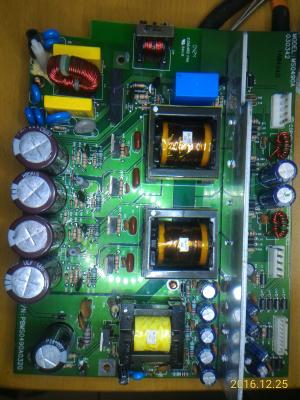

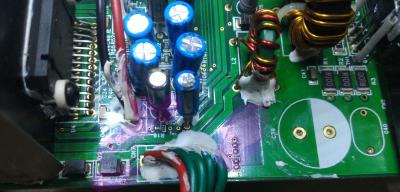
Attached Image
Attached Image

All the electrolytic capacitors on PSU board had been replaced (but the 35V/100μF were replaced with 35V/220μF, because I forgot to bought them...)
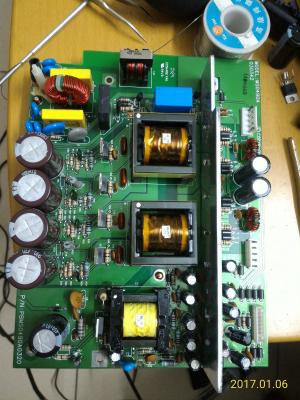
Attached Image


Update 1 (2017-01-07 02:50)
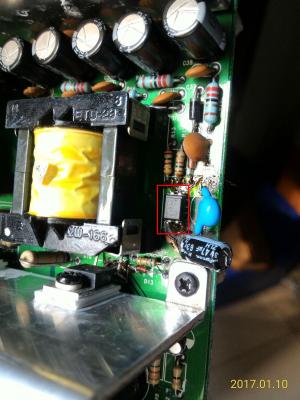
I just desoldered the opto coupler (U2), clean it, check it (seems fine, but I'm not sure), and I soldered it back, luckily, I can turn on the main power now.
There's explosion sign under C62 which is near to the opto coupler, I guess the explosion had affected the feedback circuit somehow.

Update 2 (2017-01-08 00:50)
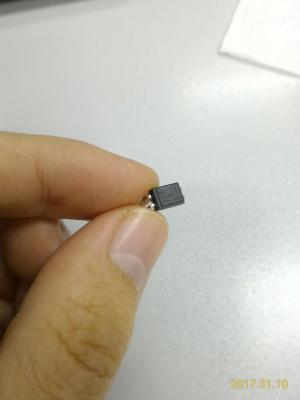
The subwoofer does not produce sounds even the main power is on. After careful check, I found that the +24V and -24V voltage are still low (around +17V and -17V), and 4 terminals of VH connector of power lines from/ AMP boards are broken (the tongue is broken/missing).
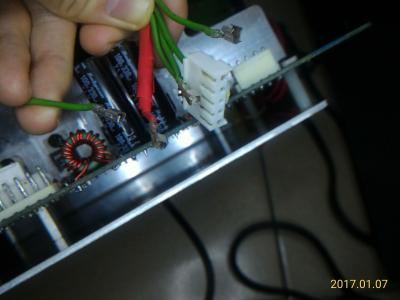
Attached Image

So I bought some opto couplers and terminal components, waiting for the arrival...
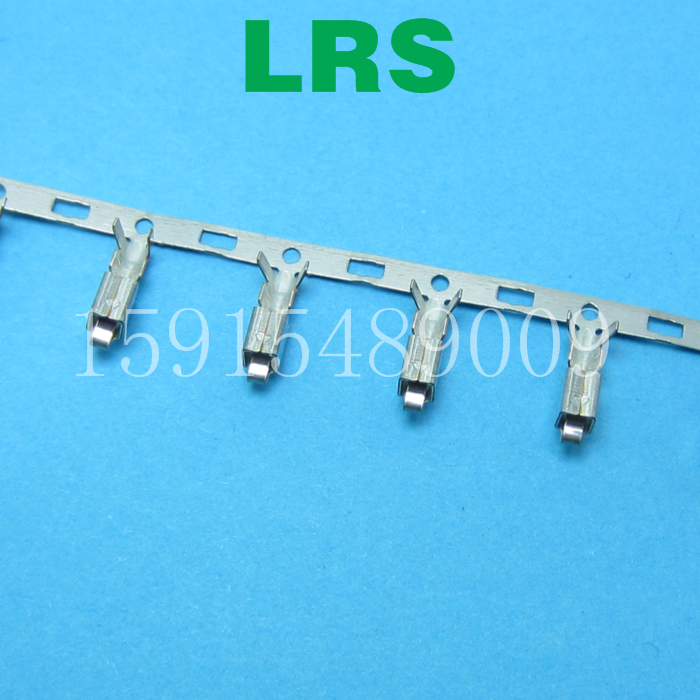
user posted image

Update 3 (2017-01-10 20:30)
Good news, after I replaced the optocoupler (U2), the subwoofer can produce sounds now !

In update 1, I thought it's okay, but it's not!
The resistance between 3 and 4 pin/leg is about 1040 Ohm, in both direction, without powered on.

-------------

Just for fun:
My PSU of desktop computer failed last week.
Symptom: Keeps rebooting without BIOS booted.

I disassembled the PSU, found two capacitors in it, and their rating are the same as S750's: 200V/470μF/22mmx35mm.
I measured the capacitance of them, only 320μF (68%) left. So I replaced them with two capacitors which were desoldered from S750, guess what, IT WORKS!
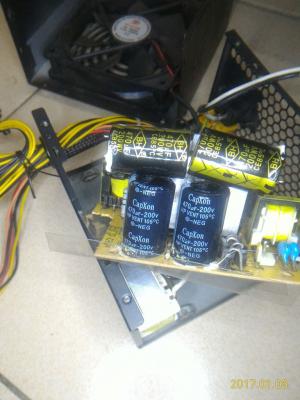
Attached Image

But for long term consideration, I bought two new Nichicon PW series capacitors and replaced those two CapXon capacitors.
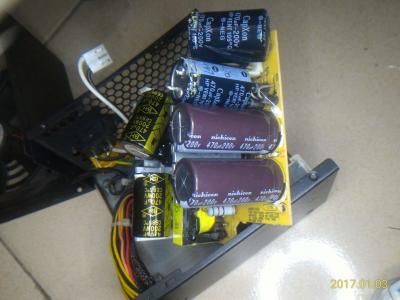
Attached Image

This post has been edited by asenrzhang: Jan 10 2017, 09:47 PM

asenrzhang
post Jan 9 2017, 02:47 AM

Getting Started
**
Junior Member
68 posts

Joined: Apr 2015
From: China
QUOTE(rsseco @ Jan 8 2017, 05:51 AM)
Hi,

It's good to read you again !
No, I haven't replaced any other capacitors (only the 470uF ones). As wrote before, I wanted to repair the set as costless as possible...

Well, if budget is the primary concern, this could lead you to a dead loop:
1. You don't have the ability to diagnose the issue.
2. You buy least components to replace suspicious failed components.
3. You found more suspicious failed components, or, the previous replacements which may not be genuine introduced more unexpected symptom.
4. You may need buy more components which cost more including delivery cost and time. (dead loop)

So I will suggest to follow @lex's guide, replace all electrolytic capacitors, then do the test. This is because that electrolytic capacitors are the most easy-to-fail components, replace them can clean the road to next step.

QUOTE(rsseco @ Jan 8 2017, 05:51 AM)
I need to know how much it will cost me to replace all of them, but I hope it will really be repaired after that.
Some users had already made a buy-list of capacitors, you can do a quick math according those lists.

QUOTE(rsseco @ Jan 8 2017, 05:51 AM)
Today, I visually check the upper Amp board ; nothing to notice.
But on the power board, I notice that the C70 was a little "bumped" on the top (the same cap which had exploded as the set died) ; I removed the protection, but didn't found any electrolite leak. Maybe the "pfff" sound could came from it even so. On the back of the board, the + pole of C70 is wonky, so I think it cames from here.

I will try to buy genuine Capacitors first, as you found that mines were faked.
*
If the subwoofer is running in normal condition, then C70 is the last one of the 4 200V/470μF capacitors that will become bulged -- because it located at the bottom -- heat go up, not go down.

So if C70 be bulged now in just testing stage (no heavy load, no long time running), it could be capacitor's fault.

About the unsteady solder joint of + leg of C70, make sure your solder points are completely soldered to the legs.
And the solder pads of these 4 capacitors are easy to get off (I really hate Snap-In legs), if so, make sure the solder pads are completely off and then make a 'L' shape connector to fix the circuit, this will make the solder joint steady.

This post has been edited by asenrzhang: Jan 9 2017, 02:57 AM
asenrzhang
post Jan 10 2017, 10:05 PM

Getting Started
**
Junior Member
68 posts

Joined: Apr 2015
From: China
QUOTE(asenrzhang @ Jan 6 2017, 03:04 AM)
...
-------------

By the way, I bought a failed subwoofer, and try to repair it for fun.
The previous owner said it does not power at all, no LED light, nothing.

After fixing, LED on back plate and control pods are back, press the "STANDBY/POWER" button, the "MASTER" led turns on, but it doesn't actually power up: no click sound came out from the relay.
I measured the output voltage of CN6, all the voltage reading values are about half of value it should be.
I suspect it's the fault of T3 (transformer 3), but I'm not sure (even I'm sure, I can't found a proper replacement now), and I'm stuck here.
Hope somebody can help me to find out the source issue.


Attached Image
Attached Image

All the electrolytic capacitors on PSU board had been replaced (but the 35V/100μF were replaced with 35V/220μF, because I forgot to bought them...)
Attached Image
Update 1 (2017-01-07 02:50)
I just desoldered the opto coupler (U2), clean it, check it (seems fine, but I'm not sure), and I soldered it back, luckily, I can turn on the main power now.
There's explosion sign under C62 which is near to the opto coupler, I guess the explosion had affected the feedback circuit somehow.

Update 2 (2017-01-08 00:50)
The subwoofer does not produce sounds even the main power is on. After careful check, I found that the +24V and -24V voltage are still low (around +17V and -17V), and 4 terminals of VH connector of power lines from/ AMP boards are broken (the tongue is broken/missing).
Attached Image

So I bought some opto couplers and terminal components, waiting for the arrival...

-------------
...
Good news, after I replaced the optocoupler (U2), the subwoofer can produce sounds now !

In update 1, I thought it's okay, but it's not!
The resistance between #3 and #4 pin/leg is about 1040 Ohm, in both direction, without powered on.
So I bought some new optocouplers (I actually bought two times, wrong type at the first time: Avago ACPL-817 C, which the rank is not right. It should be rank A, so I bought SHARP PC817 A at the second time), replaced the old one, the failed one, now the speaker can make noise now (although it still have some small issues such as low volume on some channels, I suspect it's like the issue of @lex's second fix: some channels random off).

So, I make a memo here in case I encountered same issue next time:
When got low secondary voltage of transformer 3 (while the input voltage is normal, around 300V), check the feedback circuit, including the optocoupler (U2).

This post has been edited by asenrzhang: Jan 13 2017, 01:08 PM


Attached thumbnail(s)
Attached Image Attached Image
asenrzhang
post Feb 17 2017, 06:38 PM

Getting Started
**
Junior Member
68 posts

Joined: Apr 2015
From: China
QUOTE(MichalD @ Feb 16 2017, 08:06 PM)
...what is the difference in the PSU board between US 110V and EU 230V version?
I can tell the only different is just different connections of those three 0Ω resistors, as you already found it.

QUOTE(MichalD @ Feb 16 2017, 08:06 PM)
In the PSU scheme i found something about R32, R31 and R3. Simply by following these three "resistors" (0 ohm links or open links) can i adapt the PSU board to 230V or 110V input voltages? Thanks for soon reply.
With proper modification (the schematics already figure it out), you can make the PSU works on 230V or 110V.

110V to 220~240V modification should be easy, because you don't need to buy another 0Ω resistor.
220~240V to 110V modification is easy too, but you need buy another 0Ω resistor.

asenrzhang
post Mar 12 2017, 01:30 AM

Getting Started
**
Junior Member
68 posts

Joined: Apr 2015
From: China
Again, I'm not a professional engineer, so take the advises at your own risk!
QUOTE(golestani @ Mar 11 2017, 10:01 PM)
...
so i try to disconnect the AMP 1 and AMP 2 from the power board and then when i disconnect the AMP2 wire from the power board the green light instantly get back and even i can turn on it full , but if i connect the amp2 instantly the power goes off and green power light start blinking !!! i want to know the problem is from AMP board or still maybe there is a problem with the Power board ?
I would like to do this test (let me call it Test Case for AMP Board 2) to identify the source:
disconnect AMP board 1, connect AMP board 2, then power on to see if the back LED blinking or not.

QUOTE(golestani @ Mar 11 2017, 10:01 PM)
because i just want to know if this issue came from the AMP board i will check it again for fault parts but if still maybe there is a problem with power board i will try to change all caps or anything i can again for make sure its not the power board problem
Most blinking LED issues of S750 are caused by bad capacitors.
I say "most", not "all", because when I repair AMP board 2, there's one time, when I try to mount the AMP board 2 back, I leave one screw loosely, very loosely --> this caused back LED blinking too, I guess the screw make a circuit somehow between the back plate and hint sink of AMP board 2.

QUOTE(golestani @ Mar 11 2017, 10:01 PM)
another question can anyone tell me the right voltage in a working fine and stable sub-woofer for AMP board ?
CN4 & CN5: [1] [2] [3] [4] [5](pin for RED wire)

  • V2to1 should be 70V
  • V4to3 should be -24V
  • V5to3 should be 24V

QUOTE(golestani @ Mar 11 2017, 10:01 PM)
and another thing i forgot to mean it after some disconnect and reconnecting again the amp 2 board that cause the power off the C60 get exploded ( only smoke not so much sound ) anyway what kind of the problem is that !?!?!
I don't know. I mean it could be the fault of PSU board, or fault of AMP board 2, or both.
asenrzhang
post Mar 12 2017, 03:45 PM

Getting Started
**
Junior Member
68 posts

Joined: Apr 2015
From: China
QUOTE(golestani @ Mar 12 2017, 05:23 AM)
...
and again i changed 4 200v 470uf and still 1 of the CAP get very hot if i let it go im sure it will explode again ! and its only happened when i turn on the PSU with POD or remote control ( the only way i can turn the subwoofer on is when i disconnect the AMP2 (( the one with 3 bash IC's )) and when i turn it on the CAP C60 getting hot i mean too much hot in 10 or 20 second and if i dont disconnect the cable from the electric im sure it will explode again like last time it already did !

so i just want to know if u know where this problem cause only for C60 CAP its happening .
still i don't know what is the problem maybe C60 cap didn't connected to the board well and the C60 is the power source of the AMP2 board so if i connect it to the power board , power board will understand the power is on problem or even there is a problem with AMP2 so it won't let u turn on the sub-woofer !
Let me confirm these information:
(1) You replaced C59 & C60 & C69 & C70
(2) You disconnected AMP 2
(3) You use POD or remote control to power on
(4) Still, you got C60 very hot in seconds (without AMP 2)

And the voltage of your power line is 110V or 220V~240V?

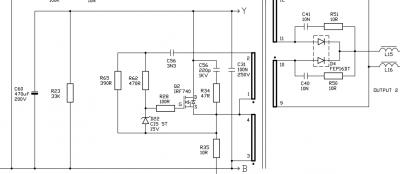
If C60 is the only capacitor which becomes hot, maybe you need to check components in the following picture:
Attached Image
Especially Q2 (IRF740) and D4 (FEP16DT), if Q2 is the one exploded and been replaced in the repair shop, then focus on D4.

QUOTE(golestani @ Mar 12 2017, 05:23 AM)
i still don't understand it at all but i won't give up so easy ! after first time i spent about 80 dollar to fix it , it only worked for 2 months and its make me feel so bad sad.gif if my s750 will get back to live again i will get all of the AMP and IO and Power board out of the sub-woofer and i will make a custom box for AMP,etc and just a small wire get into the sub-woofer for the sub-woofer sound , and i will keep the amp and other board cool with a FAN or something else maybe i put it in the freezer smile.gif) but i don't want to lose it again only because of poor design of the amp and power when there is no air coming in and out .
*
If you successfully put PSU & AMP & IO boards to another box, please share your experience. smile.gif such as
  • how to disassemble the bracket without hurt the screws (I try to disassemble the bracket of AMP 2, the screw head is been damaged, but still I can't screw it down)
  • how to fill the hole after disassembled audio IO board -- I mean the part on the back plate.
  • how to drill a small hole for audio line to subwoofer
  • and, the most important thing, how to build the box and put parts in it


This post has been edited by asenrzhang: Mar 12 2017, 04:02 PM

4 Pages < 1 2 3 4 >Top
 

Change to:
| Lo-Fi Version
0.0398sec    0.37    7 queries    GZIP Disabled
Time is now: 8th December 2025 - 10:46 PM