

QUOTE(ckeong89 @ Feb 15 2014, 03:55 AM)
i heard 1u will be better

Alright, but they only open on weekdays.

This post has been edited by romeo57: Feb 15 2014, 12:13 PM
Lenovo IdeaPad Y Series Thread v3, y510p, where are you?
|
|
 Feb 15 2014, 12:11 PM Feb 15 2014, 12:11 PM
|
 
Junior Member
373 posts Joined: Sep 2011  
|
QUOTE(ckeong89 @ Feb 15 2014, 03:55 AM) i heard 1u will be better Alright, but they only open on weekdays. This post has been edited by romeo57: Feb 15 2014, 12:13 PM |
|
|
|
|
|
Feb 16 2014, 10:40 PM
|

Senior Member
2,933 posts Joined: Nov 2007 From: Kuala lumpur
|
can i know where can get this external fan for lenovo Y510P
thank thanks 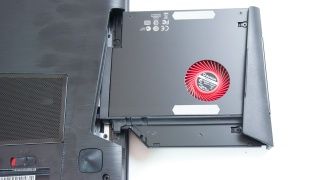 |
|
|
Feb 17 2014, 03:07 AM
|

Junior Member
202 posts Joined: Aug 2007
|
Im gonna pick up a Y410P (the GT 755M version) in a few hours. Most probably at Lowyat.
Anything i should look out for? Warranty information, serial numbers etc |
|
|
Feb 18 2014, 02:18 PM
|

Senior Member
861 posts Joined: Feb 2006
|
QUOTE(SubRoutine @ Feb 17 2014, 03:07 AM) Im gonna pick up a Y410P (the GT 755M version) in a few hours. Most probably at Lowyat. Battery, screen & turn on your laptop to take a look? Anything i should look out for? Warranty information, serial numbers etc  |
|
|
Feb 19 2014, 06:33 PM
|
 
Elite
5,093 posts Joined: Mar 2009 From: Land of make believe 
|
QUOTE(SubRoutine @ Feb 17 2014, 03:07 AM) Im gonna pick up a Y410P (the GT 755M version) in a few hours. Most probably at Lowyat. If you've Windows 8, upgrade it to Win 8.1 for free(via the Store). I got mine with Windows 8 and the WLAN kept disconnecting. Turned out that the driver was the root cause.Anything i should look out for? Warranty information, serial numbers etc |
|
|
Feb 19 2014, 08:03 PM
|

Senior Member
2,702 posts Joined: Aug 2011 From: UNKNOWN
|
QUOTE(SubRoutine @ Feb 17 2014, 03:07 AM) Im gonna pick up a Y410P (the GT 755M version) in a few hours. Most probably at Lowyat. just make sure it's malaysian set.Anything i should look out for? Warranty information, serial numbers etc |
|
|
|
|
|
Feb 19 2014, 10:50 PM
|

Senior Member
779 posts Joined: Sep 2011
|
QUOTE(SubRoutine @ Feb 17 2014, 03:07 AM) Im gonna pick up a Y410P (the GT 755M version) in a few hours. Most probably at Lowyat. seril number/machine code ended with MY is malaysia unit. and if enuf budget, add on the ram if u r taking dos version (dos version-3955 come with 4gb ram only)Anything i should look out for? Warranty information, serial numbers etc |
|
|
Feb 19 2014, 11:05 PM
|
|
Junior Member
202 posts Joined: Aug 2007
|
Bought a DOS version, MY set. added a stick of RAM on my own. Running on Windows 8 for now, runs my games like a charm. Enjoying Titanfall beta with no problems.
QUOTE(UserU @ Feb 19 2014, 06:33 PM) If you've Windows 8, upgrade it to Win 8.1 for free(via the Store). I got mine with Windows 8 and the WLAN kept disconnecting. Turned out that the driver was the root cause. Disconnecting as in the signal is gone at random times or....? My signal bars never drop, just the speed. Absolutely horrible on 802.11n mode. I had to switch my home router to use b/g mode exclusively so i can get stable speeds 90% of the time. BTW, friendly reminder to Y410P/ GT 755M owners, do not update your Nvidia drivers to the 332.21 version. I used that after my fresh W8 installation, after restart the laptop screen keeps flashing on and off. Had to remove the drivers in safe mode then use the one provided by Lenovo from their website. I have no idea about the latest 334.89 drivers, but for now i am not gonna try. Edit: forgot to thank you guys for the tips and replies. thank you very much!  This post has been edited by SubRoutine: Feb 19 2014, 11:23 PM |
|
|
Feb 19 2014, 11:59 PM
|
|
Elite
5,093 posts Joined: Mar 2009 From: Land of make believe
|
QUOTE(SubRoutine @ Feb 19 2014, 11:05 PM) Disconnecting as in the signal is gone at random times or....? My signal bars never drop, just the speed. Absolutely horrible on 802.11n mode. I had to switch my home router to use b/g mode exclusively so i can get stable speeds 90% of the time. It would suddenly disconnect by itself(Limited Access) while browsing, downloading or loading a web page. Strange that we both have the same model but out problems differ  QUOTE(SubRoutine @ Feb 19 2014, 11:05 PM) BTW, friendly reminder to Y410P/ GT 755M owners, do not update your Nvidia drivers to the 332.21 version. I used that after my fresh W8 installation, after restart the laptop screen keeps flashing on and off. Had to remove the drivers in safe mode then use the one provided by Lenovo from their website. I have no idea about the latest 334.89 drivers, but for now i am not gonna try. I've kept the driver updated and this didn't happen. However, my system would experience a slowdown for several seconds while gaming on random intervals.Edit: forgot to thank you guys for the tips and replies. thank you very much! Very strange. This post has been edited by UserU: Feb 20 2014, 12:00 AM |
|
|
Feb 20 2014, 12:32 AM
|
|
Junior Member
202 posts Joined: Aug 2007
|
QUOTE(UserU @ Feb 19 2014, 11:59 PM) It would suddenly disconnect by itself(Limited Access) while browsing, downloading or loading a web page. Okay now I get what you mean. We have the same problem. Strange that we both have the same model but out problems differ With wifi in b/g mode, the network speed hovers from 54 Mbps to 24 Mbps + Limited Access at certain times. With wifi in n mode, the network speed hovers 72 Mbps to 1.1 Mbps + Limited Access at certain times. All these can happen even when the laptop is only a few feet away from the router, in the same room. If i wanna fix this, can i just get drivers from the Lenovo website? (I used the drivers from CD when i installed Windows 8). Or do i really need to update to Windows 8.1? |
|
|
Feb 20 2014, 12:36 AM
|
|
Elite
5,093 posts Joined: Mar 2009 From: Land of make believe
|
QUOTE(SubRoutine @ Feb 20 2014, 12:32 AM) Okay now I get what you mean. We have the same problem. I did that, but no dice. You have to upgrade it to Win 8.1 to solve it permanently.With wifi in b/g mode, the network speed hovers from 54 Mbps to 24 Mbps + Limited Access at certain times. With wifi in n mode, the network speed hovers 72 Mbps to 1.1 Mbps + Limited Access at certain times. All these can happen even when the laptop is only a few feet away from the router, in the same room. If i wanna fix this, can i just get drivers from the Lenovo website? (I used the drivers from CD when i installed Windows 8). Or do i really need to update to Windows 8.1? But no worries, everything installed and stored will be maintained. Just the issue ironed out |
|
|
Feb 20 2014, 01:11 AM
|
|
Junior Member
202 posts Joined: Aug 2007
|
QUOTE(UserU @ Feb 20 2014, 12:36 AM) I did that, but no dice. You have to upgrade it to Win 8.1 to solve it permanently. Alright, will proceed with the update to 8.1. Is that all I have to do? Or should i download new drivers from the Lenovo website? Please excuse the apparent noobnessBut no worries, everything installed and stored will be maintained. Just the issue ironed out |
|
|
Feb 20 2014, 01:13 AM
|
|
Elite
5,093 posts Joined: Mar 2009 From: Land of make believe
|
QUOTE(SubRoutine @ Feb 20 2014, 01:11 AM) Alright, will proceed with the update to 8.1. Is that all I have to do? Or should i download new drivers from the Lenovo website? Please excuse the apparent noobness First, remove the existing network card driver.Then, proceed to update your system to Win 8.1 by following the steps here. Once successful, download the Windows 8.1 driver from Lenovo's page. Install it and you're done. |
|
|
|
|
|
Feb 20 2014, 01:36 AM
|
|
Junior Member
202 posts Joined: Aug 2007
|
QUOTE(UserU @ Feb 20 2014, 01:13 AM) First, remove the existing network card driver. Thank you very much for your help good sir. If this is reddit i give you reddit gold hahaThen, proceed to update your system to Win 8.1 by following the steps here. Once successful, download the Windows 8.1 driver from Lenovo's page. Install it and you're done. |
|
|
Feb 20 2014, 01:44 AM
|
|
Elite
5,093 posts Joined: Mar 2009 From: Land of make believe
|
QUOTE(SubRoutine @ Feb 20 2014, 01:36 AM) Thank you very much for your help good sir. If this is reddit i give you reddit gold haha You're welcome, glad I could help.Good to see another Redditor here. I'm a lurker for some time, might plan to unlurk soon  |
|
|
Feb 20 2014, 11:45 AM
|

Junior Member
517 posts Joined: May 2010 From: Your Heart 
|
QUOTE(SubRoutine @ Feb 19 2014, 11:05 PM) Bought a DOS version, MY set. added a stick of RAM on my own. Running on Windows 8 for now, runs my games like a charm. Enjoying Titanfall beta with no problems. How much you got yours for?Disconnecting as in the signal is gone at random times or....? My signal bars never drop, just the speed. Absolutely horrible on 802.11n mode. I had to switch my home router to use b/g mode exclusively so i can get stable speeds 90% of the time. BTW, friendly reminder to Y410P/ GT 755M owners, do not update your Nvidia drivers to the 332.21 version. I used that after my fresh W8 installation, after restart the laptop screen keeps flashing on and off. Had to remove the drivers in safe mode then use the one provided by Lenovo from their website. I have no idea about the latest 334.89 drivers, but for now i am not gonna try. Edit: forgot to thank you guys for the tips and replies. thank you very much! I've tried window 8 on Y410P 755m gt.. Really sucks TTM... Try downgrade it to window 7, as i'm using now.. The graphic card and wifi issues fixed magnificently, I wonder why is the the latest driver of nvidia GT755m doesn't support window 8... Somehow, there's a minor function key will not work after you've downgrade, as in the F9 till F12.. LOL I don't quite like the network card of Y410P.. It's running on broadcom driver? And what's the different between broadcom and intel driver? This post has been edited by Cloud2322: Feb 20 2014, 11:47 AM |
|
|
Feb 20 2014, 02:49 PM
|
|
Elite
5,093 posts Joined: Mar 2009 From: Land of make believe
|
QUOTE(Cloud2322 @ Feb 20 2014, 11:45 AM) How much you got yours for? The driver works on Win 8/ 8.1. Same for the FN key. You might want to upgrade to 8.1 to iron out those issues.I've tried window 8 on Y410P 755m gt.. Really sucks TTM... Try downgrade it to window 7, as i'm using now.. The graphic card and wifi issues fixed magnificently, I wonder why is the the latest driver of nvidia GT755m doesn't support window 8... Somehow, there's a minor function key will not work after you've downgrade, as in the F9 till F12.. LOL I don't quite like the network card of Y410P.. It's running on broadcom driver? And what's the different between broadcom and intel driver? Different regions, different NICs. Ours are from Broadcom. Just the settings differ. |
|
|
Feb 21 2014, 01:17 AM
|
|
Junior Member
202 posts Joined: Aug 2007
|
Updated to Windows 8.1, using all the latest W8.1 drivers from Lenovo. I can confirm that the WiFi problem has been fixed. Now connected to an n network with stable 65 Mbps speeds.
Thanks to UserU for the tips! |
|
|
Feb 21 2014, 01:36 AM
|
|
Elite
5,093 posts Joined: Mar 2009 From: Land of make believe
|
QUOTE(SubRoutine @ Feb 21 2014, 01:17 AM) Updated to Windows 8.1, using all the latest W8.1 drivers from Lenovo. I can confirm that the WiFi problem has been fixed. Now connected to an n network with stable 65 Mbps speeds. You're welcome, glad you got it resolved Thanks to UserU for the tips!  |
|
|
Feb 21 2014, 11:42 PM
|

Senior Member
2,054 posts Joined: Oct 2007 From: Johor Bahru, Johor
|
Y410P with HD+ resolution (1600x900) and 755M GT how much ahh? planned to get one this June!
|
| Change to: |  0.1251sec 0.1251sec
 0.50 0.50
 6 queries 6 queries
 GZIP Disabled GZIP Disabled
Time is now: 6th December 2025 - 05:45 PM |
 Quote
Quote