QUOTE(Skylinestar @ Jan 5 2016, 01:19 PM)
cleaner power source to equipment...
https://en.wikipedia.org/wiki/Electromagnetic_interference
Postage subject to total one-off bulk purchase..
[WTS/Bulk] ▲★ CAL-LAB Lightning Isolators ★▲, Authorised Seller@Performance Guarantee
|
|
Jan 5 2016, 02:47 PM
Return to original view | Post
#761
|
![]() ![]() ![]() ![]() ![]() ![]() ![]()
Senior Member
8,377 posts Joined: Nov 2004 |
QUOTE(Skylinestar @ Jan 5 2016, 01:19 PM) cleaner power source to equipment... https://en.wikipedia.org/wiki/Electromagnetic_interference Postage subject to total one-off bulk purchase.. |
|
|
|
|
|
Jan 20 2016, 01:42 PM
Return to original view | Post
#762
|
![]() ![]() ![]() ![]() ![]() ![]() ![]()
Senior Member
8,377 posts Joined: Nov 2004 |
|
|
|
Jan 20 2016, 05:04 PM
Return to original view | Post
#763
|
![]() ![]() ![]() ![]() ![]() ![]() ![]()
Senior Member
8,377 posts Joined: Nov 2004 |
QUOTE(puawk1 @ Jan 20 2016, 04:09 PM) Hi Mr. Gan, My current setting is as below: Living Hall #1: Wall power point --> 3 gang power socket extension --> TV + Astro + Xbox Living Hall#2: Wall power point --> 3 gang power socket extension --> Unifi BTU + Wifi Router + Dect Phone Please recommend the basic CLLI device which is sufficient to support. Thank you. is the TV connected with any aerial antenna? any wired LAN cable connected to ur XBox? The Unifi BTU input is fiber optic or copper cable? any wired LAN cable connected to any PCs? |
|
|
Jan 21 2016, 10:30 AM
Return to original view | Post
#764
|
![]() ![]() ![]() ![]() ![]() ![]() ![]()
Senior Member
8,377 posts Joined: Nov 2004 |
QUOTE(puawk1 @ Jan 21 2016, 08:55 AM) TV is NOT connected to antenna, only connected to Astro. Xbox game console is WITHOUT LAN cable. Living Hall #1: MDSC0039FC for power and satellite protectionUnifi BTU is with FIBER. The Wifi router is connected with 2 LAN cables to the wall patch panel, which further extended to 2 separate bed rooms. Most of the time, this 2 LAN port on the bedroom is not connected to computer. For example, only when I work in bedroom, I will connect the notebook computer to the LAN port. My main objective is to protect the TV, Astro and the Unifi BTU. There is no big concern on the router as I can easily replace it. Thanks for your advice. Living Hall #2: MDSC0039 with 2 units SLAN8CG / SLAN1236 for power and LAN cable protection As long as cable connected to router, there have possibility to attract surge and damage Unifi BTU as interconnected to each others. |
|
|
Jan 22 2016, 02:41 PM
Return to original view | Post
#765
|
![]() ![]() ![]() ![]() ![]() ![]() ![]()
Senior Member
8,377 posts Joined: Nov 2004 |
QUOTE(seiken @ Jan 22 2016, 12:42 AM) Bro, interested to purchase from you. Planning a setup consisting of TV (Connected to Astro, no antenna) with UNIFI (as well as sound bar). No LAN cable connected to any PC Does that mean I will need MDSC0039-FC and SLAN1236? Thank you your unifi input is fiber optics or copper cables? dont have any wired LAN cable connected from any PCs to Unifi setup? |
|
|
Jan 26 2016, 08:44 AM
Return to original view | Post
#766
|
![]() ![]() ![]() ![]() ![]() ![]() ![]()
Senior Member
8,377 posts Joined: Nov 2004 |
|
|
|
|
|
|
Jan 27 2016, 04:09 PM
Return to original view | Post
#767
|
![]() ![]() ![]() ![]() ![]() ![]() ![]()
Senior Member
8,377 posts Joined: Nov 2004 |
QUOTE(afiqwing @ Jan 27 2016, 08:49 AM) wOw.. Great Review from many user.. This must be great !! I need advice on what product should i purchase Hall Room 1 : 1 BTU, 1 Unifi Router, 1 telephone provided by unifi, 1 Desktop 650Watt PSU(1 Lan From Router), 1 Monitor Hall Room 2 : 1 LED TV ( No ariel cable), 1 Sound Theater System, 1 Hypp TV STB(1 lan cable from the router mentioned in hall ROOM 1), 1 Laptop, 1 Printer P/S : 1 problem that i cant solve is that my pc will keep disconnecting when fluoroscent lamp on in the other room and sometimes disconnect when i plug in Printer USB (It make my old PSU, and 2 4gb ram to be broken the last time) - It only occur in my house and not in my college Hall Room 1: MDSC0039 (for power protection) + SLAN8CG (for the LAN cable to Hypp STB) Hall Room 2: MDSC0039 (for power protection) + SLAN8CG (for the LAN cable from Unify Router) Remarks: if Satelite Dish (Astro) not connected to the LED TV. What you means the disnconnection? is the BTU internet conenction? or LAN connection? or from the power cable itself? You may consider to use NILI9920F to isolate the noise generated from power cable. However if the fluorescent inteference with your PC desktop via the air, none of Cal-Lab can help unless your PC fully shielded with metal... QUOTE(IceBikers @ Jan 27 2016, 11:50 AM) Hi Bro, what are the differences between SF9512DSL-MS2 and price? SF9512DSL-MS2+3 and price? what is the current price for SF9512DSL ? delivery charge? COD location still available at 32 square, pj? SF9512DSL MS2 and MS2+3 not longer in production anymore. I sending you PM for pricing and COD location. |
|
|
Jan 27 2016, 04:59 PM
Return to original view | Post
#768
|
![]() ![]() ![]() ![]() ![]() ![]() ![]()
Senior Member
8,377 posts Joined: Nov 2004 |
QUOTE(afiqwing @ Jan 27 2016, 04:31 PM) My Mouse And Keyboard Will Disconnect IF a Fluoroscent lamp is on.. Still Cant Figure Out Why Anyway can u pm me price, COD Location and Picture+Contact no if Possible. wireless keyboard & mouse? if yes, highly could be frequency interference... MDSC0039 and SLAN8CG is your final order setup? Any other equipment not listed in your earlier posts? |
|
|
Jan 28 2016, 10:52 AM
Return to original view | Post
#769
|
![]() ![]() ![]() ![]() ![]() ![]() ![]()
Senior Member
8,377 posts Joined: Nov 2004 |
QUOTE(afiqwing @ Jan 27 2016, 05:39 PM) Yes that was the final order setup. However there are a fixed line home telephone which are not linked to any of the plug, but the wire is near the optical cable. Not sure if i need protector for that also as i do not care about that phone But i care if the surge can jump to the fibre optic cable as it is very near. It is a wired Steelseries Rival Mouse and wired Armageddon Nighthawk KAI-5 keyboard. I understand that there might be interference with fluoroscent lamp, but idk why sometimes it will also disconnect if i plug in printer usb to my computer. Might be the problem from the computer itself but im not sure. you means beside of fiber optics from TM, you have another fixed line copper cable from TM too which side by side with ur Unifi equipments? If yes, highly recommended to protect the copper cable from TM as the surge can create static and enough to kill any sensitive devices around.. |
|
|
Feb 1 2016, 09:52 AM
Return to original view | Post
#770
|
![]() ![]() ![]() ![]() ![]() ![]() ![]()
Senior Member
8,377 posts Joined: Nov 2004 |
|
|
|
Feb 17 2016, 11:43 AM
Return to original view | Post
#771
|
![]() ![]() ![]() ![]() ![]() ![]() ![]()
Senior Member
8,377 posts Joined: Nov 2004 |
QUOTE(icyblanca @ Feb 16 2016, 04:29 PM) just the modem through the phone line. We keep the modem on 24hrs a day. so need protection for it. The rest we usually unplug when not in use. thanks for your help ya! you can use SF9512DSL or SF9812DSL for modem protection (power and RJ11 only)... if you have far end IP devices connected via wired LAN cable, so the RJ45 connection of modem must be protect as well... |
|
|
Feb 17 2016, 02:50 PM
Return to original view | Post
#772
|
![]() ![]() ![]() ![]() ![]() ![]() ![]()
Senior Member
8,377 posts Joined: Nov 2004 |
QUOTE(icyblanca @ Feb 17 2016, 01:26 PM) Oic. So if i need to connect to the telephone i need following products. Correct? MDSC0039 SP 9201-DAF Can you pm we all the price + delivery to kajang? Many thanks! Yes, you required MDSC0039 and SP9201DAF if the tel cable shared for analog telephone and ADSL modem... i have ex-stock for all the items as above... |
|
|
Mar 4 2016, 10:33 AM
Return to original view | Post
#773
|
![]() ![]() ![]() ![]() ![]() ![]() ![]()
Senior Member
8,377 posts Joined: Nov 2004 |
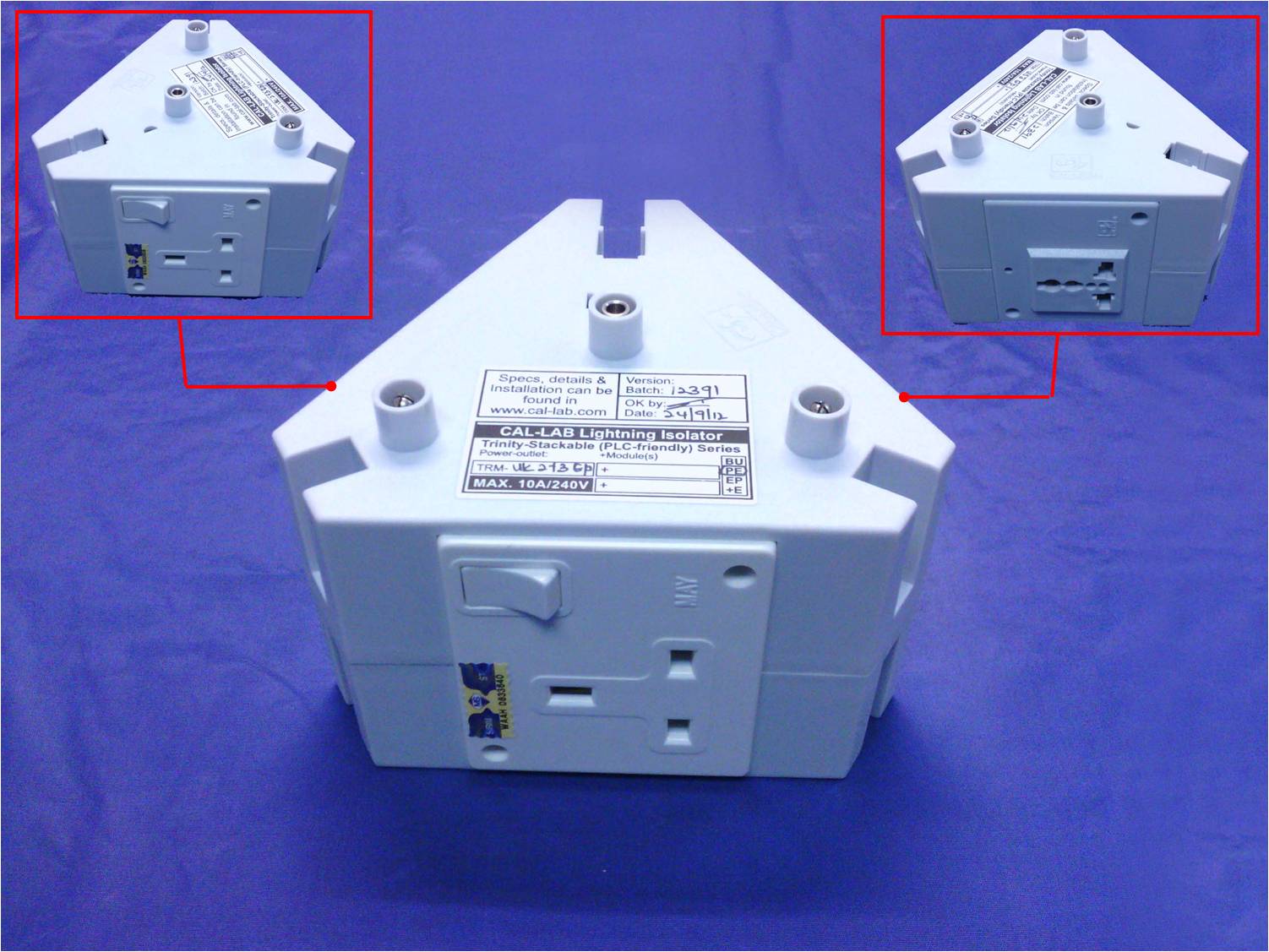
QUOTE(Yeapy @ Mar 3 2016, 12:45 AM) My set up: 1- Gaming PC + Monitor + Speakers 2- Work PC + Monitor + Speakers 3- TV+Amplifier+Subwoofer+Blu Ray Player+Asus Media Player What should I use? Any modem router connect to Setup 1 and 2? if dont have modem router, u using homeplug or wired or wirless LAN network for the IP connectivity? Setup 3, the TV connected any aerial antenna or astro satelite dish? Asus Media player connected with homeplug or wired or wireless LAN network? QUOTE(scoutfai @ Mar 3 2016, 09:56 PM) I need to protect my Maxis Fiber at home. It comes with two devices, one modem and one router. The only thing that connect to both devices are their respective power plug. There is one fiber optic connect to the modem but since fiber optic is insulator in nature so I do not think this poses any threat. There is one normal telephone cable from router to a deck phone. The deck phone has its own power plug. I personally think that if there is a surge coming to the deck phone through its power plug, this surge is unlikely to hit the router through the telephone cable. So if my understanding is correct then I will just need to protect the two power plugs (one for modem, one for router). However I also wish to have extra two sockets for future use. Hence, may I ask, do you have a product that has 4 sockets? preferably in a flat, longitudinal layout. As your requirements, if ur modem, router & DECT phone located side by side and all PC equipment or media player connected via Wireless to your wireless router... you can use TRM-EP-UK2+US1 +PE which come with 3 Power socket and extendable up to 6 / 9 number of socket... However Cal-Lab dont have the options for flat and longitudinal as these sort of design are not expandable and occupied more floor space... ![]() |
|
|
|
|
|
Mar 4 2016, 07:35 PM
Return to original view | Post
#774
|
![]() ![]() ![]() ![]() ![]() ![]() ![]()
Senior Member
8,377 posts Joined: Nov 2004 |
QUOTE(scoutfai @ Mar 4 2016, 04:28 PM) From the picture I can see one socket at the left bottom, another socket at the middle right. May I ask where is the third socket? For this product type do you have more pictures on different angle? it is just a sample only of the design... if u want power socket only, all the 3 sides also power sockets... nothing more... if u want 3 power socket only, u only required the bottom part only... if u want 6 - 9 power socket, then u need to stack up another 2 - 3 expansion unit... |
|
|
Mar 7 2016, 08:34 AM
Return to original view | Post
#775
|
![]() ![]() ![]() ![]() ![]() ![]() ![]()
Senior Member
8,377 posts Joined: Nov 2004 |
QUOTE(Yeapy @ Mar 6 2016, 12:04 AM) Gaming PC using wired LAN, work PC using wireless. any modem router too?Set up 3, TV not connected to aerial or astro, but may be can get aerial protection for future usage. Asus Media Player not connected to internet, just load movie from external HD. if yes, it is together with Gaming PC or located at 4th location? |
|
|
Mar 7 2016, 08:43 AM
Return to original view | Post
#776
|
![]() ![]() ![]() ![]() ![]() ![]() ![]()
Senior Member
8,377 posts Joined: Nov 2004 |
QUOTE(scoutfai @ Mar 7 2016, 07:54 AM) Ah I see. Now I understand the product design concept. Then is it possible to have: 1st layer = 3 sides also power socket. 2nd layer = 3 sides also power socket. (then I already have 6 sockets, more than enough) 3rd layer = 1 side is for telephone cable, 1 side is for LAN cable, the last side can be anything, not really important, maybe another power socket. Is it possible to have such layout? If it is available, please provide quotation of such a combination. ----- Edit: Just browse the callab2u website, I have a few questions: 1) ![]() Is the black color socket at the front (middle position) a power output from CLLI or a power input to the CLLI? 2) ![]() I see there is UK socket and US socket. I only need UK (the one used in Malaysia) with the switch, is it possible to have all 3 sides also UK sockets instead 2 UK+1 US configuration? Thank you. yes, u can have your own customized setup. 1st Layer Option 1: TRM-NIF-3 BU+PE (Standard Power Module) RM168.00 Option 2: TRM-PLC-3 BU+PE (Supported Homeplug) RM128.00 2nd Layer TRM-EP-UK2+US1 +PE (Standard Power Module) RM108.00 3rd Layer Option 1: TRM-EP-2 +2-FTM (2x Power Socket, with 1x DSL and 1x LAN) RM138.00 Option 2: TRM-EP-1 +4-FTM (1x Power Socket, with 1x DSL, 1x LAN and 2x for others) RM188.00 1) It is output to equipment, usually i suggest to use common 3x power socket instead. 2) the US universal socket can use with UK power plug too, so not worry |
|
|
Mar 9 2016, 09:28 AM
Return to original view | Post
#777
|
![]() ![]() ![]() ![]() ![]() ![]() ![]()
Senior Member
8,377 posts Joined: Nov 2004 |
QUOTE(Yeapy @ Mar 7 2016, 11:56 AM) Where ur phone with modem router?Is it somewhere beside the setup as below? 1- Gaming PC + Monitor + Speakers 2- Work PC + Monitor + Speakers 3- TV+Amplifier+Subwoofer+Blu Ray Player+Asus Media Player QUOTE(scoutfai @ Mar 8 2016, 07:43 AM) Thanks for your reply. 1) you can have 4x Non Power Module (1 for DSL, 1 for LAN, another 2 can be ANY module)Some questions: 1) What is meant by 3rd layer option 2 "2x for others" ? 2) I check in callab2u for some pictures and coincidentally found that the price quoted for 1st layer option 1 and 2 seems reverse, can you cross check, please. 3) 3rd layer, the "DSL" means ordinary house telephone cable right? 4) Now that I understand the product choice and design concept, I wish to know about warranty info. Does CLLI offers warranty to its own product (i.e. the CLLI itself) and the equipment connected to it? (something like Belkin offers warranty up to certain maximum limit to the electrical appliances connect to it) 5) Is it ok to connect a block socket splitter to the CLLI power output to get more sockets count? 6) I manage to find photos of the 1st and 2nd layer options provided by you from callab2u.com website. But I am unable to find photo of the 3rd layer. Can you provide link or attach photo here? Just curious how the 3rd layer will look like. 2) you can mix match any units that u required https://forum.lowyat.net/index.php?act=Atta...post&id=4184658 3) RJ11 tel cable for ADSL modem ONLY. Shared with analog telephone or fax machine are not recommended 4) No warranty for equipment as it just a "Marketing" gimmick, insurance company never pay for full amount of the original pricing depending on the market price and total year used. Hence, bad installation method will lead the equipment damages even though you used the most expensive protection in the world. However my sales thread wont survive more than 10 years if Cal-Lab is useless. 5) you can use quality extension socket on Cal-Lab as long as the connected equipment MUST side by side with Cal-Lab 6) the design 3rd layer same 100% as 2nd layer but with different non power modules only. |

|
|
Mar 11 2016, 09:59 AM
Return to original view | Post
#778
|
![]() ![]() ![]() ![]() ![]() ![]() ![]()
Senior Member
8,377 posts Joined: Nov 2004 |
QUOTE(Yeapy @ Mar 10 2016, 12:22 PM) Phone and modem are at the living hall; 1,2,3 are all inside my room, about 10 meters away from living hall. Note that I am currently using Neuropower UPS for my (2) set up. Living Hall: MDSC0039, SP9201DAF and SLAN8CG Gaming PC: MDSC0039 or TRM-NIF-3-BU (3 power socket) or TRM-PLC-3-BU (3 power socket with Homeplug supported) and SLAN8CG Work: MDSC0039 / SLAR (1 power socket) or TRM-NIF-3-BU (3 power socket) or TRM-PLC-3-BU (3 power socket with Homeplug supported) TV: MDSC0039 (1 power socket) or TRM-NIF-3-BU (3 power socket) or TRM-PLC-3-BU (3 power socket with Homeplug supported) QUOTE(scoutfai @ Mar 10 2016, 06:05 PM) » Click to show Spoiler - click again to hide... « 2) Ah no, you misunderstand. I mean you listed TRM-PLC-3 BU+PE (Supported Homeplug) to be RM128 but in the web it is RM168, and you listed TRM-NIF-3 BU+PE (Standard Power Module) to be RM168 but in web it is RM128, so I am just want to inquire you is it accidentally mix up the price already in the previous reply. 3) I do not have ADSL modem to connect to, not using ADSL now. But I do have a telephone in this setup, so there is one normal house telephone cable from the MAXIS router connects to the telephone. Thus according to what you said this normal house telephone cable cannot connect to the RJ11 inlet of the CLLI? Is there other CLLI product that can accept a normal house telephone cable? sorry for the type. Yup it should be TRM-PLC-3 BU+PE RM168 and TRM-NIF-3 BU+PE RM128 The Maxis inputs is fiber optics cables? Can you provide a complete list of equipment for the fast recommendation? This post has been edited by gkl83: Mar 11 2016, 10:04 AM |
|
|
Mar 11 2016, 11:27 PM
Return to original view | Post
#779
|
![]() ![]() ![]() ![]() ![]() ![]() ![]()
Senior Member
8,377 posts Joined: Nov 2004 |
QUOTE(scoutfai @ Mar 11 2016, 09:54 PM) Pardon for the confusion. If the DECT phone come from the Maxis gateway only and it not connected to external network directlt, basically DECT not required for protection as the incoming inputs is fiber optics.Here some pictorial diagram to better illustrate the items I wish to protect. » Click to show Spoiler - click again to hide... « Here are the actual photos of the items. » Click to show Spoiler - click again to hide... « Actually I already clear about the options you listed in previous reply, just that now you suddenly mentioned the RJ11 hole in the CLLI trinity module is only for ADSL modem ONLY, so this makes my situation stuck here because I do not need ADSL hole in the CLLI, i need a port for plugging in the telephone cable, just normal, ordinary house hold telephone cable. But isn't the ADSL modem also need to be plugged in by a telephone cable which is exactly the same type of cable of ordinary telephone, so I am quite puzzled why this RJ11 CLLI trinity module cannot accept a normal telephone cable plug into it. But IF the incoming inputs for maxis gateway is copper wires RJ11 as apply for high rise building, it is ADSL connectivity and the inputs required to be protect as it connect direct to external network. As ur case, if u can consolidate all the power source into single wall socket, TRM-PLC-3 BU+PE or TRM-NIF-3 BU+PE are enough for this requirement if u dont have other LAN cables connected to other rooms or other PCs |
|
|
Mar 12 2016, 04:10 PM
Return to original view | Post
#780
|
![]() ![]() ![]() ![]() ![]() ![]() ![]()
Senior Member
8,377 posts Joined: Nov 2004 |
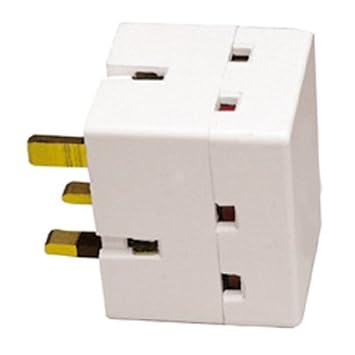
QUOTE(scoutfai @ Mar 12 2016, 11:15 AM) I am not living at high rise building so I think the 1st assumption statement is applicable to me. The proposed TRM-NIF and TRM-PLC come with 3x power socket.When you said consolidate all power sources into single wall socket, are you mean to use the 3 sides socket splitter like the following on one of the socket at CLLI? » Click to show Spoiler - click again to hide... « Aftermarket 3 sides socket spiltter are optional for you |
|
Topic ClosedOptions
|
| Change to: | 0.0333sec
0.64
7 queries
GZIP Disabled
Time is now: 1st December 2025 - 10:20 PM |