Welcome Guest ( Log In | Register )

7 Pages « < 3 4 5 6 7 >Bottom

Outline · [ Standard ] · Linear+

Unifi Sabah-Sarawak UNIFI Thread, Free until Dec 24month contract promo

views
     
junclj
post Oct 9 2018, 05:25 PM

Look at all my stars!!
*******
Senior Member
2,348 posts

Joined: Apr 2008


QUOTE(xperiaVuser @ Oct 9 2018, 05:08 PM)
I'm curious too, hope he is able to explain.
*
no need to explain, lol. Celcom Home Fiber the ISP is based on Sabah only and soon will spread to Sarawak. So far west Malaysia don't have Celcom Home Fiber but only has 4G internet but I was read the news from Chinese newspaper about Celcom is planning to expand their fiber to west Malaysia in future. Unifi and Maxis are based on west Malaysia. What I know TM was pulled the undersea fiber cable from Johor to Kuching. Then pull from Sarawak from south until north then lastly is whole Sabah.
junclj
post Oct 9 2018, 10:36 PM

Look at all my stars!!
*******
Senior Member
2,348 posts

Joined: Apr 2008


QUOTE(xperiaVuser @ Oct 9 2018, 09:54 PM)
so what cable they use?
*


This post has been edited by junclj: Oct 9 2018, 10:42 PM
junclj
post Oct 9 2018, 11:01 PM

Look at all my stars!!
*******
Senior Member
2,348 posts

Joined: Apr 2008


QUOTE(xperiaVuser @ Oct 9 2018, 10:43 PM)
Enlighten us please, we want to understand.
yup I'm aware of that submarine cable map, thank you.
*
Why need me to explain so many times? You can ask Celcom provider directly. However, not all places in Sabah here got coverage. Only certain area such like Tawau and rural area such like Ranau etc. They don't expand to Kota Kinabalu and Sandakan because both towns were occupied by TM.

https://www.facebook.com/celcomfibersabah
junclj
post Oct 11 2018, 02:12 PM

Look at all my stars!!
*******
Senior Member
2,348 posts

Joined: Apr 2008


QUOTE(kevin916587 @ Oct 11 2018, 02:09 PM)
TM came after multiple complaints lodged, with a new wifi router replacement, Dlink DIR842. However, when i was using the 5Ghz, the wifi speed i can get when i am near the wifi router only went up to around 450Mbps. (My package is 800Mbps). My laptop gets about 65Mbps on 5Ghz with using TPLINK AC600 dongle. should i upgrade my wifi adapter to newer version of adapter? if yes, TPlink T4U or TPlink T9UH? please advice
*
yes, you need to upgrade everything. No matter is router or wifi adapter.
junclj
post Oct 13 2018, 10:49 AM

Look at all my stars!!
*******
Senior Member
2,348 posts

Joined: Apr 2008


QUOTE(kevin916587 @ Oct 13 2018, 10:07 AM)
Anyone router is at the downstairs? any recommendations on how to pull a lan cable from downstairs to upstairs? (mostly accessing on upstairs instead on downstairs)
*
The simplest way is buy a best value 50 meters cat 6 cable from lazada or shopee, then pull by yourself through behind the shelves to hide the cable, then put the cable at the side corner of stairs until upstairs then hide with floor mat.

The costly way, you need to consume a lot of money to hire people who are doing renovation. You need to drill hole tunnel on your wall to hide the LAN cable up to ceiling then pull it up until the wall of upstairs then make a CAT 6 LAN Socket on the wall.
junclj
post Oct 14 2018, 10:51 PM

Look at all my stars!!
*******
Senior Member
2,348 posts

Joined: Apr 2008


QUOTE(harizlau15 @ Oct 14 2018, 10:44 PM)
when... vmad.gif

[attachmentid=10069039]

1.Lorong 1,2 already unified..

2.Lorong 3,4 the fdp box still hang on the botton of the pole

3.My Lorong is 6 and lorong 5 also the fdp box already hang last week.

I wonder how long I still need to wait bangwall.gif ...maybe wait for Lorong 3,4 finish first? or they skip to
my lorong rclxub.gif
*
When you see the box already, you have to wait for 1 month to get your home unified.
junclj
post Oct 16 2018, 11:45 AM

Look at all my stars!!
*******
Senior Member
2,348 posts

Joined: Apr 2008


QUOTE(tungfunglaw @ Oct 16 2018, 09:50 AM)
Ac 1200 but 2.4ghz, not yet test 5ghz.

Also not yet try cat6 cable. But dont think got much diff.

Suspect is unifi limitation.
*
it is wifi limitation. 2.4Ghz only limit at maximum 90~100mbps. Usually we can get around 80mbps+.
my home with 500mbps, only connect to 5GHz to get maximize speed but usually is 300mbps+ only. Need to do few more times speedtest to get 400mbps+. Never get full 500mbps. I'm with RT-AC86U as main router and RT-AC55UHP as access point. Sometimes, my RT-AC55UHP performs better than my main router. The speed can reach 460~470mbps. Even my main router not always get that speed.

However, for long range wifi signal. Still my main router is stronger but when I walk to further range, from my main router at upstairs to dining room at downstairs. My phone is still connected with my upstairs main router but not the downstairs access point. The speed is around 40mbps +, not bad for long range. Only when I go to living room at downstairs, my phone will automatic switch to access point. Speed around 300~400mbps+.

This post has been edited by junclj: Oct 16 2018, 11:53 AM
junclj
post Oct 19 2018, 04:31 PM

Look at all my stars!!
*******
Senior Member
2,348 posts

Joined: Apr 2008


QUOTE(squall0833 @ Oct 18 2018, 11:10 AM)
For your info,

Do only speedtest with following servers

speedtest.net
-telekom Malaysia
-maxis
-iskill KK
-time dot com

Time speedtest

Speedtest tm

Only these can go higher than 300mbps most of time

Most of other malaysia speedtest server sometime only 100+mbps during peak hours
*
most of the time, I only choose Telekom Malaysia as my speedtest server. The iSkill KK server ping is quite high because TM unifi in east malaysia here need to send packet back to west Malaysia first, there already consume around 25ms, then return back to east malaysia then consumed another 25ms. So when I do speedtest with local area server, never get lower than 10ms. Most server are 40~50ms. Sometimes 60ms.

So sad, we can't get the lowest ping like west Malaysia do. Users in west Malaysia can get 0ms ping, which is the lowest record I ever seen.

This post has been edited by junclj: Oct 19 2018, 04:32 PM
junclj
post Oct 21 2018, 03:07 PM

Look at all my stars!!
*******
Senior Member
2,348 posts

Joined: Apr 2008


QUOTE(kevin916587 @ Oct 21 2018, 01:09 PM)
Guys, if i wish to pull LAN cable to my room upstairs, the lan cable is from BTU unit or from my wireless router?
*
option 1:
if both btu & wireless router put side by side
pull LAN cable from wireless router LAN1, LAN2 & LAN3

option 2:
if you want to put wireless router at upstair:
pull from btu LAN1

I suggest the first option, so you can pull another 3 extra LAN cables maybe to dining room, upstairs, study room. So you can buy 1 or 2 more wireless router to set as AP mode.

This post has been edited by junclj: Oct 23 2018, 04:17 PM
junclj
post Oct 31 2018, 05:16 PM

Look at all my stars!!
*******
Senior Member
2,348 posts

Joined: Apr 2008


QUOTE(maiffa71 @ Oct 28 2018, 12:29 PM)
How to know cable is pure copper or cheap one?
*
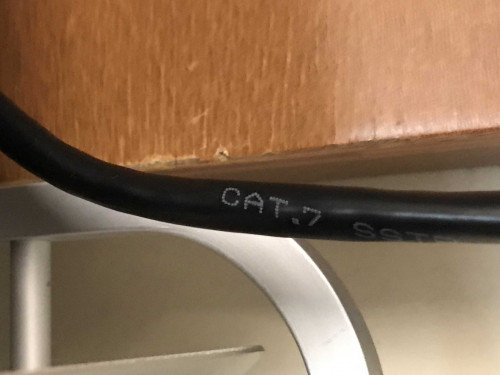
lol, full copper? Use the Cat7 LAN cable already.
junclj
post Nov 21 2018, 01:04 PM

Look at all my stars!!
*******
Senior Member
2,348 posts

Joined: Apr 2008


my office in Asia City, KK has recently been upgraded to turbo 500mbps but the office network switch is using an old 100mbps ethernet switch. Speedtest on PC only has 100mbps dl/up. What a waste.

The router which given by TM is TP-Link AC1200. By connected to 5GHz, test with my phone near the router, 300mbps~330mbps on download and 100~130mbps upload speed. When I go back to my seat, 200mbps on download and 60~90mbps on upload speed.
junclj
post Nov 23 2018, 10:31 AM

Look at all my stars!!
*******
Senior Member
2,348 posts

Joined: Apr 2008


QUOTE(maiffa71 @ Nov 20 2018, 10:01 AM)
My router is better than this.... nod.gif
*
so what router? Asus GT-AC5300? Asus RT-AX88U or Asus GT-AX11000?

For me should be get at least Asus RT-AC86U to optimise up to 800mbps download speed.

This post has been edited by junclj: Nov 23 2018, 10:34 AM
junclj
post Nov 25 2018, 04:01 PM

Look at all my stars!!
*******
Senior Member
2,348 posts

Joined: Apr 2008


QUOTE(ah_chak @ Nov 24 2018, 05:46 PM)
is it only me or i'm capped at 100mbps on my 800mbps package, can't seem to get past 100mbps on speedtest.. i'm from Miri..
*
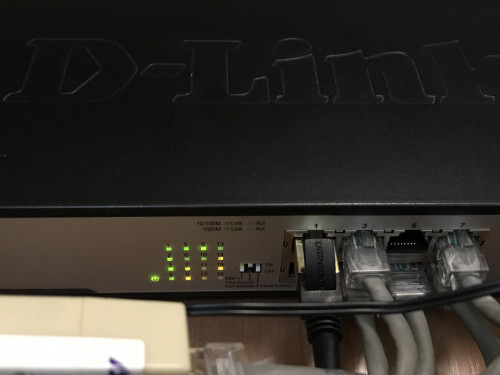
many ppl ask this question, check your BTU, router, LAN cable, network switch make sure is gigabit switch not megabit switch.
the most importantly is get ready to save money and wait for upcoming 12.12 because you need $$$ to buy new router.
please do more visit taobao.
Lastly, this post may help you https://forum.lowyat.net/index.php?showtopi...post&p=91010211
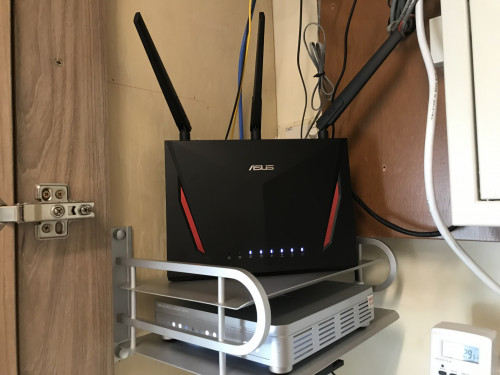
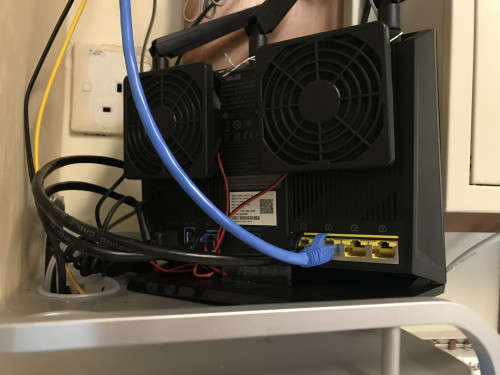
get ready to aim for a cheap Asus RT-AC86U

my upgrade for unifi turbo 500mbps.

user posted image
user posted image
user posted image
user posted image

This post has been edited by junclj: Nov 25 2018, 04:34 PM
junclj
post Nov 27 2018, 12:24 AM

Look at all my stars!!
*******
Senior Member
2,348 posts

Joined: Apr 2008


QUOTE(lyc1982 @ Nov 26 2018, 02:12 PM)
i am on 500Mbps plan as well after Turbo...

however after i setup my ac86u router and connect it with cat7 to ONU/BTU, set 5Ghz to 80Mhz, testing wifi speed on iphone 7+ (1 ft away from router) only can achieve the most 300Mbps...

can advice on how i can improve it ?
*
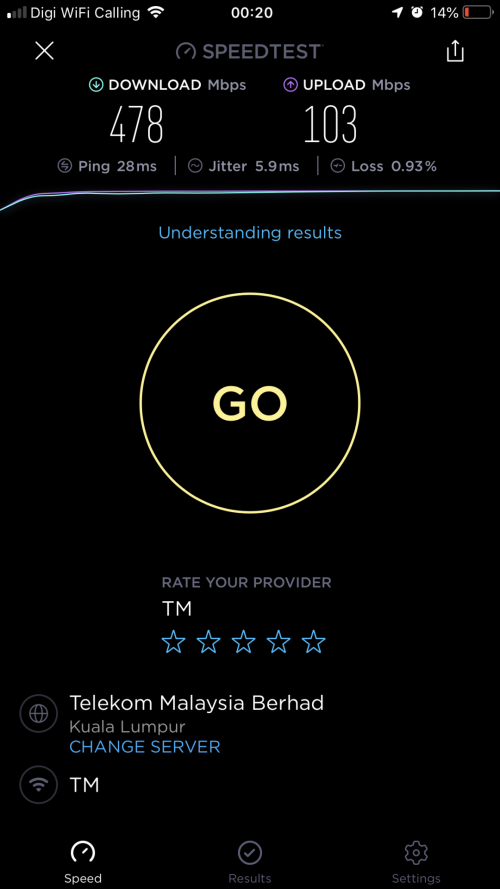
hi, just switch to server: Telekom Malaysia for best results. The reason is because Unifi is a west Malaysia ISP. Their main server are mainly based on KL/PJ/Cyberjaya.
So we cannot choose the local Sabah/Sarawak server to do speedtest because the speed you may get lower in results. You already wasted 26~30ms ping to receive/send data between Sabah/Sarawak to West Malaysia. So if you do speedtest lets say you pick this server "i-Skill Dynamic". You will get higher ping like around 50~60ms. It is because you need to send data back to West Malaysia then send again to Sabah. After the server receive your request, then TM have to receive data from i-Skill Dynamic Sabah back to west Malaysia, then only going back to your modem again from West Malaysia to here in Sabah/Sarawak.

That's why the ping of Unifi in west Malaysia always less than 10ms, Sabah/Sarawak users always get between 25~30ms ping.


There have "Change Server" option under the GO button. Just type "Telekom Malaysia Berhad", you will see two selections. Pick anyone then start your speedtest again.
Sometimes 350mbps, sometimes 400mbps, sometimes more than 450mbps. Depends on the range from your router.

I'm using iPhone 7 Plus too.

best result on wifi but not always can get that much speed.
user posted image

I did not set wifi to 80mhz, just leave everything in auto and enabled dual-band smart connect
user posted image

Also switch off everything unnecessary to get maximum speed. Disable AiProtection, disable traffic analyzer, Disable adaptive QoS, Disable Game boost, disable aidisk, disable aicloud, disable VPN server,

Disable Internet Security Software on your PC if you test on Windows.

This post has been edited by junclj: Nov 27 2018, 12:42 AM

junclj
post Dec 12 2018, 08:41 PM

Look at all my stars!!
*******
Senior Member
2,348 posts

Joined: Apr 2008


QUOTE(jahurz93 @ Dec 12 2018, 08:00 PM)
Hello anyone having extreme packet losses every 30seconds around west coast Sabah?

Its noticeable after the November fibre cable cutting incident. I already kick Telekom every 2-3 days and going to unifi live chat. Calls from their technician saying rectifying but never give an estimation. Its been nearly a month now still calling them every 2 days for info but nothing. Common websites like Youtube Facebook also affected.
*
No problem on downloading and surfing the internet. Both unifi in my home which located at between Likas/Kolombong and Unifibiz for my office in Asia City are running smooth.
Just the problem that I'm currently facing is my home internet can't always get full speed when doing speedtest. Mostly just 430~480mbps.
junclj
post Dec 13 2018, 10:41 AM

Look at all my stars!!
*******
Senior Member
2,348 posts

Joined: Apr 2008


Recently the unifi in Sabah here is getting worse. Ping get higher till 33ms, and speed max only can get 480mbps out of my 500mbps subscribed speed.
junclj
post Dec 13 2018, 01:56 PM

Look at all my stars!!
*******
Senior Member
2,348 posts

Joined: Apr 2008


QUOTE(lyc1982 @ Dec 13 2018, 10:49 AM)
480Mbps via LAN ?
*
yes
junclj
post Dec 18 2018, 05:23 PM

Look at all my stars!!
*******
Senior Member
2,348 posts

Joined: Apr 2008


QUOTE(lyc1982 @ Dec 17 2018, 10:52 AM)
looks like tm will only willingly upgrade those paying Rm189 and above to 800Mbps, if less that Rm189 will have to fight for 800Mbps
*
RM189 at this price usually will only get 500mbps. However, have you tried to request TM to reduce price to RM179? You should try if can because mine is RM179 for 500mbps.

This post has been edited by junclj: Dec 18 2018, 05:25 PM
junclj
post Jan 3 2019, 08:16 PM

Look at all my stars!!
*******
Senior Member
2,348 posts

Joined: Apr 2008


My Asus router can't login to Asus DDNS and also can't visit http://speedtest.tm.com.my/

Both of my office and home Unifi also facing the same problems.
Also can't login to some website, such like mega.nz. I can visit mega.nz but stuck at loading screen when I login to my account.

This post has been edited by junclj: Jan 3 2019, 08:21 PM
junclj
post Jan 3 2019, 08:23 PM

Look at all my stars!!
*******
Senior Member
2,348 posts

Joined: Apr 2008


QUOTE(sharpshooter85 @ Jan 3 2019, 08:21 PM)
Thx for the info bro
Maybe they still noob on this traffic routing and re-routing  laugh.gif
You from where? I still can't do speedtest too at this moment
*
My office is Asia City, my home is Taman Bukit Saujana.
City area of KK, Sabah.
Both Unifi also having the same problem.

7 Pages « < 3 4 5 6 7 >Top
 

Change to:
| Lo-Fi Version
0.0674sec    0.20    7 queries    GZIP Disabled
Time is now: 9th December 2025 - 03:17 AM