


want to surf for item details in taobao but got connection problem

Unifi Sabah-Sarawak UNIFI Thread, Free until Dec 24month contract promo
|
|
 Jan 4 2019, 03:31 PM Jan 4 2019, 03:31 PM
Return to original view | Post
#101
|
 
Senior Member
2,348 posts Joined: Apr 2008  
|
Connection problem again, start from this afternoon
want to surf for item details in taobao but got connection problem |
|
|
|
|
|
Jan 4 2019, 04:47 PM
Return to original view | Post
#102
|
|
Senior Member
2,348 posts Joined: Apr 2008
|
try again now, netflix, reddit, speedtest all back to normal
|
|
|
Jul 27 2019, 10:12 PM
Return to original view | IPv6 | Post
#103
|
|
Senior Member
2,348 posts Joined: Apr 2008
|
QUOTE(squall0833 @ Apr 25 2019, 04:01 AM) Does anyone have the ping higher than usual? You should change the speedtest server to Telekom Malaysia Berhadmine usually 32-35ms best but now it's 40-42ms does anyone from Sarawak have same latency ?  This post has been edited by junclj: Jul 27 2019, 10:12 PM |
|
|
Jul 29 2019, 01:19 PM
Return to original view | Post
#104
|
|
Senior Member
2,348 posts Joined: Apr 2008
|
QUOTE(squall0833 @ Jul 28 2019, 03:04 PM) yes I still can get ping at 26ms, in here KK Sabah as long as below 30ms.i always use that becoz lowest ping it was 32-38 before, now average 45ms   |
|
|
Aug 5 2019, 11:15 AM
Return to original view | Post
#105
|
|
Senior Member
2,348 posts Joined: Apr 2008
|
QUOTE(JuneResources @ Aug 2 2019, 02:47 PM) Hi, still got ppl haven't for Turbo upgrade yet? Mostly for landed house such as users who are living in terrace houses already get their turbo speed unless that you are living in condominium. High rise condo cannot get turbo speed beyond 100mbps.Damn, wait almost 1 year still did not anything yet. But turbo status at Online portal, expectation on Aug 2018 - Dec 2018. Well, am I still living in 2018? |
|
|
Aug 17 2019, 11:21 AM
Return to original view | Post
#106
|
|
Senior Member
2,348 posts Joined: Apr 2008
|
QUOTE(Luthien8 @ Aug 16 2019, 12:02 PM) Digi Home Fibre now in Sabah! Walk into any Digi Store or Digi Store Express in Sabah to enquire Unfortunately, not available at my home. My current plan is Unifi 500mbps but price at RM179. At this price of RM179, I can get Digi Home Fibre 1gbps already. 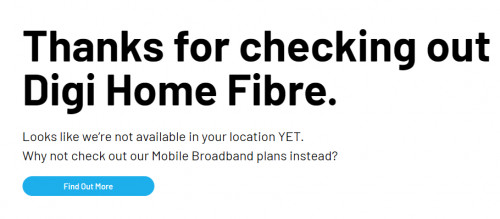 |
|
|
|
|
|
Aug 17 2019, 02:58 PM
Return to original view | Post
#107
|
|
Senior Member
2,348 posts Joined: Apr 2008
|
QUOTE(pakmulau @ Aug 17 2019, 02:03 PM) where is your home area? i check at maggatal near bandar sierra also not covered. Taman Bukit Saujanawhere exactly in KK got this digi fibre? |
|
|
Sep 20 2019, 09:51 AM
Return to original view | Post
#108
|
|
Senior Member
2,348 posts Joined: Apr 2008
|
QUOTE(anon5391 @ Sep 19 2019, 05:52 PM) Just simple question, my unifi800 can only get about 500-600Mbps @TMspeedtest via wired cat6 lan. Is this normal? My pc is fairly recent, i5, 8gb ram & ssd c drive. I've tried disabling anti-virus also. Ping is about 40ms Do not using local speedtest server, use http://speedtest.tm.com.my/Local server such as Danawa Resources, i-Skill Dynamics are all sucks server with very high 50ms ping. |
|
|
Sep 20 2019, 03:52 PM
Return to original view | Post
#109
|
|
Senior Member
2,348 posts Joined: Apr 2008
|
QUOTE(Candy12 @ Sep 20 2019, 02:56 PM) What is the point of using TM's own in house speed test server for testing only? This is unless you want a useless LAN network? Because Unifi is repeatered directly from west Malaysia. We do not have main station in East Malaysia here. All the fiber internet connections are repeatered directly from KL there. If you change your speedtest server to Kuala Lumpur, Petaling Jaya, Cyberjaya etc. You will notice that the ping is 20~30s+, but when you switch your speedtest server to Kuching, Kota Kinabalu, the ping is 50s~60s. Because the Danawa Kuching server need to send back to west Malaysia(TM Unifi) first then receive again(your PC) from west Malaysia. Did double jobs, ping was get doubled. Just the 3,800KM SKR1M submarine cable already wasted 30ms ping. Two round send and return then get 60ms already. Two times charged on ping. So why don't just switch directly to KL server to do speedtest?For an internet user of course you want good all round speed for everywhere possible including each continent such as USA, Europe, Africa or North Asia. Unless lah, TM is setting up a separate optical fiber station in East Malaysia here. So we do not need to change speedtest server to KL. Just straight test with local server will get 0~1ms. This post has been edited by junclj: Sep 20 2019, 04:22 PM |
|
|
Sep 25 2019, 08:22 AM
Return to original view | Post
#110
|
|
Senior Member
2,348 posts Joined: Apr 2008
|
QUOTE(AV_2018 @ Sep 20 2019, 07:59 PM) Many big companies have or are using CDNs/mirrors/datacentres located in KL or Singapore. It is possible to get 20ms latency and up to 70MB/s download speeds from these services which means the speedtest results are not useless. Can you tell me which East Malaysia Unifi user can get <1ms? I can guarantee you can't find anyone of them because all of them who can get <1ms are West Malaysians (or East Malaysian who are moved to KL).Testing latency to another TM user in East Malaysia can get <1ms result. This post has been edited by junclj: Sep 25 2019, 08:23 AM |
|
|
Oct 14 2019, 04:57 PM
Return to original view | Post
#111
|
|
Senior Member
2,348 posts Joined: Apr 2008
|
QUOTE(altk1989 @ Oct 11 2019, 10:16 AM) Taman Tunku Miri Area finally pulling Fiber Cable now 20ms is the lowest that you can get, usually i get nearly 30ms. This is the best ping already for unifi in Sabah and Sarawak here. So far has no issue for me, I did not play dota2, pubg that kind of multiplayer games. But I play Monster Hunter World: Iceborne in multiplayer recently. So far no issue for me, Unifi is rarely facing disconnecting. Line is smooth and fast, loading also fast. I did not find any delaying issue too during gaming. Saw it pulling from Soon Hap Garden till Servay, laying through sewer and Streamyx tiang, in fact already seen some tiang have the Unifi Little Grey Box already  Try to see if i can take some pic... Been waiting for so long......  PS: Just noticed that i post in wrg section  I wonder if Unifi reduce the Latency from Kuching Hub to Semenanjung by a lot? Copper User usually 50MS-110MS just to test Cyberjaya Server......This post has been edited by junclj: Oct 14 2019, 05:05 PM |
|
|
Dec 3 2019, 08:48 PM
Return to original view | Post
#112
|
|
Senior Member
2,348 posts Joined: Apr 2008
|
Having issue on unifi today, I can't even watch IPTV now. Internet slow but speed test still seems normal.
KK, Likas, Tuaran - Inanam area. 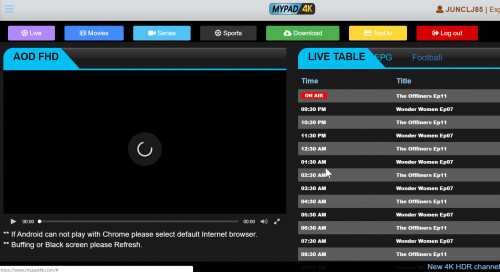 |
|
|
Dec 9 2019, 05:28 PM
Return to original view | Post
#113
|
|
Senior Member
2,348 posts Joined: Apr 2008
|
No problem for me to access internet in KK here. I can watch twitch, youtube and facebook.
|
|
|
|
|
|
Dec 9 2019, 06:37 PM
Return to original view | IPv6 | Post
#114
|
|
Senior Member
2,348 posts Joined: Apr 2008
|
QUOTE(RallyNight @ Dec 9 2019, 05:53 PM) Ya merh? 144p also cant load. my office got no issue on unifi but now i back home. the unifi is very slow. |
|
|
Dec 9 2019, 07:36 PM
Return to original view | IPv6 | Post
#115
|
|
Senior Member
2,348 posts Joined: Apr 2008
|
I already asked the TM customer service, a staff with a girl's name Siau Yin in the chatroom reply to me will resolve by 11 December 2019. Damn long, two days to wait??? I not so sure whether is that real. TM should solve this problem as fast as possible.
|
|
|
Dec 9 2019, 08:16 PM
Return to original view | Post
#116
|
|
Senior Member
2,348 posts Joined: Apr 2008
|
Reply from facebook messenger too
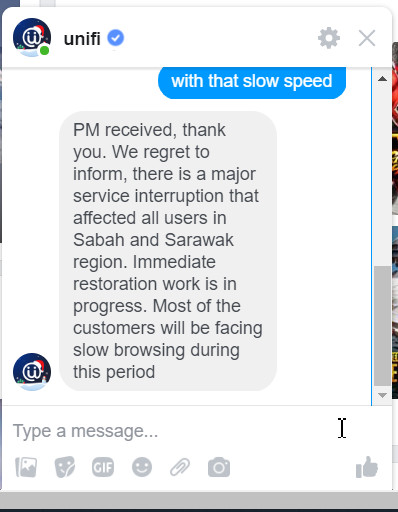 I am just noticed that, unifi still can run smooth on watching facebook live video. |
|
|
Dec 9 2019, 10:30 PM
Return to original view | IPv6 | Post
#117
|
|
Senior Member
2,348 posts Joined: Apr 2008
|
QUOTE(IdiuU @ Dec 9 2019, 09:38 PM) if u speedtest... how much u getting? 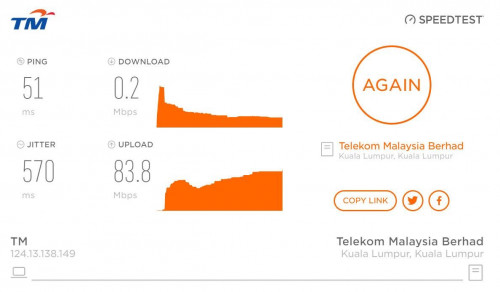 |
|
|
Dec 9 2019, 11:24 PM
Return to original view | IPv6 | Post
#118
|
|
Senior Member
2,348 posts Joined: Apr 2008
|
QUOTE(IdiuU @ Dec 9 2019, 10:37 PM) after tm reset mine.... for now.... actually its not related to reset port because mine is back to normal speed too. via LAN 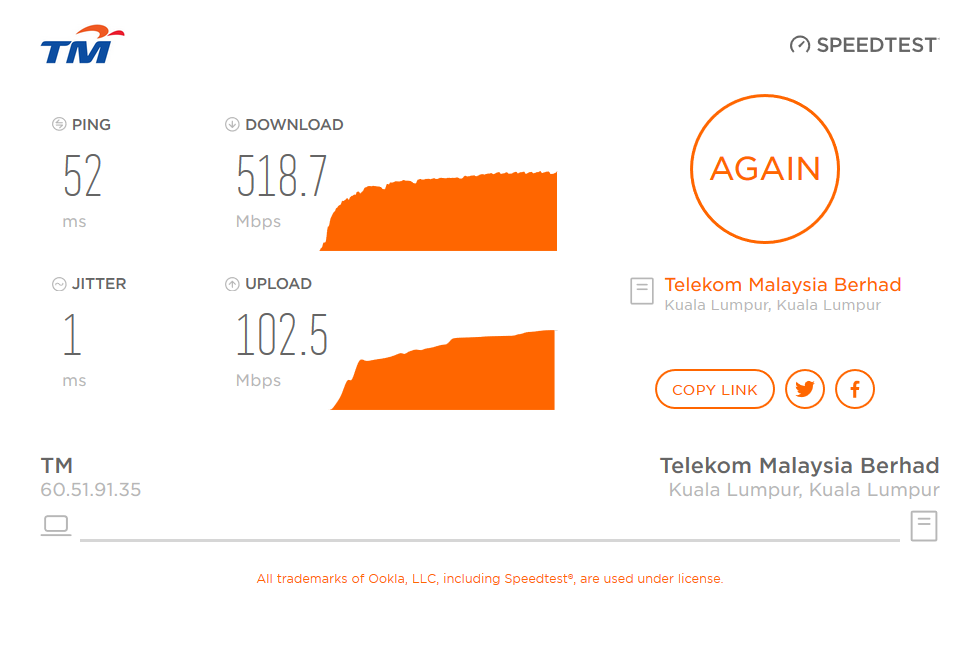 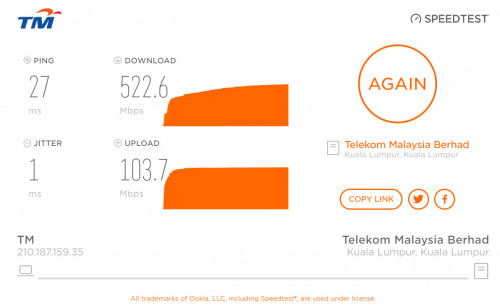 |
|
|
Jul 11 2020, 01:20 PM
Return to original view | Post
#119
|
|
Senior Member
2,348 posts Joined: Apr 2008
|
QUOTE(raemon @ Jul 10 2020, 10:10 PM) Can you change the IPTV on Lan 1 to be available for normal internet usage? You better get one of this, https://shopee.com.my/TP-LINK-8-Port-5-Port...2485.2239151373 This post has been edited by junclj: Jul 11 2020, 01:31 PM |
|
|
Jul 13 2020, 11:57 AM
Return to original view | Post
#120
|
|
Senior Member
2,348 posts Joined: Apr 2008
|
QUOTE(raemon @ Jul 12 2020, 09:34 AM) What would it do? Instead of change the IPTV port to internet port, I would recommend not to touch the router configuration. If you really in short of LAN ports, you can add one unit of gigabit switch. 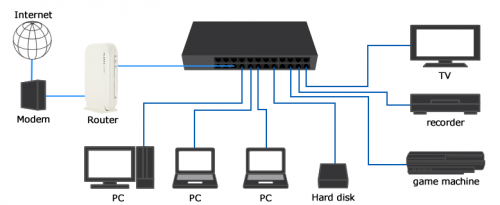 This post has been edited by junclj: Jul 13 2020, 11:58 AM |
| Change to: |  0.0837sec 0.0837sec
 0.39 0.39
 7 queries 7 queries
 GZIP Disabled GZIP Disabled
Time is now: 10th December 2025 - 04:22 AM |
 Quote
Quote