


watch facebook video lag until not moving.
Likas, KK area.

Unifi Sabah-Sarawak UNIFI Thread, Free until Dec 24month contract promo
|
|
 Aug 9 2017, 11:40 PM Aug 9 2017, 11:40 PM
Return to original view | IPv6 | Post
#41
|
 
Senior Member
2,348 posts Joined: Apr 2008  
|
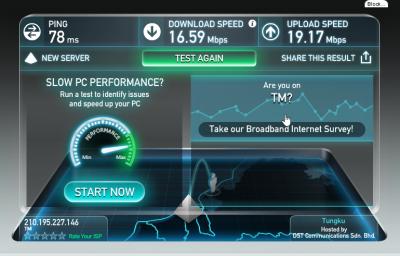
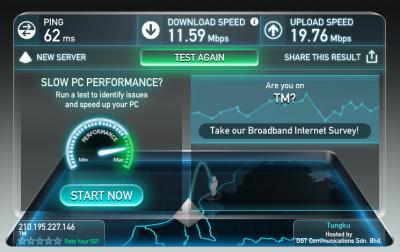
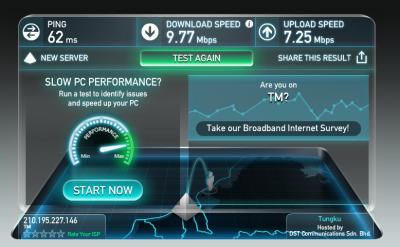
shit Unifi, the line is very unstable tonight. This is my unifi 50mbps download speed for tonight
watch facebook video lag until not moving. Likas, KK area.
|
|
|
|
|
|
Aug 23 2017, 11:14 AM
Return to original view | Post
#42
|
|
Senior Member
2,348 posts Joined: Apr 2008
|
Malaysian style are working slowly. Don't like China worker, they can complete within a week. In Malaysia need 1 year.
|
|
|
Nov 1 2017, 12:48 PM
Return to original view | IPv6 | Post
#43
|
|
Senior Member
2,348 posts Joined: Apr 2008
|
Any news for Unifi update in Sandakan area? My area is Mile 5, Sri Lagenda Villa at Jalan Sibuga just behind St. Monica. I was asked for Unifi coverage from many years ago. From the year begin of 2017, they say will available by this year end but now is already November 2017. Year 2017 is getting end soon.
|
|
|
Aug 23 2018, 09:44 AM
Return to original view | IPv6 | Post
#44
|
|
Senior Member
2,348 posts Joined: Apr 2008
|
QUOTE(ardn @ Aug 20 2018, 04:17 PM) 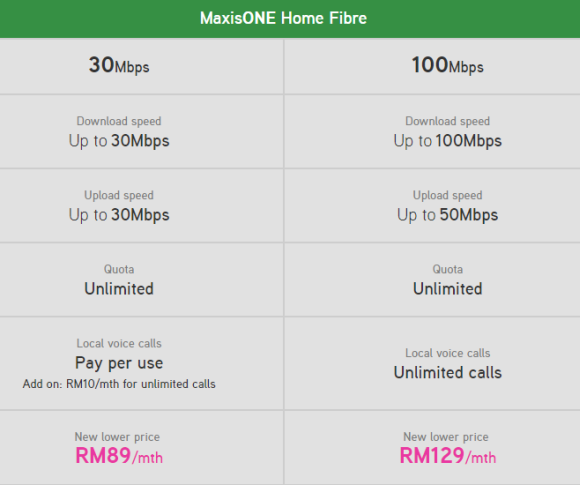 the wait is over..   Actually I was quite exciting after I read this news and deciding to switch to Maxis Fibernation. However, the current situation is 100mbps for RM129 (present and future) vs 500mbps for RM179 (future). So I think I should keep my current unifi advance 50mbps and wait for turbo upgrade in the future. Unifi Turbo 500mbps @ RM179 vs Maxis Fibernation 100mbps @ RM129, Unifi Turbo 500mbps = Present(50mbps) - RM3.58/mbps, Future - RM0.358/mbps Maxis Fibernation 100mbps (both present and future) - RM1.29/mbps Divided by price per mbps. In short term, the Maxis Fibernation 100mbps is cheaper. However, Unifi Turbo 500mbps (Currently is still Unifi Advance 50mbps) will far more cheaper in long term. This post has been edited by junclj: Aug 23 2018, 09:52 AM |
|
|
Aug 23 2018, 10:41 AM
Return to original view | IPv6 | Post
#45
|
|
Senior Member
2,348 posts Joined: Apr 2008
|
This is how sucks is TM not decided to install UniFi to my area.
Sandakan - Batu 5. 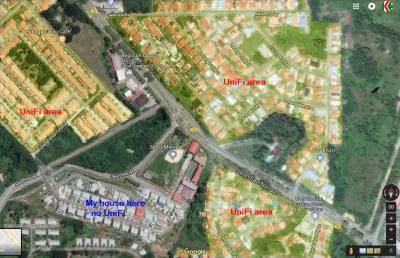
|
|
|
Aug 24 2018, 11:36 AM
Return to original view | IPv6 | Post
#46
|
|
Senior Member
2,348 posts Joined: Apr 2008
|
DELETE
This post has been edited by junclj: Aug 24 2018, 11:42 AM |
|
|
|
|
|
Aug 24 2018, 11:41 AM
Return to original view | IPv6 | Post
#47
|
|
Senior Member
2,348 posts Joined: Apr 2008
|
QUOTE(@POTUS @ Aug 23 2018, 03:15 PM) your statement very funny, ofcos it is cheaper /mbps, but do you really need that much of bandwidth. tell you what, u discuss with you neighbour to share 1 account. that even cheaper. 1 person also can enjoy 500mbps, I can download the whole 60~100GB games from PS store and steam. Actually I never buy physical PS4 disc since 3 years ago. Uncharted 4, MHW, GoW, P5 all downloaded directly from PS Store. |
|
|
Sep 13 2018, 05:03 PM
Return to original view | IPv6 | Post
#48
|
|
Senior Member
2,348 posts Joined: Apr 2008
|
Anybody from Sabah and Sarawak who got their turbo please tell us your experience here.
|
|
|
Sep 17 2018, 02:04 PM
Return to original view | IPv6 | Post
#49
|
|
Senior Member
2,348 posts Joined: Apr 2008
|
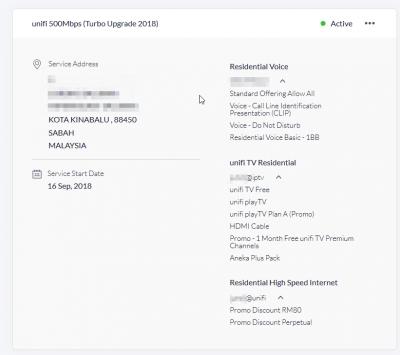
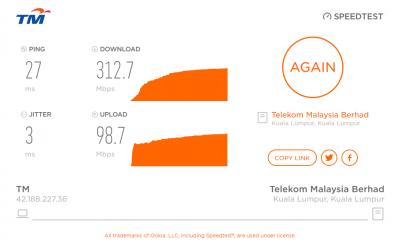
Just received my turbo upgrade today but can't get full speed. Already lodge report to TM.
|
|
|
Sep 17 2018, 07:04 PM
Return to original view | IPv6 | Post
#50
|
|
Senior Member
2,348 posts Joined: Apr 2008
|
QUOTE(squall0833 @ Sep 17 2018, 02:30 PM) Tested with ethernet cable connection? yes, in lan cable. Not ethernet but gigabit connection.Not wireless right? |
|
|
Sep 17 2018, 07:17 PM
Return to original view | IPv6 | Post
#51
|
|
Senior Member
2,348 posts Joined: Apr 2008
|
QUOTE(JohnLai @ Sep 17 2018, 04:36 PM) Shit, my contact from TM I was asked to TM, they say Unifi turbo is based on pilot phase. Meaning that, such like lucky draw or lottery base to pick randomly phase by phase. Me too also surprised that my Unifi Advance 50mbps got upgraded to Turbo 500mbps today. TM never inform me nor receive email. I was just realized that my line was upgraded when I update a game from steam. I was noticed that the download speed was increased. So I just login to Unifi portal to check my profile and surprised was turboed up to 500mbps.EDIT: FARK, I really wish I don't know the exact time date and month. Now I am really dissatisfied .  |
|
|
Sep 17 2018, 07:28 PM
Return to original view | Post
#52
|
|
Senior Member
2,348 posts Joined: Apr 2008
|
QUOTE(JohnLai @ Sep 17 2018, 07:23 PM) Pilot phase is a lie. actually unifi was turboed but speed not full. Some people get their 100mbps turboed up to 800mbps but actual speedtest result is 500mbps. Mine is 50mbps > 500mbps but actual speedtest results only has 300mbps.  TM already has the list of which accounts to be turbo-ed with date fixed. Another thing to worry after upgraded to unifi turbo. |
|
|
Sep 23 2018, 11:35 PM
Return to original view | IPv6 | Post
#53
|
|
Senior Member
2,348 posts Joined: Apr 2008
|
QUOTE(squaresoft @ Sep 19 2018, 10:50 PM) any 1 here (from kuching) have upgrade to new 100mb plan ?? do TM have give/change new router for u ? just call tm anytime or chat to them in the tm website to open report. they will arrange technician to come to your home. TM will only replace either brand TP-Link or D-Link to you. i have Lucent i240g too but it is not related to the BTU. my BTU - Alcatel Lucent I-240-G ,router - RG-Innatech-RG4332 .found out only can run 93mb speed only use cable. can i call TM to ask them come to change new router for me ?? You need to upgrade to a better router. My unifi turbo 500mbps can’t get full speed. some people say that my router RT-AC55UHP maximum only can get 300mbps. That’s why now I am facing the similar issue like you too. TM was sent technician to my home but he can’t confirm why my line only can get 300mbps. There have many reasons can cause my line can’t get full speed. However, my first step need to do is upgrade router. That’s why Im looking for RT-AC86U in taobao. see the link here, i am now discussing about buying a cheap Asus router. https://forum.lowyat.net/topic/4617839/+220 This post has been edited by junclj: Sep 23 2018, 11:44 PM |
|
|
|
|
|
Sep 24 2018, 11:18 AM
Return to original view | IPv6 | Post
#54
|
|
Senior Member
2,348 posts Joined: Apr 2008
|
QUOTE(squall0833 @ Sep 23 2018, 11:54 PM) Even with cable connection cant go over 300mbps? I'm testing speedtest with PC connected with network cable. Ur router spec looks fine to me If it was tested with wifi, then yes, u need multiple chain wireless and ur device must have multi chain support wireless ac If only single chain ac like my one plus 3t, speed will only about 300+mbps cannot go over 400mbps Check out wireless explaination thread by soonwai. Got well explaination there I guess is high possibility is my router was reached to bottleneck when speedtest reach up to 300mbps. My router RT-AC55UHP was just have a single core CPU, when speedtest reach 300mbps, my router just max up to 100% usage. I think should be time to upgrade my router. 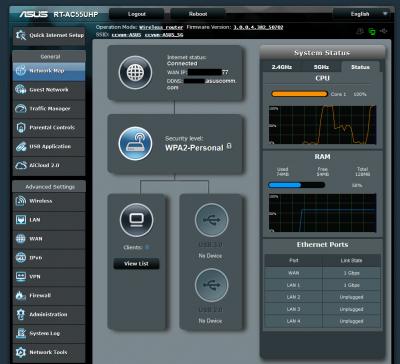
This post has been edited by junclj: Sep 24 2018, 11:20 AM |
|
|
Sep 24 2018, 04:00 PM
Return to original view | IPv6 | Post
#55
|
|
Senior Member
2,348 posts Joined: Apr 2008
|
QUOTE(JohnLai @ Sep 24 2018, 01:24 PM) Eh? Kinda impossible. I do not use these all features, this router don't have NAT acceleration and large jumbo frame.Have you disable parental control, URL filter, keyword filter and QOS? How about ensuring NAT Acceleration and large jumbo frame enabled?  everything are considered as possible. Therefore, I will upgrade to RT-AC86U soon. Just based on trial and error, I was called TM technician to come. They were checked my fiber connection with their machine, the signal is strong and without problem. The technician later told me to keep observing for 1 week. If the connection still is not maximize up to 500mbps then I have to use back the report number to call 100. I have to admit that, this problem probably is caused by my router. I was read thru the first page in here So my first step now is have to upgrade my router first in order to proceed to next step if my line still maintain not full speed after replaced to RT-AC86U. I'm now still waiting for October coming, because I am waiting for my salary to come then only can spend money to buy new router. |
|
|
Sep 24 2018, 04:55 PM
Return to original view | IPv6 | Post
#56
|
|
Senior Member
2,348 posts Joined: Apr 2008
|
QUOTE(JohnLai @ Sep 24 2018, 04:12 PM) -.- still is the same, changed from 1492 to 1480 then do speedtest. still is maintaining at 300mbpsAdvanced Setting--->LAN--->Switch Control Note: Please change the MRU and MTU to 1480 too. |
|
|
Sep 24 2018, 05:41 PM
Return to original view | IPv6 | Post
#57
|
|
Senior Member
2,348 posts Joined: Apr 2008
|
QUOTE(JohnLai @ Sep 24 2018, 05:19 PM) Hmm..... tried but still is 300mbps, I was noticed that when I do speed test. my router CPU reach to 100% usage while 40% when upload speed 100mbps. I'm still considering as my router is facing bottleneck problem. Keep those NAT Acceleration and jumbo enabled as well as MTU & MRU at 1480. (Remember to reboot) Next test is on your PC. First, enter these two commands at command prompt. Then reboot your computer and speedtest again. What is your speedtest result with spectre + meltdown mitigation disabled? After that, these are commands to enable protection back. Reboot the pc again. very similar like playing PC games, when GPU usage reach 100%, the game will stuttering and lagging. Same situation too with PC when CPU usage 100% will crash and hang too. That's what I say possible is caused by bottleneck. |
|
|
Sep 24 2018, 08:16 PM
Return to original view | IPv6 | Post
#58
|
|
Senior Member
2,348 posts Joined: Apr 2008
|
QUOTE(JohnLai @ Sep 24 2018, 07:31 PM) That type of router cpu utilization definitely isn't normal. my RT-AC55UHP don't have NAT acceleration this option. Anyway, I was just placed order in taobao. Can't wait for next week already because China will having a long public holidays in next full week. National day from 1st Oct until 7 Oct 2018. You sure there isn't anything else that prevent NAT acceleration from working its magic? Already placed order for this https://detail.tmall.com/item.htm?id=556334...919063:33030646 |
|
|
Sep 27 2018, 12:26 PM
Return to original view | IPv6 | Post
#59
|
|
Senior Member
2,348 posts Joined: Apr 2008
|
Sabah Unifi turbo users could you please tell me your experience of your speedtest results. Recently I am complaining about my Unifi turbo 500mbps can't reach full speed. Current tested speed is 300mbps out of 500mbps. Just 60% capacity of my subscribed speed.
Do you having the same problem like me too? Please share your experience. 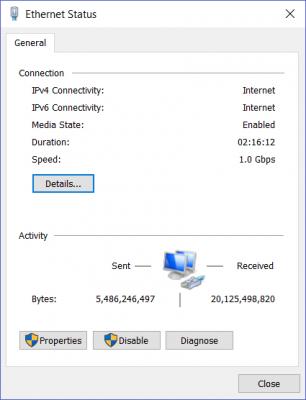
This post has been edited by junclj: Sep 27 2018, 12:27 PM |
|
|
Sep 27 2018, 02:19 PM
Return to original view | IPv6 | Post
#60
|
|
Senior Member
2,348 posts Joined: Apr 2008
|
QUOTE(Ryo83 @ Sep 27 2018, 02:02 PM) I use same Router RT-AC55UHP. Lan cat5e 300 mbps n wifi 5ghz 200++ only. Already order Router RT-AC86U. Hopefully can reach 500mbps because my unifi Turboed from 50mbps to 500mbps, Sandakan mile 6. Afraid that the taobao cainiao already start their holidays, my status is stopped at the status of "您的包裹开始拣货". No moving at all for whole day, go in to chat with the forwarder, the operators are all off from duty. Hope will update by tomorrow because next week is China national day. |
| Change to: |  0.0228sec 0.0228sec
 0.55 0.55
 7 queries 7 queries
 GZIP Disabled GZIP Disabled
Time is now: 6th December 2025 - 03:19 PM |
 Quote
Quote