

 but torrent now throttle... last month still ok... now need to use VPN
Streamyx streamyx 8mbps club V1, double the speed double the fun
|
|
 Feb 16 2014, 06:47 PM Feb 16 2014, 06:47 PM
|
 
Junior Member
78 posts Joined: Feb 2009 From: Jesselton   
|
still happy with my 8mbps
but torrent now throttle... last month still ok... now need to use VPN |
|
|
|
|
|
Feb 21 2014, 03:13 PM
|

Junior Member
62 posts Joined: Jan 2014
|
Hi people,
I just went to upgrade my 1Mbps to the 8Mpbs package. My question is, does the set top box support WiFi? Thanks in advance. |
|
|
Feb 21 2014, 03:21 PM
|
 
Elite
8,414 posts Joined: Jul 2008 
|
QUOTE(clivechen @ Feb 21 2014, 03:13 PM) Hi people, YesI just went to upgrade my 1Mbps to the 8Mpbs package. My question is, does the set top box support WiFi? Thanks in advance.  |
|
|
Feb 24 2014, 07:42 PM
|
|
Junior Member
62 posts Joined: Jan 2014
|
QUOTE(blacktubi @ Feb 21 2014, 03:21 PM) Yes Ok, thank you.Applied for the upgrade last Friday and got the upgrade today! Then had to call 100 for the stb username and password. Finally all running. The connection quite good:  Somehow all the channels from HyppTV can watch. I thought only free 17 channels plus Ruby/Platinum package? |
|
|
Feb 24 2014, 09:15 PM
|
|
Elite
8,414 posts Joined: Jul 2008
|
QUOTE(clivechen @ Feb 24 2014, 07:42 PM) Ok, thank you. First Month trial are freeApplied for the upgrade last Friday and got the upgrade today! Then had to call 100 for the stb username and password. Finally all running. The connection quite good: Somehow all the channels from HyppTV can watch. I thought only free 17 channels plus Ruby/Platinum package? |
|
|
Feb 24 2014, 10:10 PM
|
|
Junior Member
62 posts Joined: Jan 2014
|
QUOTE(blacktubi @ Feb 24 2014, 09:15 PM) First Month trial are free Oh...During registration to upgrade i chose the ruby pack so after 1 month will revert to just 17 free channels + ruby pack is it? |
|
|
|
|
|
Feb 24 2014, 10:11 PM
|

Junior Member
177 posts Joined: Nov 2007 From: Johor Bahru 
|
upgraded 4mb --> 8mb
and this is my speedtest result  somehow i think my upload has become worst as the SNR margin become <10 is it normal like this?  |
|
|
Feb 24 2014, 10:12 PM
|
|
Elite
8,414 posts Joined: Jul 2008
|
QUOTE(clivechen @ Feb 24 2014, 10:10 PM) Oh... YesDuring registration to upgrade i chose the ruby pack so after 1 month will revert to just 17 free channels + ruby pack is it? |
|
|
Feb 24 2014, 10:16 PM
|
|
Junior Member
62 posts Joined: Jan 2014
|
QUOTE(blacktubi @ Feb 24 2014, 10:12 PM) Yes Ok, thank you very much!   |
|
|
Feb 24 2014, 10:43 PM
|

All Stars
10,950 posts Joined: Jan 2009 From: Hatton Cross
|
QUOTE(TheUndead @ Feb 24 2014, 10:11 PM) upgraded 4mb --> 8mb With 512kbps upload, you can't expect it to always get 500kbps++ for upload speedand this is my speedtest result somehow i think my upload has become worst as the SNR margin become <10 is it normal like this? but SNR margin < 10 is really not good. hmm wonder why it doesn't effect your download speed  |
|
|
Feb 24 2014, 10:53 PM
|
|
Elite
8,414 posts Joined: Jul 2008
|
QUOTE(TheUndead @ Feb 24 2014, 10:11 PM) upgraded 4mb --> 8mb Bad SNR means something wrong with your copper wiring.and this is my speedtest result somehow i think my upload has become worst as the SNR margin become <10 is it normal like this? <10 SNR means you will face frequent disconnection. |
|
|
Feb 24 2014, 11:00 PM
|
|
Junior Member
177 posts Joined: Nov 2007 From: Johor Bahru
|
QUOTE(kae7 @ Feb 24 2014, 10:43 PM) With 512kbps upload, you can't expect it to always get 500kbps++ for upload speed kae7: ah.. i see.. so means eventho 8mpbs 'down' upgrade, the 'up' stays the same?but SNR margin < 10 is really not good. hmm wonder why it doesn't effect your download speed but in my case.. become worst.. haihz..  yeah.. quite worried with my <10 SNR margin.. but weird hor.. download is steady QUOTE(blacktubi @ Feb 24 2014, 10:53 PM) Bad SNR means something wrong with your copper wiring. blacktubi: the TM installer said the same thing.. maybe has got to do with my telephone wiring<10 SNR means you will face frequent disconnection. after all my housing area is >30years old.. LOL  but fortunately.. never had DC problem.. hmm.. nothing i can do i guess... guess i have to live with this kind of upload 'speed' .. lol --- and something i notice.. they give me download speed of just 9xxxkbps whereas i see others they can give 10k kbps speed.. so unfair wan??  here's my modem stats in full: Adsl Line Status SHOWTIME.L0 Adsl Mode G992.5 Up Stream 476 kbps Down Stream 9770 kbps Attenuation Down Stream 7 Attenuation Up Stream 5 SNR Margin Down Stream 36.2 SNR Margin Up Stream 8.0 Modem I'm using: D-Link DSL-2730E i wonder if i make a complaint call to 100, and tell them im not happy with the download upload speed, will they do something?  This post has been edited by TheUndead: Feb 24 2014, 11:03 PM |
|
|
Feb 24 2014, 11:02 PM
|
|
Elite
8,414 posts Joined: Jul 2008
|
QUOTE(TheUndead @ Feb 24 2014, 11:00 PM) kae7: ah.. i see.. so means eventho 8mpbs 'down' upgrade, the 'up' stays the same? Okay, I saw some problem.haihz.. yeah.. quite worried with my <10 SNR margin.. but weird hor.. download is steady the TM installer said the same thing.. maybe has got to do with my telephone wiring after all my housing area is >30years old.. LOL hmm.. nothing i can i guess... guess i have to live with this kind of upload 'speed' .. lol --- and something i notice.. they give me download speed of just 9xxxkbps whereas i see others they can give 10k kbps speed.. so unfair wan?? » Click to show Spoiler - click again to hide... « Modem I'm using: D-Link DSL-2730E i wonder if i make a complaint call to 100, and tell them im not happy with the download upload speed, will they do something? Change your ADSL Modem to ADSL2+ and enable Annex M if there's any. It take around 2 minutes to reconnect |
|
|
|
|
|
Feb 24 2014, 11:04 PM
|
|
Junior Member
177 posts Joined: Nov 2007 From: Johor Bahru
|
QUOTE(blacktubi @ Feb 24 2014, 11:02 PM) Okay, I saw some problem. yes.. a solution! will try that and update soon! Change your ADSL Modem to ADSL2+ and enable Annex M if there's any. It take around 2 minutes to reconnect  This post has been edited by TheUndead: Feb 24 2014, 11:04 PM |
|
|
Feb 24 2014, 11:12 PM
|
|
Junior Member
177 posts Joined: Nov 2007 From: Johor Bahru
|
OMG! whaddaya know???!?
it works!!  now my modem stats show as below: Adsl Mode G992.5 Up Stream 638 kbps Down Stream 10239 kbps Attenuation Down Stream 5 Attenuation Up Stream 4 SNR Margin Down Stream 28.9 SNR Margin Up Stream 23.4 thanks man!! if u happen to drop by JB, gimme a pm, i belanja u teh tarik! -- what i did was.. untick everything except ADSL2+ like u suggested (before, everything under adsl modulation was ticked) and then enabled annex M (before it was not ticked) 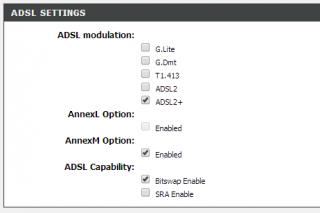
|
|
|
Feb 24 2014, 11:27 PM
|

Senior Member
1,739 posts Joined: Dec 2006
|
hey guys need ur advice
if i am using for thunder, emule and qvod download should i go for unifi or streamyx? thanks |
|
|
Feb 24 2014, 11:30 PM
|
|
Elite
8,414 posts Joined: Jul 2008
|
TheUndead : No problem, enjoy
yujin86 : Go for Unifi if your location support it, it is better |
|
|
Feb 25 2014, 08:37 AM
|
|
Junior Member
177 posts Joined: Nov 2007 From: Johor Bahru
|
so far happy with my line rite now..
i think no need to call 100 and complaint anymore   |
|
|
Feb 25 2014, 12:16 PM
|
|
Junior Member
62 posts Joined: Jan 2014
|
QUOTE(blacktubi @ Feb 24 2014, 11:02 PM) Okay, I saw some problem. Weird, I tried setting the modulation to ADSL+ and Annex Mode to Annex M, restarted the modem and waited for 5 minutes but the DSL status indicator LED never lighted up.Change your ADSL Modem to ADSL2+ and enable Annex M if there's any. It take around 2 minutes to reconnect So had to set back to the original settings which where Auto Sync-Up for modulation and Annex A/I/J/L/M for the Annex Mode. In the status page it says that I'm on ADSL+ and Annex A. Reason I tried was because my Upstream Data Rate was only 509kbps. Btw, I'm using a TP-Link wireless modem router. Any guidance?  |
|
|
Feb 25 2014, 04:24 PM
|
|
Elite
8,414 posts Joined: Jul 2008
|
QUOTE(clivechen @ Feb 25 2014, 12:16 PM) Weird, I tried setting the modulation to ADSL+ and Annex Mode to Annex M, restarted the modem and waited for 5 minutes but the DSL status indicator LED never lighted up. Dont force it to AnnexM, not every place support itSo had to set back to the original settings which where Auto Sync-Up for modulation and Annex A/I/J/L/M for the Annex Mode. In the status page it says that I'm on ADSL+ and Annex A. Reason I tried was because my Upstream Data Rate was only 509kbps. Btw, I'm using a TP-Link wireless modem router. Any guidance? What is your ADSL stats now |
|
Topic ClosedOptions
|
| Change to: |  0.6487sec 0.6487sec
 0.74 0.74
 6 queries 6 queries
 GZIP Disabled GZIP Disabled
Time is now: 10th December 2025 - 06:42 PM |
 Quote
Quote