

QUOTE(eddmecha @ Jan 23 2013, 10:42 AM)
where to get this?  wanna get one for my gf's s3

only available in US, and only sells in US, but not a problem for me, i have a US address wanna get one for my gf's s3 
Samsung Galaxy S III I9300 Official Thread V26, Happy Chinese New Year 2013 :D
|
|
 Jan 23 2013, 10:44 AM Jan 23 2013, 10:44 AM
|
 
All Stars
11,836 posts Joined: Mar 2011 From: Kota Kinabalu, Sabah  
|
QUOTE(eddmecha @ Jan 23 2013, 10:42 AM) where to get this? only available in US, and only sells in US, but not a problem for me, i have a US address wanna get one for my gf's s3 |
|
|
|
|
|
Jan 23 2013, 10:55 AM
|

Senior Member
650 posts Joined: Oct 2004
|
QUOTE(nokia6280 @ Jan 23 2013, 08:37 AM) Do you have the service report number from SC? Call Samsung... yup i got d worksheet no .... call 1800889999 |
|
|
Jan 23 2013, 10:55 AM
|

Senior Member
3,688 posts Joined: Jun 2008 From: P6Punk
|
QUOTE(noobandroid @ Jan 23 2013, 10:44 AM) only available in US, and only sells in US, but not a problem for me, i have a US address oowh i see...well how long does it takes to ship here?  |
|
|
Jan 23 2013, 11:09 AM
|
|
Senior Member
650 posts Joined: Oct 2004
|
its is a wireless charger..???
|
|
|
Jan 23 2013, 11:11 AM
|
|
All Stars
11,836 posts Joined: Mar 2011 From: Kota Kinabalu, Sabah
|
QUOTE(takashiyert @ Jan 23 2013, 11:09 AM) its is a wireless charger..??? yep, and comes with external charger which can also be charged on the mat too |
|
|
Jan 23 2013, 11:12 AM
|

Senior Member
1,450 posts Joined: Jun 2008 From: KK
|
I just updated the Android on my S3 and there's a new tab shortcut function at the side of the screen which is very irritating. Is there a way to get rid of it?
|
|
|
|
|
|
Jan 23 2013, 11:19 AM
|

Senior Member
3,158 posts Joined: Dec 2006
|
my homescreen
Attached thumbnail(s) 
|
|
|
Jan 23 2013, 11:19 AM
|

Senior Member
5,705 posts Joined: Sep 2011
|
QUOTE(takashiyert @ Jan 23 2013, 10:55 AM) yup i got d worksheet no .... call 1800889999 yES |
|
|
Jan 23 2013, 11:20 AM
|
|
Senior Member
5,705 posts Joined: Sep 2011
|
QUOTE(gundamalpha @ Jan 23 2013, 11:12 AM) I just updated the Android on my S3 and there's a new tab shortcut function at the side of the screen which is very irritating. Is there a way to get rid of it? Mean you updated to 4.1.2? otherwise print screen please. |
|
|
Jan 23 2013, 11:28 AM
|
|
Senior Member
1,450 posts Joined: Jun 2008 From: KK
|
QUOTE(nokia6280 @ Jan 23 2013, 11:20 AM) Mean you updated to 4.1.2? otherwise print screen please. The little tab on the left
|
|
|
Jan 23 2013, 11:35 AM
|
|
Senior Member
705 posts Joined: Sep 2010
|
QUOTE(gundamalpha @ Jan 23 2013, 11:28 AM) The little tab on the left The blue color icon at the left side? That is multi view icon la... if you dont want, just long press the back button and it will disappear
|
|
|
Jan 23 2013, 11:36 AM
|
|
Senior Member
1,450 posts Joined: Jun 2008 From: KK
|
QUOTE(zero721 @ Jan 23 2013, 11:35 AM) The blue color icon at the left side? That is multi view icon la... if you dont want, just long press the back button and it will disappear Ah thanks |
|
|
Jan 23 2013, 11:36 AM
|
|
Senior Member
5,705 posts Joined: Sep 2011
|
QUOTE(gundamalpha @ Jan 23 2013, 11:28 AM) The little tab on the left If not mistaken you have updated to 4.1.2 and that is multi view feature to disable it if not mistaken you can un-check Multi-view option
Your are running 4.1.2? You are using AP set? Other bro who is in 4.1.2 can you confirm? Attached image(s) 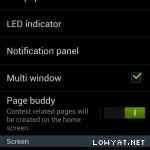 |
|
|
|
|
|
Jan 23 2013, 11:38 AM
|
|
Junior Member
124 posts Joined: Dec 2008
|
QUOTE(lostasylum @ Jan 23 2013, 01:47 AM) got my S3 back from samsung service centre today... my MP is now 1.5, but still running on 4.1.1. when i asked the service guy how come it's not 4.1.2, he said it's not released here yet. one thing that i'm really unhappy about is that they've disabled my check for updates OTA. they said allowing that would risk the phone getting SDS again. so now i have to plug my phone into laptop and then use kies to update... cis.... Probably they just disabled the OTA at applications manager? the only good thing i see from all this is that my stupid unable to paste issue is now fixed...  Try to check at "Settings" > "Applications Manager" > "All" Scroll to the end of the list to see if any app is disabled. |
|
|
Jan 23 2013, 11:38 AM
|
|
All Stars
11,836 posts Joined: Mar 2011 From: Kota Kinabalu, Sabah
|
i never understood the "page buddy" thing
|
|
|
Jan 23 2013, 11:41 AM
|
|
Senior Member
1,450 posts Joined: Jun 2008 From: KK
|
QUOTE(nokia6280 @ Jan 23 2013, 11:36 AM) If not mistaken you have updated to 4.1.2 and that is multi view feature to disable it if not mistaken you can un-check Multi-view option I'm using official set from AustraliaYour are running 4.1.2? You are using AP set? Other bro who is in 4.1.2 can you confirm? 
|
|
|
Jan 23 2013, 11:52 AM
|

Senior Member
2,554 posts Joined: Jun 2008
|
Malaysia 4.1.2 - still have to wait...as Africa and Eastern Europe + South America + PH rolling out now
 What happen with Sams@ng Mobile Malaysia   This post has been edited by SteadyPana: Jan 23 2013, 11:56 AM |
|
|
Jan 23 2013, 12:31 PM
|

All Stars
29,777 posts Joined: Jan 2009 From: Johor, Malaysia.
|
QUOTE(gundamalpha @ Jan 23 2013, 11:41 AM) I'm using official set from Australia Exactly, un-tick then you no longer see multi window function. (that blue thing on side will gone)
Actually you can call out that thing or close it anytime by press and hold your back touch button if you not disable. |
|
|
Jan 23 2013, 12:33 PM
|
|
All Stars
29,777 posts Joined: Jan 2009 From: Johor, Malaysia.
|
QUOTE(noobandroid @ Jan 23 2013, 11:38 AM) i never understood the "page buddy" thing Page buddy will activate and bring you to new page (only working in original NatureUX touchwiz launcher) when you
It auto close once you not doing anything above. |
|
|
Jan 23 2013, 12:40 PM
|

Senior Member
1,130 posts Joined: May 2010
|
QUOTE(noobandroid @ Jan 23 2013, 11:38 AM) i never understood the "page buddy" thing QUOTE(Andrewtst @ Jan 23 2013, 12:33 PM) Page buddy will activate and bring you to new page (only working in original NatureUX touchwiz launcher) when you Yes.. but so far earphone page is useful for me, at least when im driving and wanna listen song bla bla bla..
It auto close once you not doing anything above. I hv no idea what is roaming and docking page about.. any idea? |
|
Topic ClosedOptions
|
| Change to: |  0.0293sec 0.0293sec
 0.65 0.65
 6 queries 6 queries
 GZIP Disabled GZIP Disabled
Time is now: 17th December 2025 - 11:39 AM |
 Quote
Quote