Welcome Guest ( Log In | Register )

Bump Topic Topic Closed RSS Feed
127 Pages « < 12 13 14 15 16 > » Bottom

Outline · [ Standard ] · Linear+

 Tp LInk TL-MR3420 Owner CLub V2.5, need a pro here

views
     
maxcheam
post Feb 26 2013, 10:12 AM

Casual
***
Junior Member
384 posts

Joined: Jan 2006
From: Penang


QUOTE(DairymanCanada @ Feb 26 2013, 03:38 AM)
I finally found the time to register and join the party here. I'm Dairyman from the WP forum and the programmer behind the custom OpenWRT firmware. I live in Canada so I'm in a totally different time zone than everyone else here and my replies may be a bit slow.

The problem you are experiencing with the E398 stem from the fact that there is no support in ModemGUI for a 4G Huawei modem. Didn't have an example to work with at the time and never added it.

The program checks the modem for the mode and band it currently is set for and adjusts the dropboxes accordingly. It is being confused by a 4G setting when it doesn't know what that is. So what the dropboxes show is what the modem reports it is using.

Using Auto should allow it to use 4G as the modems seem to connect to the fastest mode available.

I will fix this problem in ModemGUI in the next release, as I get time.

A new version of the firmware is being created right now and will be available very soon. It adds a feature that will allow you to add a modem that is currently not supported and have it remain supported even after upgrading the firmware again. Simple to do and it is all through the web interface.
*
Hi Dairyman, thanks for taking the effort to join this forum and provide support for your great initiatives. We're grateful that you and Wahroonga Farm coming here to further enhance our experience with these awesome affordable routers from TP-Link. notworthy.gif

I'm looking forward to having the capability of doing modem related stuff directly from the web interface. thumbup.gif
khairilyazit
post Feb 26 2013, 10:59 AM

Casual
***
Junior Member
406 posts

Joined: Sep 2010
From: Papar, Sabah


hey WF and DM.. u can always count on us as testers... hahaha
DairymanCanada
post Feb 26 2013, 11:05 AM

New Member
*
Junior Member
17 posts

Joined: Feb 2013
QUOTE(maxcheam @ Feb 25 2013, 07:12 PM)
Hi Dairyman, thanks for taking the effort to join this forum and provide support for your great initiatives. We're grateful that you and Wahroonga Farm coming here to further enhance our experience with these awesome affordable routers from TP-Link.  notworthy.gif

I'm looking forward to having the capability of doing modem related stuff directly from the web interface.  thumbup.gif
*
Glad to be here. We have found the TP-Link routers to be cheap and reliable and, with the new firmware, a great piece of hardware for 3G/4G usage.

I have found the AT Command to set a Huawei modem into 4G mode. It is :

AT^SYSCFGEX=03,3FFFFFFF,2,4,7fffffffffffffff,,

This will set it to 4G mode with band selection automatic.

Use ModemGUI in the Custom Command dialog to execute this command.
Wahroonga Farm
post Feb 27 2013, 05:41 AM

Getting Started
**
Junior Member
97 posts

Joined: Feb 2013


A new version of the fast 3G/4G OpenWRT with Modem GUI is available. rclxms.gif

26022013 –
New 'modem support' and 'information' tabs so that the user may add an unsupported modem or modify an old one.
Fixed mismatch of protocol and driver for the MF6XX family.
***New MR3220 V1 and V2 firmware***.
Note: It is safe to 'keep configuration' when updating to this version.


WIKI, Dairymans "Of Modems and Men"
ibnuasad
post Feb 27 2013, 06:53 AM

A screw is not a screw until you screw it!
****
Senior Member
558 posts

Joined: Jun 2006
From: Lowyat.Net


I've been following the last couple of pages silently and I'm very excited with the new firmware. Special thanks to DairymanCanada & Wahroonga Farm smile.gif

Upgraded from 20022013 to 26022013 without a hitch.

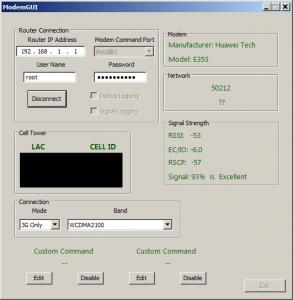
I'm using an e353 modem and it works just fine connecting to the internet with the router (MR3420 V1).
Attached Image

...but I couldn't get it to work with ModemGUI. When I click "Connect" the window sometimes goes to "Not Responding" but still connects.

OpenWRT System Log:
CODE
Feb 27 06:33:46 OpenWrt authpriv.info dropbear[6377]: Child connection from 192.168.1.100:54430
Feb 27 06:33:47 OpenWrt authpriv.notice dropbear[6377]: Password auth succeeded for 'root' from 192.168.1.100:54430


ModemGUI seems to connect with the router but I waited for 10 seconds (and longer) but all the info is 'Unknown':
Attached Image
Clicked on 'Disconnect', waited for a while, all the buttons remains disabled (including the Exit button). So I had to quit via the X button.

OpenWRT System Log:
CODE
Feb 27 06:41:15 OpenWrt authpriv.info dropbear[6377]: Exit (root): Error reading: Connection reset by peer


Enabled "Debug Logging" but after exiting (X) Log.txt only shows:
CODE
---------------------------------- Application Starting ----------------------------------
Trying list of devices
Modem manufacturer is Unknown


Wahroonga Farm
post Feb 27 2013, 07:13 AM

Getting Started
**
Junior Member
97 posts

Joined: Feb 2013


From memory the E353 uses Port 1, so try selecting the 'Modem Command port'; rather than auto, which uses Port 2.

Edit: Hmmm.

Just checked a captured image. My E353 ran ok on auto it seems.

user posted image

This post has been edited by Wahroonga Farm: Feb 27 2013, 07:26 AM
ibnuasad
post Feb 27 2013, 07:28 AM

A screw is not a screw until you screw it!
****
Senior Member
558 posts

Joined: Jun 2006
From: Lowyat.Net


QUOTE(Wahroonga Farm @ Feb 27 2013, 07:13 AM)
From memory the E353 uses Port 1, so try selecting the 'Modem Command port'; rather than auto, which uses Port 2.
*
I did try Port 1 previously but it said "Modem Not Found". Nonetheless, tried using Port 1 again, and it works! thumbup.gif notworthy.gif

Attached Image

edit: Tried Automatic again, same thing, no info. Had to force exit (x). Then tried Port 1, error "Modem Not Found". Tried Port 1 again, then it works. hmm.gif

This post has been edited by ibnuasad: Feb 27 2013, 07:35 AM
DairymanCanada
post Feb 27 2013, 09:04 AM

New Member
*
Junior Member
17 posts

Joined: Feb 2013
QUOTE(ibnuasad @ Feb 26 2013, 04:28 PM)
I did try Port 1 previously but it said "Modem Not Found". Nonetheless, tried using Port 1 again, and it works!  thumbup.gif  notworthy.gif

Attached Image

edit: Tried Automatic again, same thing, no info. Had to force exit (x). Then tried Port 1, error "Modem Not Found". Tried Port 1 again, then it works.  hmm.gif
*
One thing you have to make sure of is that the modem has finished connecting before you use ModemGUI. Don't attempt to use it while the modem is still working on the connection or really strange things can happen.

This is caused by several AT Commands being sent to the modem from different sources (connection script and ModemGUI) and they conflict with each other. Guaranteed to cause a program crash.

I have found that for some things, like SMS, you have to stop all other AT Commands from being sent to the modem or the program crashes. Actually it sits waiting for a response that got funneled off to another process and gets locked in a waiting loop.

FYI, Automatic is just ttyUSB1. Long boring story as to why this so I won't relate it.

One other thing that may be happening here. WF was probably using the PPP protocol when his image was taken. That was the original setting for the E353. You are using QMI since the firmware was changed to support this for the E353.

What can happen (it does for ZTE modems) is that using QMI changes the command port from that used in PPP. For the MF668 the command port in PPP is ttyUSB2 and using QMI it is ttyUSB1.

You sometimes have to experiment to find the correct port.

This post has been edited by DairymanCanada: Feb 27 2013, 09:11 AM
AtWork
post Mar 2 2013, 04:31 AM

New Member
*
Junior Member
14 posts

Joined: Mar 2013
Hi.

I need some help.

I need help for the indicator signal 3G/4G.

I downloaded this: http://ecco.selfip.net/attitude_adjustment/ar71xx/packages (3ginfo_20130214_all.ipk)

uci set 3ginfo.@3ginfo[0].language=en
uci commit
3ginfo

or

/etc/init.d/3ginfo start and see http://192.168.1.1:81

Insert the command in Putty above, but without effect.

It's the first time I use OpenWRT firmware. I'm new in these things.

Best Regards
Wahroonga Farm
post Mar 3 2013, 10:19 AM

Getting Started
**
Junior Member
97 posts

Joined: Feb 2013


An update of Dairyman Openwrt package is available. rclxms.gif

02/03/2013 – Minor bug fixes (e.g. script date) plus major features.

+ PAP and CHAP authentication.
+ 'Keep connection alive' (like Dovado) with a choice of 'disabled', 'just ping and report' or 'ping and restart WAN' if disconnected.
+ Additional support for the E3276, (no user added support required).
+ USB (powered) hub support.

Note: The Keep alive function pings 8.8.8.8 every 2 minutes and waits up to 10 seconds for a response. If Enabled then it logs a message stating the connection is down or that it is alive. If Enabled and Restart then it will log a message and restarts the WAN if the connection is down.

user posted image

Whirlpool Thread
WIKI
Dairymans Website

Developments are on going ...


This post has been edited by Wahroonga Farm: Mar 3 2013, 01:48 PM
Wahroonga Farm
post Mar 3 2013, 10:21 AM

Getting Started
**
Junior Member
97 posts

Joined: Feb 2013


QUOTE(AtWork @ Mar 2 2013, 07:31 AM)
Hi.

I need some help.

I need help for the indicator signal 3G/4G.

I downloaded this: http://ecco.selfip.net/attitude_adjustment/ar71xx/packages (3ginfo_20130214_all.ipk) .....

Best Regards
*
Hi,

Dairyman is investigating the possibility of incorporating some of the features of '3ginfo' into his Openwrt package.

Cheers

John k

lwk523
post Mar 4 2013, 10:25 AM

Premium Q Trader
******
Senior Member
1,040 posts

Joined: Mar 2006


Wahroonga Farm DairymanCanada
Thanks alot for your work bro. We are very happy with the firmware. rclxms.gif

Bug report
I figure out that we unable get connect in DC-HSPA+. Is that anyone seen DC-HSPA+ with aircard 320u before ? hmm.gif

user posted image


Regards
SL

This post has been edited by lwk523: Mar 4 2013, 10:50 AM
DairymanCanada
post Mar 4 2013, 12:35 PM

New Member
*
Junior Member
17 posts

Joined: Feb 2013
QUOTE(lwk523 @ Mar 3 2013, 07:25 PM)
Wahroonga Farm DairymanCanada
Thanks alot for your work bro.  We are very happy with the firmware.    rclxms.gif

Bug report
I figure out that we unable get connect in DC-HSPA+. Is that anyone seen DC-HSPA+ with aircard 320u before ? hmm.gif

user posted image
Regards
SL
*
You are probably getting DC-HSPA+ but ModemGUI is not reporting it correctly. If it finds HSPA+ in the network type it assumes it is HSAP+ and not DC-HSPA+.

I'll correct this problem in the code.

Other modems will also have this problem and will need to have it fixed.

Thanks for the bug report.
lwk523
post Mar 4 2013, 02:02 PM

Premium Q Trader
******
Senior Member
1,040 posts

Joined: Mar 2006


QUOTE(DairymanCanada @ Mar 4 2013, 12:35 PM)
You are probably getting DC-HSPA+ but ModemGUI is not reporting it correctly. If it finds HSPA+ in the network type it assumes it is HSAP+ and not DC-HSPA+.

I'll correct this problem in the code.

Other modems will also have this problem and will need to have it fixed.

Thanks for the bug report.
*
HI,
Is that we can check system Log in router there to ensure whether it is DC-HSPA+ or HSPA+ ? Let just me know if you need any info to fix the bugs .


Thanks and have a good days smile.gif
DairymanCanada
post Mar 5 2013, 01:59 AM

New Member
*
Junior Member
17 posts

Joined: Feb 2013
QUOTE(lwk523 @ Mar 3 2013, 11:02 PM)
HI,
Is that we can check system Log in router there to ensure whether it is DC-HSPA+ or HSPA+  ?  Let just me know if you need any info to fix the bugs .
Thanks and have a good days  smile.gif
*
If you have the Signal Log activated (box is checked) in ModemGUI you can look in the Signal.log file (a text file) and see exactly what was returned by the modem. I just seen another log from a 320U that shows a DC-HSPA+ network in the log file.

-------Time-------------RSSI-----RSCP------ECIO------LAC---CELLID---Network-------

Mon Mar 04 20:45:12 : -099 -096:-097 0000:-006 3450 01410298 DC-HSPA+
Mon Mar 04 20:45:24 : -099 -097:0000 0000:0003 3450 01410298 UMTS
Mon Mar 04 20:45:36 : -099 -097:0000 0000:-001 3450 01410298 DC-HSPA+
Mon Mar 04 20:45:48 : -099 -098:0000 0000:0000 3450 01410298 UMTS

Just report any thing that doesn't look right to you and I'll see if it is a bug and will attempt to fix it. I have fixed this for ZTE and Sierra modems and am currently finding a fix for Huawei modems.

This post has been edited by DairymanCanada: Mar 5 2013, 02:02 AM
dodobird23
post Mar 5 2013, 02:14 AM

New Member
*
Junior Member
18 posts

Joined: Oct 2012


DairymanCanada can you make your firmware support mr3420v2?
Wahroonga Farm
post Mar 5 2013, 04:26 AM

Getting Started
**
Junior Member
97 posts

Joined: Feb 2013


Hi DodoBird 23,

Dairyman will provide a V2 image when the OpenWRT official image is available.

It is expected soon (although we've been saying that for a while now). smile.gif

We will test it before release.

Cheers
blackhatnotes
post Mar 5 2013, 07:40 AM

New Member
*
Newbie
1 posts

Joined: Feb 2013
i have 3420 v2,,how to add openvpn,,? without extroot,,ty
kae7
post Mar 6 2013, 01:13 AM

10k VIP Club
********
All Stars
10,950 posts

Joined: Jan 2009
From: Hatton Cross


after flash to open wrt, my tp-link mr3420 unable to detect the correct location already...

before this with the stock firmware, it able to detect the current location.

For example, with stock firmware, in Puchong, my iPod Touch able to detect correct location, mind that iPod Touch doesn't have GPS and it detect location by using the connection that it connect

even in Cameron Highlands also, it can detect the correct location..

but, after flash to open wrt, itmy iPod Touch] unable to detect the exact location, it still stuck at Cameron Highlands[I flash my router at Cameron Highlands]


but when go to free WiFi McD, it able to detect exact location[McD itself]

so, it is the modem/router problem, and not the iPod Touch problem...
so, how to fix this?

This post has been edited by kae7: Mar 6 2013, 07:00 PM
khairilyazit
post Mar 6 2013, 02:36 PM

Casual
***
Junior Member
406 posts

Joined: Sep 2010
From: Papar, Sabah


QUOTE(kae7 @ Mar 6 2013, 01:13 AM)
after flash to open wrt, my tp-link mr3420 unable to detect the correct location already...

before this with the stock firmware, it able to detect the current location.

For example, with stock firmware, in Puchong, my iPod Touch able to detect correct location, mind that iPod Touch doesn't have WiFi and it detect location by using the connection that it connect

even in Cameron Highlands also, it can detect the correct location..

but, after flash to open wrt, itmy iPod Touch] unable to detect the exact location, it still stuck at Cameron Highlands[I flash my router at Cameron Highlands]
but when go to free WiFi McD, it able to detect exact location[McD itself]

so, it is the modem/router problem, and not the iPod Touch problem...
so, how to fix this?
*
dont have gps i think? sweat.gif

127 Pages « < 12 13 14 15 16 > » Top
Topic ClosedOptions
 

Change to:
| Lo-Fi Version
0.0337sec    0.42    6 queries    GZIP Disabled
Time is now: 13th December 2025 - 04:04 AM