

QUOTE(White2000 @ Oct 25 2023, 08:27 PM)
Default IPv6 off.
Turn it on or off better?

I would say turn it onTurn it on or off better?
Home Networking ASUS Malaysia Networking User & Technical Support, Managed by ASUS Malaysia Representative
|
|
 Oct 25 2023, 08:59 PM Oct 25 2023, 08:59 PM
Return to original view | IPv6 | Post
#41
|
 
Senior Member
2,608 posts Joined: Nov 2020  
|
QUOTE(White2000 @ Oct 25 2023, 08:27 PM) Default IPv6 off. I would say turn it onTurn it on or off better? White2000 liked this post
|
|
|
|
|
|
Nov 18 2023, 08:10 AM
Return to original view | IPv6 | Post
#42
|
|
Senior Member
2,608 posts Joined: Nov 2020
|
QUOTE(ran_deep @ Nov 18 2023, 01:41 AM) Need some help with setting up GT-AX11000 as my Maxis router. Currently using Archer C5v. So I have plugged in LAN2 from Modem to new router, and did default wizard setup. However GT is unable to connect to internet - in system logs, notice "unable to complete pppoe discovery" error. Have you selected a VLAN profile while setting it up?I'm sure about the credentials here, as I tested it on existing modem. Please guide if any specitic ISP setup required here. I have reached out to Maxis, but no luck with troubleshooting here. Or it should be in LAN -> IPTV In your case it should be Maxis-Fiber profile |
|
|
Nov 18 2023, 08:11 AM
Return to original view | IPv6 | Post
#43
|
|
Senior Member
2,608 posts Joined: Nov 2020
|
QUOTE(gaman @ Nov 16 2023, 01:02 PM) I have Asus DSL-N16 as back up router, I wonder how to free up LAN4 for normal internet connection? Select Unifi-Business profile instead of Unifi-HomeThat LAN4 port was previously used to connect Unifi TV. |
|
|
Nov 18 2023, 02:22 PM
Return to original view | IPv6 | Post
#44
|
|
Senior Member
2,608 posts Joined: Nov 2020
|
QUOTE(ran_deep @ Nov 18 2023, 01:19 PM) But I'm not using IPTV. This is purely Internet router Look just click on the button as mentionedI don't know why Asus shoved it in that section It's for the ISP Profile settings Do note it'll set one of the Lan ports for daisy chaining your old router for VoIP If not needed, just select custom and enter 621 for Internet ID This post has been edited by PRSXFENG: Nov 18 2023, 02:24 PM ran_deep liked this post
|
|
|
Nov 20 2023, 12:12 PM
Return to original view | IPv6 | Post
#45
|
|
Senior Member
2,608 posts Joined: Nov 2020
|
QUOTE(gaman @ Nov 20 2023, 11:29 AM) Many thanks for your reply. Check if there is a setting in LAN -> IPTVHow to change from Unifi-Home profile to Unifi-Business profile without connecting to DSL? Without going through "Quick Internet Setup"? I tried but failed due to no DSL connection. It just stuck at "Start to detect your connection type..." My TM internet connection has changed from DSL to Fiber few months back, now I am no longer able to access/connect DSL anymore. I am using ASUS' "Dual WAN" setting to use LAN1 as WAN to connect to TM ONU, all LAN2, LAN3 and LAN4 are working fine. Just that LAN4 is somehow only could connect to Unifi TV but not internet. Quite an old model so not sure on the firmware |
|
|
Nov 20 2023, 05:29 PM
Return to original view | IPv6 | Post
#46
|
|
Senior Member
2,608 posts Joined: Nov 2020
|
QUOTE(failed.hashcheck @ Nov 20 2023, 05:22 PM) Any aimesh capable router/ap that supports PoE? Technically yes but I don't think it's sold herehttps://www.asus.com/networking-iot-servers...pertwifi-eba63/ |
|
|
|
|
|
Nov 21 2023, 10:30 AM
Return to original view | IPv6 | Post
#47
|
|
Senior Member
2,608 posts Joined: Nov 2020
|
QUOTE(gaman @ Nov 21 2023, 10:02 AM) Is it an old router, that's why I am using it as back up in case my main router having problem. Hmm I wonder if you will get more settings if you set the Primary WAN to Ethernet instead of xDSLThere are some settings about "IPTV" in LAN section, like in the attached photo. I did play around with them but still not able to connection to internet using this LAN4. Unlike the other router which has option to disable LAN4 port VLAN 600/IPTV option. Any idea? [attachmentid=11485225] Since you said you're using dual wan backup as the method of getting online Or in that screenshot, change the drop-down from VDSL to WAN if that's an option? This post has been edited by PRSXFENG: Nov 21 2023, 10:30 AM |
|
|
Dec 13 2023, 01:33 PM
Return to original view | Post
#48
|
|
Senior Member
2,608 posts Joined: Nov 2020
|
QUOTE(firdausbhari @ Dec 13 2023, 01:15 PM) Okay will do. I have done it before, you can ask CS to deregister it for you, but you need to provide details of the old device and proof of purchase of it& also i forgot to de-register my DDNS on the previous router. Is it possible to de-register from HQ? refer to https://www.asus.com/support/FAQ/1035881/ firdausbhari liked this post
|
|
|
Dec 27 2023, 06:21 PM
Return to original view | IPv6 | Post
#49
|
|
Senior Member
2,608 posts Joined: Nov 2020
|
QUOTE(firdausbhari @ Dec 27 2023, 02:57 PM) I noticed there’s dual 5-1 & 5-2 band transmitted thru ZenWifi XT8 as mesh node. I believe one of the bands is used for AiMeshI can only control 5-2 band within main router. Cant control channel & width on 5-1. If i turn off either 5-1 or 5-2, both 5ghz band wont work. Any fix to use only single band 5ghz instead of 5-1/5-2? |
|
|
Jan 18 2024, 07:29 PM
Return to original view | IPv6 | Post
#50
|
|
Senior Member
2,608 posts Joined: Nov 2020
|
QUOTE(MixBlood @ Jan 18 2024, 07:28 PM) I have RT-AX57 and currently using Time but will swap to Unifi once I moved out this May. My question is, with Unifi I need to sacrifice one LAN port for IPTV even though I don't subscribe IPTV? Simply select the "Unifi Business" profile instead of "Unifi Home" and the IPTV port will be freed up |
|
|
Jan 19 2024, 11:16 PM
Return to original view | IPv6 | Post
#51
|
|
Senior Member
2,608 posts Joined: Nov 2020
|
QUOTE(sinnlig @ Jan 19 2024, 09:04 PM) Just subbed to Time if you are using the all in one ont/router combo units, ask time to convert to ont only modeTrying to use my asus tuf ax3000 as the router. Already input the poor info. But no connection. What am I doing wrong? also, might need VLAN ID 499? |
|
|
Feb 6 2024, 12:15 PM
Return to original view | IPv6 | Post
#52
|
|
Senior Member
2,608 posts Joined: Nov 2020
|
QUOTE(D.gRave @ Feb 6 2024, 10:26 AM) Hi, and just able to do it. Factory reset, then update firmware. I don't think 53u has itHowever, unable to find speedtest in the asus app for the 53u. Speedtest is in same apps for ax55. Its a lower end budget Asus router using MediaTek platform instead of the usual Broadcom platform D.gRave liked this post
|
|
|
Feb 21 2024, 04:34 PM
Return to original view | Post
#53
|
|
Senior Member
2,608 posts Joined: Nov 2020
|
QUOTE(pokemon @ Feb 21 2024, 04:11 PM) Can RT-AC86U support unifi 1Gbps and 2Gbps? At the most you will get 940Mbps due to Gigabit Ethernet Port limit |
|
|
|
|
|
Mar 10 2024, 05:19 PM
Return to original view | IPv6 | Post
#54
|
|
Senior Member
2,608 posts Joined: Nov 2020
|
QUOTE(coolkwc @ Mar 10 2024, 04:39 PM) Hi guys, i need some help regarding my Asus ZenWifi XT-8 router mesh. So firstly, make sure you're connecting from LAN2 of Fiberhome ONT to your Asus, other LAN ports will not workRecently i changed from Unifi to Maxis fiber, the Unifi fiber and fiberhome ONU is re-used. The installer help me to setup with the new Maxis AR2140 Wifi 6 router but not with the Asus router. The only changes on the ONU is connection change from LAN1 to LAN2. I asked the Maxis account and password from the installer and i thought the setup should be straight forward, just enter the user name and password in the PPPoE section will do, however i just can't get it work correctly. I reset the ASUS router and done the quick internet setup, from there i enter the ISP user name and password and select 'special ISP requirement' and make sure i select the Maxis fiber, the setup finished and WAN IP was assigned. However no matter how i can't access to internet, but the ASUS router page shown internet is 'connected'. I noticed the WAN IP is not same as when i used the Maxis router. Asus WAN IP start with 172.xxx, Maxis start with 10.xxx. I really don't know what's wrong with that. Is it because Maxis is using private IP opposed to Unifi's public IP? I really need help if anyone got experience. Currently what i can do is connect the Asus router as AP to the Maxis router via LAN cable, which is not ideal, i would like to get rid of the Maxis router if possible. 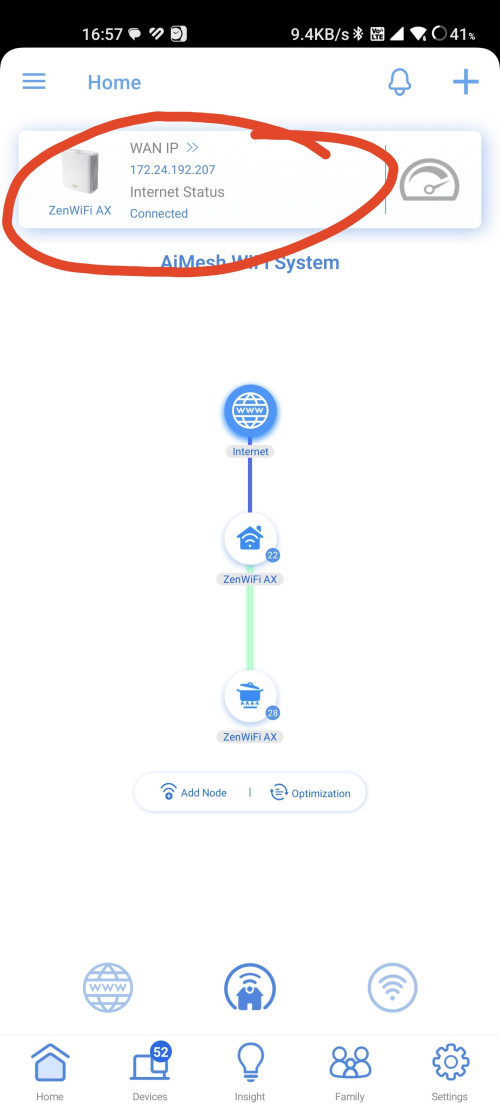 Secondly, your PPPoE details should be like A12345@home.maxis.com.my And the password is like A123451 Basically the front of username with an extra 1 added to the back However, in some cases, there is no extra 1 at the back, try both, that was the issue I faced with my setup VLAN, you could try Manual and enter 621 |
|
|
Jun 4 2024, 08:52 PM
Return to original view | Post
#55
|
|
Senior Member
2,608 posts Joined: Nov 2020
|
QUOTE(squall_12 @ Jun 2 2024, 02:21 PM) yes i using this ip also cannot access not sure what happen previously on my old system windows 7 does not have this issue. you can use their tool to find the ip of your routerhttps://www.asus.com/my/support/faq/1037094/ |
|
|
Jun 5 2024, 11:40 AM
Return to original view | IPv6 | Post
#56
|
|
Senior Member
2,608 posts Joined: Nov 2020
|
QUOTE(jiaen0509 @ Jun 4 2024, 10:11 PM) Supposed to be router.asus.com that was the old domain, they added the new one because of HTTPS security thingsthe problem was that browsers that have visited asus.com remember that that website has https, and refuses to downgrade to non https when visiting router.asus.com and thus you could not access the router webui |
|
|
Jul 2 2024, 05:25 PM
Return to original view | IPv6 | Post
#57
|
|
Senior Member
2,608 posts Joined: Nov 2020
|
QUOTE(nazeric @ Jul 1 2024, 04:55 PM) - Yes I am using TM modem (the white one). Sorry I forgot to mention before trying out "623" in the VLAN i did try "500" too but still didn't work. maybe related to this?- As for checking with Unifi tech support, yes I read out all the username and password to the Unifi tech support to make sure they repatch the correct one, and I also manually typed in the username and password a couple of times to make sure I did not miss out anything. - When I tried connecting to the ASUS router, the Unifi tech support could see the error on why I'm not connected to the internet was due to "wrong username/password", even though the username and password has been checked a bunch of times. Should they be able to "reset the port" in this situation? I'm assuming they didn't do it because they couldn't.. but not sure. - Besides the above, could there be anything else? Can't be a hardware issue right? https://forum.lowyat.net/index.php?showtopi...#entry109967336 get them to send you new password and use vlan500, and make sure you are connected from LAN1 of the modem to WAN of the asus |
|
|
Jul 4 2024, 03:34 PM
Return to original view | Post
#58
|
|
Senior Member
2,608 posts Joined: Nov 2020
|
QUOTE(pokemon @ Jul 4 2024, 12:40 PM) TQ AsusMy for your reply. 940Mbps, no higher than thatWhat is the maximum speed RT-AC86U can support though Ethernet? that's the max speed of Gigabit Ethernet |
|
|
Aug 14 2024, 12:28 PM
Return to original view | Post
#59
|
|
Senior Member
2,608 posts Joined: Nov 2020
|
QUOTE(wong_86 @ Aug 14 2024, 10:52 AM) I using TUF AX4200 router Consider disabling DFS Channels thenwho had experience wifi disconnect on 5ghz channel in width 160mhz ? i set the channel in Auto. i go through the log, saw a log call " Radar Detected ". it happen randomly, but i not staying near any airport or any radar station. any setting to be done to prevent this wifi disconnect issue ? https://www.asus.com/support/faq/1045936/ |
|
|
Aug 19 2024, 05:10 PM
Return to original view | IPv6 | Post
#60
|
|
Senior Member
2,608 posts Joined: Nov 2020
|
QUOTE(dragon528 @ Aug 19 2024, 05:02 PM) Hi everyone, your WAN IP is in the 10.X range, which means you are behind CGNATI'm trying to do a port forwarding for my torrent software. I am currently using AC88U, previously it worked, but after moving to a new house and setting up everything again, the port forwarding does not work anymore. I even tried to disable all the firewall from my Windows to router firewall, but it still indicates the port is blocked. I also read something regarded to nat or cgnat stuff but I totally got no idea. Attached image that I have done port forwarding in the router and my wan IP. think of it like instead of your router is connected directly to the internet you are connected to yet another router and some other users are also connected to the same router, and you all share the same public ip address with this, you have no control over port forwarding, you just can't who is your ISP? If Unifi, I think you need 500Mbps and up If Maxis, +RM10 monthly If TIME, 600Mbps or up If Allo/City Broadband, RM100 one time fee |
| Change to: |  0.1020sec 0.1020sec
 0.22 0.22
 7 queries 7 queries
 GZIP Disabled GZIP Disabled
Time is now: 12th December 2025 - 03:50 AM |
 Quote
Quote