Welcome Guest ( Log In | Register )

Outline · [ Standard ] · Linear+

Home Networking ASUS Malaysia Networking User & Technical Support, Managed by ASUS Malaysia Representative

views
     
PRSXFENG
post Nov 7 2024, 09:02 AM

Look at all my stars!!
*******
Senior Member
2,608 posts

Joined: Nov 2020


QUOTE(WaNaWe900 @ Nov 6 2024, 11:19 PM)
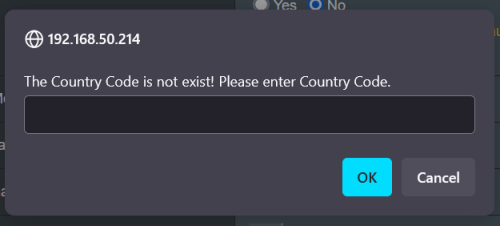
The pop-up Country Code still there  doh.gif  even in AP Mode

user posted image

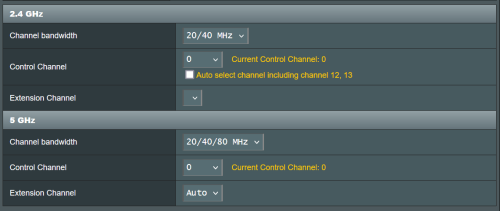
and yup can't change the Control Channel to Auto  cry.gif  from 0

user posted image

I read [Wireless Router] How to fix wireless Control Channel? oso not helping how to restore Country Code

read List of WLAN channels seems without Country Code there will be no Control Channel

Finally found these Asus RT-AX86U no wifi. LEDs off  rclxub.gif

Many same RT-AX86U series have same issues with WiFi gone after reset... / suddenly Can't login GUI somewhere in Oct 2024  rclxub.gif  no official statement from Asus yet so far
*
https://www.snbforums.com/threads/malware-k...52/#post-932257

this may be related
seems like malware is going around killing the wireless radios by destroying the configuration data partition

A lot of models, even ancient old EoL ones are getting updates to fix the vulnerability it seems
so update your routers folks! even ancient old ones like AC66U got updates

This post has been edited by PRSXFENG: Nov 7 2024, 09:21 AM
PRSXFENG
post Nov 16 2024, 11:47 AM

Look at all my stars!!
*******
Senior Member
2,608 posts

Joined: Nov 2020


QUOTE(Dozz @ Nov 16 2024, 11:39 AM)
Hi

Just got ASUS RT BE88U router yesterday, successfully setup it up running but i encounter an issue!

Here my setup:

TM modem to Maxis router to do the PPPoE login, from Maxis router to RT BE88U for wireless router. I have been using this setup for years with my previous ASUS router without issue, with RT BE88U
whenever i reboot the router, it wont connect to internet and the internet light is red in BE88U. I have to unplug the Ethernet cable from maxis router (port 1) to another port (port 2) then the light will turn green and connected to internet. I have to do it all over again every time BE88U reboot.

Can anyone here suggest a fix for this annoying issue please?
*
Suggest just dropping the Maxis router and let the Asus handle PPPoE
If you need the phone, connect it after the Asus router
PRSXFENG
post Nov 16 2024, 03:52 PM

Look at all my stars!!
*******
Senior Member
2,608 posts

Joined: Nov 2020


QUOTE(Dozz @ Nov 16 2024, 11:55 AM)
Hi

I want to use the phone and maxis USB backup dongle.

Possible to use them without maxis router?

you mention connect the phone after asus router?  i dont really get it, mind to tell a bit more in detail please?
*
4g backup will have to be sacrificed, but for the phone, you can connect the maxis router *after* the asus

when you setup PPPoE on the Asus select the Maxis-Fiber profile in VLAN settings, it will mention one of the LAN ports is used for VOIP
connect up the maxis router to the mentioned lan port, and disable it's wifi/internet pppoe interface, and the maxis router will just be a phone adapter

(for 4G Backup, the dongle is checking for "Maxis_Archer_C5v" hostname, you can try setting that as your hostname but some did not have success with that)


PRSXFENG
post Nov 22 2024, 07:35 PM

Look at all my stars!!
*******
Senior Member
2,608 posts

Joined: Nov 2020


QUOTE(yenchenje @ Nov 22 2024, 06:37 PM)
TM has revised it in 2024 to be 300mbps and below

TIME unsure
*
time, 200 is private

500 (and maybe 600?) is being slowly migrated to cgnat

can still move back on request with CS
PRSXFENG
post Nov 25 2024, 11:13 AM

Look at all my stars!!
*******
Senior Member
2,608 posts

Joined: Nov 2020


QUOTE(medi88 @ Nov 25 2024, 01:09 AM)
Hi,

wondering if I can get some assistance. been using my XT8 with Time Internet for the last 4 years or so. Moved to a new location where Time is not available so decided to go with CelcomDigi 1gbps fibre. The fibre modem provided by TM is skyworth GPON ONT.

Been trying to connect the XT8 directly to the Skyworth with no success so far, tried to copy the VLAN ID (629) from the the TP Link router provided by CelcomDigi but not working at all. The WebGUI is just showing status of the XT8 as "not connected to the internet".

appreciate the assistance I could get on this.

edited for grammar & spelling
*
LAN2 of TM ONT to WAN of Asus right, other LAN ports will not work
VLAN629 should be correct

PPPoE Username and password setup correctly?
PRSXFENG
post Nov 25 2024, 07:31 PM

Look at all my stars!!
*******
Senior Member
2,608 posts

Joined: Nov 2020


QUOTE(medi88 @ Nov 25 2024, 06:37 PM)
and just as I posted this, it just miraculously work today..... 😅😅😅
*
Hmm possibly could have been a PPPoE session thing as well, where it still thinks the old router is logged in and won't let another device log in with the same credentials

Had that before on TIME

Either way good that it's working now
PRSXFENG
post Dec 19 2024, 04:53 PM

Look at all my stars!!
*******
Senior Member
2,608 posts

Joined: Nov 2020


QUOTE(HonG8821 @ Dec 19 2024, 03:24 PM)
Hi, I recently purchased a pair of ASUS XT8 ZenWiFi devices from lazada and set them up—one as the router and the other as a mesh node. While most things are working fine, I’ve encountered an issue with the router unit: LAN Port 3 isn’t functioning at all.

Here’s what I’ve tried so far:

Checked the physical connection to ensure the cable is securely plugged in.
Tested the same cable and device on other LAN ports (they work fine).
The other LAN ports on the router work as expected. I’m wondering if anyone else has experienced a similar issue or has suggestions on troubleshooting this further.
*
Who's your ISP, did you pick one of the VLAN Profiles like Unifi? Then one of the ports may have been reserved for the old HyppTV/Unifi TV Box

go to LAN -> IPTV and change to Unifi-Business if you dont want the port reserved, you may also use "custom" if you're on other ISP
PRSXFENG
post Mar 14 2025, 05:43 PM

Look at all my stars!!
*******
Senior Member
2,608 posts

Joined: Nov 2020


QUOTE(thomas1983 @ Mar 13 2025, 10:49 PM)
Hi guys , 
My AX88U suddenly the 5ghz wifi disappear!
The 5ghz light on router also off …
I am sure its enable !
The current control channel is 0, MAC address also blank
I did hard reset and switch to Merlin but still no luck ;(

Or its the hardware issue ?

Anyone can help with this issue pls …
*
you have been hit by malware, do the firmware update to resolve it
PRSXFENG
post Apr 13 2025, 04:06 PM

Look at all my stars!!
*******
Senior Member
2,608 posts

Joined: Nov 2020


QUOTE(BoonKo @ Apr 13 2025, 12:26 PM)
Hi All,
Help needed here. I just migrated from UNIFI to CelcomDigi and would like to use my Asus RT-AX86U to dial in (PPPOE). I noticed that for CelcomDigi Fibre I need to setup a VLAN but somehow I check on my router, it does not have any VLAN for me to setup. I need guidance on how to find the VLAN on my router. Appreicate the help here.
*
You would have already been using VLAN setup for Unifi

but anyways, it is in

LAN -> IPTV -> "LAN Port - Select ISP Profile"

If there isn't a preset for Celcom/Digi, select Manual, and under "Internet", enter the required VLAN into VID box, PIRO can be ignored and left at default

Not sure which VLAN ID it is, some say 623/629, but it depends on who's infra you're on
See if their stock router says it or ask CelcomDigi


PRSXFENG
post Jul 10 2025, 10:47 AM

Look at all my stars!!
*******
Senior Member
2,608 posts

Joined: Nov 2020


QUOTE(n20nine @ Jul 9 2025, 11:10 PM)
Guys, I have a very bizarre issue. I have two Rt-AX59U on a mesh configuration on Time Internet. Been working well for months. Today, the internet stopped working despite showing the usual white light. I restarted both my modem and router and issue still persists. Have done the following:

1. Checked cabling for modem, router and all in good condition
2. Connected via modem to laptop via ethernet - no issues
3. Have hard reset modem, successfully set-up and internet connection detected, only for it to stop working again, white light still showing as normal
4. I have swapped ethernet cables between modem and router and same issue still persists
5. Both hardware firmware are updated to latest version

What do I do next?
*
Resetting the modem might have been a bad move

Are you setting it up with the modem in bridge mode or default mode?


PRSXFENG
post Sep 19 2025, 08:54 PM

Look at all my stars!!
*******
Senior Member
2,608 posts

Joined: Nov 2020


QUOTE(axoloke @ Sep 18 2025, 11:49 AM)
Is there any ASUS equivalent all in 1 replacement for the TM provided Dlink DPN-FX3060V? As the fiber is terminated in the same unit now instead of the separate ONT unit? Thanks.
*
Unfortunately no, you will have to bridge mode the dlink and connect your asus router after the dlink

4 Pages « < 2 3 4Top
 

Change to:
| Lo-Fi Version
0.0362sec    0.71    7 queries    GZIP Disabled
Time is now: 11th December 2025 - 11:58 PM