Welcome Guest ( Log In | Register )

4 Pages < 1 2 3 4 >Bottom

Outline · [ Standard ] · Linear+

Home Networking ASUS Malaysia Networking User & Technical Support, Managed by ASUS Malaysia Representative

views
     
PRSXFENG
post Nov 5 2022, 09:20 PM

Look at all my stars!!
*******
Senior Member
2,611 posts

Joined: Nov 2020


QUOTE(deathninjax @ Nov 5 2022, 07:13 PM)
Hi I need some guidance regarding 2 RT-AX53U i bought. I wasnt able to connect to the Maxis fiber network and unifi home on both routers. I bought them for my relatives. I have called maxis support and the username and password are correct and the stock router works so its not on their side. i tried my own unifi home username and password and it doesnt work too. my own rt-AX86S works with the username and password. Does anyone have any ideas?
*
As mentioned by the other person, the RT AX53U's factory installed firmware has broken PPPoE (great job Asus)

So you'll have to manually update them to the latest firmware manually from webgui with local file, after that next reboot it will be online and connected.
PRSXFENG
post Nov 6 2022, 08:16 PM

Look at all my stars!!
*******
Senior Member
2,611 posts

Joined: Nov 2020


QUOTE(yozx @ Nov 6 2022, 05:56 PM)
Think change to www.asusrouter.com with latest firmware
*
There was a discussion on SNBForums, basically browsers these days see asus.com at the end, know it's a https site from their list and will refuse to load it without https, which your router isn't running (it doesn't know the difference that router.asus.com is a local site)

So, they made a temporary exemption for it i think but Asus decided to move to a dedicated domain for it just like how TP-LINK does it.
PRSXFENG
post May 3 2023, 10:00 AM

Look at all my stars!!
*******
Senior Member
2,611 posts

Joined: Nov 2020


QUOTE(blacktubi @ May 2 2023, 09:09 PM)
You might be able to use the USB 4G modem backup on your ASUS router instead of using it on the Maxis Router. In fact, it's actually better to use the ASUS Router as the main router as well.

You always want to have the faster router as the main router.
*
The 4G Backup is locked to the stock router and refuses to work on other devices afaik
though it may work if you set the hostname of the asus to "Maxis_Archer_C5v"

guessing based on this
https://forum.lowyat.net/index.php?showtopi...post&p=98295735
PRSXFENG
post May 19 2023, 02:54 PM

Look at all my stars!!
*******
Senior Member
2,611 posts

Joined: Nov 2020


QUOTE(Skylinestar @ May 19 2023, 02:46 PM)
What is the server that asus router RT-AX55 pings to check for internet status?
Currently, the WAN (internet) light on the router is red (instead of the normal blue light when internet is available).
In the router home page, it is showing Internet status: Disconnected
user posted image
But internet is actually available and working on all my devices (wired and wireless) that are connected to my router.
What's happening?
A restart of the router fix this issue (it will show blue light), but this issue keeps on coming back.
*
The issue is due to a faulty antivirus database update
but to answer your question, I'm pretty sure asus routers by default pings dns.msftncsi.com to check for connectivity
PRSXFENG
post May 19 2023, 09:08 PM

Look at all my stars!!
*******
Senior Member
2,611 posts

Joined: Nov 2020


QUOTE(Skylinestar @ May 19 2023, 03:09 PM)
i didn't update anything.
it was working fine all these while. this issue started suddenly for the past few days.
is this something that can be changed?
*
I think the Antivirus auto updates

As for the 2nd, i don't remember it anymore since I no longer use an Asus router but I think it's somewhere within system tab
Something about DNS query/ping connectivity check
PRSXFENG
post May 27 2023, 01:42 PM

Look at all my stars!!
*******
Senior Member
2,611 posts

Joined: Nov 2020


QUOTE(krofal @ May 27 2023, 11:10 AM)
Hi,

Basically now I have a BTU, 2x XT8 and one un-managed switch. I live in a 3-storey hse and the BTU unit is in the storage room, along with a bunch of cables that lead to various ethernet ports around the hse. I'm trying to create a wired backhaul (as XT8 wireless backhaul has been very hit and miss. one moment no issue, another moment nodes keep dropping). The idea is as below:

3rd floor - XT8 node (wired thru ethernet port from 1st floor)
2nd floor - XT8 router (wired thru ethernet port from 1st floor)
1st floor (storage room) - BTU and switch

I'm not that good at networking, so can you kindly advise what are my setup plans or possibilities? It would be very much appreciated!!
*
Hmm..
BTU -> XT8 2nd floor -> XT8 3rd floor

So basically 1 Ethernet cable from 1st floor to 2nd floor to connect to the XT8, this one will have the Unifi credentials entered into it

Then another cable from the XT8 from the 2nd floor connects to the XT8 on the 3rd floor

If you need the cable to go back to the 1st floor
The XT8 from 2nd floor goes to 1st floor then back up to 3rd floor

Not sure about the switch, probably don't need to use it

This post has been edited by PRSXFENG: May 27 2023, 01:43 PM
PRSXFENG
post May 28 2023, 11:26 AM

Look at all my stars!!
*******
Senior Member
2,611 posts

Joined: Nov 2020


QUOTE(482baby @ May 28 2023, 10:21 AM)
I have three question need to enquiry at below:

1.)May I know current new Asus router for AX Series or Zenwifi Series,the usb port can do usb cable printer sharing to print out document?

2.)Zenwifi and AX Series router can mix to do AI-Mesh Wifi?

3.)These two unifi and maxis what different and can i do customize vlan number and these two unifi what different and a few maxis and what different also and may i know vlan number same?Please see pictures.

[attachmentid=11468872]      [attachmentid=11468873]
*
1 and 2 I think can, but I never tried so not sure

3. unifi home reserves one of the ports for the old hypptv box, business doesn't have it, if you don't use the box just select business and get a free lan port
maxis fiber is maxis on tm infra, maxis fiber special is maxis on maxis own infra, the others are maxis on the mentioned infra name (eg maxis on allo)

the vlan numbers youll have to check online

you can also just choose the manual setting option to enter vlan numbers manually
PRSXFENG
post Jun 1 2023, 11:07 PM

Look at all my stars!!
*******
Senior Member
2,611 posts

Joined: Nov 2020


QUOTE(LA773 @ Jun 1 2023, 08:45 PM)
Ohhh? Then wat happen to the mesh router?
So basically is the asus high gain unit replace the mesh, but it sits together with the ONU

I actually thought the asus is to enhnace the signal so that both the mesh ( in bedroom) and also the signal of the wifi is stronger at the living area as well
*
Currently it's

Fiber -> TIME 1 (as modem, router and main mesh node) -> TIME 2 (mesh node)

If you want to use the Asus

Fiber -> TIME 1 (as modem only) -> Asus (as router and wifi)

TIME 2 is unused (and can't be used)

You could

Fiber -> TIME 1 (as modem, router and main mesh node) -> TIME 2 (mesh node) and with a cable to the Asus in AP mode but then you'll have conflicting wifi networks

Solution would be to get another TIME Huawei mesh node (plenty for sale on Carousell) or commit entirely to Asus AiMesh system

Sadly every brand has their own proprietary mesh
There is a open standard (Wifi Alliance EasyMesh) but not many brands want to implement it

This post has been edited by PRSXFENG: Jun 1 2023, 11:07 PM
PRSXFENG
post Jun 9 2023, 10:38 PM

Look at all my stars!!
*******
Senior Member
2,611 posts

Joined: Nov 2020


QUOTE(jiaen0509 @ Jun 9 2023, 12:46 PM)
Quick question. On recent Unifi 2gbps.
If Asus router can support? Different configurations?
*
There are some methods to sorta get it working kind of with dual wan, see unifi thread, its somewhere in there
PRSXFENG
post Jul 17 2023, 05:49 PM

Look at all my stars!!
*******
Senior Member
2,611 posts

Joined: Nov 2020


QUOTE(eclectice @ Jul 17 2023, 02:26 PM)
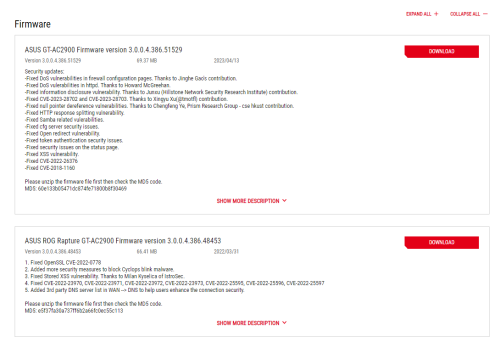
Wow, there are only two firmware upgrades for this model so far:

user posted image

https://rog.asus.com/my/supportonly/rog_rap.../helpdesk_bios/

I'm not sure if you purchased it during the COVID period since the first firmware release wasn't until 2022. Could you please clarify when you bought it?

You may want to consider updating the firmware to see if it can help extend the life of your router.

However, based on my personal experience with the RT-AC88U router I purchased in 2019, which exhibited similar symptoms to what you're experiencing, I decided to replace it instead.

When I ran a speed test, the results showed that it was only delivering half of the normal speed that my 800 Mbps Unifi package subscribed to. After confirming with the TM technician that the speed test was done using their stock mesh router, I opted to upgrade to the Asus ZenWIFI AX XT8 (2022) 2-pack for my first home.

This was a wise choice, as I had previously purchased the same Asus ZenWIFI AX XT8 system for my neighbor in 2020 and it's still performing well today.

Now, I have another Asus ZenWIFI AX XT8 mesh system joined together with a 2-pack ZenWIFI XT12 (2023) for my other home.
*
US Site suggests it existed since 2019
https://www.asus.com/us/supportonly/rog%20r.../helpdesk_bios/

Still, would recommend to update to latest firmware
PRSXFENG
post Jul 19 2023, 10:59 AM

Look at all my stars!!
*******
Senior Member
2,611 posts

Joined: Nov 2020


QUOTE(482baby @ Jul 19 2023, 09:43 AM)
@ASUSmy please reply my question and because I am not understand?
*
another forum user and me have already responded to your question a while back...
PRSXFENG
post Aug 14 2023, 11:26 AM

Look at all my stars!!
*******
Senior Member
2,611 posts

Joined: Nov 2020


QUOTE(neuromancerx @ Aug 14 2023, 12:10 AM)
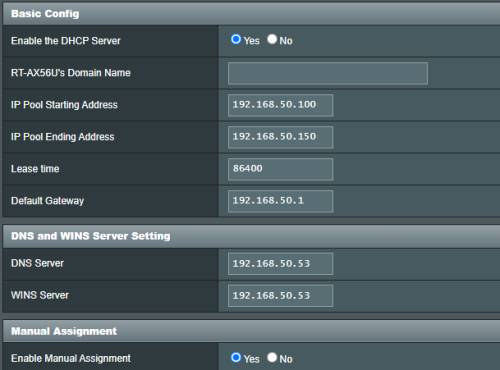
I have pi-hole and i want all client to use this as sole DNS server. Below is my router DHCP option setting, i explicitely set my pi-hole address (192.168.50.53) only

user posted image

However, i can see router's ip address being advertised as additional/secondary DNS server also

user posted image

I remembered there is an option or check box to advertise router's ip address as additional dns server, but i could not find it.

How can i remove router address from being advertised as DNS?
*
Yeah it's one of the annoyances of AsusWRT
I think the checkbox is only on newer firmware (386) or Merlin

An alternative is to set via cli, follow this comment on Reddit
https://www.reddit.com/r/pihole/comments/ma...comment/grva31i

So note that you'll probably have leaks over ipv6 as well
PRSXFENG
post Aug 14 2023, 03:57 PM

Look at all my stars!!
*******
Senior Member
2,611 posts

Joined: Nov 2020


QUOTE(LoNeLyKiRa @ Aug 14 2023, 11:39 AM)
hi is there any asus router with wifi 6e at the moment
*
Got, such as ROG Rapture GT-AXE16000 or ROG Rapture GT-AXE11000

of course, not cheap
PRSXFENG
post Aug 26 2023, 07:29 PM

Look at all my stars!!
*******
Senior Member
2,611 posts

Joined: Nov 2020


QUOTE(myrancid @ Aug 26 2023, 06:19 PM)
Is it ok to put router near to microwave ?
*
your 2.4Ghz peformance may become significantly affected when the microwave is on
PRSXFENG
post Sep 20 2023, 01:15 PM

Look at all my stars!!
*******
Senior Member
2,611 posts

Joined: Nov 2020


QUOTE(mohd_ikh1 @ Sep 20 2023, 11:20 AM)
Hi again ASUS Msia..my last inquiry was in 2021, now would like to inquire almost the same question again..
Previously using Maxis Fibre, now change tu Unifi.

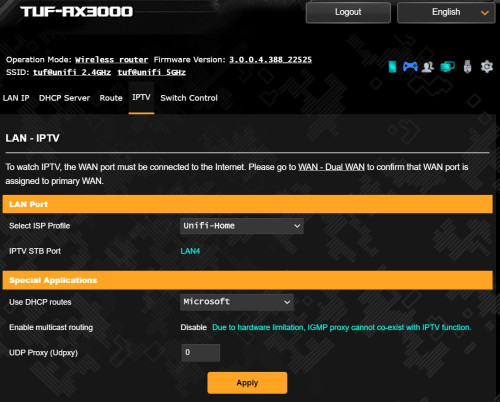
So I just change my Unifi router to ASUS TUF AX3000, already manage to get connected using default Unifi ISP Profile.
But how do i make LAN4 port available since not using any Unifi IPTV STB? Change the ISP Profile to manual then change the VID number/code?
Photo attached is the screenshot of the default settings. Please help, thanks in advance.

user posted image
*
Please choose Unifi-Buisness
PRSXFENG
post Sep 22 2023, 07:37 AM

Look at all my stars!!
*******
Senior Member
2,611 posts

Joined: Nov 2020


QUOTE(rogue @ Sep 22 2023, 06:54 AM)
@Asusmy

Hi, Feature request to Asus Malaysia..

1. Add DNS64 option in stock router
2. Add NAT64 option in stock router
3. Add DoT/DoH DNS option in stock router
4. Add Wireguard support in stock router

Cheers.
*
not sure about the first 2, but the last 2 are coming to 388 firmware soon (AX series only)
(well, DoT only)

source:
https://routerkb.asuscomm.com/?page_id=9&lang=en
https://www.asus.com/support/FAQ/1048280/
https://www.asus.com/support/FAQ/1048282

This post has been edited by PRSXFENG: Sep 22 2023, 07:37 AM
PRSXFENG
post Sep 29 2023, 07:47 PM

Look at all my stars!!
*******
Senior Member
2,611 posts

Joined: Nov 2020


QUOTE(yongtjunkit @ Sep 29 2023, 03:00 PM)
Hi, just wondering does asus router supports the Dlink DWM-222 usb 4G modem?
*
It is mentioned in https://www.asus.com/support/FAQ/1047044/

So I think it should work
PRSXFENG
post Oct 7 2023, 10:53 AM

Look at all my stars!!
*******
Senior Member
2,611 posts

Joined: Nov 2020


QUOTE(White2000 @ Oct 7 2023, 07:44 AM)
Can all IT Hypermarket selling Asus Router be trusted? Asus RT-86U Pro around 1.3k

They didn't have LazMall label means Lazada cannot guarantee delivery or genuine product right?
+ Also RT-86U pro is a good Asus router right? No known issues?
*
All IT is a large chain store, they got physical branches, but usually more expensive physically

LazMall just guarantees genuine, if the product didn't get delivered you'll still get a refund
Same applies for Shopee Mall I suppose

As for why sellers don't want to join these programs
It actually costs the seller more to join these Preferred or Mall programs, the platform will take a larger cut of their profits due to their status
They're depending on their already existing reputation of being a retail chain, so they don't bother with getting Mall tag

So yeah, totally ok to get from them
PRSXFENG
post Oct 8 2023, 07:25 PM

Look at all my stars!!
*******
Senior Member
2,611 posts

Joined: Nov 2020


QUOTE(XeactorZ @ Oct 8 2023, 03:08 PM)
Since Unifi thread super fast responce which I might miss to read some post, hence I ask here since I'm using Asus TUF-AX3000

As I am using swu 3.0 300mbps, 1st year speed upgrade to 500mbps
But all my devices on Wi-Fi getting around 300mbps, max is around 350+mbps, on LAN no issue getting 500+mbps

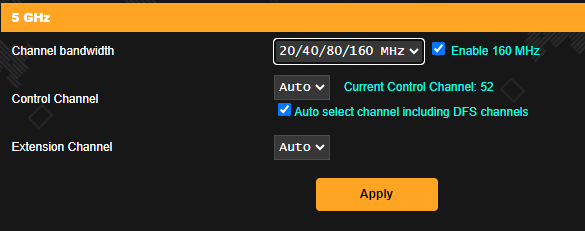
Should I turn on 160Mhz then set channel bandwidth for 5Ghz to 20/40/80/160Mhz?

user posted image

*I am using smart connect which both 2.4Ghz and 5Ghz using same SSID and didn't turn on 160Mhz
*
I suppose it doesn't hurt to try and see if it makes any difference?

QUOTE(adrianteo @ Oct 8 2023, 05:47 PM)
Hi all, need your recommendation to set up mesh wifi. TM provided a modem and also 2 DLink DIR-X1860Z mesh.

Currently considering getting XT8 because the coverage at my home is poor with the Dlink and the speed I’m getting is only 100mb (I have the 300mbps package but seems like Unifi will upgrade to 500mbps?)

Was wondering if i need to configure the TM modem or is just plug and play.

Also, will the XD5 work and be a cheaper option noting that this is not a triband?

Thanks in advance.
*
to configure, you need your PPPoE Username and Password which you can get by asking TM
guide, can refer to this youtube video
https://www.youtube.com/watch?v=kHisnAEsKik

as for recommendation of hardware, I have no comment since I don't have experience with those models
PRSXFENG
post Oct 13 2023, 07:10 AM

Look at all my stars!!
*******
Senior Member
2,611 posts

Joined: Nov 2020


QUOTE(yfyap69 @ Oct 13 2023, 07:00 AM)
Just bought a AX6000 to replace my AX86u. I want to setup my AX86u as mesh with 2.5G port. I attached the network cable to my AX6000 2.5G port then the other end to my AX86u WAN port. When I switch the AX86u backhaul to 2.5G, the AX86u disconnected. How to solve this problem?
*
hmm, seems like you have to use the 1gig WAN port
https://www.asus.com/us/support/FAQ/1035140/

4 Pages < 1 2 3 4 >Top
 

Change to:
| Lo-Fi Version
0.0484sec    0.37    7 queries    GZIP Disabled
Time is now: 15th December 2025 - 02:00 AM