Outline ·
[ Standard ] ·
Linear+
Home Networking ASUS Malaysia Networking User & Technical Support, Managed by ASUS Malaysia Representative
|
Eithanius
|
 Apr 16 2020, 09:53 AM Apr 16 2020, 09:53 AM
|

|
QUOTE(blacktubi @ Apr 16 2020, 09:08 AM) ASUS AiMesh has never been great in roaming. It is massively improved on their ZenWiFi series but still no 802.11r fast roaming. What you can do is to turn off the WiFi on your iPad and turn on again and it should always connect to the best signal AP. Downgrading is possible as well. Are you running on AiMesh mode or Lyra mesh? Tried many times turning off wifi on ipad and back on again, it still keep on connecting to the further node. Setup using AiMesh as per your recommendation months earlier and ditched the Lyra mesh... |
|
|
|
|
|
Eithanius
|
Apr 16 2020, 01:38 PM
|
|
|
QUOTE(blacktubi @ Apr 16 2020, 09:58 AM) Are you using the smart connect function on Lyra Trio? Perhaps try using smart connect. There's a roaming assistant function on the WiFi advanced settings, make sure that is enabled as well. Smart Connect is not available from AsusWRT on my original Lyra (not Lyra Trio)... Roaming assistant has already been enabled by default, with option to Disconnect clients with RSSI lower than -55dBm... 
Attached is the sideview layout of my house with the position of the Lyra nodes on green circle. Notice the red arrows indicating the extremely weak connections of my devices to the furthest node. As an alternative, I've tried relocating the bedroom node from MB2 to MB1 but the node often drop connections with the rest of the network overnight so placing nodes in MB1 is out of the question. Also note that somehow the node from MB2 does not form a direct connection to the Living Hall node, often times have to go thru the Hallway node as depicted below...  This post has been edited by Eithanius: Apr 16 2020, 01:52 PM
 |
|
|
|
|
|
Eithanius
|
Apr 16 2020, 02:25 PM
|
|
|
QUOTE(blacktubi @ Apr 16 2020, 02:07 PM) EithaniusActually WIFI is really poor at passing through wall and it will be worst if you use hardwood flooring and deeper plaster ceiling. This could explain why it is taking another path instead. Possible to shift the unit 2 from MB2 to upper stairwell?Try disabling your roaming assistant, -55dBm is too low and may cause issue. Thought of it before... Need to hack walls and drag wires for a new plug point... Even then it is still partially blocked by cement block and floor tiles... My house has too many walls... Doesn't even have plaster ceilings yet... This post has been edited by Eithanius: Apr 16 2020, 02:36 PM |
|
|
|
|
|
Eithanius
|
Apr 20 2020, 12:29 AM
|
|
|
QUOTE(blacktubi @ Apr 16 2020, 02:07 PM) EithaniusActually WIFI is really poor at passing through wall and it will be worst if you use hardwood flooring and deeper plaster ceiling. This could explain why it is taking another path instead. Possible to shift the unit 2 from MB2 to upper stairwell? Try disabling your roaming assistant, -55dBm is too low and may cause issue. Disabling it made both firmware and in-between-node connections unstable. Bedroom node kept going offline... |
|
|
|
|
|
Eithanius
|
Apr 23 2020, 12:47 AM
|
|
|
Out of curiosity...
How long can a typical router maintain stable connection without having to restart...?
|
|
|
|
|
|
Eithanius
|
Apr 23 2020, 12:05 PM
|
|
|
QUOTE(sHawTY @ Apr 23 2020, 11:33 AM) My record is 5 months straight, but that's only because of a power trip. If that power trip didn't happen, it would've last longer My WAN IP address remain constant throughout that 5 months FYI - I'm using ASUS GT-AC5300 & my UniFi is on FTTH, not VDSL I guess the current Lyra firmware is so bad it cannot tahan the 6th week of MCO and whole damn thing collapsed... |
|
|
|
|
|
Eithanius
|
Apr 23 2020, 03:42 PM
|
|
|
QUOTE(ASUSmy @ Apr 23 2020, 02:23 PM) Hi Eithanius May I know what the collapsed that you mean? Cannot power on? Cannot log in to Lyra GUI? Do provide more information we that we can help you to troubleshoot your problem. Thank you Figuratively... The whole network went down and have to restart all units... Sorry if my phrase startled you... EDIT: Funny that all 3 of my iDevices got disconnected and unable to connect, but yet all 3 Lyra nodes doesn't show any sign of lost connection via their LED indicators. Even disabling and enabling WiFi from the iDevices also refuse to connect. Can't login to GUI to find out what happened other than just restarting all nodes... This post has been edited by Eithanius: Apr 23 2020, 03:47 PM |
|
|
|
|
|
Eithanius
|
Apr 23 2020, 10:11 PM
|
|
|
QUOTE(ASUSmy @ Apr 23 2020, 06:25 PM) Hi Eithanius, May I know is this happen frequently? Only iDevices are effected? I assume the firmware is the latest with the version 3.0.0.4.384.46249 for all 3 Lyra? Thank you First time happening... Usually my Lyras don't even last 3 or more days online due to empty house. Most of the time they are turned off between 4 to 18 hours every day... Current MCO so far put the Lyras on the longest usage without restart... I'd only checked iDevices as at that time I was in bedroom. Never test the 2 laptops downstairs... Firmware is up to date... My itchy hand always check for firmware updates via the Asus Router app every week... |
|
|
|
|
|
Eithanius
|
Apr 24 2020, 10:44 AM
|
|
|
QUOTE(ASUSmy @ Apr 24 2020, 09:12 AM) Hi Eithanius, If the problem happen, do send a feedback from the router GUI with the Feedback feature. PM me your email address once done, will request RD to look into your case. Thank you Thanks... Will do that when it happens again... Though I might have to wait another 6 weeks before the Lyra crashes again...?  Btw, does the router GUI store logs of previous sessions even after the router has been manually restarted...? Or do I need to hook it up the router via LAN to access the logs and send over feedbacks before restarting the router...? |
|
|
|
|
|
Eithanius
|
Apr 25 2020, 03:45 PM
|
|
|
QUOTE(blacktubi @ Apr 25 2020, 11:55 AM) Getting 700Mbps easily on Wi-Fi 6 with ZenWiFi XT8 (connected to main unit). This is over one wall on my desktop with PCE-AX58BT (Intel AX200).  Very tempted to replace my 3-node Lyra with ZenWifi XT8, but the latter only has 2 nodes... and my broadband is only a paltry 100mbps... |
|
|
|
|
|
Eithanius
|
Apr 28 2020, 11:09 AM
|
|
|
QUOTE(ASUSmy @ Apr 28 2020, 10:42 AM) Hi joeyrm, It seen like there is some bug with the iOS APP with the new firmware, there will be a new version of iOS APP available in the next 2-3 days to fix this problem. Thank you I'm curious... You said new version of iOS app...? Can an app disrupt wifi connection...? Can this be related to my 3 iDevices losing connection to my Lyra simultaneously...? |
|
|
|
|
|
Eithanius
|
Sep 8 2020, 02:24 PM
|
|
|
QUOTE(ASUSmy @ Sep 7 2020, 04:22 PM) Hi ideaplus, You can use the feedback using the ASUS Router APP also, but I would prefer user to use the router GUI to send the feedback. It is located at Administration->Feedback. Thank you Hi ASUSmy, Asus hasn’t released any new firmware updates on the original Lyra for months now. I’m still stuck with intermittent disconnection on individual nodes at times, and the firmware Feedback function hasn’t been working correctly. Is the original Lyra EOL dy...? |
|
|
|
|
|
Eithanius
|
Sep 8 2020, 09:41 PM
|
|
|
QUOTE(ASUSmy @ Sep 8 2020, 02:37 PM) Hi Eithanius, The Lyra is no longer selling in the market, the current Lyra model available is Lyra Trio and Lyra Voice. May I know what is the error you are getting when you try send the feedback? Thank you 
Error message after clicking Send button. 
No "Debug File" found... Unable to send email to ASUS support without this Debug file. And btw, why can't I access the Feedback page from the web interface...? There's no option for Feedback on my Administration Tab page. I have to manually key in the address after extensive search on Google with the address string "/Advanced_Feedback.asp?" |
|
|
|
|
|
Eithanius
|
Sep 9 2020, 10:00 PM
|
|
|
QUOTE(ASUSmy @ Sep 9 2020, 03:01 PM) Hi Eithanius, It seen like the Lyra don't have the Feedback feature enabled, can you download the system log from the router directly and share the log to me. Thank you PM sent... |
|
|
|
|
|
Eithanius
|
Sep 20 2020, 11:55 AM
|
|
|
QUOTE(ideaplus @ Sep 19 2020, 11:32 PM) Hi @asusmy, the red light problem of RT-AX56U happened again but I unable to proceed any testing. I only managed to screen shot its system log. Please check as this unit seems like "reset" itself without losing any configuration. 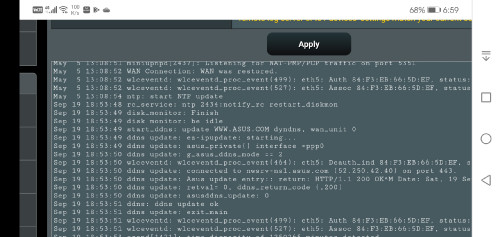 I had checked back my screen shot record. All system logs were revert back to may 2020 after "reset" issue happened. Not so frequent but still an unsolved issue to us who had this problems  Funny that my system logs also stuck in May, and never updated since... Asus Lyra here... Been getting intermittent disconnection issue on one of my nodes. It would seem Asus firmrware nowadays are shit... |
|
|
|
|
|
Eithanius
|
Jan 10 2021, 11:04 AM
|
|
|
QUOTE(blacktubi @ Jan 9 2021, 04:03 PM) Get the XT8, it costs a bit more but the performance is way better. Pretty much all issues are already solved by ASUS few months back.It's still the fastest mesh WiFi system that's available in Malaysia currently. Yes you can, but I wouldn't recommend buying a Lyra now unless you already own a Lyra. AiMesh runs poorly on that model. Does that include the poor AiMesh roaming issue...? Very tempted to get XT8 but my Lyra on 2-node setup just refuse to die... 3-node is pretty unstable, but I lazy to RMA the whole setup since MCO is unpredictable... This post has been edited by Eithanius: Jan 10 2021, 11:05 AM |
|
|
|
|
|
Eithanius
|
Jan 10 2021, 01:14 PM
|
|
|
QUOTE(blacktubi @ Jan 10 2021, 12:56 PM) The ZenWiFi series is 10x better than the Lyra. I doubt RMA can fix Lyra issue. As for the XT8, the roaming is pretty reliable now. 802.11k/v is already supported and more improvements are expected in the future. Thanks for the update... It's good to know...  Now I just need to hunt for discounts if any... Should I wait for WiFi 6E instead...? |
|
|
|
|
|
Eithanius
|
Feb 16 2021, 12:32 PM
|
|
|
My Lyra started acting up again after switching off for a week... Yesterday restarted back, but one of the nodes kept dropping off wifi the entire nite... This morning tried reset everything and upgrade to the latest beta firmware, but the affected node refused to join the AiMesh network... The Lyra is easily the worst router I've ever used... Feels like smashing them to pieces already... Can't imagine I paid 1 grand for these pieces of crap... 
 This post has been edited by Eithanius: Feb 16 2021, 12:34 PM
 |
|
|
|
|
|
Eithanius
|
Feb 17 2021, 10:20 AM
|
|
|
QUOTE(ASUSmy @ Feb 17 2021, 10:11 AM) Hi Eithanius, Make sure the node are near the main router before the adding process. Maybe you can try firmware restoration method on the effected node. If still same then it might be something wrong with the node. Thank you Nodes acting up was the point why I upgraded the firmware manually one by one to the latest beta... The nodes were side by side when I tried adding them again... |
|
|
|
|
|
Eithanius
|
Mar 4 2021, 02:04 PM
|
|
|
Just got a called from SC telling me my Asus Lyra sent in for warranty, that product line has been discontinued and offered to replace with the Lyra Trio... I was like what the heck...? AC2200 downgrade to AC1750 while my house already struggling to get signal even with the former nodes.
I totally rejected it and ask them to get me a better offer...
ASUSmy What are my alternatives...?
|
|
|
|
|



 Quote
Quote
 0.0409sec
 0.66
0.66
 7 queries
 GZIP Disabled