Welcome Guest ( Log In | Register )

Outline · [ Standard ] · Linear+

Home Networking ASUS Malaysia Networking User & Technical Support, Managed by ASUS Malaysia Representative

views
     
Eithanius
post Mar 4 2021, 02:30 PM

::+::KukuNius(tm)::+::
*******
Senior Member
3,952 posts

Joined: Apr 2005
From: Sector 1921B, Delta Quadrant


QUOTE(ASUSmy @ Mar 4 2021, 02:16 PM)
Hi Eithanius,

The RMA department will update you on the alternative as this is handle them.

Thank you
*
Yes but the fact is they should carry at least a few units of the original Lyra for RMA purposes. Not discontinue everything just because ASUS decided to stop selling this model. It's unbelievable that at ASUS, once a product stops selling, all activities related to that model shutter with it, including RMA and firmware updates. That doesn't bode well for consumer satisfaction...
Eithanius
post Mar 18 2021, 02:29 PM

::+::KukuNius(tm)::+::
*******
Senior Member
3,952 posts

Joined: Apr 2005
From: Sector 1921B, Delta Quadrant


Upgraded to Zen XT8 but still having frequent disconnection at upper floors with 5GHz, the same problem that was plaguing my original Lyra at 2.4GHz…

Any way to manually force just one device to use 2.4GHz only…? If XT8 is more powerful than the Lyra then 2.4GHz should solve my drop signal issue…
Eithanius
post Mar 20 2021, 03:00 PM

::+::KukuNius(tm)::+::
*******
Senior Member
3,952 posts

Joined: Apr 2005
From: Sector 1921B, Delta Quadrant


QUOTE(danielyeap @ Mar 20 2021, 09:41 AM)
1. How big is your place?
2. How many floors?
3. Where do you put your routers?
4. Which firmware are you using?
5. How many walls between your nearest node and the location you hv frequent disconnect?

XT8 is plenty powerful.
*
QUOTE(blacktubi @ Mar 20 2021, 01:47 PM)
The band steering still does not work properly in edge cases.

You can disable smart connect and use a different name for the 2.4Ghz network as a workaround. This will prevent your device from automatically switching to the weaker 5Ghz network.

The best case scenario is to purchase anothe single pack XT8 but that will involve additional $$$ investment.
*
danielyeap Good question... The firmware that came with the XT8 was ancient, more than a year old, and one firmware behind the fix for iPhone 11... Now wonder my iPhone wifi behaves like shit...

And to your questions above, the nearest node and the frequently disconnected location is about 2 walls and one concrete ceiling away... ph34r.gif

blacktubi I've reassigned channels for both 2.4GHz and 5GHz with much better results. Frequently DC location now almost can fly even with 5GHz...

With the Lyra I can only see 2.4GHz with intermittent disconnection...

I was thinking of getting a 3rd node but I need to hack my wall to re-wire another power outlet, costing far more than just a single XT8 investment...


Thanks guys... thumbsup.gif

This post has been edited by Eithanius: Mar 20 2021, 03:02 PM

Eithanius
post May 25 2021, 10:05 PM

::+::KukuNius(tm)::+::
*******
Senior Member
3,952 posts

Joined: Apr 2005
From: Sector 1921B, Delta Quadrant


Anyone here with a Zenwifi XT8 disconnects from Internet when accidentally nudge the main node...?
Eithanius
post May 26 2021, 10:37 AM

::+::KukuNius(tm)::+::
*******
Senior Member
3,952 posts

Joined: Apr 2005
From: Sector 1921B, Delta Quadrant


QUOTE(blacktubi @ May 26 2021, 12:57 AM)
Loose WAN port or old cable?

Try to clean the port with isopropyl alcohol if there's dirt on the pin.
*
cable came with the router... changed another cable also the same...

will check if got loose WAN port...

just got the unit 2 months ago, warranty replacement for my Lyra... not sure if it's refurbished unit...
Eithanius
post Oct 3 2021, 11:39 AM

::+::KukuNius(tm)::+::
*******
Senior Member
3,952 posts

Joined: Apr 2005
From: Sector 1921B, Delta Quadrant


So tu ZenWifi ET8 bila masuk...? brows.gif
Eithanius
post Oct 3 2021, 01:16 PM

::+::KukuNius(tm)::+::
*******
Senior Member
3,952 posts

Joined: Apr 2005
From: Sector 1921B, Delta Quadrant


QUOTE(blacktubi @ Oct 3 2021, 11:49 AM)
Not until MCMC approved 6Ghz band I guess tongue.gif

I am more interested in the ZenWiFi Pro though

Already can get 500Mbps on every corner with XT8. Doubt the ET8 gonna be a lot faster.

https://edgeup.asus.com/2021/zenwifi-pro-et...nwifi-pro-xt12/
*
drool.gif drool.gif drool.gif drool.gif brows.gif

This post has been edited by Eithanius: Oct 3 2021, 01:16 PM
Eithanius
post Nov 5 2021, 09:43 PM

::+::KukuNius(tm)::+::
*******
Senior Member
3,952 posts

Joined: Apr 2005
From: Sector 1921B, Delta Quadrant


Updated last week but my XT8 is purely on wireless... no issue so far... no time to tinker around here and there... no connection issue either...
Eithanius
post Jan 5 2022, 06:38 PM

::+::KukuNius(tm)::+::
*******
Senior Member
3,952 posts

Joined: Apr 2005
From: Sector 1921B, Delta Quadrant


Anyone here have their Asus routers connected to any wireless security cameras in their homes/offices...?

Been reading about some connectivity issues with Eufycams not able to maintain proper connection to an XT8...
Eithanius
post Jan 5 2022, 10:22 PM

::+::KukuNius(tm)::+::
*******
Senior Member
3,952 posts

Joined: Apr 2005
From: Sector 1921B, Delta Quadrant


QUOTE(blacktubi @ Jan 5 2022, 09:57 PM)
5Ghz high band channels are reserved to the 5Ghz-2 on XT8.

Yes, you can create Guest WiFi for 5Ghz-2.
From what I see online, the issue is due to Eufycam does not support AX properly.

Not ASUS fault on this.
*
Haha... maybe I should rephrase my sentence a bit... not blaming Asus though... Coz I've also read Eufy has problems with certain models from Netgear and Google...

Looks like my Eufy investment will have to put on hold... sad.gif

This post has been edited by Eithanius: Jan 5 2022, 10:23 PM
Eithanius
post Jan 5 2022, 11:08 PM

::+::KukuNius(tm)::+::
*******
Senior Member
3,952 posts

Joined: Apr 2005
From: Sector 1921B, Delta Quadrant


QUOTE(blacktubi @ Jan 5 2022, 10:53 PM)
Many IoT vendors still do not update their drivers to work with WiFi 6 properly. It will take a long long time.

I believe some will not be updated at all.
*
Have you experienced Tapo having connectivity issues with Wifi 6...?

I was scouting for Tapo cameras as well but it requires power as opposed to Eufy only on battery and solar-powered...
Eithanius
post Jan 5 2022, 11:52 PM

::+::KukuNius(tm)::+::
*******
Senior Member
3,952 posts

Joined: Apr 2005
From: Sector 1921B, Delta Quadrant


QUOTE(blacktubi @ Jan 5 2022, 11:49 PM)
TP-Link sell WiFi 6 routers as well, of course they will make sure their Tapo works with their own router.  tongue.gif

You can still use Eufy, just disable WiFi 6 on the 2.4Ghz of your router.

WiFi 6 on 2.4Ghz is pretty much conter-intuitive anyways.
*
Thanks… Appreciate your input… thumbup.gif
Eithanius
post Jan 18 2022, 11:01 PM

::+::KukuNius(tm)::+::
*******
Senior Member
3,952 posts

Joined: Apr 2005
From: Sector 1921B, Delta Quadrant


QUOTE(blacktubi @ Jan 18 2022, 01:17 PM)
Dont forget ASUS AX11000 router costs RM2000+

The XT12 is basically 2 units of AX11000 router.
*
Attached Image

If this is the real deal... ph34r.gif
Eithanius
post Feb 12 2022, 11:39 PM

::+::KukuNius(tm)::+::
*******
Senior Member
3,952 posts

Joined: Apr 2005
From: Sector 1921B, Delta Quadrant


QUOTE(jasonsaw96 @ Feb 12 2022, 07:08 PM)
Noobie here,

My house has 2 floors with around 23-30 devices connected most of the time. Unifi package is 500mbps. However, the speed is capped at max 280-29x Mbps with LAN. Currently using 7 year old router ASUS RT-AC55HP.

Other bigger issues are:
1. some users experience super slow internet (as low as 3mbps) or keep disconnecting despite connected to 2.4ghz.

2. Certain areas also have very poor connection or completely no signal (example: washroom upstairs).

Help me! I am prepared to upgrade or buy new equipments if necessary (but no need so high end la), just want future proof for the next 5-7 years if possible?
*
I've also got this problem at times despite using ZenWifi XT8... Dunno what the heck is going on with WiFi nowadays, not sure if it is congestion related...
Eithanius
post Mar 28 2022, 10:59 AM

::+::KukuNius(tm)::+::
*******
Senior Member
3,952 posts

Joined: Apr 2005
From: Sector 1921B, Delta Quadrant


QUOTE(blacktubi @ Mar 8 2022, 10:53 PM)
Been using the ZenWiFi Pro XT12 for 2 weeks now and here are my thoughts

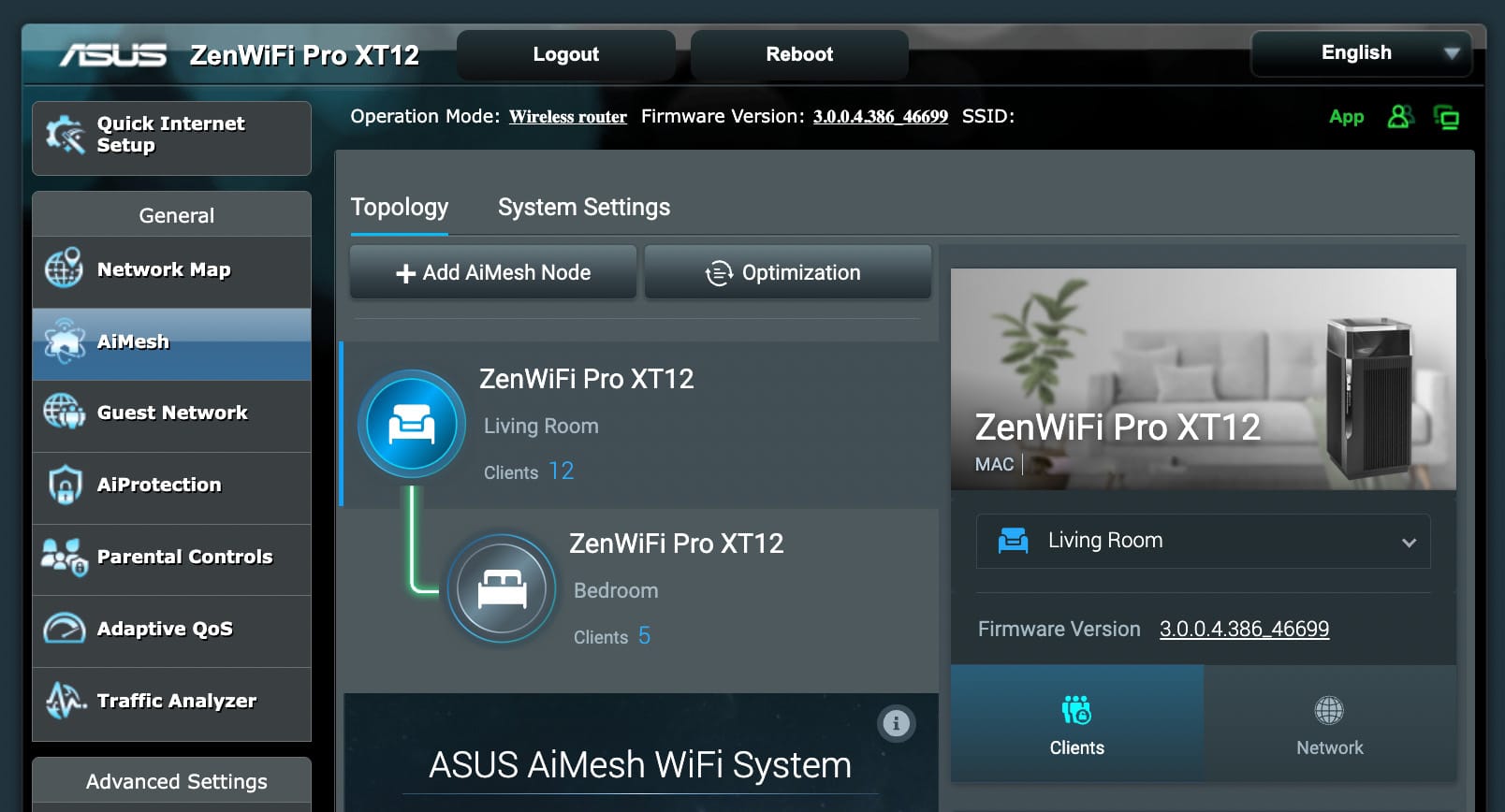
user posted image

Pros:
- Extremely good performance. 800Mbps everywhere at my property
- Way faster and stable than the ZenWiFi XT8. The XT8 is already a class-leading product but XT12 is so much better.
- The new 2.0Ghz Quad Core CPU is extremely fast, the XT12 is the first product to use this CPU
- Dual 2.5G WAN/LAN is very useful especially for those lucky Singaporeans with 2G Internet

At RM3888, I wouldn't accept anything less but the XT12 doesn't disappoint.

Shameless plug of my own site if you want to read more
https://www.blacktubi.com/review/asus-zenwifi-pro-xt12/
*
If you want to ditch your XT8 do send it my way… I still need a third node for my XT8 setup… brows.gif tongue.gif

XT12 way too overkill for my 100Mbps setup unless I strike Jackpot… ph34r.gif

This post has been edited by Eithanius: Mar 28 2022, 11:01 AM
Eithanius
post Mar 28 2022, 04:01 PM

::+::KukuNius(tm)::+::
*******
Senior Member
3,952 posts

Joined: Apr 2005
From: Sector 1921B, Delta Quadrant


QUOTE(blacktubi @ Mar 28 2022, 11:44 AM)
The strongest part of the XT12 is how well ASUS optimized the whole backhaul pipeline.

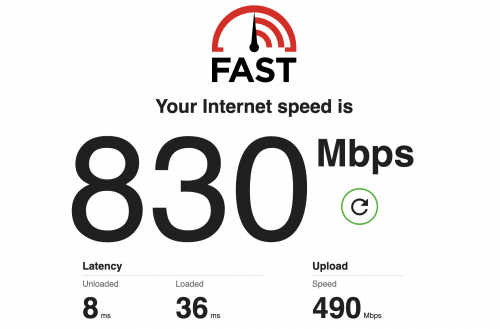
At full load of my TIME 1Gbps, the loaded latency (bufferbloat) is just 36ms. This is extremely good and truly best in class.

This will be a huge difference between a smooth or laggy conference call when your network is congested. Many mesh WiFi systems struggled on this particular test shooting all the way to few hundred ms.

Bear in mind, this is connected over WiFi to the mesh node on wireless backhaul.  icon_idea.gif

user posted image

Edit: Also worth mentioning, ASUS make full use of the new Broadcom chip. There's full hardware offload for all WiFi radio unlike the XT8.
*
This is very interesting... How do I find out if my problem stems from too many walls or too many networks, or both...? ph34r.gif
Eithanius
post Jun 19 2023, 10:51 AM

::+::KukuNius(tm)::+::
*******
Senior Member
3,952 posts

Joined: Apr 2005
From: Sector 1921B, Delta Quadrant


QUOTE(eclectice @ Jun 19 2023, 09:44 AM)
I haven't updated the firmware yet since getting the issue; so, both units are still with the old stock firmware Version 3.0.0.4.386.49723
*
Why didn't you update the firmware on the XT12 see if that solves the problem...?

I would try update firmware, then restore to factory default settings and setup again...

This post has been edited by Eithanius: Jun 19 2023, 10:54 AM
Eithanius
post Jun 19 2023, 09:01 PM

::+::KukuNius(tm)::+::
*******
Senior Member
3,952 posts

Joined: Apr 2005
From: Sector 1921B, Delta Quadrant


QUOTE(eclectice @ Jun 19 2023, 08:18 PM)
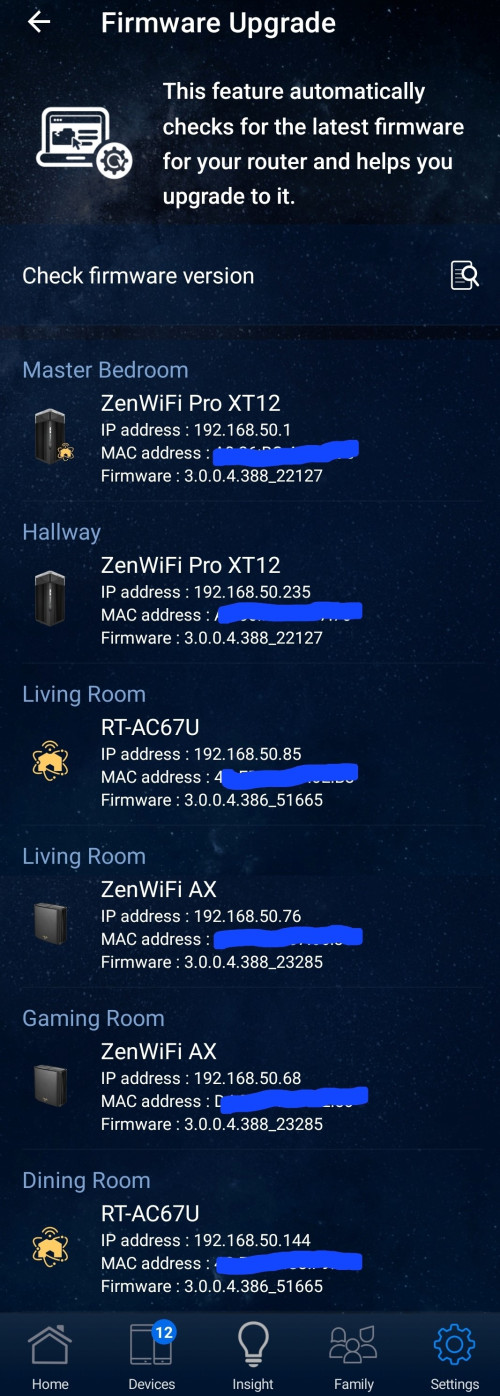
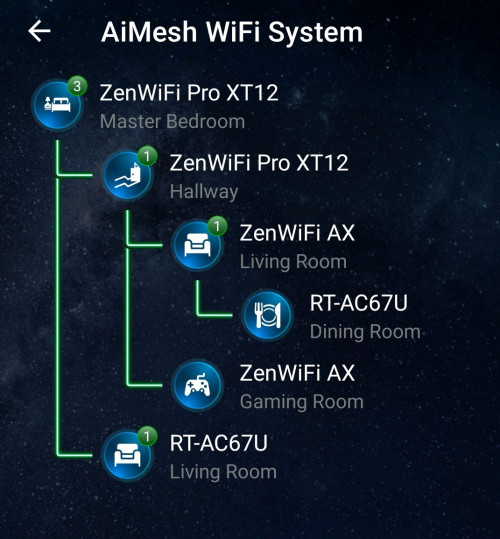
After updating my Pro XT12 router to the latest firmware ASUS ZenWiFi Pro XT12 Firmware version 3.0.0.4.388.22127, I was able to successfully resolve the issue with the WAN port in relation to PPPoE.

user posted image

user posted image

» Click to show Spoiler - click again to hide... «

*
You live in a castle or something...? blink.gif blink.gif

4 Pages « < 2 3 4Top
 

Change to:
| Lo-Fi Version
0.0530sec    0.85    7 queries    GZIP Disabled
Time is now: 12th December 2025 - 01:32 AM