Outline ·
[ Standard ] ·
Linear+
Maxis Maxis 3G/HS 4G Thread V8 (Not WBB), It's time for LTE now :p
|
LEVIATHAN
|
 Dec 27 2012, 05:17 PM Dec 27 2012, 05:17 PM
|

|
Even with antenna. Freaking EDGE with 1-2 bars. My phone keeps dropping E and no signal every several minutes. When I called Maxis they said nothing wrong in my area.
Asked me to give them a week to resolve this. I said FU I need my H now as I use it for work.
I guess that's the flipside of working from home.
|
|
|
|
|
|
greenlp_87
|
Dec 27 2012, 05:19 PM
|
|
|
QUOTE(LEVIATHAN @ Dec 27 2012, 05:17 PM) Even with antenna. Freaking EDGE with 1-2 bars. My phone keeps dropping E and no signal every several minutes. When I called Maxis they said nothing wrong in my area. Asked me to give them a week to resolve this. I said FU I need my H now as I use it for work. I guess that's the flipside of working from home. what modem u use? |
|
|
|
|
|
LEVIATHAN
|
Dec 27 2012, 06:21 PM
|
|
|
Running with a Huawei E587 something. It's a MiFi.
|
|
|
|
|
|
winyap991
|
Dec 27 2012, 06:34 PM
|
Getting Started

|
QUOTE(winyap991 @ Dec 27 2012, 12:56 PM) hope someone can break 20Mbps |
|
|
|
|
|
LEVIATHAN
|
Dec 27 2012, 06:50 PM
|
|
|
Yes yes somebody broke this guy e-penor already. Damn it.
|
|
|
|
|
|
TSblacktubi
|
Dec 27 2012, 06:52 PM
|
-

|
QUOTE(winyap991 @ Dec 27 2012, 06:34 PM) hope someone can break 20Mbps What if I break 30Mbps for you  |
|
|
|
|
|
digilife
|
Dec 27 2012, 06:52 PM
|
|
|
QUOTE(LEVIATHAN @ Dec 27 2012, 06:21 PM) Running with a Huawei E587 something. It's a MiFi. To use MiFi, you need to be smart, battery should be fully charged , set it to UMTS only , use a fish net to bundle the MiFi and hang it high up your celling i tried my e5331 , can touch 4Mbps when my MF680 managed 6Mbps |
|
|
|
|
|
chuahcs79
|
Dec 27 2012, 06:54 PM
|
Look at all my stars!!
|
Well not every one can get high result in speedtest.net. As of example speedtest is using 1 connection compare to idm 16 connection. If speedtest result is low = doesn't mean real speed is low. Some user also encounter low speedtest.net result but their real download speed is more than that. Even can exceed 20Mbps is speedtest doesn't mean the real download speed is maintain 20Mbps. Speedtest.net only last about 10-15 second. Real download speed is maintain the number after 30second to 1min.
|
|
|
|
|
|
digilife
|
Dec 27 2012, 07:02 PM
|
|
|
real speed 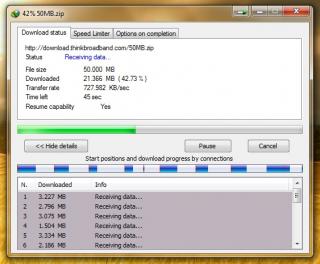
bull speed  |
|
|
|
|
|
wavezard
|
Dec 27 2012, 07:04 PM
|
|
|
QUOTE(digilife @ Dec 27 2012, 07:02 PM) real speed
bull speed usually when using mf680...how much your speed in idm?  compared to e398 |
|
|
|
|
|
digilife
|
Dec 27 2012, 07:09 PM
|
|
|
QUOTE(wavezard @ Dec 27 2012, 07:04 PM) usually when using mf680...how much your speed in idm? compared to e398 dua kali lima , lima kali dua ~ not much different MF680 and E398 are twin brothers But E398 have Masters Degree and will go for promotion when Appraisal time comes ( When Maxis launch LTE ) and MF680 only have a normal Degree ~ no promotion .  i have not setup my Antenna yet ~ Dual Panel  |
|
|
|
|
|
greenlp_87
|
Dec 27 2012, 07:10 PM
|
|
|
QUOTE(chuahcs79 @ Dec 27 2012, 06:54 PM) Well not every one can get high result in speedtest.net. As of example speedtest is using 1 connection compare to idm 16 connection. If speedtest result is low = doesn't mean real speed is low. Some user also encounter low speedtest.net result but their real download speed is more than that. Even can exceed 20Mbps is speedtest doesn't mean the real download speed is maintain 20Mbps. Speedtest.net only last about 10-15 second. Real download speed is maintain the number after 30second to 1min. exactly..totally agree with u 
Added on December 27, 2012, 7:12 pmQUOTE(digilife @ Dec 27 2012, 07:09 PM) dua kali lima , lima kali dua ~ not much different MF680 and E398 are twin brothers But E398 have Masters Degree and will go for promotion when Appraisal time comes ( When Maxis launch LTE ) and MF680 only have a normal Degree ~ no promotion . i have not setup my Antenna yet ~ Dual Panel setupla apa tggu lg This post has been edited by greenlp_87: Dec 27 2012, 07:12 PM |
|
|
|
|
|
bosouman
|
Dec 27 2012, 07:12 PM
|
|
|
QUOTE(bosouman @ Dec 27 2012, 05:14 PM) oh and btw.. i got my E398 today.. just wondering how to focus it signal to 2100.. since mdma doesnt work  QUOTE(bosouman @ Dec 27 2012, 06:44 PM) so.. i tried e398 on my mr3420.. idk what happen.. but i can't access my tplink dashboard via wifi and LAN.. reseted my router. and only LAN can access dashboard. plug-in my modem.. anddddddddd.......darkishblue/light blue light.. but no internet connection...frustrated edi... any tips? anyone..  |
|
|
|
|
|
digilife
|
Dec 27 2012, 07:16 PM
|
|
|
QUOTE(greenlp_87 @ Dec 27 2012, 07:10 PM) exactly..totally agree with u
Added on December 27, 2012, 7:12 pmsetupla apa tggu lg Bang i busy la.......... Antennas , SMA extension , TS9 all in ady........just that i have to get a plank to screw in the Antenna bracket cause i will have to move the plank that hold the twin Antenna around the four walls of my living area to get the G Spot.  p/s G=good, dun think otherwise  |
|
|
|
|
|
greenlp_87
|
Dec 27 2012, 07:18 PM
|
|
|
QUOTE(digilife @ Dec 27 2012, 07:16 PM) Bang i busy la.......... Antennas , SMA extension , TS9 all in ady........just that i have to get a plank to screw in the Antenna bracket cause i will have to move the plank that hold the twin Antenna around the four walls of my living area to get the G Spot. p/s G=good, dun think otherwise i also will find a best g=spot this saturday with my e372 & yagi |
|
|
|
|
|
digilife
|
Dec 27 2012, 07:18 PM
|
|
|
QUOTE(bosouman @ Dec 27 2012, 07:12 PM) anyone.. haha, your simcard is not compatible with this Modem ? wat modem you used before this ? if Maxis Branded ~ then 75% your simcard is not compatible with this modem
Added on December 27, 2012, 7:19 pmQUOTE(greenlp_87 @ Dec 27 2012, 07:18 PM) i also will find a best g=spot this saturday with my e372 & yagi e372 & yagi , signal bole pancut? This post has been edited by digilife: Dec 27 2012, 07:19 PM |
|
|
|
|
|
bosouman
|
Dec 27 2012, 07:23 PM
|
|
|
QUOTE(digilife @ Dec 27 2012, 07:18 PM) haha, your simcard is not compatible with this Modem ? wat modem you used before this ? if Maxis Branded ~ then 75% your simcard is not compatible with this modem
Added on December 27, 2012, 7:19 pme372 & yagi , signal bole pancut? Huawei E173(maxis).. Huawei E372(Huawei)...and its working on that modem.. currently online use E398.. and its working fine via usb.. but when use it on tplink mr3420 router....connected but no internet access..via lan and wifi  This post has been edited by bosouman: Dec 27 2012, 07:27 PM This post has been edited by bosouman: Dec 27 2012, 07:27 PM |
|
|
|
|
|
wavezard
|
Dec 27 2012, 07:28 PM
|
|
|
QUOTE(digilife @ Dec 27 2012, 07:18 PM) haha, your simcard is not compatible with this Modem ? wat modem you used before this ? if Maxis Branded ~ then 75% your simcard is not compatible with this modem
Added on December 27, 2012, 7:19 pme372 & yagi , signal bole pancut? what u mean by not supported? as now i use maxis simcard with e173 maxis modem...than e398 will not supported? |
|
|
|
|
|
winyap991
|
Dec 27 2012, 07:30 PM
|
Getting Started
|
QUOTE(chuahcs79 @ Dec 27 2012, 06:54 PM) Well not every one can get high result in speedtest.net. As of example speedtest is using 1 connection compare to idm 16 connection. If speedtest result is low = doesn't mean real speed is low. Some user also encounter low speedtest.net result but their real download speed is more than that. Even can exceed 20Mbps is speedtest doesn't mean the real download speed is maintain 20Mbps. Speedtest.net only last about 10-15 second. Real download speed is maintain the number after 30second to 1min. next time post idm screenshot |
|
|
|
|



 Quote
Quote




 0.0196sec
 1.05
1.05
 6 queries
 GZIP Disabled