Welcome Guest ( Log In | Register )

Bump Topic Topic Closed RSS Feed

Outline · [ Standard ] · Linear+

 [WTS] HIMEDIA Q5 Pro Quad Core 4K Smart Android TV, preload with Android 7 Nougat

views
     
TSnicety
post Dec 18 2013, 01:36 PM

Getting Started
**
Junior Member
108 posts

Joined: Aug 2011
From: Penang


QUOTE(h9s9h @ Dec 18 2013, 11:08 AM)
addon from xunitytalk.com  thumbup.gif
user posted image
tip: select hk server to be able to play pptv n youku in hitv. (use google public dns)
*
Thank you for the tips bro, this info is useful info to Q5 and Q5II buyers.
Andzriana
post Dec 18 2013, 02:06 PM

New Member
*
Newbie
2 posts

Joined: Oct 2010
for user what to explor ur XBMC... click this link.....

http://wiki.xbmc.org/index.php?title=Category:How-to
jutamind
post Dec 18 2013, 09:00 PM

Look at all my stars!!
*******
Senior Member
2,429 posts

Joined: Jul 2007
How to add this himedia xunity addon in xbmc? I've installed xunitytalk installer.

QUOTE(h9s9h @ Dec 18 2013, 11:08 AM)
addon from xunitytalk.com  thumbup.gif
user posted image
tip: select hk server to be able to play pptv n youku in hitv. (use google public dns)
*
jutamind
post Dec 18 2013, 09:22 PM

Look at all my stars!!
*******
Senior Member
2,429 posts

Joined: Jul 2007
I also realized whenever i use XBMC Video addons, i always get the droidgroups.com green screen layover the addons for 30 secs - 1 min....how do we block this?

h9s9h
post Dec 18 2013, 09:28 PM

New Member
*
Junior Member
43 posts

Joined: Jun 2006
From: Sarawak, Malaysia


QUOTE(jutamind @ Dec 18 2013, 09:00 PM)
How to add this himedia xunity addon in xbmc? I've installed xunitytalk installer.
*
this's not a addon in xbmc. it's hitv. it's pre-install in q5ii.
TSnicety
post Dec 18 2013, 10:10 PM

Getting Started
**
Junior Member
108 posts

Joined: Aug 2011
From: Penang


QUOTE(h9s9h @ Dec 18 2013, 09:28 PM)
this's not a addon in xbmc. it's hitv. it's pre-install in q5ii.
*
Just tested, it works with HK server now :-)

Thank you bro for the sharing bro.
mercun
post Dec 18 2013, 10:18 PM

New Member
*
Junior Member
12 posts

Joined: Oct 2007


anyone know where to download q6 11 latest firmware or its same as Q5 11 ?
jutamind
post Dec 18 2013, 10:27 PM

Look at all my stars!!
*******
Senior Member
2,429 posts

Joined: Jul 2007
iQiyi in HiTV seems to generate error message. anyone has such error?

QUOTE(nicety @ Dec 18 2013, 10:10 PM)
Just tested, it works with HK server now :-)

Thank you bro for the sharing bro.
*
TSnicety
post Dec 18 2013, 10:30 PM

Getting Started
**
Junior Member
108 posts

Joined: Aug 2011
From: Penang


QUOTE(taithinye @ Dec 18 2013, 12:07 PM)
i notice the xbmc in himedia can't save the channel into favorites tab as in android tablet.. anything that i miss ?
*
Just press the "menu" button in the addon screen, the "Add To Favorites" will shown as below.
Attached Image

P/S : Menu button available in Himedia Remote Control

This post has been edited by nicety: Dec 18 2013, 10:34 PM
TSnicety
post Dec 18 2013, 10:37 PM

Getting Started
**
Junior Member
108 posts

Joined: Aug 2011
From: Penang


QUOTE(jutamind @ Dec 18 2013, 10:27 PM)
iQiyi in HiTV seems to generate error message. anyone has such error?
*
iQiYi not works with HK server, China server is OK.

BGOOD
post Dec 19 2013, 06:51 PM

New Member
*
Junior Member
35 posts

Joined: Oct 2013
[quote=nicety,Dec 18 2013, 01:49 AM]
To my customers and forumers active in this thread :

It is time to update your xBMC addon, if you need the steps by steps guide, please email to me or download from my skydrive.


I need help on this, please check your hotmail.
TSnicety
post Dec 19 2013, 07:23 PM

Getting Started
**
Junior Member
108 posts

Joined: Aug 2011
From: Penang


QUOTE(BGOOD @ Dec 19 2013, 06:51 PM)
To my customers and forumers active in this thread :

It is time to update your xBMC addon, if you need the steps by steps guide, please email to me or download from my skydrive.
I need help on this, please check your hotmail.
*
Yes, just sent to you.

This post has been edited by nicety: Dec 19 2013, 07:33 PM
josenigel
post Dec 22 2013, 01:00 PM

Getting Started
**
Junior Member
227 posts

Joined: May 2007
From: Middle Earth


Received my package on Saturday. Thx nicety smile.gif
Getting used to my new media player now. Hope to learn more stuff here on your thread notworthy.gif
TSnicety
post Dec 22 2013, 01:23 PM

Getting Started
**
Junior Member
108 posts

Joined: Aug 2011
From: Penang


QUOTE(josenigel @ Dec 22 2013, 01:00 PM)
Received my package on Saturday. Thx nicety smile.gif
Getting used to my new media player now. Hope to learn more stuff here on your thread  notworthy.gif
*
Thank you for acknowledge receipt bro. Just sent you the link to my skydrive, we will prepare more step by step guide with screen shot and upload into the skydrive. Pls keep the link, you might need it in the future.
ccschua
post Dec 22 2013, 05:11 PM

Regular
******
Senior Member
1,630 posts

Joined: Jun 2006
pls pm best price Q5 ii with emmc.
TSnicety
post Dec 22 2013, 07:24 PM

Getting Started
**
Junior Member
108 posts

Joined: Aug 2011
From: Penang


QUOTE(ccschua @ Dec 22 2013, 05:11 PM)
pls pm best price Q5 ii with emmc.
*
Bro, dun be attracted by those marketing tactic. If you read Himedia web site, they did not mentioned about the EMMC at all because this is not really an upgrade. Only those 3rd party web site or reseller made it as major upgrade to attract the buyers.

Yes, the EMMC help booting faster few seconds. Nothing bad about EMMC, but the key function of the box is not the booting but the stability of the audio/video functions. We will would like to test the new EMMC firmware stability before intro to my customers. We will not have Q5II EMMC until Jan.

This post has been edited by nicety: Dec 22 2013, 07:28 PM
taithinye
post Dec 23 2013, 01:32 AM

Casual
***
Junior Member
369 posts

Joined: Dec 2008
Nothing wrong with the current booting. Why need Emma?
rgchai
post Dec 23 2013, 02:33 PM

Getting Started
**
Junior Member
167 posts

Joined: Oct 2007
From: Kuching


QUOTE(h9s9h @ Dec 18 2013, 11:08 AM)
addon from xunitytalk.com  thumbup.gif
user posted image
tip: select hk server to be able to play pptv n youku in hitv. (use google public dns)
*
Any idea how to add the HongKong server into the server list on HiTV v3 (Q5)? I checked my HiTV only got 4 or 5 servers there and HongKong server is not in the list.
TSnicety
post Dec 23 2013, 09:37 PM

Getting Started
**
Junior Member
108 posts

Joined: Aug 2011
From: Penang


QUOTE(taithinye @ Dec 23 2013, 01:32 AM)
Nothing wrong with the current booting. Why need Emmc?
*
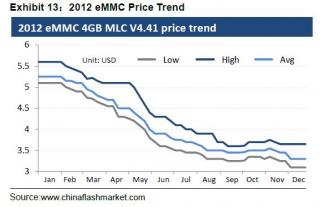
The real reason to use EMMC is due to the mass production cost of EMMC in China dropped, not the significant technology upgrade. You can verify in Himedia web site, Himedia did not emphasis of this in their web site but some reseller take the opportunity to increase the price. The worse is some seller related EMMC to the heat generated by the CPU.
user posted image

This post has been edited by nicety: Dec 24 2013, 01:31 AM


Attached thumbnail(s)
Attached Image
TSnicety
post Dec 25 2013, 03:23 AM

Getting Started
**
Junior Member
108 posts

Joined: Aug 2011
From: Penang


QUOTE(rgchai @ Dec 23 2013, 02:33 PM)
Any idea how to add the HongKong server into the server list on HiTV v3 (Q5)? I checked my HiTV only got 4 or 5 servers there and HongKong server is not in the list.
*
Technically could not add the HK server into HITV manually. However there is good news for you, firmware 1.1.5 is available now for Q5 1st generation, after upgrade to firmware 1.1.5 you will get the HK Server in HiTV. (P/S : Pls use Google DNS to access HITV because TM DNS will block HITV. However, please take note that HiTV might be laggy sometime)

Good news for Q5 Buyers:
Himedia do not forget you, although the product already end of sale but Himedia still continue release the new firmware version 1.1.5. Please download from my skydrive since Himedia website download speed is too slow. This is the beauty of buying Himedia product where you get continue firmware support as I shared in the selection criteria for Android TV Box. Please use the force upgrade method to upgrade your Q5 to 1.1.5 as per below steps :

1. Download the upgrade file from HIMEDIA website.
2. Copy the file into USB disk , ROOT directly. ( don’t change the filename)
3. Remove all other USB and HDD device from Q device, keep only the USB disk with upgrade file.
4. Press and hold the button in the RESTORE hole, then power on your Q5 ( release the RESTORE button after 5 sec)
5. The box will enter into Recovery mode, then start to upgrade. You should see the greenrobot and the upgrade progress bar.
6. Wait for the upgrade finished and the box will reboot

P/S : Remember to copy the backup APK out before update the new firmware such that you can reinstall the app again after upgrade.

1.1.4
user posted image

1.1.5
user posted image

This post has been edited by nicety: Dec 28 2013, 01:20 AM

134 Pages « < 54 55 56 57 > » Top
Topic ClosedOptions
 

Change to:
| Lo-Fi Version
0.0259sec    0.88    6 queries    GZIP Disabled
Time is now: 8th December 2025 - 08:56 PM