Outline ·
[ Standard ] ·
Linear+
[WTS] HIMEDIA Q5 Pro Quad Core 4K Smart Android TV, preload with Android 7 Nougat
|
TSnicety
|
 Dec 10 2013, 11:51 PM Dec 10 2013, 11:51 PM
|
Getting Started


|
QUOTE(gg8090 @ Dec 10 2013, 11:45 PM) Just received my QII today. Excellent NAS player(mp4, mkv etc with external .srt) Picture quality was also excellent. Thanks Nicety for prompt service. Anyway,i'm having problem with the Airplay. Currently using iPhone 5C & iPad 4 both running IOS 7.0.4. I'm able to connect to Q5iiEN@202 at home button. But when i try Airplay my photo or movie, i cannot see the option(only iPhone & apple tv appear). Any clue? To further understand your problem, pls sent me the your ipad or iphone screen via email and briefly explain how do you airplay the photo and movies. Via the native IOS player or 3rd party player? This post has been edited by nicety: Dec 10 2013, 11:52 PM |
|
|
|
|
|
gg8090
|
Dec 11 2013, 12:39 AM
|
New Member
|
ok, i've emailed you.
|
|
|
|
|
|
TSnicety
|
Dec 11 2013, 01:12 AM
|
Getting Started
|
QUOTE(gg8090 @ Dec 11 2013, 12:39 AM) Thank you bro, I hv received your email. Will revert back you as soon as possible. |
|
|
|
|
|
feizaiII
|
Dec 11 2013, 11:20 AM
|
|
|
QUOTE(nicety @ Aug 25 2013, 11:24 AM) Below webcam model tested by Himedia : SSK DC-P331 10Moon D804RC Logitech HD 720P Physically there is no video/audio input for Q5, therefore you could not records Astro from Q5. I have tested Astro On The Go apps , it support only iPad and Samsung devices. I do not know why Astro limit the device in their apps. To rate Q5, it is very much depend on the requirement. Overall I will rate 9 out of 10. Question to Q5 Buyers :If you have tested any webcam model works in Q5, would be appreciated if you could share it here. I will accumulate the list of webcam model here. Hi nicety, you have intalled Astro-On-The-GO in your himedia? Was trying to install but it show device is not support in Google Play. |
|
|
|
|
|
TSnicety
|
Dec 11 2013, 12:18 PM
|
Getting Started
|
QUOTE(feizaiII @ Dec 11 2013, 11:20 AM) Hi nicety, you have intalled Astro-On-The-GO in your himedia? Was trying to install but it show device is not support in Google Play. As mentioned in the thread, Astro on the go only support iPad and Samsung device only. Therefore you got the error message Device not Supported. |
|
|
|
|
|
feizaiII
|
Dec 11 2013, 01:12 PM
|
|
|
QUOTE(nicety @ Dec 11 2013, 12:18 PM) As mentioned in the thread, Astro on the go only support iPad and Samsung device only. Therefore you got the error message Device not Supported. Thanks, thought you have workaround. Anyways, good support you giving. |
|
|
|
|
|
gg8090
|
Dec 12 2013, 10:37 PM
|
New Member
|
Hi Nicety,
Can we configure Q5II as a hotspot/access point. Meaning that no need a wifi router.
|
|
|
|
|
|
gg8090
|
Dec 12 2013, 10:55 PM
|
New Member
|
QUOTE(nicety @ Dec 10 2013, 11:51 PM) To further understand your problem, pls sent me the your ipad or iphone screen via email and briefly explain how do you airplay the photo and movies. Via the native IOS player or 3rd party player? Hi Nicety, The same problem occur. By the way, i've found the solution. I need to on & off the wifi connection from iPhone/Ipad to access point several times until the Q5II Airplay connection appear as video connection. Otherwise, it'll just establish a speaker connection. However, i still cannot detect Q5II Airplay via my Mac Book. thx, |
|
|
|
|
|
TSnicety
|
Dec 12 2013, 11:37 PM
|
Getting Started
|
QUOTE(gg8090 @ Dec 12 2013, 10:55 PM) Hi Nicety, The same problem occur. By the way, i've found the solution. I need to on & off the wifi connection from iPhone/Ipad to access point several times until the Q5II Airplay connection appear as video connection. Otherwise, it'll just establish a speaker connection. However, i still cannot detect Q5II Airplay via my Mac Book. thx, Thank you for sharing the solution. I do not have MAcBook to test, but I will try to Google if there is any different between IPhone AirPlay Sender and MacBook AirPlay Sender. |
|
|
|
|
|
jjmmph
|
Dec 13 2013, 08:00 AM
|
New Member
|
Nicety, I downloaded Bit Torrent in my Q5ii. Is there a way that I can configure my BT to save downloads directly to my external HDD? Thanks!
|
|
|
|
|
|
TSnicety
|
Dec 13 2013, 09:50 AM
|
Getting Started
|
QUOTE(jjmmph @ Dec 13 2013, 08:00 AM) Nicety, I downloaded Bit Torrent in my Q5ii. Is there a way that I can configure my BT to save downloads directly to my external HDD? Thanks! If the app do not allow you to specify the download path, pls try to set the default storage external hard disk, just goto Settings->default storage. If you goto GooglePlay, you could find few different BT downloader, I am not which one you installed. First to to find the app which allow you to set download path, if could not find only consider default storage setting. This post has been edited by nicety: Dec 13 2013, 09:52 AM |
|
|
|
|
|
taithinye
|
Dec 13 2013, 05:08 PM
|
|
|
QUOTE(jjmmph @ Dec 13 2013, 08:00 AM) Nicety, I downloaded Bit Torrent in my Q5ii. Is there a way that I can configure my BT to save downloads directly to my external HDD? Thanks! what BT app you are using ? |
|
|
|
|
|
jjmmph
|
Dec 13 2013, 07:49 PM
|
New Member
|
QUOTE(taithinye @ Dec 13 2013, 05:08 PM) what BT app you are using ? I am using Bit Torrent. I can't find in the preference settings where you set the download path, just like how it is done in desktop version of the software. |
|
|
|
|
|
urgo88
|
Dec 13 2013, 10:07 PM
|
Getting Started
|
Received my Q5II from nicety. He did a very good job in setting up the 'must-have' applications and provided the useful guide for newbies. Without these 2 value-add, I believe the learning curve is very steep.
|
|
|
|
|
|
TSnicety
|
Dec 13 2013, 11:27 PM
|
Getting Started
|
QUOTE(urgo88 @ Dec 13 2013, 10:07 PM) Received my Q5II from nicety. He did a very good job in setting up the 'must-have' applications and provided the useful guide for newbies. Without these 2 value-add, I believe the learning curve is very steep. Thank you bro for your appreciation :-) |
|
|
|
|
|
DaTaPcHousE
|
Dec 14 2013, 03:52 AM
|
Getting Started
|
please pm the best price.
|
|
|
|
|
|
TSnicety
|
Dec 14 2013, 10:14 AM
|
Getting Started
|
QUOTE(DaTaPcHousE @ Dec 14 2013, 03:52 AM) please pm the best price. Thank you bro, just pmed to you. |
|
|
|
|
|
bloophead
|
Dec 14 2013, 05:03 PM
|
New Member
|
QUOTE(nicety @ Dec 6 2013, 10:10 PM) Please goto Setting and search for the below screen and click as per the mouse cursor. [attachmentid=3756959] Hey, thanks for this! Another couple of issues I am having: - Whenever I try to turn the ethernet cable on and off, the settings application crashes! Is there a fix? - I shared a new folder on my home network, but when i try to access it through the file explorer, although I can see the folder, when i click on it, I get a 'no server' response. Any idea what is going on? Do you think I need to upgrade the software? Also the LCD display on the unit seems to be dying one node after another! Anyone else experiencing this? |
|
|
|
|
|
TSnicety
|
Dec 14 2013, 06:27 PM
|
Getting Started
|
QUOTE(jjmmph @ Dec 13 2013, 08:00 AM) Nicety, I downloaded Bit Torrent in my Q5ii. Is there a way that I can configure my BT to save downloads directly to my external HDD? Thanks! Just simulated your problem using Bit-torrent version 1.31. I noticed that when you add the torrent, you enter "Save to" for the first time, it will save the same path for the next time. Do you have this? If yes, then you just need to set for the first time until you change the path again. 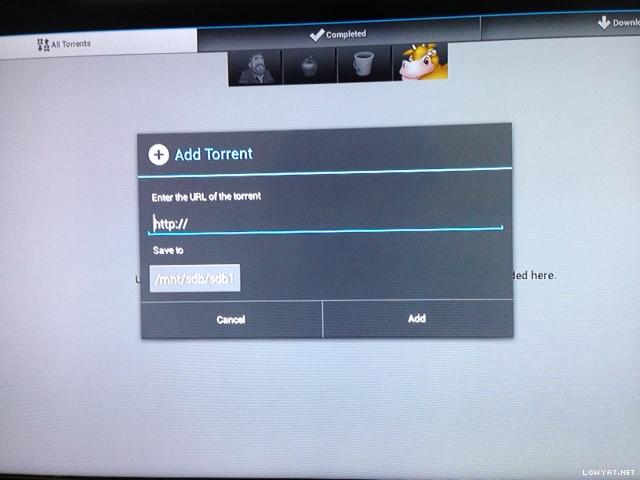 This post has been edited by nicety: Dec 14 2013, 06:29 PM Attached thumbnail(s) This post has been edited by nicety: Dec 14 2013, 06:29 PM Attached thumbnail(s)
|
|
|
|
|
|
urgo88
|
Dec 14 2013, 07:02 PM
|
Getting Started
|
Can a wireless keyboard combo like Logitech Wireless Combo MK270 be used with Q5II? Or must it be just a wireless mouse?
|
|
|
|
|



 Quote
Quote


 0.0233sec
 0.41
0.41
 6 queries
 GZIP Disabled