

One of the LYN Iphone expert with great reputation

The Official iPhone 4S Discussion Thread v7, the awaiting iPhone 5, on 7th August!
|
|
 Jan 3 2013, 12:32 AM Jan 3 2013, 12:32 AM
|
 
Senior Member
786 posts Joined: Oct 2011 
|
http://forum.lowyat.net/index.php?showtopic=1810771&hl=
One of the LYN Iphone expert with great reputation |
|
|
|
|
|
Jan 31 2013, 08:51 PM
|

Senior Member
505 posts Joined: Aug 2007 From: Bandar Sri Damansara, Kuala Lumpur 
|
Anybody here experiencing issues where the Wifi option in the settings is grey out and cannot be turned on? (image below)
I don't think it's a hardware problem as I did some google searching and turns out that it only happened after upgraded to iOS 6 and mostly happen on 4S (never seen any posts regarding this problem on iPhone 5, iPhone 4 or 3GS). Are there any solutions to this? Updating it to iOS 6.1 didn't solve the problem, restoring, rebooting etc etc also doesn't help. This post has been edited by Heero Yuy: Jan 31 2013, 08:52 PM Attached thumbnail(s) 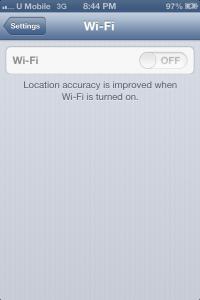
|
|
|
Jan 31 2013, 09:12 PM
|

Junior Member
358 posts Joined: Dec 2009 From: bolehland
|
Its a hardware problem dude
|
|
|
Jan 31 2013, 09:20 PM
|

Senior Member
2,631 posts Joined: Feb 2005 From: Tsimtsum 
|
Usually in this case if you bring to claim warranty, they will give you a new replacement unit. Seems like a hardware issue
 |
|
|
Jan 31 2013, 09:45 PM
|

Senior Member
2,574 posts Joined: Mar 2008 From: Puchong 
|
It's confirmed wifi chip issue. Effect from dropping your iPhone for sure. Read hardware stickies for more infos. A lot of other people faced the same
|
|
|
Feb 1 2013, 12:06 AM
|

Junior Member
10 posts Joined: Jan 2013 
|
Hi, I'm a new iPhone 4S user. Anybody update to iOS 6.1 yet?
I did it yesterday and there's a problem with updating apps. Apparently when I go to App Store > Updates, the page is blank. I tried hard reset as recommended by a kind forumer here, but it didn't do the trick. Really hope Apple will fix this. |
|
|
|
|
|
Feb 1 2013, 12:34 AM
|

Senior Member
2,302 posts Joined: Jan 2011 From: Monster Hunter Freedom Unite
|
QUOTE(yezhacolic @ Jan 31 2013, 09:45 PM) It's confirmed wifi chip issue. Effect from dropping your iPhone for sure. Read hardware stickies for more infos. A lot of other people faced the same How much to fix this bro? |
|
|
Feb 11 2013, 11:20 PM
|

Newbie
1 posts Joined: Feb 2013
|
Same problem here dude. Its happen when i upgrading to ios 6.1 . before this wifi can use . I dont know how to fix this
 |
|
|
Feb 12 2013, 01:03 PM
|

Senior Member
2,139 posts Joined: Oct 2007
|
Try to update to 6.1.1?
"fixes an issue that could impact cellular performance and reliability for iPhone 4S." Not sure if this Wifi problem would be fixed. |
|
|
Feb 21 2013, 02:07 PM
|
|
Junior Member
31 posts Joined: May 2010
|
I think is ios 6 problem.. my 4s after upgrade can't connect to wifi .. always show incorrect password..
|
|
|
Feb 22 2013, 04:51 PM
|
|
Junior Member
22 posts Joined: Nov 2005
|
After updating to 6.1.2 on Wednesday night, my i4s couldn't enable the wifi option. Prior to that working perfectly.
|
|
|
Feb 22 2013, 05:42 PM
|

Junior Member
228 posts Joined: Nov 2006 From: Kuala Lumpur
|
QUOTE(Heero Yuy @ Jan 31 2013, 08:51 PM) Anybody here experiencing issues where the Wifi option in the settings is grey out and cannot be turned on? (image below) This may be a ridiculous question..but,do you use the correct ipsw during restore??i've once encounter this a long time ago when i use iphone ipsw to restore an ipod touch..the perfect example to describe is like when u want to format a PC@laptop,u have to find the correct driver or installer for your hardware e.g sound,graphic cards etc..if use a different driver, it may not function perfectly..since u said it works fine before updating,i don't think its hardware problem..better check it again..if u're sure u use the correct ipsw,then u might want to send it for warrantyI don't think it's a hardware problem as I did some google searching and turns out that it only happened after upgraded to iOS 6 and mostly happen on 4S (never seen any posts regarding this problem on iPhone 5, iPhone 4 or 3GS). Are there any solutions to this? Updating it to iOS 6.1 didn't solve the problem, restoring, rebooting etc etc also doesn't help. |
|
|
Feb 22 2013, 05:48 PM
|
|
Junior Member
14 posts Joined: Jul 2009
|
Its a known hardware problem within a certain batch of Iphone ,if ur phone is still under Network provider's warranty...then u shud send it back for replacement..
|
|
|
|
|
|
Feb 25 2013, 11:52 AM
|
|
Junior Member
14 posts Joined: Sep 2011
|
this problem make me afraid to update 6.1.2..currently use 6.0..
i thought this problem happen to jailbreak phone only~ |
|
|
Feb 25 2013, 11:57 AM
|

All Stars
10,688 posts Joined: Jan 2005
|
QUOTE(maderfader @ Feb 22 2013, 05:42 PM) This may be a ridiculous question..but,do you use the correct ipsw during restore??i've once encounter this a long time ago when i use iphone ipsw to restore an ipod touch..the perfect example to describe is like when u want to format a PC@laptop,u have to find the correct driver or installer for your hardware e.g sound,graphic cards etc..if use a different driver, it may not function perfectly..since u said it works fine before updating,i don't think its hardware problem..better check it again..if u're sure u use the correct ipsw,then u might want to send it for warranty Possible ehh?AFAIK, whenever you try restore the wrong ipsw, iTunes can detect its not matching Unless you using other app to resstore the ipsw.. |
|
|
Feb 25 2013, 12:20 PM
|
|
Junior Member
228 posts Joined: Nov 2006 From: Kuala Lumpur
|
QUOTE(gengstapo @ Feb 25 2013, 11:57 AM) Possible ehh? It really did happen to me,maybe that time they didn't put a restriction to what kind of ipsw to install which idevice..n i didn't remember itunes have any popups like that(the mismatch ipsw with device)AFAIK, whenever you try restore the wrong ipsw, iTunes can detect its not matching Unless you using other app to resstore the ipsw.. |
|
|
Feb 25 2013, 12:22 PM
|

Senior Member
2,109 posts Joined: Jan 2003 From: Damansara Damai, PJ
|
did your phone heat up once after updating?? i guess your wifi chip burnt/shorted.. Must claim warranty already.. bluetooth also cannot turn on?? No amount of updating will help. Some even suggest putting into freezer..lol
This post has been edited by loki: Feb 25 2013, 12:24 PM |
|
|
Feb 25 2013, 12:59 PM
|
|
All Stars
10,688 posts Joined: Jan 2005
|
QUOTE(maderfader @ Feb 25 2013, 12:20 PM) It really did happen to me,maybe that time they didn't put a restriction to what kind of ipsw to install which idevice..n i didn't remember itunes have any popups like that(the mismatch ipsw with device) Ic, thats badWell, it never happen to me Been long time using iPhone, never encounter such error.. |
|
|
Feb 25 2013, 04:37 PM
|

Senior Member
2,459 posts Joined: May 2006 From: Land Below the Wind
|
many people with 4s updated to 6.1.x having no wifi option greyed out.
I know because few of my frens did.lol google also no work around. I dont think its hardware problem though. |
|
|
Feb 25 2013, 07:45 PM
|

Junior Member
594 posts Joined: Dec 2009
|
Either reset your network settings. Or reboot. Happened to me before @.@
|
|
Topic ClosedOptions
|
| Change to: |  0.0198sec 0.0198sec
 0.85 0.85
 6 queries 6 queries
 GZIP Disabled GZIP Disabled
Time is now: 14th December 2025 - 04:32 AM |
 Quote
Quote