QUOTE(warrior @ Jun 2 2012, 01:08 AM)
hey guys, saw some complains in xda forum regarding G version ICS update make total memory shown only 687mb, can someone confirm if msia ics has that problem?

true..i sc my phone 

Samsung Galaxy S II Official Thread V33, Official ICS for Non-G and G! First Post
|
|
 Jun 2 2012, 01:15 AM Jun 2 2012, 01:15 AM
|
 
Junior Member
66 posts Joined: Jul 2009  
|
QUOTE(warrior @ Jun 2 2012, 01:08 AM) hey guys, saw some complains in xda forum regarding G version ICS update make total memory shown only 687mb, can someone confirm if msia ics has that problem? true..i sc my phone |
|
|
|
|
|
Jun 2 2012, 01:35 AM
|

Junior Member
204 posts Joined: Oct 2006 From: Taiping
|
anybody know the new button to capture a screenshot in ICS?
before this we need to press Home + ON button...but now only the Task Manager appear.. |
|
|
Jun 2 2012, 01:38 AM
|

Senior Member
5,011 posts Joined: Aug 2011
|
QUOTE(areev19 @ Jun 2 2012, 01:35 AM) anybody know the new button to capture a screenshot in ICS? http://lmgtfy.com/?q=how+to+snap+screenshot+on+ics+sgs2before this we need to press Home + ON button...but now only the Task Manager appear.. Here you go |
|
|
Jun 2 2012, 01:41 AM
|

Senior Member
3,699 posts Joined: May 2006 
|
QUOTE(areev19 @ Jun 2 2012, 01:35 AM) anybody know the new button to capture a screenshot in ICS? volume down + power button press for 2sec.before this we need to press Home + ON button...but now only the Task Manager appear.. |
|
|
Jun 2 2012, 01:41 AM
|
|
Junior Member
204 posts Joined: Oct 2006 From: Taiping
|
QUOTE(mtxx @ Jun 2 2012, 01:38 AM) i already googled before i post here lor...all methods didnt work, thats why i'm asking here...  Added on June 2, 2012, 1:42 am QUOTE(Shizuru @ Jun 2 2012, 01:41 AM) volume down + power button press for 2sec. its not working...i tried already... im using the new stock ICS... Added on June 2, 2012, 1:47 ami guess the screenshot button for stock ICS 'G' version is different and still unknown. tried the volume down + on and normal on + home button, but still not working...  This post has been edited by areev19: Jun 2 2012, 01:47 AM |
|
|
Jun 2 2012, 02:00 AM
|

Senior Member
3,432 posts Joined: Apr 2010 
|
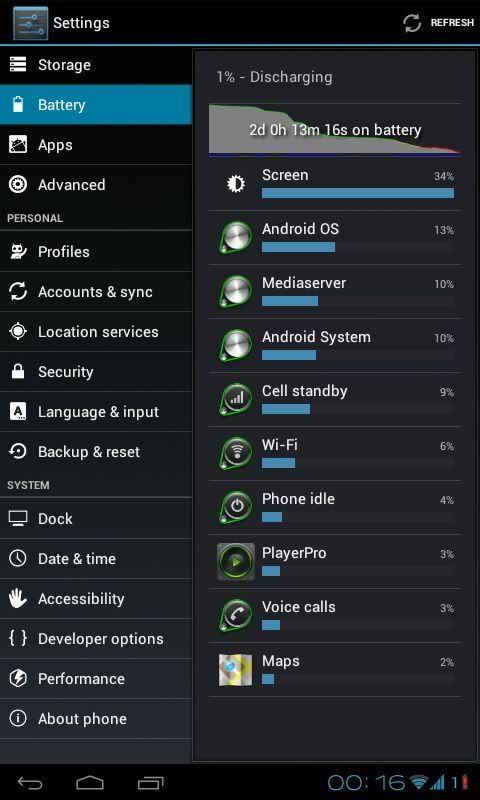
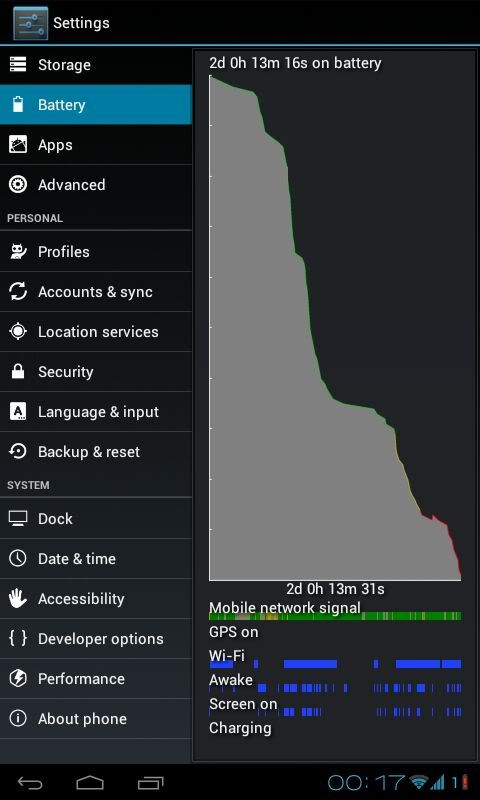
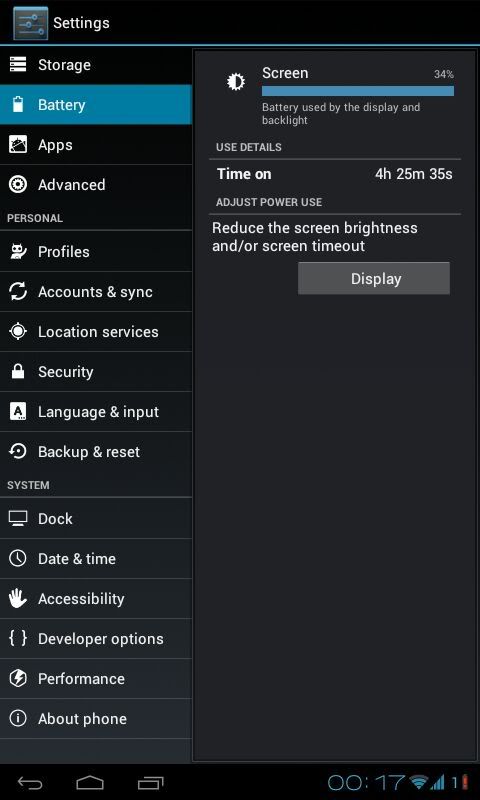
QUOTE(funny duck @ Jun 2 2012, 12:11 AM) galaxy s2 can last for how long?? 2 years,3 years or 10 years???? depends on what you aim for, if for normal use i'd say last for 3 more years also can, afterall it can do mostly everything a laptop can do now, as in play music/moviesQUOTE(nehalem176 @ Jun 2 2012, 12:32 AM) not bad but anybody can do better than me wow at fiz see quite imba, budden 4hr 25 mins screen on, quite nice la but u must really rarely use ur phone lol, btw what's your xxtweaks settings? » Click to show Spoiler - click again to hide... « » Click to show Spoiler - click again to hide... « » Click to show Spoiler - click again to hide... « QUOTE(areev19 @ Jun 2 2012, 01:41 AM) i already googled before i post here lor...all methods didnt work, thats why i'm asking here... follow exactly ah, u put both finger on the volume down and power on buttons. then u press the power on button first, then immediately press the volume button, both press ad, u hold them for 1 secs or two and it will snap pic. if the volume bar or the power menu comes out then u wrong adAdded on June 2, 2012, 1:42 am its not working...i tried already... im using the new stock ICS... Added on June 2, 2012, 1:47 ami guess the screenshot button for stock ICS 'G' version is different and still unknown. tried the volume down + on and normal on + home button, but still not working... |
|
|
|
|
|
Jun 2 2012, 02:01 AM
|

All Stars
12,573 posts Joined: Nov 2008
|
Anyone saw this? haha quite enticing the price.. and 1024X600!!!!
http://forum.lowyat.net/index.php?showtopi...&#entry51857388 Btw, updating to ICS now. Almost finished  This post has been edited by -kytz-: Jun 2 2012, 02:04 AM |
|
|
Jun 2 2012, 02:02 AM
|
|
Senior Member
3,432 posts Joined: Apr 2010
|
QUOTE(-kytz- @ Jun 2 2012, 02:01 AM) Anyone saw this? haha quite enticing the price.. and 1024X600!!!! i saw nothing Btw, updating to ICS now. Almost finished  |
|
|
Jun 2 2012, 02:03 AM
|

Junior Member
395 posts Joined: Nov 2006 From: Sri Kembangan, Putrajaya, K.Terengganu, Butterworth
|
QUOTE(antt00 @ Jun 1 2012, 05:35 PM) fluxi kernel only for AOSP/AOKP. samsung rom cannot use. red it wrongly, thought it said for aokp or ics.take it suitable since vk is ics. tq for the correctoQUOTE(nehalem176 @ Jun 1 2012, 06:43 PM) seriously flash fluxi at samsung based rom? *facepalm.... if you know how to flash that rom, by right you should know which based for that ROM. Come on... what on earth happen here..? yeah yeah...android user all over the world that know to flash never did moronic mistake like this except me.extreme facepalm for me  sorry for wasting the bandwith with my q.truly i am sorry for wasting the bandwith with my q.truly i am |
|
|
Jun 2 2012, 02:05 AM
|
|
All Stars
12,573 posts Joined: Nov 2008
|
QUOTE(destEX @ Jun 2 2012, 02:02 AM) i saw nothing Aisehh  http://forum.lowyat.net/topic/2362935 http://forum.lowyat.net/topic/2362935Design is neat, simple and nice actually. Packed with Dual core 1.2GHz, 1024X600 7" screen,1GB ram and 16GB memory  Added on June 2, 2012, 2:10 amOhh Hello ICS!!!!! Added on June 2, 2012, 2:14 amEhhh ICS stock browser scrolling&pinch to zoom not as smooth as GB?  This post has been edited by -kytz-: Jun 2 2012, 02:14 AM |
|
|
Jun 2 2012, 02:17 AM
|
|
Senior Member
3,699 posts Joined: May 2006
|
QUOTE(-kytz- @ Jun 2 2012, 02:05 AM) Aisehh use chrome beta http://forum.lowyat.net/topic/2362935Design is neat, simple and nice actually. Packed with Dual core 1.2GHz, 1024X600 7" screen,1GB ram and 16GB memory Added on June 2, 2012, 2:10 amOhh Hello ICS!!!!! Added on June 2, 2012, 2:14 amEhhh ICS stock browser scrolling&pinch to zoom not as smooth as GB? |
|
|
Jun 2 2012, 02:18 AM
|
|
Junior Member
204 posts Joined: Oct 2006 From: Taiping
|
follow exactly ah, u put both finger on the volume down and power on buttons. then u press the power on button first, then immediately press the volume button, both press ad, u hold them for 1 secs or two and it will snap pic. if the volume bar or the power menu comes out then u wrong ad [/quote] i tried it already...i guess its just not working on stock ICS 'G' version. are u using 'G' version ICS? anybody using new stock 'G' ICS can confirm that? |
|
|
Jun 2 2012, 02:21 AM
|
|
Senior Member
3,432 posts Joined: Apr 2010
|
QUOTE(-kytz- @ Jun 2 2012, 02:05 AM) Aisehh http://forum.lowyat.net/topic/2362935Design is neat, simple and nice actually. Packed with Dual core 1.2GHz, 1024X600 7" screen,1GB ram and 16GB memory  how much the tablet? btw ntg special about 1024x600 la galaxy note is 1280x800 lor and i think the new ipad has even bigger resolution how much the tablet? btw ntg special about 1024x600 la galaxy note is 1280x800 lor and i think the new ipad has even bigger resolution2048-by-1536-pixel resolution at 264 pixels per inch (ppi) heck its even lower resolution that the old ipads |
|
|
|
|
|
Jun 2 2012, 02:26 AM
|
|
All Stars
12,573 posts Joined: Nov 2008
|
QUOTE(Shizuru @ Jun 2 2012, 02:17 AM) use chrome beta Ohh yaaah!! I go try that now  QUOTE(destEX @ Jun 2 2012, 02:21 AM) how much the tablet? btw ntg special about 1024x600 la galaxy note is 1280x800 lor and i think the new ipad has even bigger resolution2048-by-1536-pixel resolution at 264 pixels per inch (ppi) heck its even lower resolution that the old ipads  Most of the cheapo tablets are using 800X480 saja though I'm not exactly sure of the Ainol RM800 tablet.. And ohh, the tablet is RM560 saja This post has been edited by -kytz-: Jun 2 2012, 02:27 AM |
|
|
Jun 2 2012, 02:27 AM
|
|
Senior Member
3,432 posts Joined: Apr 2010
|
QUOTE(-kytz- @ Jun 2 2012, 02:26 AM) Ohh yaaah!! I go try that now yea deswai my first sentence is "what is the price" Well, try to find a cheapo tablet around RM500-800 that uses more than 800X480? Most of the cheapo tablets are using 800X480 saja though I'm not exactly sure of the Ainol RM800 tablet.. This post has been edited by destEX: Jun 2 2012, 02:30 AM |
|
|
Jun 2 2012, 02:29 AM
|
|
All Stars
12,573 posts Joined: Nov 2008
|
QUOTE(destEX @ Jun 2 2012, 02:27 AM) yea deswai my first sentence is "what is the price" RM560 I edited my post above you btw, added youtube This post has been edited by -kytz-: Jun 2 2012, 02:29 AM |
|
|
Jun 2 2012, 02:31 AM
|
|
Senior Member
3,432 posts Joined: Apr 2010
|
QUOTE(-kytz- @ Jun 2 2012, 02:29 AM) RM560 oh? rm560? boleh lah, slightly more expensive than a psp3000 lol, budden the processor and gpu is as good as an overclocked non-g SGS2, i'd say get it. budden dun expect much development and support from xdaI edited my post above you btw, added youtube |
|
|
Jun 2 2012, 02:36 AM
|

Junior Member
369 posts Joined: Sep 2004 From: Kajang
|
[quote=areev19,Jun 2 2012, 02:18 AM]
follow exactly ah, u put both finger on the volume down and power on buttons. then u press the power on button first, then immediately press the volume button, both press ad, u hold them for 1 secs or two and it will snap pic. if the volume bar or the power menu comes out then u wrong ad [/quote] i tried it already...i guess its just not working on stock ICS 'G' version. are u using 'G' version ICS? anybody using new stock 'G' ICS can confirm that? [/quote] hold home button+power button for 1 sec. than u get a screenshot. everyone here already use 'G' version ICS two days ago already |
|
|
Jun 2 2012, 02:36 AM
|

Senior Member
864 posts Joined: Dec 2009 From: Selangor
|
[quote=areev19,Jun 2 2012, 02:18 AM]
follow exactly ah, u put both finger on the volume down and power on buttons. then u press the power on button first, then immediately press the volume button, both press ad, u hold them for 1 secs or two and it will snap pic. if the volume bar or the power menu comes out then u wrong ad [/quote] i tried it already...i guess its just not working on stock ICS 'G' version. are u using 'G' version ICS? anybody using new stock 'G' ICS can confirm that? [/quote]Ok. I figured it out. Hold power on button first. Then immediately press and hold home button. TADDA~! Edit: Reverse also can. Time is the key. Do it in 0.25second. This post has been edited by ZRong223: Jun 2 2012, 02:38 AM |
|
|
Jun 2 2012, 02:36 AM
|

Senior Member
781 posts Joined: Nov 2011 From: Serdang
|
QUOTE(destEX @ Jun 2 2012, 02:00 AM) wow at fiz see quite imba, budden 4hr 25 mins screen on, quite nice la but u must really rarely use ur phone lol, btw what's your xxtweaks settings? not rarely though since busy at work just used it as normal as i could. Like i mentioned previously, no UV just UC. the rest leave it stock. brightness -5, AFTR+LPA, tweak ondemand sampling 12000 and up threshold 95, -25mv GPU. fluxi know best for his kernel |
|
Topic ClosedOptions
|
| Change to: |  0.0326sec 0.0326sec
 0.47 0.47
 6 queries 6 queries
 GZIP Disabled GZIP Disabled
Time is now: 13th December 2025 - 01:11 PM |
 Quote
Quote