

restarted modem
QoS/Bandwidth Control, <cleanup> Wanna shape your traffic ?
QoS/Bandwidth Control, <cleanup> Wanna shape your traffic ?
|
|
 Apr 25 2010, 11:00 PM Apr 25 2010, 11:00 PM
|
 
Senior Member
2,096 posts Joined: May 2008 
|
restarted modem
|
|
|
|
|
|
May 1 2010, 10:28 PM
|

Senior Member
3,705 posts Joined: Sep 2004 From: Malaysia  
|
QUOTE(Shinichi @ May 26 2009, 07:37 PM) Hi all, I'm using TP Link TD-W8910G 54M ADSL2+ router. hows ur setting on this model? i not mange to get the setting ler....I want to set QoS for my own pc to use 50% of the bandwidth. Is this do-able? I'm on 512k line... I read the user guide but I have no idea how to set them. Need advice from gurus here. Following is screenshot of QoS page from my router. » Click to show Spoiler - click again to hide... « Thanks.  |
|
|
May 18 2010, 10:52 PM
|

Senior Member
646 posts Joined: Nov 2008 From: Malaysia  
|
How to setup QoS on TP-Link W8901g ?
I am searching for it but can't find it. |
|
|
May 31 2010, 08:08 AM
|

Senior Member
1,849 posts Joined: Sep 2007
|
Anyone knwo how to set QoS using Streamyx free modem, Innacomm w3100.. I know where is it. Just not sure which value is which...
|
|
|
Jun 3 2010, 02:12 PM
|

Junior Member
484 posts Joined: Sep 2006 From: Seremban, N.S.
|
Hi, attached is the photo of the settings I did on my DD-WRT router.
I am using a Linksys WRT54GL router, using a TMNET 1MBps Streamyx line and it's shared with 15 units of pcs and macs. On the router, I limited the downloads to 50kpbs and upload to 30kpbs. After I set the download limit, I am still able to download files at the speed of 60 -100kpbs wirelessly. Is my settings are wrong or the QOS on the DD-WRT are not working? Attached File(s)  qox.tiff ( 237.99k )
Number of downloads: 568
qox.tiff ( 237.99k )
Number of downloads: 568 |
|
|
Jun 20 2010, 02:05 PM
|

Senior Member
3,394 posts Joined: Jan 2003 From: Kuala Lumpur 
|
Greetings,
Anyone using the Linksys WAG120N QoS function before ? |
|
|
|
|
|
Jun 23 2010, 03:37 PM
|

Senior Member
868 posts Joined: Dec 2005
|
QUOTE(Timber @ Jun 3 2010, 02:12 PM) Hi, attached is the photo of the settings I did on my DD-WRT router. lol bro.. ur setting is wrong.. the 30 and 50 u input should be ur total dl and ul but don put the max 1 for example ur 1mbps streamyx,I am using a Linksys WRT54GL router, using a TMNET 1MBps Streamyx line and it's shared with 15 units of pcs and macs. On the router, I limited the downloads to 50kpbs and upload to 30kpbs. After I set the download limit, I am still able to download files at the speed of 60 -100kpbs wirelessly. Is my settings are wrong or the QOS on the DD-WRT are not working? downlink put 900 uplink put 300 (it is kbps) den to limit every computer speed, set the QoS priority.. for example pc 1's mac is 11.22.33.44.55 den add this mac address 1st den under the Mac Priority, dl put 50, uplink put 30 (note that it is kbps not kBps..) 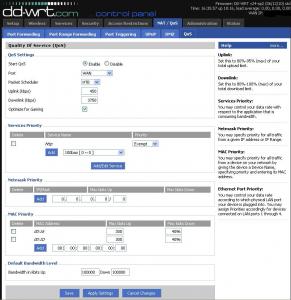
This post has been edited by ywkwy: Jun 23 2010, 04:46 PM |
|
|
Jun 23 2010, 03:47 PM
|

Senior Member
4,743 posts Joined: Jan 2003 From: u noe EARTH ? wher all human being is there
|
QUOTE(the100308 @ May 31 2010, 08:08 AM) Anyone knwo how to set QoS using Streamyx free modem, Innacomm w3100.. I know where is it. Just not sure which value is which... ya anybody knows how to set this up?Added on July 2, 2010, 6:27 pmanybody knows how to set QOS for innacomm w3100? This post has been edited by milky: Jul 2 2010, 06:27 PM |
|
|
Aug 10 2010, 05:37 PM
|
|
Senior Member
1,568 posts Joined: Dec 2004 From: Malaysia Truly Asia
|
QUOTE(milky @ Jun 23 2010, 03:47 PM) ya anybody knows how to set this up? I don't think so Innacomm w3100 has QOS. I'm afraid that, that thing has common problem on WiFi. So easily get disconnected.Added on July 2, 2010, 6:27 pmanybody knows how to set QOS for innacomm w3100? |
|
|
Aug 14 2010, 12:57 PM
|

Junior Member
41 posts Joined: Oct 2009
|
Hi, does anyone know how to set up QoS for Tp-Link TD-W8960N?
The manual I've read was rather confusing. I want to set up QoS for Web browsing, Torrent downloads, Streaming as well as for direct downloading. Currently the router + modem is connected with 3 PCs with the nearest to it is connecting through a cable. The other two are using wireless. |
|
|
Sep 14 2010, 01:59 PM
|

Senior Member
557 posts Joined: Apr 2005
|
QUOTE(HughieRmX @ Jun 20 2010, 02:05 PM) Greetings, Ya, I want to know as well. I have one speed in the settings. I presume it's the upload stream speed since we can't control download stream.....is that correct?Anyone using the Linksys WAG120N QoS function before ? Need to try this at home actually...... |
|
|
Sep 21 2010, 11:07 AM
|
|
Junior Member
146 posts Joined: Feb 2009 From: Penang
|
anyone know how to set up QoS at Aztech Dsl605ew ?
It work for this modem ? |
|
|
Oct 1 2010, 11:37 PM
|

Senior Member
618 posts Joined: Mar 2007 From: Selangor
|
wats the easiest QoS setting Modem/router now in the market ...im gonna buy it
|
|
|
|
|
|
Oct 12 2010, 11:28 AM
|

Senior Member
1,559 posts Joined: Nov 2005 From: Cheras
|
anyone know how to set qos in dlink dsl 520b?
my old tmnet modem just spoiled, got a new one now. i wanna set priority for my steam games. |
|
|
Nov 11 2010, 01:38 AM
|
|
Junior Member
160 posts Joined: Aug 2010 From: Ipoh
|
I read this thread from page 1 - 11 but doesn't find any real guild on setting up QOS for router. So I tough maybe I can test one of the Aztech DSL600ER router / modem which lying around for some time without using it and share with anyone who own an Aztech router / modem. But please bear in mind that the QOS feature inside Aztech router isn't that kind of powerful compare to DD-WRT, OpenWRT, HyperWRT etc and it's kind of buggy.
To start off I'll be using only 3 feature inside the QOS of the Aztech DSL600ER. - Egress Layer 3 - Qos Shaper Configuration - Policy Routing Configuration Egress Layer 3 Inside Aztech Firmware > QoS > Egress > Connection > select your WAN connection name (mine is "Streamyx", default should be "quickstart") > Layer 3 > then configure the priority of CoS1 - CoS6 base on TOS (Terms of Service). Actually I have no idea what's TOS. I google a bit a find this page. I guess it should be something to do with priority so i just pick the value from CS1 - CS5. @.@  QoS Shaper Configuration Inside Aztech Firmware > QoS > QoS Shaper Configuration > Interface > select your WAN connection name (mine is "Streamyx", default should be "quickstart") >  Max Rate = Your connection maximum upload rate. You can get this rate by Speedtest. Usually Max Rate is -5% or -10% of the actual rate. So that if you line speed deteriorate a bit you still have a +/- 5%. Low Latency Queue Discipline = I use this so that I can configure the max usable rate for CoS2 - CoS6. CoS is actually a priority for the QoS as CoS1 with the highest priority and not rate limited follow by Cos2 - Cos5 and CoS6 is "Best Effort" (what ever left behind or not configure goto CoS6). In this example I set CoS2 - 200Kbits, CoS3 - 100Kbits and so on. This mean if CoS1 didn't consume all bandwidth CoS2 will going to have 200Kbits and if CoS1 + CoS2 didn't use up all bandwidth CoS3 will going to have 100Kbits and so on. I gave CoS6 full rate because it's Best Effort (what ever bandwidth left will assign here). Policy Routing Configuration This part is the simplest if you know how to configure port forwarding. It's nearly the same. Here you configure which PC or port that's going to the CoS1 - CoS5. Higher priority for the service you need most and lower priority for the service that was less important. My sample use a single IP accessing the router as 10.1.1.2/32 (forgot to mention my Aztech DSL600ER gateway / IP was 10.1.1.1). If you want to configure a generals rules for all PCs accessing the router you can use 10.1.1.0/24 (or what ever you IP range 192.168.1.0, 192.168.0.0 etc). First I want to put port 53 UDP (DNS) into CoS1 as I want to DNS service to have highest priority,  Source IP = IP for PC that's accessing this service. I use IP=10.1.1.2, Mask=255.255.255.255 because I only have 1 PC accessing this service. If you want all PC to access this service with the same priority you can put like IP=10.1.1.0, Mask=255.255.255.0 (IP=192.168.1.0, Mask=255.255.255.0). Destination IP = 0.0.0.0, Mask 0.0.0.0 for wildcat (whatever IP) Source Port Start - End = nothing as router access dnsserver:53 using a random port.  Destination Port Start - End = 53 - 53 Make sure you select the right protocol as 53(DNS) is an UDP port. Here's another example for 443 TCP (HTTPS) to CoS1 priority.  When complete it's something like this,  I put TCP/UDP ports starting from 1024 - 65535 to CoS5 which was lowest priority and only with 1KBits bandwidth (at QoS Shaper Configuration) so that P2P software that uses those ports will suffer heavy drop by QoS. But you need to be careful especially with TCP. Make sure you exclude those important port that may be use by you software / online games etc. Example was 1863 TCP which is use by MSN Live, 5050 TCP by Yahoo Messenger etc. ------------------------------------------------ I gave another example of the fun using the Aztech QoS. First I put 80 TCP (HTTP. port that we use for web surfing and downloading direct file, playback youtube etc inside a browser, download accelerator) into CoS2 that have 200KBits upload bandwidth. Then I start off download a file using a Download Manager (accelerator). And here's how the bandwidth,  Red (In)=Download, Black (Out)=Upload Here I can have my Download Manager utilizing most of my download speed because it only needed 130KBits +/- upload speed to be able to download at 3.96MBits. Now I put 80 TCP (HTTP) port to CoS4 which only have 20KBits Upload bandwidth,  Red (In)=Download, Black (Out)=Upload The download speed now cannot even go over 1MBits because it only have less then 20KBits upload rate to use and it's surely not enough to push to higher download speed. Also mean most of the excessive packet that trying to gain more upload bandwidth was drop by the QoS. This conclude on my QoS testing on the Aztech DSL600ER Router / Modem. Hope this guild can help those with Aztech Router / Modem setup their QoS. Have FUN. This post has been edited by myandylai: Nov 11 2010, 03:38 AM |
|
|
Jan 1 2011, 06:56 PM
|

Junior Member
115 posts Joined: Nov 2008 From: Cowboy Town, JB. 
|
Hi, can someone enlighten me on the Qos setting for 3Com® OfficeConnect® Wireless 54 Mbps (Model 3CRWER100-75).
Thanks in advance and Happy New Year to all  |
|
|
Feb 15 2011, 08:14 PM
|
|
Newbie
3 posts Joined: Jan 2011
|
Hi you can monitor your speed using ProteMac Meter.It’s soft record of your network and Internet traffic
This post has been edited by Hony6: Feb 15 2011, 08:14 PM |
|
|
Mar 17 2011, 03:44 AM
|
 
Elite
2,425 posts Joined: Jan 2003 From: Purgatory
|
Anyone know how to setup up QoS for the Innacomm W3400V. I notice it does have a QoS page, but I have no idea what to do. Thanks.
|
|
|
Mar 23 2011, 02:21 PM
|

Junior Member
31 posts Joined: Apr 2010 From: Penang
|
anyone know how to do bandwith control setting for tplink TD W8960N???
|
|
|
Mar 25 2011, 09:42 PM
|
|
Newbie
3 posts Joined: Jan 2011
|
what about bandwidth monitor you can try use ProteMac Meterhttp://www.protemac.com/Meter/
.It;s really nice prog) Added on March 28, 2011, 6:28 pmyou can monitor your bandwidth using ProteMac Meter ProteMac Meterhttp://www.protemac.com/Meter/ .It;s really nice prog) This post has been edited by Hony6: Mar 28 2011, 06:28 PM |
| Change to: |  0.0207sec 0.0207sec
 0.49 0.49
 6 queries 6 queries
 GZIP Disabled GZIP Disabled
Time is now: 8th December 2025 - 02:08 PM |
 Quote
Quote
