Welcome Guest ( Log In | Register )

16 Pages « < 8 9 10 11 12 > » Bottom

Outline · [ Standard ] · Linear+

 QoS/Bandwidth Control, <cleanup> Wanna shape your traffic ?

views
     
ck_mon
post Jun 1 2009, 07:50 PM

Getting Started
**
Junior Member
133 posts

Joined: May 2007
i do the QoS like this for my house :

for my roomate:
user posted image

i bypassed the IP address and MAC address my roomates PC to avoid login page.. they get full 1mbps downlink


for guest who want to use the internet:
user posted image

i limited the connection until 64kbps because sometimes my friend come to my house just want to download >.<
in this case other PC want to connect to my network must login first


normeck
post Jul 17 2009, 01:07 AM

Look at all my stars!!
*******
Senior Member
3,158 posts

Joined: Dec 2006


what is the program that u use?
ck_mon
post Jul 28 2009, 09:02 PM

Getting Started
**
Junior Member
133 posts

Joined: May 2007
mikrotik routerOS tongue.gif
Scanart
post Sep 5 2009, 01:06 AM

Getting Started
**
Junior Member
129 posts

Joined: Sep 2008
From: Distro in Kuala Lumpur, Malaysia


Please try our Asus RT-N11 11n Wireless Router with Multiple SSID and Bandwidth Control. That means you can set different bandwidth for different users, direct control. thumbup.gif

user posted image


user posted image
pengiranijam
post Sep 5 2009, 05:27 AM

Regular
******
Senior Member
1,568 posts

Joined: Dec 2004
From: Malaysia Truly Asia


Linksys also have QoS for specific port even better than current Asus have...
MX510
post Sep 5 2009, 06:55 PM

Love Me Sin Hate Me Sinner
*******
Senior Member
4,038 posts

Joined: Aug 2005
From: Earth


So far this is the best QOS features Linksys WRT54GL with DD-WRT v24 Special Edition firmware fully customized firmware and QOS is working

This is the sample of settings

user posted image

You also can install rFloW i used this to monitor all my clients that connected to my hotspot

To monitor your dd-wrt AP and clients connected to it

user posted image

This post has been edited by MX510: Sep 5 2009, 06:57 PM
Scanart
post Sep 7 2009, 04:01 PM

Getting Started
**
Junior Member
129 posts

Joined: Sep 2008
From: Distro in Kuala Lumpur, Malaysia


QUOTE(pengiranijam @ Sep 5 2009, 05:27 AM)
Linksys also have QoS for specific port even better than current Asus have...
Hi there,

Our Asus RT-N11 is around RM200 & below. We doubt there are any 11n Router with direct bandwidth control from it's own firmware at such a price. Good feature yet very affordable - price/performance.


^cash^
post Sep 13 2009, 02:26 PM

太子
****
Senior Member
619 posts

Joined: May 2005
From: 唐朝太子


QUOTE(kando @ Dec 5 2005, 07:36 PM)


Last but not least, why do you want a 24hr online if you're not using p2p? do u really need to be online while you're sleeping???
*
i online 25 hours even during sleep.......
Euthenics
post Dec 7 2009, 05:11 AM

Getting Started
**
Junior Member
220 posts

Joined: Mar 2007
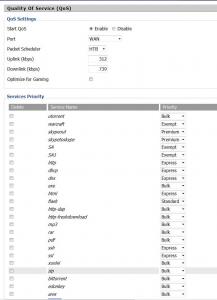
TP Link is a good alternative router. What the user will get (depending on which model, of course) a good N router, Gigabit port and a few more useful features. One would say it's value for money as it's affordable as well. I've already sold a number of their products range and so far seem impressed with it.

user posted image
red-queen
post Dec 12 2009, 04:08 PM

Regular
******
Senior Member
1,310 posts

Joined: Jan 2003


lately i just change from dd-wrt to Victek's Tomato firmware.

by far it's the best firmware i've used for my WRT54GL and also the best QoS in terms of granularity in terms of the configurations. i use a few features in Victek's tomato firmware for QoS.

1. i create services base on ports. set a class for each service, then set a bandwidth control for each class.

2. i create bandwidth limiter for each user in the network. this bandwidth limiter works hand in hand with the QoS that i've configured. i set a minimum guaranteed bandwidth for dl and ul for each user as well as a ceiling for dl and ul for each user. i have a scheduler running for bandwidth limiter. during peak hours, every one will be subject to their respective policy. during off peak hours, there will be no bandwidth limiter, only QoS running.

with this 2 combine, services which are important will be always ahead in the que. and with the guaranteed bw it will ensure that even users running services which are in the lowest class will have a minimum bandwidth to it (eg: torrents).

really happy that i switched over to victek's tomato. anyone with any questions or need help configuring, feel free to pm me or msn me.


Added on December 12, 2009, 4:15 pmp/s: always remember to set at least 85% and below for your maximum download and upload. otherwise it's better if you don't configure QoS at all. we wanna leave that 10-15% of buffer bandwidth so that QoS can make use of it to prioritise your traffic. QoS just won't work with ur internet link is jam packed.

a simple example would be. you have a 3 lane road. would you want cars to be travelling on all 3 lanes? if so, how would you ask the cars to rearrange their position to the front or to the back of the que?

imagine if you have a 3 lane road, and only 2 lanes are full. we still have that 1 lane extra where u can ask the car infront to move to the back, so that the prime ministers car at the back can come to the front.

just a metaphor smile.gif

This post has been edited by red-queen: Dec 12 2009, 04:15 PM

Vigilant
post Dec 14 2009, 03:36 AM

Be ever vigilant, but never suspicious
******
Senior Member
1,288 posts

Joined: Apr 2009
Hi, I have been browsing through page to page but nobody has clear explaination on how to limit bandwith of torrents on certain IP or whatsoever using AZTECH DSL modem

I own a DSL605EW, and I need to reduce bandwith for another computer, where should I start and what should I fill in, I'm asking for spoon feed from a-z because I had read the manuals and tried play around myself but nothing good comes out of that.

Which one (below), I need to set up, let say if I need to reduce torrent speed for 192.169.1.3 on LAN with port number of 10345. Kindly provide me the digits that I should fill in every blank columns. Thank you

Egress
Ingress
QoS Shaper Configuration
Policy Routing Configuration

This post has been edited by Vigilant: Dec 14 2009, 03:39 AM
ldragon
post Dec 17 2009, 05:04 PM

Regular
******
Senior Member
1,026 posts

Joined: Jan 2003
From: Kuala Lumpur, Malaysia
This is what i set in my Linksys WRT54GL (DD-WRT Firmware).
So far I am happy with this settings.

Attached Image

Or set using the MAC address
Attached Image

This post has been edited by ldragon: Dec 17 2009, 05:10 PM
red-queen
post Dec 17 2009, 06:01 PM

Regular
******
Senior Member
1,310 posts

Joined: Jan 2003


QUOTE(ldragon @ Dec 17 2009, 05:04 PM)
This is what i set in my Linksys WRT54GL (DD-WRT Firmware).
So far I am happy with this settings.

Attached Image

Or set using the MAC address
Attached Image
*
i was also using dd-wrt prior to this. but then i realised that if you were to use the L7 to match the services, not very accurate. so i manually created services base on port rather than application.

but then i tried tomato and it has way way way more flexibility on the QoS. at least this is my IMHO.
ldragon
post Dec 17 2009, 06:19 PM

Regular
******
Senior Member
1,026 posts

Joined: Jan 2003
From: Kuala Lumpur, Malaysia
red-queen, u r right on that i set it base on port. Else I set that particular PC MAC address as bulk as simple as that.

At home I have 5 user (5 Laptops + 3 PCs). One is 24x7 torrent machine. If i didn't manage the QoS properly they all will complain LAG & SLOW when user are playing Battle.net DOTA & Sudden Attack. The most important is skype

This post has been edited by ldragon: Dec 17 2009, 09:11 PM
silentser
post Dec 17 2009, 06:50 PM

OH MAH ANDROID
*******
Senior Member
3,177 posts

Joined: Sep 2006
From: subway FTW


anyone know how to set QoS for p1 wimax?
yapcm
post Dec 21 2009, 05:50 PM

New Member
*
Junior Member
48 posts

Joined: May 2009
The best Multi-Wan load balancing router for cyber cafes with Smart Qos.

http://www.qno.com.tw/english/_products_mu...wall_router.asp

This post has been edited by yapcm: Dec 21 2009, 05:51 PM
cosmiqeddie
post Dec 23 2009, 01:39 AM

Getting Started
**
Junior Member
96 posts

Joined: Apr 2006
QUOTE(yapcm @ Dec 21 2009, 05:50 PM)
The best Multi-Wan load balancing router  for cyber cafes with Smart Qos.

http://www.qno.com.tw/english/_products_mu...wall_router.asp
*
this is for commercial standard isnt it? i thought all are talking about firmwares and routers that are affordable enough?
simon82
post Jan 11 2010, 10:01 AM

On my way
****
Senior Member
567 posts

Joined: Nov 2004

Does anyone have workable QOS example on the Zyxel P-660HW T1 v2 modem wireless router?

Mine just not working.. help ..
RwGlmllhpSX
post Mar 6 2010, 03:49 PM

Getting Started
**
Junior Member
203 posts

Joined: May 2008
QUOTE(kando @ Dec 5 2005, 03:50 AM)
My roommate wanna share my Streamyx.  So i'm charging him RM40 a month, with terms & conditions.

1. No P2P!!
2. No 24Hr online.

I'm going to buy a wireless router (cos i don't want to pull those damn lines).  So now the question is:

1. How do I restrict him to use P2P? Can I do some tricks in the Port Forwarding?
2. How to divide/limit the bandwidth? (sorry, the old thread is gone)
*
Just turn off the router in the midnight?

and yea I think you're selfish
orenzai
post Apr 11 2010, 01:13 AM

Look at all my stars!!
*******
Senior Member
3,114 posts

Joined: Dec 2006


I am moving in to a condo unit of 4 people incl me. We are all friend and we are going to study at the same uni. I was wondering which N router will be good for QoS? I plan to subscribe 4mb streamyx then share out 1mb per pax. TP-Link I never used before but i schemed through this thread and it supports QoS? I was eyeing on Belkin Wireless N routers but I dont think it supports QoS right? Thanks for helping smile.gif

16 Pages « < 8 9 10 11 12 > » Top
 

Change to:
| Lo-Fi Version
0.0252sec    0.28    6 queries    GZIP Disabled
Time is now: 7th December 2025 - 11:11 AM