

if you put that into your external SD, in your CWM, you should chose to install from external sd
SΛMSUNG Galaxy W (I8150) Official Thread V4, Be intelligent; read thoroughly.
SΛMSUNG Galaxy W (I8150) Official Thread V4, Be intelligent; read thoroughly.
|
|
 Feb 4 2012, 08:15 PM Feb 4 2012, 08:15 PM
Return to original view | Post
#21
|
 
Senior Member
2,248 posts Joined: Sep 2010 
|
if you put that into your external SD, in your CWM, you should chose to install from external sd
|
|
|
|
|
|
Feb 4 2012, 08:32 PM
Return to original view | Post
#22
|
|
Senior Member
2,248 posts Joined: Sep 2010
|
QUOTE(shiki_arc @ Feb 4 2012, 08:17 PM) All okay now and its super smooth for me. Thanks a lot! It is still 1.4ghz only, you need to manually set OC it using SetCPU: So its set to 1.8ghz now? Or i have to manually OC it? So its set to 1.8ghz now? Or i have to manually OC it? http://forum.xda-developers.com/showthread.php?t=505419 |
|
|
Feb 4 2012, 10:24 PM
Return to original view | Post
#23
|
|
Senior Member
2,248 posts Joined: Sep 2010
|
QUOTE(gastacopz @ Feb 4 2012, 08:52 PM) previously got...then after flashing..i reinstall...not using backup... BuddiesNow should have been a gone case in the new ROM! U sure you using latest ROM?btw..1st FC error... didnt even know wtf is that...  » Click to show Spoiler - click again to hide... « Added on February 4, 2012, 8:57 pmand KIES via usb seems doesnt work with ur ROM...am i d only one or not? http://forum.xda-developers.com/showthread.php?t=1441662 Get the ROM here: Based on I8150DXLA2: http://dl.dropbox.com/u/52938136/GT-I8150_COW_OC.zip Alternate link: Part 1: http://www.mediafire.com/?nh5ihudrj5afmc1 Part 2: http://www.mediafire.com/?9675rx6o71baaga Even Kies Update should work. We in Malaysia should definately work because my ROM is based on that. Added on February 4, 2012, 10:29 pm QUOTE(shiki_arc @ Feb 4 2012, 09:02 PM) Have a weird situation.. I changed the language to english and all the options are in english..but why the icons in the menu is still in BM? lol. And somehow i cant connect to market even though i manage to sync my contacts with my google account. so weird... I experience that before too, apparently after _some_ time it will get updated. Alternatively you can reboot the phone. Not sure if this is custom ROM related....About the Market, not sure what is wrong, try set your default account in Account and Setting... Added on February 4, 2012, 10:30 pm QUOTE(gastacopz @ Feb 4 2012, 09:19 PM) solved for wallpaper... My latest ROM already has the Android Calendar... in /system/app/com.android.calendar-1.apkany idea which file is the google calendar from your stock apps folder???? This post has been edited by cowithgun: Feb 4 2012, 10:30 PM |
|
|
Feb 4 2012, 11:00 PM
Return to original view | Post
#24
|
|
Senior Member
2,248 posts Joined: Sep 2010
|
QUOTE(gastacopz @ Feb 4 2012, 10:35 PM) im using the ZEAM version..non OC... Kies Air should work... I have that and been using that. Kies USB, i didnt install Kies on my pc... so, can't test btw..im flashing to Slim version d...coz previous a bit lag wif my phone..  any help with KIES??cant connect...connecting all d way...  |
|
|
Feb 5 2012, 02:59 PM
Return to original view | Post
#25
|
|
Senior Member
2,248 posts Joined: Sep 2010
|
My OC kernel has aggressive undervolting that should help extend battery life. Here is the comparison:
Stock: 1.4ghz - 1275 Aggressive undervolting: 1.4ghz:1200, 1.5ghz:1225, 1.6ghz:1250, 1.7ghz:1275, 1.8ghz:1300 (in my latest custom ROM) Less aggressive undervolting: 1.4ghz:1225, 1.5ghz:1250, 1.6ghz:1275, 1.7ghz:1300 1.8ghz:1325 So, as you can see, using my ROM, even if u set max freq to 1.7ghz, the battery usage should be the same with Stock ROM. Anything less, should give u tiny bit more battery. I set mine to just 1.4ghz max, only 1.8ghz when needed. Added on February 5, 2012, 3:03 pm QUOTE(botakbin @ Feb 5 2012, 02:09 PM) i dont get.. means the rom comes with custom kernel edi? yes, it's a custom kernel so far, the only OC kernel for SGW  This post has been edited by cowithgun: Feb 5 2012, 03:03 PM |
|
|
Feb 5 2012, 03:24 PM
Return to original view | Post
#26
|
|
Senior Member
2,248 posts Joined: Sep 2010
|
Although undervolting is important, but i think it is the CPU governor that will make a difference on Power / Battery ration. A CPU governor control how fast the CPU should change speed, max speed, lowest speed, etc. I have been testing a CPU governor called smartassv2 (google it). This governor allow you to set something like ideal speed, speed when screen is off, etc. It's supposed to give you really good interactive speed (because it increase the CPU speed in a faster manner towards ideal speed), at the same time, save battery when you switch off screen, etc..
Here is what I got after 12 hours (minimal usage - i was sleeping for a bit): 8% battery: Attached thumbnail(s) 
|
|
|
|
|
|
Feb 5 2012, 04:34 PM
Return to original view | Post
#27
|
|
Senior Member
2,248 posts Joined: Sep 2010
|
i spent some time thinking about that expanding the available ram too. although we have 512mb, only 351mb available.
after some attempt, managed to squeeze additional 2mb to be used. so if u use my kernel, you should have 353mb available ram. may be it's possible to get additional 20mb more if we disable 720p recording.... but i just duno if the effort is worth it. i always like to keep all the functionality of my phone. alternatively, i duno if this is gonna work, may be it's possible to reduce the radio image that occupied part of the unavailable memory or look at the bootloader. the bootloader is extremely 'delegate'... if u miss anything, you will get a hard brick! not even ClockWorkMod will work! only by sending back to samsung or if u have some nice piece of JTAG hardware... This post has been edited by cowithgun: Feb 5 2012, 04:35 PM |
|
|
Feb 5 2012, 09:47 PM
Return to original view | Post
#28
|
|
Senior Member
2,248 posts Joined: Sep 2010
|
QUOTE(~@Sharks@~ @ Feb 5 2012, 07:29 PM) Wow guys. My battery was used for 4 h 17 MIN . Most of the time it is in idle state . I used like 10 mins to download apps and it dropped from 99% to 97 % . that was alright. Then it went idle for 3 hours straight and it drained 4% ! Last night it went idle for 8 hrs an it only drained 1%. Is this normal? According to what you say: Plus, everytime i use advance task killer, I would minimize it and go back to the app to check if there are any other apps running. And it shows that i'm running gallery, whatsapp, google search, market,email, maps, and social hub . Any idea why? :confused: 4h 17min - 100%-99% 10 mins internet - 99%-97% 3 hours idle - 97%-93% 8 hours sleep - 93%-92% Total = 15 hours 27 mins = 8% usage This is very good already. It would be more accurate if you can post your battery usage. Go to Setting, About phone, Battery usage, tap on the graph you can see if your phone is active or in sleep from the graph. Added on February 5, 2012, 9:48 pm QUOTE(driots @ Feb 5 2012, 09:42 PM) How do u capture the screen on the phone? Press Home button, hold it, press screen off. Let go both.what is the method. thanks..... This post has been edited by cowithgun: Feb 5 2012, 09:48 PM |
|
|
Feb 5 2012, 09:59 PM
Return to original view | Post
#29
|
|
Senior Member
2,248 posts Joined: Sep 2010
|
QUOTE(Besanth @ Feb 5 2012, 09:54 PM) I'm now going to install the OC version of Cow's Custom ROM. I've backed up my contacts & applications and finished downloading everything. Wish me luck guys! Most important: make sure you have nandroid backup! anything wrong, can revert back. Good luck! |
|
|
Feb 5 2012, 10:03 PM
Return to original view | Post
#30
|
|
Senior Member
2,248 posts Joined: Sep 2010
|
QUOTE(Besanth @ Feb 5 2012, 10:01 PM) Luckily not yet do. Btw, where to get Nandroid and why when I click the "Start" on Odin, it keep saying "Please connect phones !!" ? You can access nandroid back in ClockWorkMod. In CWM, select Backup your phone. You cannot use Odin to install my custom ROM! Must use CWM or RZRecovery... |
|
|
Feb 5 2012, 10:10 PM
Return to original view | Post
#31
|
|
Senior Member
2,248 posts Joined: Sep 2010
|
QUOTE(Besanth @ Feb 5 2012, 10:04 PM) Oh... Okay. But... last time you PM'ed me the details on how to install the Custom ROM, you wrote there use Odin to Install ClockworkMod? Ya, use Odin to install CWM. Then use CWM to install my ROM. PS: about the step 0, there is newer ROM now! check this page: http://forum.xda-developers.com/showthread.php?t=1441662 This post has been edited by cowithgun: Feb 5 2012, 10:12 PM |
|
|
Feb 5 2012, 10:18 PM
Return to original view | Post
#32
|
|
Senior Member
2,248 posts Joined: Sep 2010
|
Phone connected to PC via USB??? Hey, if u not sure, dont continue until you get someone to help u!
Got something to do! Back in 2 hours! |
|
|
Feb 6 2012, 12:13 AM
Return to original view | Post
#33
|
|
Senior Member
2,248 posts Joined: Sep 2010
|
QUOTE(Besanth @ Feb 5 2012, 11:49 PM) I've successfully installed Cow's OC version of ROM in my Galaxy W with the help of my brother Nice! Good luck testing it!Added on February 6, 2012, 12:20 am QUOTE(Amroth @ Feb 5 2012, 11:51 PM) damn...cow's rom lagging on my class 4 sd card... Normal usage, I have not experience any lag. But I was testing the other day when I fill up the phone with 4 or 5 app, occupied more than 300mb, the low memory killer starts killing App in background, i got lag like 15 seconds. but after that it's normal.cow, how's ur class 10 running on your oc rom? any lag at all? what brand would you recommend me to buy? if this is the behaviour, it is as expected because i really want to tweak the low memory killer in such a way that it is suitable for running 1 app at the time. the running app will have more RAM by making low memory killer more aggressive. you can change that though! you can install V6 Supercharger and use a different options. for example, if u multitask a lot, u can use the script to configure that. again, i have been using my ROM since I first made them, normal use, i dont experience lag but, again, i use class 10 32gig sd card (brand DNA - not much choice) duno if it help... but so far, no one can beat my antutu score yet hehe - 4381Added on February 6, 2012, 12:22 am QUOTE(xchaosdragon @ Feb 6 2012, 12:00 AM) Thanks a lot it works now =) Which App? If can, I will try install it and test it out. You can help me to diagnose it a lot if you do this:Added on February 6, 2012, 12:02 am I've some problems using that rom myself. I've wipe cache, wipe data, format system. But when I try to install, a "Installation Aborted" message will show. Any ideas why ? adb logcat > log.txt in your phone, start the install the App. let it abort. control-c the adb logcat. give me the log.txt This post has been edited by cowithgun: Feb 6 2012, 12:29 AM Attached thumbnail(s) 
|
|
|
|
|
|
Feb 6 2012, 02:45 AM
Return to original view | Post
#34
|
|
Senior Member
2,248 posts Joined: Sep 2010
|
QUOTE(Amroth @ Feb 6 2012, 02:27 AM) i'm using chainfire3d driver..changed it to nvidia..maybe that's the cause of it.. Score does look a bit low. Even with my Slim Shady (2nd ROM), I already got 4k Antutu score  funny though, my native internal sd read speed got around 17mb/s and no lag on the stock rom..i guess a few mb really makes that much difference.. Anyway, here is the conclusion of my SmartAssV2 battery benchmark after 24 hours of minimal usage. This is my only phone, so, there is minimal video, wifi, calls, etc. From 100%-78%. So, 24 hours = 22%. I have OnDemandX ROM ready. Will run it for the next 24 hours and report accordingly. Attached thumbnail(s) 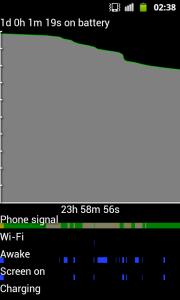
|
|
|
Feb 6 2012, 09:14 AM
Return to original view | Post
#35
|
|
Senior Member
2,248 posts Joined: Sep 2010
|
QUOTE(IwanAGP @ Feb 6 2012, 03:11 AM) Impressive. Give some battery life test based on games. Simple one, where's my water in example. Mind test that out? Btw, what's your Max Freq for CPU for the test done? Will consider to root and flash if it impress me much The ROM and kernel was not built to impress you or anyone, I built the ROM for my own used, if anyone like it, that's great.  ps: anyway, about the battery test, it was done in such a way because i want to test the suspend features of SmartAssV2, its a feature that the default OnDemand does not have. so, whenever the screen is off, a preferred low freq will be used by default. thus, should improved battery life. i suspect in gaming, SmartAssV2 may eat more battery, this is because it ramp up speed more quicker than OnDemand. however, if the game is too demanding, CPU governor will not have effect anymore since the phone most likely running at max freq anyway. in this case, undervolting of the kernel will help a bit. the battery test was done on OC kernel, but with max freq set to 1.4ghz. i use my phone in such a way that, i only switch to 1.8ghz when needed. battery test is boring and take a lot of time. i m currently testing OnDemandX, a variation of OnDemand but with support for early suspend. a feature that similar to SmartAssV2 that keep the freq low after screen off. i m pretty confident that this will beat both SmartAssV2 and the default OnDemand governor, in term of battery life. ^^ Added on February 6, 2012, 9:15 am QUOTE(kiLLua the babap @ Feb 6 2012, 04:11 AM) im also used ur slim shady ROM. I think the APK you are looking for can be found in my zip:cow, can u point me which apk Photo Editor?? the default stock app u hav remove it in ur rom http://www.multiupload.com/RDWN6MML4K Look for PhotoRetouch.apk. This post has been edited by cowithgun: Feb 6 2012, 11:18 AM |
|
|
Feb 6 2012, 11:22 AM
Return to original view | Post
#36
|
|
Senior Member
2,248 posts Joined: Sep 2010
|
QUOTE(driots @ Feb 6 2012, 10:30 AM) This is my antutu score after i flased the OC ver rom and using class 4 sd card. Nice score! With the new OC ROM, not only that you can have 1.8ghz speed, you also should find that you have more available memory (which is 353mb) and lower memory usage usually between 110mb-140mb. |
|
|
Feb 6 2012, 11:57 AM
Return to original view | Post
#37
|
|
Senior Member
2,248 posts Joined: Sep 2010
|
QUOTE(Besanth @ Feb 6 2012, 11:52 AM) Wow, I must say my experience with Cow's ROM for a day is terrible. I've been getting non stop pop up for FC's.  Did that happen after you start restoring app, sms or anything? Did that happen after you start restoring app, sms or anything?Anyway, I hope you have nandroid backup to do the necessary restore.  |
|
|
Feb 6 2012, 12:11 PM
Return to original view | Post
#38
|
|
Senior Member
2,248 posts Joined: Sep 2010
|
QUOTE(Besanth @ Feb 6 2012, 12:00 PM) Nope, after install the Rom itself non stop FC popups already. If you have FC even without any restore, I recommend you to install it 1 more time. This time clear all cache, etc in CWM. This should solve the problem.I don't know why I backed up, but when I go under CWM and click Restore, it goes back to your ROM back again. Can't go back one. Damn About your Backup, you should only see folders with numbers and not zip file; my ROM is a zip file... You also can use MyFiles in your phone to look for folder "ClockWorkMod" folder in either /sdcard/ or /sdcard/external_sd . You should have it IF you backup your phone. |
|
|
Feb 6 2012, 03:58 PM
Return to original view | Post
#39
|
|
Senior Member
2,248 posts Joined: Sep 2010
|
QUOTE(Besanth @ Feb 6 2012, 02:19 PM) » Click to show Spoiler - click again to hide... « I keep getting these kind of Force Closes. Not to mention the device is pretty laggy and slow. I'm using Cow's OC version of ROM. I've tried to re-flash it twice but still the same. Anyone know how to solve this problem? 1) connect phone to computer 2) adb logcat > log.txt 3) (do whatever to cause the crash or lag) 4) control-c in "adb locat" 5) PM me the log.txt the custom rom suppose to make the phone faster and lighter, if u are experiencing it the other way round, something is definitely wrong... Added on February 6, 2012, 4:24 pm QUOTE(IwanAGP @ Feb 6 2012, 12:44 PM) Aiya... Then don't impress me. Do some gaming and impress yourselves how the battery does so well with your ROM. Not time consuming pun. 10mins enough alrdy (10mins how many %). Help a bit la~~ Right now, still testing OnDemandX. Need to wait until 24 hour complete for a fair comparison to SmartAssV2. The thing about battery consumption in gaming, too many variables. Each game demand differently, each part of the game demand differently. Battery level indications (how much battery left) are actually not accurate, the effect is worse in short duration benchmark like 10 minutes. For high demanding game, most likely CPU is being pushed to max anyway, so the type of Governor has no more impact. In this case, you can calculate the power saving by comparing the voltage: Waiting for your answer~ Waiting for your answer~So you mean it'll probably have 210MB+- memory free to use? Stock: 1.4ghz:1275 Aggressive undervolting: 1.4ghz:1200, 1.5ghz:1225, 1.6ghz:1250, 1.7ghz:1275, 1.8ghz:1300 Not much, but it should definitely save some power if running at 1.4ghz. What a real life test? Go test it for yourself! About the memory, yes, as the attachment shown: 353-119=234mb free. This post has been edited by cowithgun: Feb 6 2012, 04:26 PM Attached thumbnail(s) 
|
|
|
Feb 6 2012, 05:49 PM
Return to original view | Post
#40
|
|
Senior Member
2,248 posts Joined: Sep 2010
|
QUOTE(gastacopz @ Feb 6 2012, 05:36 PM) happened to me also..but im using NON oc and also tried the slim version... Actually, you can get more free RAM (in stock ROM), close to Slim ROM if you use V6 Supercharger option 5. that was used in the Slim Shady ROM... then, check Setting, Running services, uninstall things you dont need. that was the essence of Slim Shady ROM anyway. Drawback is...Both ROM cant use KIES (in my case i suspect) as i already restored the stock ROM and KIES back to normal... and manually remove all the bloatware apps which not useful to me... badly..the RAM usage not free as much as using cow roms...   This post has been edited by cowithgun: Feb 6 2012, 05:51 PM |
|
Topic ClosedOptions
|
| Change to: |  0.0463sec 0.0463sec
 1.04 1.04
 7 queries 7 queries
 GZIP Disabled GZIP Disabled
Time is now: 11th December 2025 - 10:59 AM |
 Quote
Quote

