


This post has been edited by nanamizuki: Jul 8 2012, 02:36 PM
HP Pavillion DV6-6XXX series Owners Lounge V5, >9000 owners. Like a boss.
|
|
 Jul 8 2012, 01:08 PM Jul 8 2012, 01:08 PM
|
 
Senior Member
1,152 posts Joined: Aug 2011 
|
dayum...proceed to update leshcat then
This post has been edited by nanamizuki: Jul 8 2012, 02:36 PM |
|
|
|
|
|
Jul 8 2012, 05:37 PM
|

Junior Member
137 posts Joined: May 2009
|
acid whats ur temp playing blacklight?
|
|
|
Jul 9 2012, 09:47 PM
|

Senior Member
7,864 posts Joined: Oct 2006 From: Klang 
|
wow... congrats to acid for the great find! =)
Added on July 9, 2012, 10:04 pmAMD 12.6 update is out... =) just to let u know if anyone missed out... This post has been edited by moniqee: Jul 9 2012, 10:04 PM |
|
|
Jul 9 2012, 10:42 PM
|

Senior Member
6,612 posts Joined: Jan 2003 From: Tomorrow 
|
QUOTE(chahupping @ Jul 8 2012, 05:37 PM) acid whats ur temp playing blacklight? After over an hour.. with TurboBoost off of course.  |
|
|
Jul 9 2012, 11:35 PM
|
|
Junior Member
137 posts Joined: May 2009
|
QUOTE(Acid_RuleZz @ Jul 9 2012, 11:42 PM) After over an hour.. with TurboBoost off of course. lol kinda same, mine went up to 90 though.  |
|
|
Jul 10 2012, 12:12 AM
|

Junior Member
182 posts Joined: Feb 2008
|
My laptop's screen doesn't seem to light up again after putting up the lid after installing the 12.6 update...
Back to 12.2 for me :/ |
|
|
|
|
|
Jul 10 2012, 12:23 AM
|
|
Senior Member
6,612 posts Joined: Jan 2003 From: Tomorrow
|
QUOTE(chahupping @ Jul 9 2012, 11:35 PM) lol kinda same, mine went up to 90 though. CPU or GPU?QUOTE(storky20 @ Jul 10 2012, 12:12 AM) My laptop's screen doesn't seem to light up again after putting up the lid after installing the 12.6 update... U mean black screen when waking up from sleep?Back to 12.2 for me :/ |
|
|
Jul 10 2012, 12:26 AM
|
|
Junior Member
182 posts Joined: Feb 2008
|
QUOTE(Acid_RuleZz @ Jul 10 2012, 12:23 AM) CPU or GPU? yup. Can login and all just no image lol. U mean black screen when waking up from sleep? Reinstalling 12.6 now. |
|
|
Jul 10 2012, 12:30 AM
|
|
Senior Member
6,612 posts Joined: Jan 2003 From: Tomorrow
|
Which intel driver? I have no problem waking up.
|
|
|
Jul 10 2012, 12:31 AM
|
|
Junior Member
182 posts Joined: Feb 2008
|
QUOTE(Acid_RuleZz @ Jul 10 2012, 12:30 AM) Which intel driver? I have no problem waking up. How do I check that?Edit: 8.882.2.3000 Edit2: Uninstalled 12.6 and it's okay again. Lemme see now when I reinstall it. This post has been edited by storky20: Jul 10 2012, 12:38 AM |
|
|
Jul 10 2012, 12:39 AM
|
|
Junior Member
137 posts Joined: May 2009
|
QUOTE(Acid_RuleZz @ Jul 10 2012, 01:23 AM) CPU or GPU? cpu, gpu around 80.U mean black screen when waking up from sleep? |
|
|
Jul 10 2012, 12:39 AM
|
|
Senior Member
6,612 posts Joined: Jan 2003 From: Tomorrow
|
whut? u still using HP driver...
 at this screen when u ran Leshcat installer, which one u chose?  i selected above setup. Added on July 10, 2012, 12:40 am QUOTE(chahupping @ Jul 10 2012, 12:39 AM) cpu, gpu around 80. With TurboBoost on? I open my bottom panel btw..Added on July 10, 2012, 12:42 amoh wait... i picked Alter Windows Registry. This post has been edited by Acid_RuleZz: Jul 10 2012, 12:42 AM |
|
|
Jul 10 2012, 12:54 AM
|
|
Junior Member
182 posts Joined: Feb 2008
|
QUOTE(Acid_RuleZz @ Jul 10 2012, 12:39 AM) whut? u still using HP driver... For intel i chose the other one... at this screen when u ran Leshcat installer, which one u chose? i selected above setup. Added on July 10, 2012, 12:40 am With TurboBoost on? I open my bottom panel btw.. Added on July 10, 2012, 12:42 amoh wait... i picked Alter Windows Registry. |
|
|
|
|
|
Jul 10 2012, 12:59 AM
|
|
Junior Member
137 posts Joined: May 2009
|
QUOTE(Acid_RuleZz @ Jul 10 2012, 01:39 AM) whut? u still using HP driver... nop, with off. at this screen when u ran Leshcat installer, which one u chose? i selected above setup. Added on July 10, 2012, 12:40 am With TurboBoost on? I open my bottom panel btw.. Added on July 10, 2012, 12:42 amoh wait... i picked Alter Windows Registry. |
|
|
Jul 10 2012, 01:07 AM
|
|
Senior Member
6,612 posts Joined: Jan 2003 From: Tomorrow
|
QUOTE(storky20 @ Jul 10 2012, 12:54 AM) For intel i chose the other one... try choose the newer one and make sure everything is installed properly... no fail status at post installation report.QUOTE(chahupping @ Jul 10 2012, 12:59 AM) nop, with off. try open bottom panel. 90c with TB off is pretty high imo.. also my temp is with GPU overvolted to 1.052 and overclocked to 870/1010. my room temp was around 27c.eh.. did u managed to reapply the thermal paste?  |
|
|
Jul 10 2012, 01:15 AM
|
|
Junior Member
182 posts Joined: Feb 2008
|
QUOTE(Acid_RuleZz @ Jul 10 2012, 01:07 AM) try choose the newer one and make sure everything is installed properly... no fail status at post installation report. Alright reinstalled and everything's back to normal. CCC STILL doesn't want to turn itself on though... Ah well. |
|
|
Jul 10 2012, 01:18 AM
|
|
Senior Member
6,612 posts Joined: Jan 2003 From: Tomorrow
|
Have u try what i posted in previous page?
 QUOTE Q. ”I’ve installed everything, everything went smooth, but my CCC does not appear when i try to launch it. It does not give me an error, just does not start. What should i do now?” A. Its rare and unpleasant bug when moving from one one set to another. You can beat it like this: 1. Go to Windows “Program and Features” 2.Launch “Ati uninstaller”. Select ONLY CCC for uninstallation. Uninstall it. Do not reboot. 3. Launch respective UnifL unpacked set. Check ONLY CCC checkbox and install it again. 4. Reboot after this procedure. CCC should be now operational. ————————————————————————————————————— Q. ” I cant uninstall CIM(Catalyst Install Manager) via “Programs and Features”… uninstaller gives me an error 2753 SetACL64.exe.” A. Navigate to following folder “PackagesAppsCIM” at respective unpacked UnifL set. First install `ATICatalystInstallManager.msi` from ”Win32″ folder, then from “Win64″. That should do. When you guys comply to this there will be no problem with CCC Before when i had the same problem, i just reinstall CCC directly from ccc-core-static.msi |
|
|
Jul 10 2012, 01:31 AM
|
|
Junior Member
182 posts Joined: Feb 2008
|
QUOTE(Acid_RuleZz @ Jul 10 2012, 01:18 AM) Have u try what i posted in previous page? Tried that before but didn't work. Before when i had the same problem, i just reinstall CCC directly from ccc-core-static.msi Trying that again now. EDIT: Didn't work. I still see it in Task Manager though. Just no interface pops up  This post has been edited by storky20: Jul 10 2012, 01:42 AM |
|
|
Jul 10 2012, 08:46 AM
|
|
Junior Member
137 posts Joined: May 2009
|
QUOTE(Acid_RuleZz @ Jul 10 2012, 02:18 AM) Have u try what i posted in previous page? nope, hvnt, thats why its so high. Before when i had the same problem, i just reinstall CCC directly from ccc-core-static.msi |
|
|
Jul 10 2012, 01:41 PM
|

All Stars
23,688 posts Joined: Aug 2007 From: Outer Space 
|
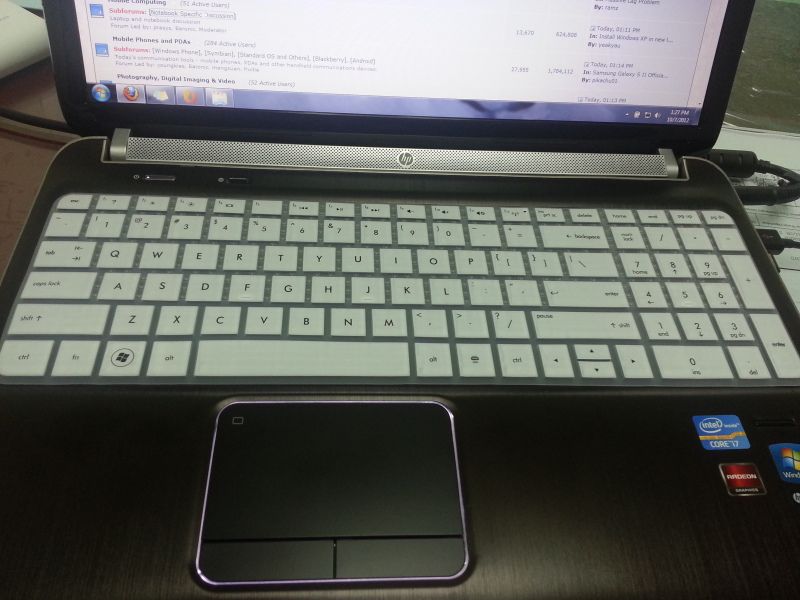
My new keyboard skin:
 |
|
Topic ClosedOptions
|
| Change to: |  0.0344sec 0.0344sec
 0.19 0.19
 6 queries 6 queries
 GZIP Disabled GZIP Disabled
Time is now: 10th December 2025 - 07:40 PM |
 Quote
Quote