Welcome Guest ( Log In | Register )

Bump Topic Topic Closed RSS Feed

Outline · [ Standard ] · Linear+

 HP Pavillion DV6-6XXX series Owners Lounge V5, >9000 owners. Like a boss.

views
     
gunsligerboyz
post Apr 23 2012, 03:41 AM

New Member
*
Junior Member
6 posts

Joined: Jun 2011
Acid, I need help, before I updated my driver from HP website, my games were running smoothly and perfectly, BTW I'm using the Pavilion dv6-6114tx, but after I updated to the latest one in HP websites, all my games seemed to run very slow and lag, why is that so? Is there a way to fix it? BTW I donwloaded the 11.5b hotfix from amd website, but it makes no difference..

This post has been edited by gunsligerboyz: Apr 23 2012, 03:41 AM
TSAcid_RuleZz
post Apr 23 2012, 06:33 AM

ミウ ❤
*******
Senior Member
6,612 posts

Joined: Jan 2003
From: Tomorrow


Are u using Dynamic or Fixed switching?
gunsligerboyz
post Apr 23 2012, 10:30 AM

New Member
*
Junior Member
6 posts

Joined: Jun 2011
QUOTE(Acid_RuleZz @ Apr 23 2012, 06:33 AM)
Are u using Dynamic or Fixed switching?
*
Acid, I tried again this morning, and it is back to how it should be again, games recovered as they used to be (lag free like last time).


Since the problem is fixed, I still have a question for you. I've been using dynamic all the while and I haven't encountered any problem, games ran smooth, until one day I installed RAGE and was trying to play but it was very laggy, so I planned to upgrade my graphics driver. After updating RAGE still has issues so I just uninstalled. BTW, at first my WEI score was like this, just when I bought this laptop >
Attached Image

Notice the WEI score, in the graphics and gaming graphics segment, the score is still lower by 0.1 than when I first purchased my laptop, I believed the 0.1 drop is caused after I updated my driver from HP website. What do you think caused the drop? Here is my WEI score now >
Attached Image


The question is why do you think there will be a drop of 0.1 in my WEI score, could it be due to the driver?


This was the graphics driver I downloaded from HP > http://h10025.www1.hp.com/ewfrf/wc/softwar...105001&sw_lang=

I really appreciate if you could help me figure out what's the problem. Thanks.

This post has been edited by gunsligerboyz: Apr 23 2012, 03:31 PM
gunsligerboyz
post Apr 23 2012, 12:30 PM

New Member
*
Junior Member
6 posts

Joined: Jun 2011
So after that I enabled "fixed" graphics in my BIOS and ran the WEI score one more time again, and this is how it is >
Attached Image

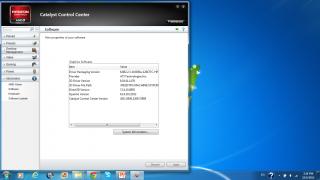
By the way, as you can see here, I don't have a catalyst version, so should I install to AMD Catalyst 12.1 since now I'm on "fixed" graphics? >
Attached Image

Your reply would be greatly appreciated. Thanks.

This post has been edited by gunsligerboyz: Apr 23 2012, 04:13 PM
ashwin1234
post Apr 23 2012, 07:22 PM

║█║▌║█║▌│║▌║▌█║
*****
Senior Member
779 posts

Joined: Dec 2010
From: Everywhere


QUOTE(gunsligerboyz @ Apr 23 2012, 12:30 PM)
So after that I enabled "fixed" graphics in my BIOS and ran the WEI score one more time again, and this is how it is >
Attached Image

By the way, as you can see here, I don't have a catalyst version, so should I install to AMD Catalyst 12.1 since now I'm on "fixed" graphics? >
Attached Image

Your reply would be greatly appreciated. Thanks.
*
For best WEI scores, use the latest GFX drivers. Get it from AMD website under the desktop video card driver area. All the 6000 series and above use the same driver file as the desktop version. biggrin.gif
Bboy4Life
post Apr 23 2012, 07:59 PM

~My Style, My Flava~
******
Senior Member
1,855 posts

Joined: May 2011
From: Cat City
Need help here, thrs something wrong with my F12 Wifi indicator. The Wifi is ON and its showing red instead of white. I tried to switch it off and on again, still the same thing. Any idea ??? icon_question.gif
TSAcid_RuleZz
post Apr 23 2012, 08:27 PM

ミウ ❤
*******
Senior Member
6,612 posts

Joined: Jan 2003
From: Tomorrow


QUOTE(gunsligerboyz @ Apr 23 2012, 10:30 AM)
Acid, I tried again this morning, and it is back to how it should be again, games recovered as they used to be (lag free like last time).
Since the problem is fixed, I still have a question for you. I've been using dynamic all the while and I haven't encountered any problem, games ran smooth, until one day I installed RAGE and was trying to play but it was very laggy, so I planned to upgrade my graphics driver. After updating RAGE still has issues so I just uninstalled. BTW, at first my WEI score was like this, just when I bought this laptop >

Notice the WEI score, in the graphics and gaming graphics segment, the score is still lower by 0.1 than when I first purchased my laptop, I believed the 0.1 drop is caused after I updated my driver from HP website. What do you think caused the drop? Here is my WEI score now >

The question is why do you think there will be a drop of 0.1 in my WEI score, could it be due to the driver?
This was the graphics driver I downloaded from HP > http://h10025.www1.hp.com/ewfrf/wc/softwar...105001&sw_lang=

I really appreciate if you could help me figure out what's the problem. Thanks.
*
Sorry for the late reply, so tired. sweat.gif

Rage use OpenGL, when u're on Dynamic switching, it won't switch to discrete graphic at all for OpenGL application/game. You need to use Fixed switching but then the game is very buggy. (talk about bad console port)

QUOTE(gunsligerboyz @ Apr 23 2012, 12:30 PM)
So after that I enabled "fixed" graphics in my BIOS and ran the WEI score one more time again, and this is how it is >
Attached Image

By the way, as you can see here, I don't have a catalyst version, so should I install to AMD Catalyst 12.1 since now I'm on "fixed" graphics? >

Your reply would be greatly appreciated. Thanks.
*
If u want to keep using Fixed switching i guess Leshcat 12.2 UP5 is the best driver so far. Make sure u read the FAQs page for installation guide.


Added on April 23, 2012, 8:28 pm
QUOTE(Bboy4Life @ Apr 23 2012, 07:59 PM)
Need help here, thrs something wrong with my F12 Wifi indicator. The Wifi is ON and its showing red instead of white. I tried to switch it off and on again, still the same thing. Any idea ???  icon_question.gif
*
Even after you reboot the system? I never had that one. :sweat;

This post has been edited by Acid_RuleZz: Apr 23 2012, 08:28 PM

gunsligerboyz
post Apr 23 2012, 11:37 PM

New Member
*
Junior Member
6 posts

Joined: Jun 2011
QUOTE(ashwin1234 @ Apr 23 2012, 07:22 PM)
For best WEI scores, use the latest GFX drivers. Get it from AMD website under the desktop video card driver area. All the 6000 series and above use the same driver file as the desktop version.  biggrin.gif
*
Thanks!! biggrin.gif

QUOTE(Acid_RuleZz @ Apr 23 2012, 08:27 PM)
Sorry for the late reply, so tired. sweat.gif

Rage use OpenGL, when u're on Dynamic switching, it won't switch to discrete graphic at all for OpenGL application/game. You need to use Fixed switching but then the game is very buggy. (talk about bad console port)
If u want to keep using Fixed switching i guess Leshcat 12.2 UP5 is the best driver so far. Make sure u read the FAQs page for installation guide.


Added on April 23, 2012, 8:28 pm

Even after you reboot the system? I never had that one. :sweat;
*
Thanks Acid, really appreciate your assistance! biggrin.gif

This post has been edited by gunsligerboyz: Apr 23 2012, 11:57 PM
Tamamama
post Apr 24 2012, 03:13 PM

On my way
****
Senior Member
507 posts

Joined: Sep 2010


hey guys, is there a review up for the HP-DV6 6c19tx? interested to buy but i cant find a review anywhere.
TSAcid_RuleZz
post Apr 24 2012, 05:02 PM

ミウ ❤
*******
Senior Member
6,612 posts

Joined: Jan 2003
From: Tomorrow


QUOTE(Tamamama @ Apr 24 2012, 03:13 PM)
hey guys, is there a review up for the HP-DV6 6c19tx? interested to buy but i cant find a review anywhere.
*
Hard to find since it is Malaysian model but you can find review for any DV6-6100 series with similar spec. It's the same.
Tamamama
post Apr 24 2012, 06:30 PM

On my way
****
Senior Member
507 posts

Joined: Sep 2010


hm.. quite hard to find one with the exact same soec. anyway, i think i'll just ask here. got a few question that i want to know;

1. how is the cooling system? does it overheat when playing graphically intensive games? and the air vents, does it have good air flow?
2. how long is the battery life? idle and when in intense use.
3. what do you feel overall about the laptop?
hirota
post Apr 25 2012, 12:24 AM

Look at all my stars!!
*******
Senior Member
2,387 posts

Joined: Jun 2005
hi all, im back again using dv6-6114tx
today i updated latest BIOS and Catalyst 12.3
and i try to set to "Fixed" mode in BIOS setting and selected "Hign-Performance GPU"
found that my WEI Graphic and Gaming Graphic dropped from 6.6 to 6.0

now when i start LoL and open OpenHardwareMonitor i cant see the temp of HD6700.... is this normal?

Thanks

afiqheafy
post Apr 25 2012, 12:24 AM

New Member
*
Junior Member
49 posts

Joined: Aug 2009
can't wait to get my HP-DV6 6C19TX tomorrow rclxm9.gif
TSAcid_RuleZz
post Apr 25 2012, 01:23 AM

ミウ ❤
*******
Senior Member
6,612 posts

Joined: Jan 2003
From: Tomorrow


QUOTE(Tamamama @ Apr 24 2012, 06:30 PM)
hm.. quite hard to find one with the exact same soec. anyway, i think i'll just ask here. got a few question that i want to know;

1. how is the cooling system? does it overheat when playing graphically intensive games? and the air vents, does it have good air flow?
2. how long is the battery life? idle and when in intense use.
3. what do you feel overall about the laptop?
*
Sorry i can't comment on that since i'm using 6001TX. doh.gif

QUOTE(hirota @ Apr 25 2012, 12:24 AM)
hi all, im back again using dv6-6114tx
today i updated latest BIOS and Catalyst 12.3
and i try to set to "Fixed" mode in BIOS setting and selected "Hign-Performance GPU"
found that my WEI Graphic and Gaming Graphic dropped from 6.6 to 6.0

now when i start LoL and open OpenHardwareMonitor i cant see the temp of HD6700.... is this normal?

Thanks
*
Can download GPU Cap Viewer at the first page and check if HD6770M actually running and using the correct clocks.

QUOTE(afiqheafy @ Apr 25 2012, 12:24 AM)
can't wait to get my HP-DV6 6C19TX tomorrow  rclxm9.gif
*
Congratz. :claps: Do check the guides on the 1st and 2nd post. :claps:
afiqheafy
post Apr 25 2012, 01:40 AM

New Member
*
Junior Member
49 posts

Joined: Aug 2009
QUOTE(Acid_RuleZz @ Apr 25 2012, 02:23 AM)
Congratz. :claps: Do check the guides  on the 1st and 2nd post. :claps:
*
already did.. nod.gif

This post has been edited by afiqheafy: Apr 25 2012, 01:40 AM
Netto Hikari
post Apr 25 2012, 03:35 AM

Solution Architect?
*******
Senior Member
2,410 posts

Joined: Jan 2003
From: Selangor


QUOTE(Tamamama @ Apr 24 2012, 06:30 PM)
hm.. quite hard to find one with the exact same soec. anyway, i think i'll just ask here. got a few question that i want to know;

1. how is the cooling system? does it overheat when playing graphically intensive games? and the air vents, does it have good air flow?
2. how long is the battery life? idle and when in intense use.
3. what do you feel overall about the laptop?
*
cooling system? under normal load, its running cool. but when playing game, i only set to the maximum of my 6c19tx can support can heat it through out the gaming period, and its freaking hot when u actually set it to maximum (about 90+ celcius), else just set to minimum than the heat wont be that hot although it might still hit about 60-70 celcius depending on the game graphic but hack, just hardcore use the nb until it die. and it serve me well b4 i change to another 1 in maybe after 3Y time?

battery life, battery saving mode can last me for a trip from KL - PG with movies and some mini games and yet still have some battery left. for heavy mode, wont last more than an hour. (tested 98% starting, played AC:revelation with all graphic settings max, about 64 min of playing, it auto hibernate for me, which i was in the middle of killing ppl dry.gif)

i can assure u that no matter which brand of nb, when heavy graphic gaming, the nb will definitely be hot as an oven.
afiqheafy
post Apr 25 2012, 04:34 PM

New Member
*
Junior Member
49 posts

Joined: Aug 2009
HP-DV6 6C19TX reporting in cool2.gif
hirota
post Apr 25 2012, 06:22 PM

Look at all my stars!!
*******
Senior Member
2,387 posts

Joined: Jun 2005
QUOTE(Acid_RuleZz @ Apr 25 2012, 01:23 AM)

Can download GPU Cap Viewer at the first page and check if HD6770M actually running and using the correct clocks.
ok downloaded GPU Cap Viewer, this is the result

user posted image

temp 50++? Fan speed 30% even i set the fan to coolest mode?
also i did not open any heavy GPU program, just chrome and windows explorer
Netto Hikari
post Apr 25 2012, 06:24 PM

Solution Architect?
*******
Senior Member
2,410 posts

Joined: Jan 2003
From: Selangor


which version of cool sense u using?
hirota
post Apr 25 2012, 06:25 PM

Look at all my stars!!
*******
Senior Member
2,387 posts

Joined: Jun 2005
QUOTE(Netto Hikari @ Apr 25 2012, 06:24 PM)
which version of cool sense u using?
*
Version 1.0.1.4

thanks

------
after i started LoL game the temp become 56 and im in aircond room without any cooler fan.

This post has been edited by hirota: Apr 25 2012, 06:26 PM

127 Pages « < 72 73 74 75 > » Top
Topic ClosedOptions
 

Change to:
| Lo-Fi Version
0.0481sec    0.46    6 queries    GZIP Disabled
Time is now: 5th December 2025 - 04:27 PM