Welcome Guest ( Log In | Register )

Bump Topic Topic Closed RSS Feed

Outline · [ Standard ] · Linear+

 HP Pavillion DV6-6XXX series Owners Lounge V5, >9000 owners. Like a boss.

views
     
gunsligerboyz
post Apr 23 2012, 03:41 AM

New Member
*
Junior Member
6 posts

Joined: Jun 2011
Acid, I need help, before I updated my driver from HP website, my games were running smoothly and perfectly, BTW I'm using the Pavilion dv6-6114tx, but after I updated to the latest one in HP websites, all my games seemed to run very slow and lag, why is that so? Is there a way to fix it? BTW I donwloaded the 11.5b hotfix from amd website, but it makes no difference..

This post has been edited by gunsligerboyz: Apr 23 2012, 03:41 AM
gunsligerboyz
post Apr 23 2012, 10:30 AM

New Member
*
Junior Member
6 posts

Joined: Jun 2011
QUOTE(Acid_RuleZz @ Apr 23 2012, 06:33 AM)
Are u using Dynamic or Fixed switching?
*
Acid, I tried again this morning, and it is back to how it should be again, games recovered as they used to be (lag free like last time).


Since the problem is fixed, I still have a question for you. I've been using dynamic all the while and I haven't encountered any problem, games ran smooth, until one day I installed RAGE and was trying to play but it was very laggy, so I planned to upgrade my graphics driver. After updating RAGE still has issues so I just uninstalled. BTW, at first my WEI score was like this, just when I bought this laptop >
Attached Image

Notice the WEI score, in the graphics and gaming graphics segment, the score is still lower by 0.1 than when I first purchased my laptop, I believed the 0.1 drop is caused after I updated my driver from HP website. What do you think caused the drop? Here is my WEI score now >
Attached Image


The question is why do you think there will be a drop of 0.1 in my WEI score, could it be due to the driver?


This was the graphics driver I downloaded from HP > http://h10025.www1.hp.com/ewfrf/wc/softwar...105001&sw_lang=

I really appreciate if you could help me figure out what's the problem. Thanks.

This post has been edited by gunsligerboyz: Apr 23 2012, 03:31 PM

gunsligerboyz
post Apr 23 2012, 12:30 PM

New Member
*
Junior Member
6 posts

Joined: Jun 2011
So after that I enabled "fixed" graphics in my BIOS and ran the WEI score one more time again, and this is how it is >
Attached Image

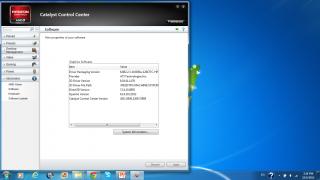
By the way, as you can see here, I don't have a catalyst version, so should I install to AMD Catalyst 12.1 since now I'm on "fixed" graphics? >
Attached Image

Your reply would be greatly appreciated. Thanks.

This post has been edited by gunsligerboyz: Apr 23 2012, 04:13 PM
gunsligerboyz
post Apr 23 2012, 11:37 PM

New Member
*
Junior Member
6 posts

Joined: Jun 2011
QUOTE(ashwin1234 @ Apr 23 2012, 07:22 PM)
For best WEI scores, use the latest GFX drivers. Get it from AMD website under the desktop video card driver area. All the 6000 series and above use the same driver file as the desktop version.  biggrin.gif
*
Thanks!! biggrin.gif

QUOTE(Acid_RuleZz @ Apr 23 2012, 08:27 PM)
Sorry for the late reply, so tired. sweat.gif

Rage use OpenGL, when u're on Dynamic switching, it won't switch to discrete graphic at all for OpenGL application/game. You need to use Fixed switching but then the game is very buggy. (talk about bad console port)
If u want to keep using Fixed switching i guess Leshcat 12.2 UP5 is the best driver so far. Make sure u read the FAQs page for installation guide.


Added on April 23, 2012, 8:28 pm

Even after you reboot the system? I never had that one. :sweat;
*
Thanks Acid, really appreciate your assistance! biggrin.gif

This post has been edited by gunsligerboyz: Apr 23 2012, 11:57 PM

Topic ClosedOptions
 

Change to:
| Lo-Fi Version
0.0529sec    0.12    7 queries    GZIP Disabled
Time is now: 6th December 2025 - 03:52 AM