

QUOTE(yuktsi14 @ Jul 17 2012, 12:44 PM)
is yours as loud as this?

even mine also same
Alienware Mothership V9, Ivy babies!!!
|
|
 Jul 17 2012, 09:05 PM Jul 17 2012, 09:05 PM
|
 
Senior Member
1,951 posts Joined: Jun 2008 From: Mars  
|
QUOTE(yuktsi14 @ Jul 17 2012, 12:44 PM) is yours as loud as this? even mine also same |
|
|
|
|
|
Jul 17 2012, 09:50 PM
|

Junior Member
186 posts Joined: Jan 2003 From: KL
|
All of a sudden, mine was delivered this morning!!!!
DELL ALIENWARE M14XR2 LAPTOP 3rd generation Intel® Core™ i7-3720QM Processor(2.6GHz with Turbo Boost 2.0 up to 3.6GHz, 6MB Cache) Genuine Windows 7 Home Premium 1TB 5400RPM Hard Drive 16GB 1600MHz DDR3 SDRAM(2x8GB) Blu-ray BD-ROM / DVD+/-RW Combo Drive Internal High-Definition Performance Audio 2GB GDDR5 NVIDIA GeForceGT 650M using NVIDIA Optimus technology Killer™ Wireless-N 1202 a/g/n 2x2 MIMO for Gaming & Video and Bluetooth(MY) Intel Centrino Wireless-N 2230 With Bluetooth 4.0 Stealth Black with Soft Touch Finish 14.0"(35.56 cm) WLED HD+(900p) display(1600X900) FullHD Camera with dual digital microphones Alienhead 3D / AlienFX AQUA 8-cell Primary Battery |
|
|
Jul 17 2012, 09:54 PM
|
|
Senior Member
1,951 posts Joined: Jun 2008 From: Mars
|
QUOTE(Saint_Kawa @ Jul 17 2012, 09:50 PM) All of a sudden, mine was delivered this morning!!!! congratulations bro !DELL ALIENWARE M14XR2 LAPTOP 3rd generation Intel® Core™ i7-3720QM Processor(2.6GHz with Turbo Boost 2.0 up to 3.6GHz, 6MB Cache) Genuine Windows 7 Home Premium 1TB 5400RPM Hard Drive 16GB 1600MHz DDR3 SDRAM(2x8GB) Blu-ray BD-ROM / DVD+/-RW Combo Drive Internal High-Definition Performance Audio 2GB GDDR5 NVIDIA GeForceGT 650M using NVIDIA Optimus technology Killer™ Wireless-N 1202 a/g/n 2x2 MIMO for Gaming & Video and Bluetooth(MY) Intel Centrino Wireless-N 2230 With Bluetooth 4.0 Stealth Black with Soft Touch Finish 14.0"(35.56 cm) WLED HD+(900p) display(1600X900) FullHD Camera with dual digital microphones Alienhead 3D / AlienFX AQUA 8-cell Primary Battery |
|
|
Jul 17 2012, 09:55 PM
|

Senior Member
1,838 posts Joined: Jun 2008 From: The Grid
|
QUOTE(Saint_Kawa @ Jul 17 2012, 09:50 PM) All of a sudden, mine was delivered this morning!!!! You bought 2 NIC? DELL ALIENWARE M14XR2 LAPTOP 3rd generation Intel® Core™ i7-3720QM Processor(2.6GHz with Turbo Boost 2.0 up to 3.6GHz, 6MB Cache) Genuine Windows 7 Home Premium 1TB 5400RPM Hard Drive 16GB 1600MHz DDR3 SDRAM(2x8GB) Blu-ray BD-ROM / DVD+/-RW Combo Drive Internal High-Definition Performance Audio 2GB GDDR5 NVIDIA GeForceGT 650M using NVIDIA Optimus technology Killer™ Wireless-N 1202 a/g/n 2x2 MIMO for Gaming & Video and Bluetooth(MY) Intel Centrino Wireless-N 2230 With Bluetooth 4.0 Stealth Black with Soft Touch Finish 14.0"(35.56 cm) WLED HD+(900p) display(1600X900) FullHD Camera with dual digital microphones Alienhead 3D / AlienFX AQUA 8-cell Primary Battery  |
|
|
Jul 17 2012, 10:04 PM
|
|
Junior Member
186 posts Joined: Jan 2003 From: KL
|
QUOTE(rc2x @ Jul 17 2012, 09:55 PM) You bought 2 NIC? Sorry, copy & paste from others spec & forgot to remove the one I'm different with.......hahaha |
|
|
Jul 17 2012, 10:05 PM
|
|
Senior Member
1,838 posts Joined: Jun 2008 From: The Grid
|
QUOTE(Saint_Kawa @ Jul 17 2012, 10:04 PM) Sorry, copy & paste from others spec & forgot to remove the one I'm different with.......hahaha Hahahaa! Too nervous getting your notebook...  |
|
|
|
|
|
Jul 17 2012, 10:20 PM
|
|
Junior Member
393 posts Joined: Apr 2010
|
well i got this thin white light on the left side of the screen meanwhile in every corner.. there's none of that white light
Added on July 17, 2012, 10:23 pm QUOTE(Kris187 @ Jul 17 2012, 01:30 PM) as far as i know, you cannot change the delivery address. just saying.. you could... but your order will delay somemoreThis post has been edited by bosouman: Jul 17 2012, 10:23 PM |
|
|
Jul 17 2012, 10:29 PM
|
|
Senior Member
1,496 posts Joined: Jul 2008
|
QUOTE(chowdm @ Jul 17 2012, 02:33 PM) I am facing some weird experience with my windows 7 in my newly purchased m14xR2....Here is the link WEI doesnt means everything, dont care about thathttp://www.youtube.com/watch?v=YWdVrSUhvLE Everything was working fine in the day before and i started to encounter this on yesterday night. At first i thought my SSD got problem..so i try to reboot it, check the firmware...everything seems ok....then i thought it might be the Intel HD graphic driver issue...i tried to reinstall the driver and everything related to Intel chipset for HM77 motherboard.....this problem was disappear after few reboot but it came again after another reboot.... Anyone had this experience before? I got another Dell Studio XPS 1643, also using Home Premium 64 bit....never had this issue before....is it a bug of W7 or something was not correctly configure with my m14x?   Appreciate your comment....  This post has been edited by putochip123: Jul 17 2012, 11:28 PM |
|
|
Jul 18 2012, 12:21 AM
|

Junior Member
87 posts Joined: Apr 2009
|
hey guys, i just received my m14x r2 and there's a slight problem i would like to ask experts here
1) My ac adapter seems to have some noise like ''pzz'' or slight buzz in it, is that normal for everyone else here? its very noticeable like some suction sound  Should i consult dell customer care or its memang like that one due to the motor thats running in the adapter coz its huge? 2) It is normal for the cd-rom to produce sound when u close your lid or anything else? This post has been edited by Gallardo: Jul 18 2012, 12:54 AM |
|
|
Jul 18 2012, 07:01 AM
|
|
Newbie
1 posts Joined: Jun 2012
|
QUOTE(Gallardo @ Jul 18 2012, 12:21 AM) hey guys, i just received my m14x r2 and there's a slight problem i would like to ask experts here Hi, check the first post above and watch the youtube if ur dvd produce same sound1) My ac adapter seems to have some noise like ''pzz'' or slight buzz in it, is that normal for everyone else here? its very noticeable like some suction sound Should i consult dell customer care or its memang like that one due to the motor thats running in the adapter coz its huge? 2) It is normal for the cd-rom to produce sound when u close your lid or anything else? |
|
|
Jul 18 2012, 03:06 PM
|
 
Elite
24,193 posts Joined: Feb 2010 From: Perak
|
QUOTE(Gallardo @ Jul 18 2012, 12:21 AM) hey guys, i just received my m14x r2 and there's a slight problem i would like to ask experts here I'm using an M14x R11) My ac adapter seems to have some noise like ''pzz'' or slight buzz in it, is that normal for everyone else here? its very noticeable like some suction sound Should i consult dell customer care or its memang like that one due to the motor thats running in the adapter coz its huge? 2) It is normal for the cd-rom to produce sound when u close your lid or anything else? 1) There shouldn't be any sounds... have you make sure that you've connected properly to the socket and to your laptop?  2) The CD-Rom will generate noise when starting Windows etc. IF there is a disc in your optical drive. And yes, the sound is quite apparent, which is normal since the disc is spun very quickly  |
|
|
Jul 18 2012, 03:15 PM
|
|
Elite
24,193 posts Joined: Feb 2010 From: Perak
|
Anyway, for all new M14x R2 users,
below are some of the problems faced in the M14x R1, some of which were not yet fixed 1. Very abrupt and loud fan noise, solved by BIOS update which causes the fan speed to increase gradually instead of abruptly. Its still loud, but not all of a sudden  2. AlienFX lights of the left keyboard panel and around the touchpad will not work when starting Windows IF you are using ADVANCE LIGHTING settings (pulse/color morphs) 3. Auto-shutdown when gaming at high performance profile on battery 4. Rare, but occasional and random "tock tock" sound from the speakers, regardless of whether your speakers are on or disabled You guys might wanna see whether any of these problems are still there |
|
|
 Jul 18 2012, 08:37 PM Jul 18 2012, 08:37 PM
|

Elite
1,193 posts Joined: Aug 2011 From: Miri, Sarawak 
|
QUOTE(Saint_Kawa @ Jul 17 2012, 09:50 PM) All of a sudden, mine was delivered this morning!!!! Congrats bro....... » Click to show Spoiler - click again to hide... « This post has been edited by Pro3363: Jul 18 2012, 08:37 PM |
|
|
|
|
|
Jul 18 2012, 10:15 PM
|
|
Junior Member
87 posts Joined: Apr 2009
|
QUOTE(TOKNENENG @ Jul 18 2012, 07:01 AM) Hi, check the first post above and watch the youtube if ur dvd produce same sound QUOTE(PF T.J. @ Jul 18 2012, 03:06 PM) I'm using an M14x R1 thanks guys! w 1) There shouldn't be any sounds... have you make sure that you've connected properly to the socket and to your laptop? 2) The CD-Rom will generate noise when starting Windows etc. IF there is a disc in your optical drive. And yes, the sound is quite apparent, which is normal since the disc is spun very quickly  but the sound of the cd rom frequents like say every now and then eventho there are no CDs in it lol but the sound of the cd rom frequents like say every now and then eventho there are no CDs in it lolThis post has been edited by Gallardo: Jul 18 2012, 11:02 PM |
|
|
Jul 19 2012, 07:48 AM
|
|
Newbie
1 posts Joined: Jun 2012
|
QUOTE(Gallardo @ Jul 18 2012, 10:15 PM) thanks guys! w Yes same and also to my Friend. Im ignoring it because we are planning to change it to a HDD. but the sound of the cd rom frequents like say every now and then eventho there are no CDs in it lolNew issue: I also tried the Dell Diagnostic Tool and upon checking, the SMART is not enabled in the HDD. |
|
|
Jul 19 2012, 01:49 PM
|

Junior Member
127 posts Joined: Sep 2005 From: Malaysia
|
hello guys.. i just received my M14x R2 with i3720QM, KillerN, 32+750, 8GB RAM, 2GBGT650M. Ordered on 11/07/12
TS pls put my name into the list. May I ask a few questions regarding the usage of my alienware? I mainly use it for coding and gaming throughout the whole day and most of the time my habit is to download stuff whenever I'm asleep or out for shopping. Basically previous laptop (Asus K40IN) is turned on continuously for 2-3 days and once a while I will shutdown if feel it's on for many days. Can I do the same for Alienware? Can it endure such long hours? Also, for my prev laptop, the battery is inside casing, need to open latch to take it out, so I lazy and never take out and use adaptor all the time. I realise this has caused my battery to weaken. For our alienware, if use long hour, should i plug off and on to drain/cycle the battery life or can just leave it plugged all the time? |
|
|
Jul 19 2012, 01:59 PM
|

Junior Member
116 posts Joined: Apr 2012
|
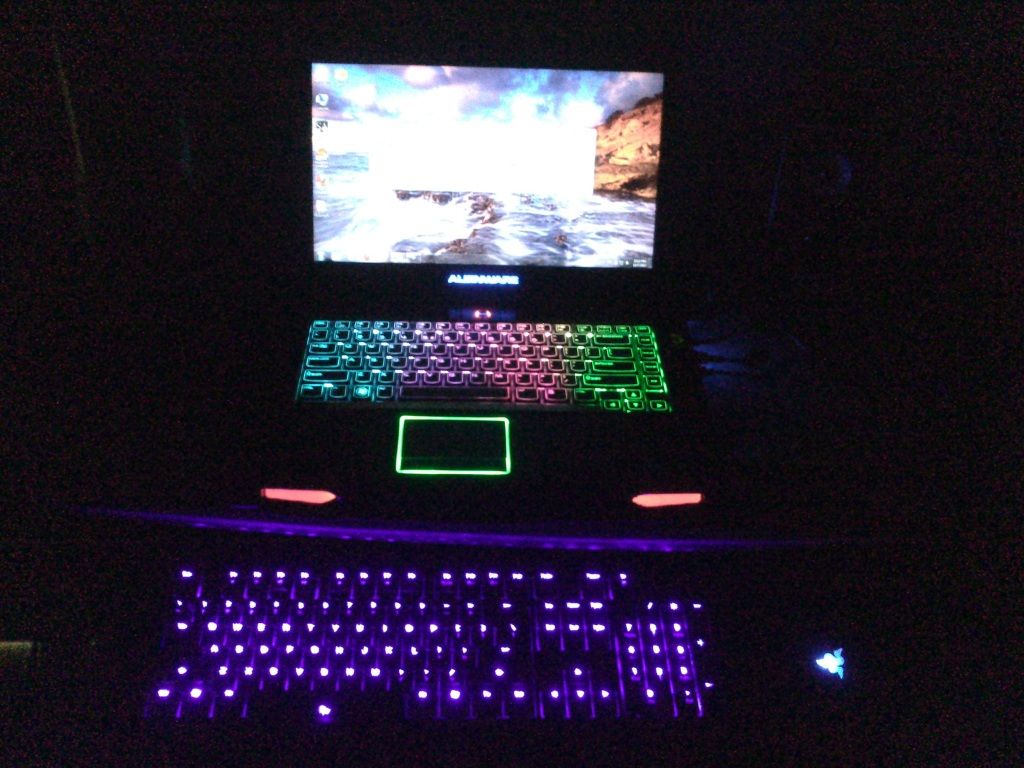
Laptop Received Yesterday
  |
|
|
Jul 19 2012, 05:14 PM
|
|
Elite
24,193 posts Joined: Feb 2010 From: Perak
|
QUOTE(sewerside @ Jul 19 2012, 01:49 PM) hello guys.. i just received my M14x R2 with i3720QM, KillerN, 32+750, 8GB RAM, 2GBGT650M. Ordered on 11/07/12 Its an Alienware, of course it can take it TS pls put my name into the list. May I ask a few questions regarding the usage of my alienware? I mainly use it for coding and gaming throughout the whole day and most of the time my habit is to download stuff whenever I'm asleep or out for shopping. Basically previous laptop (Asus K40IN) is turned on continuously for 2-3 days and once a while I will shutdown if feel it's on for many days. Can I do the same for Alienware? Can it endure such long hours? Also, for my prev laptop, the battery is inside casing, need to open latch to take it out, so I lazy and never take out and use adaptor all the time. I realise this has caused my battery to weaken. For our alienware, if use long hour, should i plug off and on to drain/cycle the battery life or can just leave it plugged all the time? As for the battery, battery lifespan is greatly determined by the heat it is exposed to.. luckily the guys at AW placed the battery at the coolest place in the laptop... still you can do your part by placing the laptop in air-conditioned rooms, or at least cool it with a cooler pad/ fan etc. You can also disable turboboost when not in use, that'll lower CPU temps by around 10C |
|
|
Jul 19 2012, 06:20 PM
|
|
Junior Member
127 posts Joined: Sep 2005 From: Malaysia
|
Thanks for the info bro. May I know how to disable the turbo boost?
QUOTE(PF T.J. @ Jul 19 2012, 05:14 PM) Its an Alienware, of course it can take it As for the battery, battery lifespan is greatly determined by the heat it is exposed to.. luckily the guys at AW placed the battery at the coolest place in the laptop... still you can do your part by placing the laptop in air-conditioned rooms, or at least cool it with a cooler pad/ fan etc. You can also disable turboboost when not in use, that'll lower CPU temps by around 10C |
|
|
Jul 19 2012, 06:36 PM
|
|
Elite
24,193 posts Joined: Feb 2010 From: Perak
|
QUOTE(sewerside @ Jul 19 2012, 06:20 PM) Thanks for the info bro. May I know how to disable the turbo boost? Left click the battery/charging icon at the lower right corner of your desktop > More power options > Change plan settings > Change advance power settings > Processor power management > Maximum processor state > change both to 99 |
|
Topic ClosedOptions
|
| Change to: |  0.0321sec 0.0321sec
 1.00 1.00
 6 queries 6 queries
 GZIP Disabled GZIP Disabled
Time is now: 14th December 2025 - 08:44 AM |
 Quote
Quote