Welcome Guest ( Log In | Register )

9 Pages « < 3 4 5 6 7 > » Bottom

Outline · [ Standard ] · Linear+

Unifi Draytek Vigor 2130n, Just received today!.. First impression.

views
     
goodseeder
post Feb 15 2012, 06:08 PM

New Member
*
Junior Member
43 posts

Joined: Mar 2011
QUOTE(iipohbee @ Feb 15 2012, 03:02 PM)
With over RM800, I'm better off getting an Asus RT-N66U aka the Dark Knight.

Only cost around USD$180-190(not even RM600)

Broadcom chipset.

Maximum simultaneous connections:
http://www.smallnetbuilder.com/lanwan/rout...-max-simul-conn
It can do twice as many as the Draytek2130n

Built quality is way better coming from the top motherboard manufacturer and superb quality heatsink that is as heavy as a brick.

Asus Malaysia provides 1 to 1 replacement as they were challlenged by TP-Link previously.
*
its rm480 for vigor2130n.. I don't think I will need to replace this baby anytime soon. But as you said, for cheap hardware you need 1-to-1 replacement

Its worth it. I own one, you don't seem to. As a satisfied customer with the superb hardware and the nice service by the people working there. I want to say all your nonsense is exactly that, nonsense.
» Click to show Spoiler - click again to hide... «

you go around in broadband topics trying to start arguments, I saw your whining about Unifi and TM or the bandwidth pipe stuff blablahh laugh.gif laugh.gif
I for one am very happy with Unifi despite what you say, its the best internet in malaysia, and I tried the majority nod.gif
izzat80
post Feb 15 2012, 07:49 PM

Getting Started
**
Junior Member
261 posts

Joined: Sep 2011
QUOTE(goodseeder @ Feb 15 2012, 01:12 AM)
L4D2 works like charm! My friends ip in my network became 192.168.1.201
smooth play! Thanks izzat.

Unifi symmetrical speed it feels just like LAN play! smile.gif
Much better than hamachi! I guess because this way is direct
*
smile.gif yes vpn is better..
actually hamachi not bad... but for some game like urs not working so just use vpn...

also in win7 super easy to use (just click start >>> type vpn in search) first one the wizard... next put ip next... thats it!!

ignore that guy la... see my reply him in this thread even.. he repeating again same bs.. here and /k also...
search lyn rt n56 see owenr feedbacks first..tongue.gif
iipohbee
post Feb 15 2012, 10:36 PM

On my way
****
Senior Member
603 posts

Joined: Dec 2008
QUOTE(goodseeder @ Feb 15 2012, 06:08 PM)
its rm480 for vigor2130n.. I don't think I will need to replace this baby anytime soon. But as you said, for cheap hardware you need 1-to-1 replacement

Its worth it. I own one, you don't seem to. As a satisfied customer with the superb hardware and the nice service by the people working there. I want to say all your nonsense is exactly that, nonsense.
QUOTE(gotdamsg @ Nov 23 2011, 12:14 PM)
Here are the prices.

Vigor 2130 (no wireless) @ RM510
Vigor 2130n (with wireless N) @ RM820
Sudah harga turun ka bro? No demand? Tak laku?
Price dropped by half with less demand?

QUOTE(goodseeder @ Feb 15 2012, 06:08 PM)
you go around in broadband topics trying to start arguments, I saw your whining about Unifi and TM or the bandwidth pipe stuff blablahh laugh.gif  laugh.gif
I for one am very happy with Unifi despite what you say, its the best internet in malaysia, and I tried the majority nod.gif
*
We are talking about hardware here kiddo. What's with the ISP service promotion now on a hardware thread?

Your post seems more like an argument inciter than mine. I'm just making the public aware of a new router model that all.
izzat80
post Feb 16 2012, 12:18 AM

Getting Started
**
Junior Member
261 posts

Joined: Sep 2011
QUOTE(iipohbee @ Feb 15 2012, 10:36 PM)
Sudah harga turun ka bro? No demand? Tak laku?
Price dropped by half with less demand?
We are talking about hardware here kiddo. What's with the ISP service promotion now on a hardware thread?

Your post seems more like an argument inciter than mine. I'm just making the public aware of a new router model that all.
*
here we ago again....u dun see this is owner thread? why u come here try convince us we r wrong and stupid for buying? we already buy man... its too late tongue.gif

since u always use smallnetbuilder.... do u check the forum ? go there...
also my fav forum: http://forums.whirlpool.net.au/forum/82?g=56
read the feedbacks about each... vigor king man smile.gif

and if u wan to make the (public aware of new model) like u say... go to unifi thread... the word router is not even in title of this thread... only ppls who know this come inside here so get out and promo ur super asus in main unifi thread lah..sure got much more ppls see it there
the only kiddo here is u not goodseeder or anyone else... its U.. iipohbee the clueless spamming bee laugh.gif

soonwai
post Feb 17 2012, 03:36 AM


********
All Stars
11,456 posts

Joined: Oct 2007
From: KL


Hi Vigor owners, any of you use the VPN server on the 2130? How fast is it using 3DES or AES128?

My friend thinking of getting one for the office. Currently he has an Asus n56u but VPN from him to his supplier's VPN server is problematic. i.e.: doesn't really work from what he tells me. Now he needs incoming VPN but not a dedicated box or server so that's why I suggested to him the Vigor. Only 2 or 3 person needs to use at any one time.

Anyway he's gonna give me the n56u if I can get something working for him. :-)

PS: does the Asus n56u have a VPN server built-in?

This post has been edited by soonwai: Feb 17 2012, 03:37 AM
goodseeder
post Feb 17 2012, 11:42 AM

New Member
*
Junior Member
43 posts

Joined: Mar 2011
QUOTE(soonwai @ Feb 17 2012, 03:36 AM)
Hi Vigor owners, any of you use the VPN server on the 2130? How fast is it using 3DES or AES128?

My friend thinking of getting one for the office. Currently he has an Asus n56u but VPN from him to his supplier's VPN server is problematic. i.e.: doesn't really work from what he tells me. Now he needs incoming VPN but not a dedicated box or server so that's why I suggested to him the Vigor. Only 2 or 3 person needs to use at any one time.

Anyway he's gonna give me the n56u if I can get something working for him. :-)

PS: does the Asus n56u have a VPN server built-in?
*
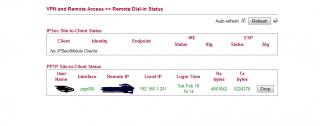
Not sure if its the same as what you ask but I'm doing this. Hamachi did not work with L4D2 so I enabled VPN in the vigor and my friend used the Windows vpn wizard to join my network, see izzat post I followed it

In the game his IP is 192.168.1.201, just like a local LAN IP

What type is that or what is the speed no idea rolleyes.gif

This post has been edited by goodseeder: Feb 17 2012, 11:43 AM
soonwai
post Feb 17 2012, 12:18 PM


********
All Stars
11,456 posts

Joined: Oct 2007
From: KL


QUOTE(goodseeder @ Feb 17 2012, 11:42 AM)
Not sure if its the same as what you ask but I'm doing this. Hamachi did not work with L4D2 so I enabled VPN in the vigor and my friend used the Windows vpn wizard to join my network, see izzat post I followed it

In the game his IP is 192.168.1.201, just like a local LAN IP

What type is that or what is the speed no idea rolleyes.gif
*
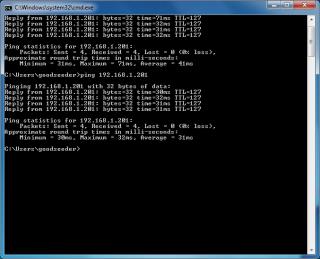
Exactly what we want to do also sans the gaming part. :-) What are the ping times like with the VPN? What encryption do you set for the connection? The speed I was asking about is how fast it takes, for example, to copy a file from your friend's PC to yours. Because the encryption will slow things down for sure. If you got time, maybe you can just copy a file for me and see how long it takes. Thanks in advance.

This post has been edited by soonwai: Feb 17 2012, 12:21 PM
goodseeder
post Feb 17 2012, 04:17 PM

New Member
*
Junior Member
43 posts

Joined: Mar 2011
QUOTE(soonwai @ Feb 17 2012, 12:18 PM)
Exactly what we want to do also sans the gaming part. :-) What are the ping times like with the VPN? What encryption do you set for the connection? The speed I was asking about is how fast it takes, for example, to copy a file from your friend's PC to yours. Because the encryption will slow things down for sure. If you got time, maybe you can just copy a file for me and see how long it takes. Thanks in advance.
*
Ok I will check with my friend tonight when he goes online. I usually call my friend on skype and we speak then he joins using VPN to my network so we can play
I guess using skype to send file will not use VPN right? How do I copy to see the VPN speed?
soonwai
post Feb 17 2012, 07:44 PM


********
All Stars
11,456 posts

Joined: Oct 2007
From: KL


QUOTE(goodseeder @ Feb 17 2012, 04:17 PM)
Ok I will check with my friend tonight when he goes online. I usually call my friend on skype and we speak then he joins using VPN to my network so we can play
I guess using skype to send file will not use VPN right? How do I copy to see the VPN speed?
*
Once he's connected to your VPN. If he's got File Sharing on, you should be able to see him in My Networks. Just drag and drop as usual after that. Thanks, man.
ldragon
post Feb 17 2012, 08:15 PM

Regular
******
Senior Member
1,026 posts

Joined: Jan 2003
From: Kuala Lumpur, Malaysia
more info on the VPN setup
http://www.smallnetbuilder.com/wireless/wi...eviewed?start=2
soonwai
post Feb 18 2012, 02:59 PM


********
All Stars
11,456 posts

Joined: Oct 2007
From: KL


QUOTE(ldragon @ Feb 17 2012, 08:15 PM)
Thanks, exactly what I was looking for.
ldragon
post Feb 18 2012, 04:02 PM

Regular
******
Senior Member
1,026 posts

Joined: Jan 2003
From: Kuala Lumpur, Malaysia
more in smart vpn...
http://www.draytek.com/user/SupportFAQDetail.php?ID=1967
goodseeder
post Feb 18 2012, 04:41 PM

New Member
*
Junior Member
43 posts

Joined: Mar 2011
QUOTE(soonwai @ Feb 17 2012, 07:44 PM)
Once he's connected to your VPN. If he's got File Sharing on, you should be able to see him in My Networks. Just drag and drop as usual after that. Thanks, man.
*
joined just now
Attached Image
ping
Attached Image
the sharing he said not interested to do now play first sweat.gif
rjb123
post Feb 19 2012, 04:36 AM

Regular
******
Senior Member
1,820 posts

Joined: May 2010
From: Kuala Lumpur


Still happy with my Draytek here smile.gif

System Uptime : 44d 10:26:45
izzat80
post Feb 20 2012, 07:33 PM

Getting Started
**
Junior Member
261 posts

Joined: Sep 2011
QUOTE(rjb123 @ Feb 19 2012, 04:36 AM)
Still happy with my Draytek here smile.gif

System Uptime  :   44d 10:26:45
*
still 1.5.1? jus upgrade to 1.5.2beta bro... enjoy the new stuffs
they say will release 1.5.2 final for long keep saying coming soon... i give up waiting then upgrade... very2 stable and new stuff worth break the uptime counter tongue.gif

This post has been edited by izzat80: Feb 20 2012, 07:36 PM
soonwai
post Feb 21 2012, 12:22 PM


********
All Stars
11,456 posts

Joined: Oct 2007
From: KL


@izzat80

My IPv6 config for my Mikrotik RB750GL as requested.
CODE
/interface 6to4
add disabled=no local-address=175.139.x.x name=6to4 remote-address=unspecified

/ipv6 address
add address=2002:XXXX:XXXX::1/16 advertise=no comment=6to4public disabled=no eui-64=no interface=6to4
add address=2002:XXXX:XXXX:1::1/64 advertise=yes comment=6to4subnet disabled=no eui-64=no interface=ether2

/ipv6 route
add disabled=no distance=1 dst-address=2000::/3 gateway=::192.88.99.1%6to4

175.139.x.x is current IP address.
2002:XXXX:XXXX:1::1 is the IPv6 address calculated based on the above IP. Just convert to hex.
This needs to be updated every time you get an IP from UniFi. On my router, I run a script to update it automatically whenever the IPv4 address changes. Can you do schedule scripts on the 2130n?

IPv6 DNS from OpenDNS: 2620::ccd::2 and 2620::ccc::2

As you can see, there're not that many things to set. Most of the settings goes into IPv6 >> WAN General Setup on the 2130n. Not sure about the route. You'll need to create a route to 192.88.99.1 which is the IPv6 any cast relay.

Another option is to try Hurricane Electric. They have a forum there which might be helpful.

Once your router is set up and is advertising the IPv6 subnet, your PCs should pick it up automatically. I'm using OS X and I think Vista and 7 should work with no configuration on your part. You might need to install something for XP.

If you use 6to4 anycast relay, you get assigned a /48 which means you have 65536 /64 subnets at your disposal. You can assign an IPv6 address to everything in your house including the ants.

Have fun. Looking forward to seeing your IPv6 tag.

ps: I had probs with the browser preferring to connect to LYN with IPv4 instead of IPv6. Let me know if you encounter this.

This post has been edited by soonwai: Feb 21 2012, 12:34 PM
izzat80
post Feb 23 2012, 08:15 PM

Getting Started
**
Junior Member
261 posts

Joined: Sep 2011
QUOTE(soonwai @ Feb 21 2012, 12:22 PM)
@izzat80

Have fun. Looking forward to seeing your IPv6 tag.

ps: I had probs with the browser preferring to connect to LYN with IPv4 instead of IPv6. Let me know if you encounter this.
*
soonwai very2 thanks for ur useful detail reply

I think it work!!!!! but where to setup 6to4 thing? do i hv ipv6 tag?

first... i convert my ipv4 to ipv6 like u said... i use this link:
http://www.subnetonline.com/pages/subnet-c...6-converter.php

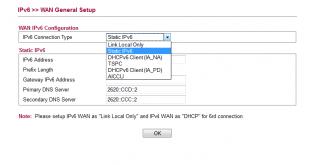
then i go to vigor ipv6 menu and choose static ipv6 and key in the ip
Attached Image

but got no ipv6 gateway.... the gateway is telekom right? do they hv ipv6 gateway? so this one i jus leave empty

after i click ok (apply setting for ipv6 static ip) my connection drop and reconnect and now in online stats i got ipv6 ip also above it my ipv4...see the online stat:
Attached Image

so now how to test if it works? i pm u my ipv6 u try to ping? smile.gif

This post has been edited by izzat80: Feb 23 2012, 08:36 PM
soonwai
post Feb 24 2012, 12:27 PM


********
All Stars
11,456 posts

Joined: Oct 2007
From: KL


QUOTE(izzat80 @ Feb 23 2012, 08:15 PM)
soonwai very2 thanks for ur useful detail reply

I think it work!!!!! but where to setup 6to4 thing? do i hv ipv6 tag?

so now how to test if it works? i pm u my ipv6 u try to ping?  smile.gif
*
No probs but I think your config is not right. Are you using the 6to4 relay?

Let's say you're using 6to4 relay.
And your UniFi IPv4 address is: 175.139.160.5
Your IPv6 address prefix is always: 2002:AF8B:A005:1::
The AF8B:A005 part is obtained from 175.139.160.5 = AF.8B.A0.05 (dec to hex for each quad)
This IPv6 address is always reserved for this particular IPv4 based on the simple formula above.
The gateway for 6to4 is always 192.88.99.1.

Hope that helps. I haven't had time to look at the 2130n web config. When I do, I'll see if I can work it out.

Anyway if it works, try and ping Facebook. Their IPv6 address is:

www.v6.facebook.com
2620:0:1cfe:face:b00c::3

On a Mac, I use ping6 instead of ping, not sure about Windows. You're in Windows right?

Once you have it working (including IPv6 DNS), you should be able to browse as usual to www.v6.facebook.com.
www.v6.facebook.com will not work if you're still on IPv4.

Don't test on forum.lowyat.net because it's dual-stacked, i.e.: running both IPv4 and IPv6, so you can't tell easily if you're on one or the other.
izzat80
post Feb 25 2012, 04:10 AM

Getting Started
**
Junior Member
261 posts

Joined: Sep 2011
QUOTE(soonwai @ Feb 24 2012, 12:27 PM)
No probs but I think your config is not right. Are you using the 6to4 relay?

Don't test on forum.lowyat.net because it's dual-stacked, i.e.: running both IPv4 and IPv6, so you can't tell easily if you're on one or the other.
*
thanks bro...

i think i understand how it work but not sure how 6to4 relay is... is it SERVIS or just (configuration)??

see what i do now:

1) convert my ipv4 to ipv6 as per ur instruction.. so now its in format 2002:converted part here:1::

2) go to vigor ipv6 wan setup and choose STATIC ipv6.. pls see screenshot
Attached Image
btw the other one i try but hv some kind of user name and password need... the tunnel i mean

3) i setup dns as u gave me....
primary: 2620::ccd::2
second: 2620::ccc::2

4) the ipv6 gateway as u said is 192.88.99.1 so i need to convert this as per step 1 to ipv6 format then key in router right?

one thing... after i apply the new setting for static ipv6... the vigor auto drop the line and dial to tm again... so now my tm ip is not the same.... rclxub.gif

is this correct way for 4to6 relay bro?
soonwai
post Feb 26 2012, 04:13 AM


********
All Stars
11,456 posts

Joined: Oct 2007
From: KL


QUOTE(izzat80 @ Feb 25 2012, 04:10 AM)
i think i understand how it work but not sure how 6to4 relay is... is it SERVIS or just (configuration)??
It's a service, run by volunteers and free. IETF says it's to ease the transition of IP to IPv6. It's easy to setup but no so reliable because the 6to4 relays come and go. Free mah.

And sorry for not coming back to you earlier. I just had a better look at the 2130n simulator and it doesn't support 6to4 relay but it does support tunnelbrokers such as Hurricane Electric, he.net. I think you use the option TSPC. Sign up for a HE account first. Tunnelbrokers such as HE use 6in4 and is actually more reliable than 6to4 relays since it's managed by an actual company which in the case of Hurricane Electric, decided to make it free. Actually quite a few 6to4 relays also belong to he.net.

9 Pages « < 3 4 5 6 7 > » Top
 

Change to:
| Lo-Fi Version
0.0270sec    0.43    6 queries    GZIP Disabled
Time is now: 3rd December 2025 - 02:38 PM