


Have been busy testing this unit vs my previous setup Mikrotik RB250GS + Asus RT-N16 + DD-WRT. Pretty happy with Draytek 2130n.
Unifi Draytek Vigor 2130n, Just received today!.. First impression.
|
|
 Dec 23 2011, 12:03 AM Dec 23 2011, 12:03 AM
|
 
Senior Member
1,026 posts Joined: Jan 2003 From: Kuala Lumpur, Malaysia 
|
Received the Draytek on 20th Dec.
Have been busy testing this unit vs my previous setup Mikrotik RB250GS + Asus RT-N16 + DD-WRT. Pretty happy with Draytek 2130n. |
|
|
|
|
|
Dec 23 2011, 12:58 PM
|

Junior Member
380 posts Joined: Nov 2004 From: selangor, malaysia 
|
wowww great!..
|
|
|
Dec 23 2011, 03:47 PM
|

Junior Member
261 posts Joined: Sep 2011
|
QUOTE(ldragon @ Dec 23 2011, 12:03 AM) Received the Draytek on 20th Dec. cool...what that oren box for?
Have been busy testing this unit vs my previous setup Mikrotik RB250GS + Asus RT-N16 + DD-WRT. Pretty happy with Draytek 2130n.  |
|
|
Dec 23 2011, 08:47 PM
|
|
Senior Member
1,026 posts Joined: Jan 2003 From: Kuala Lumpur, Malaysia
|
That box is the Broadband router 4 port switch without Wi-Fi.
|
|
|
Dec 29 2011, 02:12 PM
|

Junior Member
43 posts Joined: Mar 2011
|
neway so i got this
after install can stream and work but for upnp now I'm confused, refer to picture. How is it there is a speed setting for Upnp?  
before in my linksys the upnp is for auto-open then close the ports right? no need manual forward and all that. So if got utorrent enable upnp then enable in router, can get open port (green status) automatically... same for xbox can get open nat. this router it opens the port but I need to specify speed? isnt upnp just for opening and closing ports? sometimes the unifi speed test is higher than what i subscribe. upload speed always higher. so should it be 6m if got 5m unifi? also it says it supports DLNA, anyone tried streaming directly from the router to hdtv? that would be neat no need for streaming device/player. Already got the new xtreamer but just curious. If got second hdtv no need to buy another xtreamer  |
|
|
Dec 30 2011, 09:57 AM
|
|
Junior Member
261 posts Joined: Sep 2011
|
it extra feature la.. u can set the speed for upnp client...
if u want no limit just put 6mb if got 5mb... like u say dlna look interesting.... dun think i hv any device that hv that... just normal tv no fancy stuffs.. if u try it tell how is it |
|
|
|
|
|
Dec 31 2011, 09:24 PM
|
|
Junior Member
43 posts Joined: Mar 2011
|
QUOTE(izzat80 @ Dec 30 2011, 09:57 AM) it extra feature la.. u can set the speed for upnp client... try d if u want no limit just put 6mb if got 5mb... like u say dlna look interesting.... dun think i hv any device that hv that... just normal tv no fancy stuffs.. if u try it tell how is it  You will need to put a USB thumbdrive or disk to install it. did you try the new firmware? now I can view the QoS real time stat  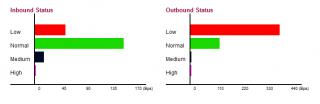
I'm seeding full speed and downloading, then I view youtube video automatically QoS reduce torrent download (red one).. and the green (youtube video) takes priority. the black is skype I was making a call, was perfect clear! this baby is epic still dont know the high. Red = torrent/p2p, green = browsing. black = skype/voice. purple = ? dont know yet never see it move before UNIFI FTW. Man I was missing much with the old crappy connection. I downloaded gigs and gigs. unifi is EPIC |
|
|
Jan 2 2012, 12:41 PM
|
|
Junior Member
261 posts Joined: Sep 2011
|
QUOTE(goodseeder @ Dec 31 2011, 09:24 PM) try d its looks cool I will try it You will need to put a USB thumbdrive or disk to install it. did you try the new firmware? now I can view the QoS real time stat
I'm seeding full speed and downloading, then I view youtube video automatically QoS reduce torrent download (red one).. and the green (youtube video) takes priority. the black is skype I was making a call, was perfect clear! this baby is epic still dont know the high. Red = torrent/p2p, green = browsing. black = skype/voice. purple = ? dont know yet never see it move before UNIFI FTW. Man I was missing much with the old crappy connection. I downloaded gigs and gigs. unifi is EPIC yes unifi is great i remember i was excite like this when i got it first... after a while nothing left to download... all HDD is full hahaha   |
|
|
Jan 3 2012, 01:15 PM
|
|
Junior Member
43 posts Joined: Mar 2011
|
Regarding the external USB drive, I was told using ext3fs (linux file system) gives much better read/write performance.
With NTFS it wasn't fast, but to use ext3fs you have to format the HDD, meaning lose all data on the drive, because you are changing the filesystem.  I don't have linux, but there is a format tool in the router BUT my external HDD is packed with content and I have no place to move it. Have any tried the ext3fs? Is there a big jump? Is it worth it to reformat? I don't think any of my friends has 1TB laying around for me to use so need to get rid of the 1080p collection  . And after doing this the HDD will not be usable in windows right? Since its a linux file system. Ahh man . And after doing this the HDD will not be usable in windows right? Since its a linux file system. Ahh man |
|
|
Jan 3 2012, 02:51 PM
|
|
Junior Member
380 posts Joined: Nov 2004 From: selangor, malaysia
|
I found a lot of techniques to read and write ext3 file system on Windows. you may try google around :-)
|
|
|
Jan 4 2012, 07:29 PM
|
|
Junior Member
43 posts Joined: Mar 2011
|
|
|
|
Jan 5 2012, 04:42 PM
|
|
Junior Member
261 posts Joined: Sep 2011
|
QUOTE(gotdamsg @ Jan 3 2012, 02:51 PM) I found a lot of techniques to read and write ext3 file system on Windows. you may try google around :-) if u find good one already share lah..... we needs to google again?» Click to show Spoiler - click again to hide... « QUOTE(goodseeder @ Jan 4 2012, 07:29 PM) but.... is there app that can integrate with win and not open manual to do all? dun think so....anyway why need to access? if u put the hdd with vigor, u can access from share direct... why u need to put it back to windows? just make the hdd permanet attached to vigor router...  |
|
|
Jan 5 2012, 05:46 PM
|
|
Junior Member
380 posts Joined: Nov 2004 From: selangor, malaysia
|
found a lot but haven't tried it yet.. so I didn't know which one is working best
I will let you all know once I got the chance to do it |
|
|
|
|
|
Jan 8 2012, 02:02 AM
|
|
Junior Member
43 posts Joined: Mar 2011
|
QUOTE(izzat80 @ Jan 5 2012, 04:42 PM) if u find good one already share lah..... we needs to google again? » Click to show Spoiler - click again to hide... « but.... is there app that can integrate with win and not open manual to do all? dun think so.... anyway why need to access? if u put the hdd with vigor, u can access from share direct... why u need to put it back to windows? just make the hdd permanet attached to vigor router... QUOTE(gotdamsg @ Jan 5 2012, 05:46 PM) found a lot but haven't tried it yet.. so I didn't know which one is working best Yup, I think thats what I'm gonna do. I will keep my current HD for my use and buy a new HD just for the Vigor and attach it, format to linux file system and leave it there permanently for use by the router I will let you all know once I got the chance to do it |
|
|
Jan 16 2012, 02:16 PM
|
|
Junior Member
10 posts Joined: May 2005
|
Looks like this wireless router is good.
I do have a question, as the current TM provided DIR-615 is just not working for me - my front upstairs room can't get the signal from the wireless AP situated at the ground floor back room. I would like to know whether with 2130n setup at the downstairs backroom, can reach the upstairs front room? Anyone with similar setup? |
|
|
Jan 16 2012, 03:11 PM
|

Senior Member
1,941 posts Joined: Jan 2003
|
I actually put at my house living hall and i don't know if this consider as front? and my bedroom is actually located upstair back of the house...
with DIR-615, i barely can get signal and sometime the line broken... but with 2130n, I can have at least 3 - 4 bars of signal when i move my notebook til the edge of the room. If i stay near the door of my room, I can actually get full bar! As for iPhone/iPad, 1 bar at the edge of the room, 2 - 3 bars near the door of the room... Conclusion, it is actually quite strong for the signal... If you need any further technical detail, i guess I can spend sometime to give you the dbi signal strength if you want... |
|
|
Jan 16 2012, 03:30 PM
|
|
Junior Member
10 posts Joined: May 2005
|
QUOTE(thankyou @ Jan 16 2012, 03:11 PM) I actually put at my house living hall and i don't know if this consider as front? and my bedroom is actually located upstair back of the house... Thanks! with DIR-615, i barely can get signal and sometime the line broken... but with 2130n, I can have at least 3 - 4 bars of signal when i move my notebook til the edge of the room. If i stay near the door of my room, I can actually get full bar! As for iPhone/iPad, 1 bar at the edge of the room, 2 - 3 bars near the door of the room... Conclusion, it is actually quite strong for the signal... If you need any further technical detail, i guess I can spend sometime to give you the dbi signal strength if you want... This gives me anidea about the signal strength. Currently i'm using a repeater which i'm trying to avoid unless necessary. I wonder whether 2130n antenna allows stronger signal strength compared to Asus RT-N56 ? |
|
|
Jan 16 2012, 04:19 PM
|
|
Senior Member
1,941 posts Joined: Jan 2003
|
Never own an Asus RT-N56 so I can't comment on that...
|
|
|
Jan 16 2012, 05:13 PM
|

Junior Member
361 posts Joined: Jun 2007
|
QUOTE(jameskam @ Jan 16 2012, 03:30 PM) Thanks! I don't think the signal is stronger than Asus RT-N56 but even at 2-3 bar, the signal is stable and never drop. This gives me anidea about the signal strength. Currently i'm using a repeater which i'm trying to avoid unless necessary. I wonder whether 2130n antenna allows stronger signal strength compared to Asus RT-N56 ? Later, will experiment with a higher dBi antenna to see if the signal improve. |
|
|
Jan 16 2012, 08:34 PM
|
|
Junior Member
43 posts Joined: Mar 2011
|
happy with the draytek wireless range also, covers the entire place comfortably
and the three antennas are detachable, they can be replaced/upgraded easily |
| Change to: |  0.0317sec 0.0317sec
 0.49 0.49
 6 queries 6 queries
 GZIP Disabled GZIP Disabled
Time is now: 3rd December 2025 - 11:58 PM |
 Quote
Quote