


i hv non-wireless 2130

Unifi Draytek Vigor 2130n, Just received today!.. First impression.
|
|
 Nov 19 2011, 04:06 PM Nov 19 2011, 04:06 PM
Return to original view | Post
#1
|
 
Junior Member
261 posts Joined: Sep 2011 
|
naise... welcome to club
i hv non-wireless 2130 |
|
|
|
|
|
Nov 23 2011, 12:39 PM
Return to original view | Post
#2
|
|
Junior Member
261 posts Joined: Sep 2011
|
QUOTE(gotdamsg @ Nov 23 2011, 12:14 PM) Here are the prices. what about the promo price rm480 for wireless one.... is over? means u pay rm820 for ur 2130n???Vigor 2130 (no wireless) @ RM510 Vigor 2130n (with wireless N) @ RM820  another forumer said she bought for rm480 the wireless one (2130n)... i was thinking sell the one i hv then buy the wireless version... the one i have is non wireless but i bought long ago ....no promotion that time u bought from http://www.draytek-malaysia.com/ ??? also how is the wireless?? is it good range? |
|
|
Nov 23 2011, 12:53 PM
Return to original view | Post
#3
|
|
Junior Member
261 posts Joined: Sep 2011
|
QUOTE(gotdamsg @ Nov 23 2011, 12:44 PM) the RM480 for the wireless version is a limited time promo. just few units for that price. very very limited. oh so u bought rm480Yes I bought from Draytek Malaysia. The range of the signal is good. They will soon release a new firmware which will add up more new features. the wireless how much is the transfer speed? if u hv desktop and laptop... can u pls try transfer HD movie from desktop to laptop using wireless and tell the speed.... thanks  i want to make sure its worth i sell my nonwireless den buy the wireless one before promo is over... |
|
|
Nov 26 2011, 05:29 PM
Return to original view | Post
#4
|
|
Junior Member
261 posts Joined: Sep 2011
|
hi gotdamsg
bro did u test the one i ask?? let me know pls QUOTE(thankyou @ Nov 25 2011, 11:08 AM) Just gotten mine @ RM480 + RM15 postage Haven't get a chance to unbox it... Will try it out by tonight when I get back home... Bank in yesterday at 11:30 noon and got it by pos laju this morning... fast delivery...  bro can u test the one i ask before about the wireless? using wireless N try transfer between wireless laptop and ur desktop HD movie and tell the speed... thaanks bro |
|
|
Nov 26 2011, 11:23 PM
Return to original view | Post
#5
|
|
Junior Member
261 posts Joined: Sep 2011
|
QUOTE(iipohbee @ Nov 26 2011, 10:10 PM) For that kind of price, the specs for wireless router is just mediocre. yes bro i disregard that factor Draytek brand is well known over-priced Western brand sold in pound sterling currency.Not a wise decision. With that kind of pricing level you're better off getting a high end Asus(Black Diamond or N16) or Buffalo model that is chaper. You can also buy almost buy 3 sets of the TP-Link TL-WR1043D with an excess of RM800. It has only 64Mb RAM + 8Mb Flash. In comparison the Asus RT-56U has a 500MHz processor from Ralink with double amount of RAM-128MB with 8MB flash.You may disregard this factor, but for 3rd party firmware, this is a VERY important feature. Now that's not just it. In about a year's time we'll even start seeing dual core CPU routers coming out the market. Just wait. fancy hardwares SPECS dun matter in real life is what matter not specs... like amd bulldozer 8 core cpu new architetcture but den .... ahh.. but i still waiting for amd to pull together NEVER INTEL  go to smallnetbuilder and australia forum whirlpool and read what ppls say about vigor most of them are coming form WRT610n or asus or other super high speed box i hv been use non-wireless 2130 that i bought more than year ago at first with streamyx 4mbps and now Unifi.. i hv been so impress that i go around advise anyone who wan high end to buy one.... its class alone not using the same broadcom/TI/ralink common stuffs u see in all others... no crash no reboot no feature that dun work actually dir615 cpu is higher....  but compare the two in p2p or many user.. but compare the two in p2p or many user..i send email ask about cpu speed.. they told me its 200mhz lol i was whaaaaaat???   den they explain to me many of the feature is hardware accelerate with own chip.. den challenge me to crash the router with any software if i can lol how can 200mhz cpu reach 800mbps route speed  if i go to the shell and check the load cpu its idle... and i see in the data flow page 7 active user and 4 my housemate are torrenting each with 1000-1500+ session... qos and bandwidth limit enabled but still its idle... they r right the cpu is not doing load.. haha i pay rm490 for NO wireless... and still after a year the price online is like before it didn drop...its worth it really a great router that u jus install den forget ts and thankyou got same model as me... how izit? |
|
|
Nov 27 2011, 04:29 AM
Return to original view | Post
#6
|
|
Junior Member
261 posts Joined: Sep 2011
|
QUOTE(iipohbee @ Nov 26 2011, 11:32 PM) Please do not ignore the memory storage for the router's OS. lates firmware release 2 months ago... nuff saidIt's a very crucial feature for future upgrades when new features come in demand. You're not going to be able to load the full package of the 3rd party firmware such as customized VPN support, CPU overclocking and ISP customizations without the extra storage. This refers to a RM800 piece of hardware that was reviewed back in March 2010? what r u talking about? customized VPN?? lol see the vpn menu bro can reach 800mbps at stock... overclock it?? isp customisation mean like vlan tagging for unifi which already supported? what u wan to do? put TM logo? read what real broadband 150mbps user from netherland r saying not me.. jus search in the forum i post up like i say in my sig.. 1 to 3 user tp-link is best choise.. very2 great price and stable for p2p but if wan spend 400+ on anything toprange vigor is king |
|
|
|
|
|
Nov 29 2011, 12:36 PM
Return to original view | Post
#7
|
|
Junior Member
261 posts Joined: Sep 2011
|
QUOTE(izzani @ Nov 29 2011, 07:25 AM) Hurm, it's a good router actually. Last time I used tplink load balancer at my shop. My customer always whining about lagging and delay while playing online games (HON and Blackshot, it's around 40-50 people playing BS on peak hour, oh my, this game is using p2p protocol to establish connection). The tplink can't handle too much sessions on peak hours, sometime the device hang! I decided to change to better enterprise router, on the first place im going peplink. The price was overy budget RM6.5k (Peplink 380). So I change to Draytek Vigor 3200 which had 4 WANs. wow 4 wan.. bro mind sharing the diagnos data flow screen when ur shop is full!!! curious just wan to see if u dun mind Guess what, with no fancy firewall rules, no bandwidth and sessions limit, the router easily handle 60 PCs and fully utilize 4x4mbps Streamyx. This month I will be open 2nd floor with 30 more PCs, I hope it will do the job perfectly! And the great thing is, today my unifi will be install. It BIZ20 x 4!  FYI, draytek 3200 is unifi compatible and I can get rid those dlink router FYI, draytek 3200 is unifi compatible and I can get rid those dlink router  on my router not even 1 page full hv 7 housemate and when hv guest reach 12... not more.. but u 50 must be many page on my router not even 1 page full hv 7 housemate and when hv guest reach 12... not more.. but u 50 must be many page 4 x 20 total 80 of SUPER... i wan test torrent download 1080p HD on that how long ??  QUOTE(thankyou @ Nov 29 2011, 11:31 AM) Bro izzat80, I do not have 300mbps wireless client card so I couldn't test it out for you... thanks very2 much broo This is what you've requested: 2130n location: downstair living hall File Transfer: Sitting beside 2130n router  File Transfer: Upstair bedroom at the end of the house "door closed"  rly appreciat u testing... nice collection of HD goods u hv there haha those speed good... too bad u dun hv wireless N full speed device to test full capable of router anyway thanks bro  This post has been edited by izzat80: Nov 29 2011, 12:48 PM |
|
|
Dec 23 2011, 03:47 PM
Return to original view | Post
#8
|
|
Junior Member
261 posts Joined: Sep 2011
|
QUOTE(ldragon @ Dec 23 2011, 12:03 AM) Received the Draytek on 20th Dec. cool...what that oren box for?[attachmentid=2600345] Have been busy testing this unit vs my previous setup Mikrotik RB250GS + Asus RT-N16 + DD-WRT. Pretty happy with Draytek 2130n. |
|
|
Dec 30 2011, 09:57 AM
Return to original view | Post
#9
|
|
Junior Member
261 posts Joined: Sep 2011
|
it extra feature la.. u can set the speed for upnp client...
if u want no limit just put 6mb if got 5mb... like u say dlna look interesting.... dun think i hv any device that hv that... just normal tv no fancy stuffs.. if u try it tell how is it |
|
|
Jan 2 2012, 12:41 PM
Return to original view | Post
#10
|
|
Junior Member
261 posts Joined: Sep 2011
|
QUOTE(goodseeder @ Dec 31 2011, 09:24 PM) try d its looks cool I will try it You will need to put a USB thumbdrive or disk to install it. did you try the new firmware? now I can view the QoS real time stat  [attachmentid=2615727] I'm seeding full speed and downloading, then I view youtube video automatically QoS reduce torrent download (red one).. and the green (youtube video) takes priority. the black is skype I was making a call, was perfect clear! this baby is epic still dont know the high. Red = torrent/p2p, green = browsing. black = skype/voice. purple = ? dont know yet never see it move before UNIFI FTW. Man I was missing much with the old crappy connection. I downloaded gigs and gigs. unifi is EPIC yes unifi is great i remember i was excite like this when i got it first... after a while nothing left to download... all HDD is full hahaha |
|
|
Jan 5 2012, 04:42 PM
Return to original view | Post
#11
|
|
Junior Member
261 posts Joined: Sep 2011
|
QUOTE(gotdamsg @ Jan 3 2012, 02:51 PM) I found a lot of techniques to read and write ext3 file system on Windows. you may try google around :-) if u find good one already share lah..... we needs to google again?» Click to show Spoiler - click again to hide... « QUOTE(goodseeder @ Jan 4 2012, 07:29 PM) but.... is there app that can integrate with win and not open manual to do all? dun think so....anyway why need to access? if u put the hdd with vigor, u can access from share direct... why u need to put it back to windows? just make the hdd permanet attached to vigor router...  |
|
|
Jan 17 2012, 01:03 PM
Return to original view | Post
#12
|
|
Junior Member
261 posts Joined: Sep 2011
|
QUOTE(thankyou @ Jan 17 2012, 10:53 AM) I'm facing one very annoying problem! no need send email i think i knw why like thisMy company VPN (PPTP & L2TP) keep disconnecting! From time to time, the connection will just suddenly freeze but the connection remain "Connected" I have to reconnect the VPN in order to re-establish my SSH/Remote Connection... When i change this back to TM D-Link router, everything is back to normal! there is builtin vpn server in vigor... since u r using ur company vpn server.... u dun need vigor vpn and it conflict maybe go to vpn menu and disable all vpn service can see there is vpn passthru aso... |
|
|
Feb 4 2012, 03:27 PM
Return to original view | Post
#13
|
|
Junior Member
261 posts Joined: Sep 2011
|
QUOTE(goodseeder @ Feb 4 2012, 12:01 PM) thankyou maybe you can help me with something can...I'm trying to play a game called Left 4 Dead 2 with my friend and this game supports LAN play. I tried to use hamachi, I get an ip like 5.48.7.5 then my friend installed hamachi also, he gets IP: 5.77.1.9 But I can never find him in lobby, after research it appears L4D doesn't allow it. The IP must be the same except last digit. For example: me: 192.168.1.10 my friend: 192.168.1.15 Then it will work. I saw in some forum that people use VPN to play. from my understanding VPN allow other to join my local network right? In vigor2130n how can I let me friend get IP 192.168.1.15 and act like local? ask ur friend to use win7 vpn wizard... and he need to key in ur ip... can see it from online status in ur vigor router... go to vpn option. enable pptp then add new user.. then put user name and password and give static ip... like u say 192.168.1.15... make sure u tick allow pptp.. i attach pic for u u just need add usr for ur friend.. i actually did same but for sharing folder not vpn but is same gaming time Attached thumbnail(s) 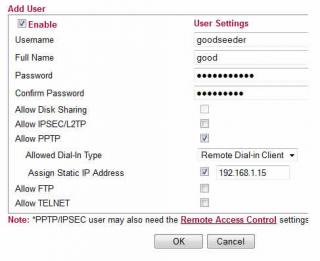
|
|
|
|
|
|
Feb 6 2012, 08:32 AM
Return to original view | Post
#14
|
|
Junior Member
261 posts Joined: Sep 2011
|
QUOTE(goodseeder @ Feb 5 2012, 01:09 PM) Yea its great. I sent many emails to support asking about all things I think if I send anymore they will refund and ask for the router back lol i finally upgrade my router...But I understand more about networking now. Anyways regarding the beta firmware there are different versions The first file I got when I asked about it was named v2130_r25xx.all Then I asked if there are any updates and they sent me a newer one: v2130_r2623.all And all of them are called 1.5.2beta They also said the final is soon. So keep that uptime counting for now haha i installed v2130_r2650.all recevied this morning firmware is oni two days old released but my uptime counter reset...  
|
|
|
Feb 6 2012, 04:51 PM
Return to original view | Post
#15
|
|
Junior Member
261 posts Joined: Sep 2011
|
QUOTE(goodseeder @ Feb 6 2012, 12:54 PM) I was curious to try 2650 so I sent another email yes.. i think im first owner here.. i buy long ago standard price not promo and that time i call speak not email the guy said:lol yea I guess I will just wait fed up with my emails I guess hahaha. Seems he knows you well |
|
|
Feb 15 2012, 07:49 PM
Return to original view | Post
#16
|
|
Junior Member
261 posts Joined: Sep 2011
|
QUOTE(goodseeder @ Feb 15 2012, 01:12 AM) L4D2 works like charm! My friends ip in my network became 192.168.1.201 smooth play! Thanks izzat. Unifi symmetrical speed it feels just like LAN play! Much better than hamachi! I guess because this way is direct yes vpn is better..actually hamachi not bad... but for some game like urs not working so just use vpn... also in win7 super easy to use (just click start >>> type vpn in search) first one the wizard... next put ip next... thats it!! ignore that guy la... see my reply him in this thread even.. he repeating again same bs.. here and /k also... search lyn rt n56 see owenr feedbacks first.. |
|
|
Feb 16 2012, 12:18 AM
Return to original view | Post
#17
|
|
Junior Member
261 posts Joined: Sep 2011
|
QUOTE(iipohbee @ Feb 15 2012, 10:36 PM) Sudah harga turun ka bro? No demand? Tak laku? here we ago again....u dun see this is owner thread? why u come here try convince us we r wrong and stupid for buying? we already buy man... its too late Price dropped by half with less demand? We are talking about hardware here kiddo. What's with the ISP service promotion now on a hardware thread? Your post seems more like an argument inciter than mine. I'm just making the public aware of a new router model that all. since u always use smallnetbuilder.... do u check the forum ? go there... also my fav forum: http://forums.whirlpool.net.au/forum/82?g=56 read the feedbacks about each... vigor king man and if u wan to make the (public aware of new model) like u say... go to unifi thread... the word router is not even in title of this thread... only ppls who know this come inside here so get out and promo ur super asus in main unifi thread lah..sure got much more ppls see it there the only kiddo here is u not goodseeder or anyone else... its U.. iipohbee the clueless spamming bee |
|
|
Feb 20 2012, 07:33 PM
Return to original view | Post
#18
|
|
Junior Member
261 posts Joined: Sep 2011
|
QUOTE(rjb123 @ Feb 19 2012, 04:36 AM) Still happy with my Draytek here still 1.5.1? jus upgrade to 1.5.2beta bro... enjoy the new stuffsSystem Uptime : 44d 10:26:45 they say will release 1.5.2 final for long keep saying coming soon... i give up waiting then upgrade... very2 stable and new stuff worth break the uptime counter This post has been edited by izzat80: Feb 20 2012, 07:36 PM |
|
|
Feb 23 2012, 08:15 PM
Return to original view | Post
#19
|
|
Junior Member
261 posts Joined: Sep 2011
|
QUOTE(soonwai @ Feb 21 2012, 12:22 PM) @izzat80 soonwai very2 thanks for ur useful detail replyHave fun. Looking forward to seeing your IPv6 tag. ps: I had probs with the browser preferring to connect to LYN with IPv4 instead of IPv6. Let me know if you encounter this. I think it work!!!!! but where to setup 6to4 thing? do i hv ipv6 tag? first... i convert my ipv4 to ipv6 like u said... i use this link: http://www.subnetonline.com/pages/subnet-c...6-converter.php then i go to vigor ipv6 menu and choose static ipv6 and key in the ip 
but got no ipv6 gateway.... the gateway is telekom right? do they hv ipv6 gateway? so this one i jus leave empty after i click ok (apply setting for ipv6 static ip) my connection drop and reconnect and now in online stats i got ipv6 ip also above it my ipv4...see the online stat: 
so now how to test if it works? i pm u my ipv6 u try to ping? This post has been edited by izzat80: Feb 23 2012, 08:36 PM |
|
|
Feb 25 2012, 04:10 AM
Return to original view | Post
#20
|
|
Junior Member
261 posts Joined: Sep 2011
|
QUOTE(soonwai @ Feb 24 2012, 12:27 PM) No probs but I think your config is not right. Are you using the 6to4 relay? thanks bro... Don't test on forum.lowyat.net because it's dual-stacked, i.e.: running both IPv4 and IPv6, so you can't tell easily if you're on one or the other. i think i understand how it work but not sure how 6to4 relay is... is it SERVIS or just (configuration)?? see what i do now: 1) convert my ipv4 to ipv6 as per ur instruction.. so now its in format 2002:converted part here:1:: 2) go to vigor ipv6 wan setup and choose STATIC ipv6.. pls see screenshot 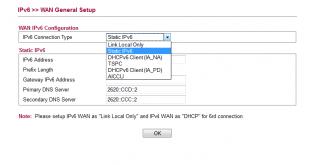
btw the other one i try but hv some kind of user name and password need... the tunnel i mean 3) i setup dns as u gave me.... primary: 2620::ccd::2 second: 2620::ccc::2 4) the ipv6 gateway as u said is 192.88.99.1 so i need to convert this as per step 1 to ipv6 format then key in router right? one thing... after i apply the new setting for static ipv6... the vigor auto drop the line and dial to tm again... so now my tm ip is not the same.... is this correct way for 4to6 relay bro? |
| Change to: |  0.0314sec 0.0314sec
 0.86 0.86
 7 queries 7 queries
 GZIP Disabled GZIP Disabled
Time is now: 9th December 2025 - 11:58 PM |
 Quote
Quote