Welcome Guest ( Log In | Register )

Outline · [ Standard ] · Linear+

Unifi Draytek Vigor 2130n, Just received today!.. First impression.

views
     
goodseeder
post Dec 22 2011, 10:41 AM

New Member
*
Junior Member
43 posts

Joined: Mar 2011
hi forum smile.gif

Im interested in this... can someone confirm is it fully smooth with xbox360 (open nat and upnp)? also the wireless doesn't drop for ipad/iphone?

xtreamer, xbox, NAS in the network

Streaming 1080p from NAS and p2p seeds running all the time. Not many torrent downloads ~few gigs per day. There is good upload traffic though, see my nickname thumbup.gif

I need a device that can manage seeding and smooth game play. Is this a suitable router for me? word from existing xbox owners would be nice... THANKS smile.gif
goodseeder
post Dec 29 2011, 02:12 PM

New Member
*
Junior Member
43 posts

Joined: Mar 2011
neway so i got this
after install can stream and work but for upnp now I'm confused, refer to picture. How is it there is a speed setting for Upnp? blink.gif
Attached Image
before in my linksys the upnp is for auto-open then close the ports right? no need manual forward and all that. So if got utorrent enable upnp then enable in router, can get open port (green status) automatically... same for xbox can get open nat.

this router it opens the port but I need to specify speed? isnt upnp just for opening and closing ports? sometimes the unifi speed test is higher than what i subscribe. upload speed always higher. so should it be 6m if got 5m unifi?

also it says it supports DLNA, anyone tried streaming directly from the router to hdtv? that would be neat no need for streaming device/player. Already got the new xtreamer but just curious. If got second hdtv no need to buy another xtreamer cool.gif
goodseeder
post Dec 31 2011, 09:24 PM

New Member
*
Junior Member
43 posts

Joined: Mar 2011
QUOTE(izzat80 @ Dec 30 2011, 09:57 AM)
it extra feature la.. u can set the speed for upnp client...
if u want no limit just put 6mb if got 5mb... like u say

dlna look interesting.... dun think i hv any device that hv that... just normal tv no fancy stuffs.. if u try it tell how is it
*
try d smile.gif
You will need to put a USB thumbdrive or disk to install it.

did you try the new firmware? now I can view the QoS real time stat drool.gif
Attached Image
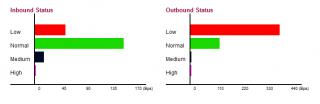
I'm seeding full speed and downloading, then I view youtube video automatically QoS reduce torrent download (red one).. and the green (youtube video) takes priority. the black is skype I was making a call, was perfect clear! this baby is epic
still dont know the high. Red = torrent/p2p, green = browsing. black = skype/voice. purple = ? dont know yet never see it move before
UNIFI FTW. Man I was missing much with the old crappy connection. I downloaded gigs and gigs. unifi is EPIC
goodseeder
post Jan 3 2012, 01:15 PM

New Member
*
Junior Member
43 posts

Joined: Mar 2011
Regarding the external USB drive, I was told using ext3fs (linux file system) gives much better read/write performance.

With NTFS it wasn't fast, but to use ext3fs you have to format the HDD, meaning lose all data on the drive, because you are changing the filesystem.
Attached Image
I don't have linux, but there is a format tool in the router BUT my external HDD is packed with content and I have no place to move it. Have any tried the ext3fs? Is there a big jump? Is it worth it to reformat?

I don't think any of my friends has 1TB laying around for me to use so need to get rid of the 1080p collection sad.gif. And after doing this the HDD will not be usable in windows right? Since its a linux file system. Ahh man
goodseeder
post Jan 4 2012, 07:29 PM

New Member
*
Junior Member
43 posts

Joined: Mar 2011
Oh. This you mean? http://www.fs-driver.org/

Mind sharing the app you are using? Thanks
goodseeder
post Jan 8 2012, 02:02 AM

New Member
*
Junior Member
43 posts

Joined: Mar 2011
QUOTE(izzat80 @ Jan 5 2012, 04:42 PM)
if u find good one already share lah..... we needs to google again?
» Click to show Spoiler - click again to hide... «


but.... is there app that can integrate with win and not open manual to do all? dun think so....
anyway why need to access? if u put the hdd with vigor, u can access from share direct... why u need to put it back to windows? just make the hdd permanet attached to vigor router...  nod.gif
*
QUOTE(gotdamsg @ Jan 5 2012, 05:46 PM)
found a lot but haven't tried it yet.. so I didn't know which one is working best smile.gif I will let you all know once I got the chance to do it
*
Yup, I think thats what I'm gonna do. I will keep my current HD for my use and buy a new HD just for the Vigor and attach it, format to linux file system and leave it there permanently for use by the router smile.gif
goodseeder
post Jan 16 2012, 08:34 PM

New Member
*
Junior Member
43 posts

Joined: Mar 2011
happy with the draytek wireless range also, covers the entire place comfortably
and the three antennas are detachable, they can be replaced/upgraded easily
goodseeder
post Jan 17 2012, 11:06 AM

New Member
*
Junior Member
43 posts

Joined: Mar 2011
send email to the support. I sent to them to help me setup my network itunes server, very responsive
goodseeder
post Jan 31 2012, 03:13 PM

New Member
*
Junior Member
43 posts

Joined: Mar 2011
owners of 2130, install the new firmware its waay better

torrent downloader now works great. The trick is must use the ext3 file system on the hard drive not fat/ntfs

Attached Image

lol don't mind all red lines. got to hide those torrents haha biggrin.gif

Just get a empty hard drive then attach to your router, then format using ext3 file system. After you plug the HDD, use the format tool available in the router menu.. And now you got a good NAS!

That ext filesystem is much better than NTFS/FAT.. Copying to/from router shared folders now are faster also rclxms.gif
goodseeder
post Jan 31 2012, 04:06 PM

New Member
*
Junior Member
43 posts

Joined: Mar 2011
QUOTE(logit85 @ Jan 31 2012, 03:16 PM)
i see ur speed slow what happen torrent speed
*
yea it doesn't go as high as bitcomet on my PC.
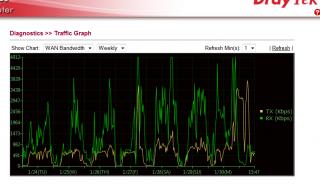
there are specific highs and lows in the day, see my weekly graph when using built-in:
Attached Image

See the waves? its constant. TM enforcing something? the client in router not encrypted I think.
when I disable the router torrent and download with my PC using bitcomet the speed is constant maximum so it could be that hmm.gif

This post has been edited by goodseeder: Jan 31 2012, 04:08 PM
goodseeder
post Feb 4 2012, 12:01 PM

New Member
*
Junior Member
43 posts

Joined: Mar 2011
QUOTE(thankyou @ Feb 2 2012, 01:32 PM)
Somehow with the new V1.5.2 beta firmware installed, the VPN disconnection no longer appear...

Will have more testing before any further comment! Good start!
*
thankyou maybe you can help me with something

I'm trying to play a game called Left 4 Dead 2 with my friend and this game supports LAN play.

I tried to use hamachi, I get an ip like 5.48.7.5
then my friend installed hamachi also, he gets IP: 5.77.1.9
But I can never find him in lobby, after research it appears L4D doesn't allow it. The IP must be the same except last digit. For example:
me: 192.168.1.10
my friend: 192.168.1.15
Then it will work. I saw in some forum that people use VPN to play. from my understanding VPN allow other to join my local network right?

In vigor2130n how can I let me friend get IP 192.168.1.15 and act like local?
goodseeder
post Feb 4 2012, 09:58 PM

New Member
*
Junior Member
43 posts

Joined: Mar 2011
QUOTE(izzat80 @ Feb 4 2012, 03:27 PM)
can...
ask ur friend to use win7 vpn wizard... and he need to key in ur ip... can see it from online status

in ur vigor router... go to vpn option. enable pptp then add new user.. then put user name and password
and give static ip... like u say 192.168.1.15... make sure u tick allow pptp.. 
i attach pic for u u just need add usr for ur friend.. i actually did same but for sharing folder not vpn but is same
gaming time  rclxms.gif
*
THANKS a lot smile.gif I will try it with my friend tomorrow and see how it goes
goodseeder
post Feb 5 2012, 01:09 PM

New Member
*
Junior Member
43 posts

Joined: Mar 2011
QUOTE(rjb123 @ Feb 5 2012, 05:20 AM)
Draytek 2130N user reporting in ...

So far Uptime : 30d 11:09:10

Transferred A LOT over LAN (few TB at least), downloading on Usenet and torrents constantly, and perfectly stable.

Much more reliable than the original DLink and the TP Link I used after that as a replacement, still happy smile.gif

Might change to the Beta firmware soon
*
Yea its great. I sent many emails to support asking about all things I think if I send anymore they will refund and ask for the router back lol

But I understand more about networking now. Anyways regarding the beta firmware there are different versions

The first file I got when I asked about it was named v2130_r25xx.all
Then I asked if there are any updates and they sent me a newer one: v2130_r2623.all
And all of them are called 1.5.2beta

They also said the final is soon. So keep that uptime counting for now haha
goodseeder
post Feb 6 2012, 12:54 PM

New Member
*
Junior Member
43 posts

Joined: Mar 2011
I was curious to try 2650 so I sent another email tongue.gif the guy said:
QUOTE
build 2650 is not public and I only sent it to one person so I think I know who you got this number from. say hi to the old timer!

Changes are minimal. Really its the same for users in Malaysia; in recent builds changes mostly concern VOIP, VOIP models are not even imported locally. The code running on your router is exactly the same among these builds. The final will be out soon and you'll be able to download it from official site.

lol yea I guess I will just wait tongue.gif fed up with my emails I guess hahaha. Seems he knows you well smile.gif
goodseeder
post Feb 15 2012, 01:12 AM

New Member
*
Junior Member
43 posts

Joined: Mar 2011
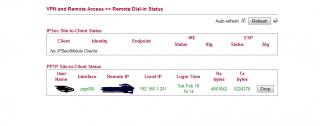
L4D2 works like charm! My friends ip in my network became 192.168.1.201
smooth play! Thanks izzat.

Unifi symmetrical speed it feels just like LAN play! smile.gif
Much better than hamachi! I guess because this way is direct
goodseeder
post Feb 15 2012, 06:08 PM

New Member
*
Junior Member
43 posts

Joined: Mar 2011
QUOTE(iipohbee @ Feb 15 2012, 03:02 PM)
With over RM800, I'm better off getting an Asus RT-N66U aka the Dark Knight.

Only cost around USD$180-190(not even RM600)

Broadcom chipset.

Maximum simultaneous connections:
http://www.smallnetbuilder.com/lanwan/rout...-max-simul-conn
It can do twice as many as the Draytek2130n

Built quality is way better coming from the top motherboard manufacturer and superb quality heatsink that is as heavy as a brick.

Asus Malaysia provides 1 to 1 replacement as they were challlenged by TP-Link previously.
*
its rm480 for vigor2130n.. I don't think I will need to replace this baby anytime soon. But as you said, for cheap hardware you need 1-to-1 replacement

Its worth it. I own one, you don't seem to. As a satisfied customer with the superb hardware and the nice service by the people working there. I want to say all your nonsense is exactly that, nonsense.
» Click to show Spoiler - click again to hide... «

you go around in broadband topics trying to start arguments, I saw your whining about Unifi and TM or the bandwidth pipe stuff blablahh laugh.gif laugh.gif
I for one am very happy with Unifi despite what you say, its the best internet in malaysia, and I tried the majority nod.gif
goodseeder
post Feb 17 2012, 11:42 AM

New Member
*
Junior Member
43 posts

Joined: Mar 2011
QUOTE(soonwai @ Feb 17 2012, 03:36 AM)
Hi Vigor owners, any of you use the VPN server on the 2130? How fast is it using 3DES or AES128?

My friend thinking of getting one for the office. Currently he has an Asus n56u but VPN from him to his supplier's VPN server is problematic. i.e.: doesn't really work from what he tells me. Now he needs incoming VPN but not a dedicated box or server so that's why I suggested to him the Vigor. Only 2 or 3 person needs to use at any one time.

Anyway he's gonna give me the n56u if I can get something working for him. :-)

PS: does the Asus n56u have a VPN server built-in?
*
Not sure if its the same as what you ask but I'm doing this. Hamachi did not work with L4D2 so I enabled VPN in the vigor and my friend used the Windows vpn wizard to join my network, see izzat post I followed it

In the game his IP is 192.168.1.201, just like a local LAN IP

What type is that or what is the speed no idea rolleyes.gif

This post has been edited by goodseeder: Feb 17 2012, 11:43 AM
goodseeder
post Feb 17 2012, 04:17 PM

New Member
*
Junior Member
43 posts

Joined: Mar 2011
QUOTE(soonwai @ Feb 17 2012, 12:18 PM)
Exactly what we want to do also sans the gaming part. :-) What are the ping times like with the VPN? What encryption do you set for the connection? The speed I was asking about is how fast it takes, for example, to copy a file from your friend's PC to yours. Because the encryption will slow things down for sure. If you got time, maybe you can just copy a file for me and see how long it takes. Thanks in advance.
*
Ok I will check with my friend tonight when he goes online. I usually call my friend on skype and we speak then he joins using VPN to my network so we can play
I guess using skype to send file will not use VPN right? How do I copy to see the VPN speed?
goodseeder
post Feb 18 2012, 04:41 PM

New Member
*
Junior Member
43 posts

Joined: Mar 2011
QUOTE(soonwai @ Feb 17 2012, 07:44 PM)
Once he's connected to your VPN. If he's got File Sharing on, you should be able to see him in My Networks. Just drag and drop as usual after that. Thanks, man.
*
joined just now
Attached Image
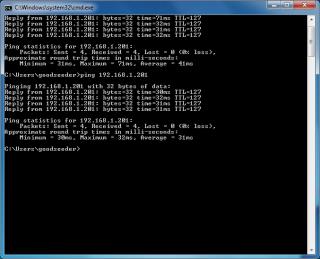
ping
Attached Image
the sharing he said not interested to do now play first sweat.gif
goodseeder
post Mar 12 2012, 08:16 PM

New Member
*
Junior Member
43 posts

Joined: Mar 2011
QUOTE(fazryle @ Mar 12 2012, 01:16 AM)
VPN tested ok.. ping success .. but DOTA game cant see.. is there any prob that i misS??
*
Windows firewall!

If using Win7 click Start then just type Allow
There in the list first choice. Add your game to the list smile.gif

2 Pages  1 2 >Top
 

Change to:
| Lo-Fi Version
0.0350sec    0.20    7 queries    GZIP Disabled
Time is now: 3rd December 2025 - 03:30 AM