


Unifi Draytek Vigor 2130n, Just received today!.. First impression.
Unifi Draytek Vigor 2130n, Just received today!.. First impression.
|
|
 Jan 16 2012, 10:29 PM Jan 16 2012, 10:29 PM
|
 
Junior Member
257 posts Joined: Aug 2011 From: Kuala Lumpur 
|
Good to learn about Draytek here, but the price is too high for us to get one just to try and test it
|
|
|
|
|
|
Jan 17 2012, 10:53 AM
|

Senior Member
1,941 posts Joined: Jan 2003
|
I'm facing one very annoying problem!
My company VPN (PPTP & L2TP) keep disconnecting! From time to time, the connection will just suddenly freeze but the connection remain "Connected" I have to reconnect the VPN in order to re-establish my SSH/Remote Connection... When i change this back to TM D-Link router, everything is back to normal! |
|
|
Jan 17 2012, 11:06 AM
|

Junior Member
43 posts Joined: Mar 2011
|
send email to the support. I sent to them to help me setup my network itunes server, very responsive
|
|
|
Jan 17 2012, 01:03 PM
|

Junior Member
261 posts Joined: Sep 2011
|
QUOTE(thankyou @ Jan 17 2012, 10:53 AM) I'm facing one very annoying problem! no need send email i think i knw why like thisMy company VPN (PPTP & L2TP) keep disconnecting! From time to time, the connection will just suddenly freeze but the connection remain "Connected" I have to reconnect the VPN in order to re-establish my SSH/Remote Connection... When i change this back to TM D-Link router, everything is back to normal!  there is builtin vpn server in vigor... since u r using ur company vpn server.... u dun need vigor vpn and it conflict maybe go to vpn menu and disable all vpn service can see there is vpn passthru aso... |
|
|
Jan 31 2012, 03:13 PM
|
|
Junior Member
43 posts Joined: Mar 2011
|
owners of 2130, install the new firmware its waay better
torrent downloader now works great. The trick is must use the ext3 file system on the hard drive not fat/ntfs 
lol don't mind all red lines. got to hide those torrents haha  Just get a empty hard drive then attach to your router, then format using ext3 file system. After you plug the HDD, use the format tool available in the router menu.. And now you got a good NAS! That ext filesystem is much better than NTFS/FAT.. Copying to/from router shared folders now are faster also  |
|
|
Jan 31 2012, 03:16 PM
|

Senior Member
1,814 posts Joined: Dec 2008  
|
QUOTE(goodseeder @ Jan 31 2012, 03:13 PM) owners of 2130, install the new firmware its waay better i see ur speed slow what happen torrent speedtorrent downloader now works great. The trick is must use the ext3 file system on the hard drive not fat/ntfs
lol don't mind all red lines. got to hide those torrents haha Just get a empty hard drive then attach to your router, then format using ext3 file system. After you plug the HDD, use the format tool available in the router menu.. And now you got a good NAS! That ext filesystem is much better than NTFS/FAT.. Copying to/from router shared folders now are faster also |
|
|
|
|
|
Jan 31 2012, 04:06 PM
|
|
Junior Member
43 posts Joined: Mar 2011
|
QUOTE(logit85 @ Jan 31 2012, 03:16 PM) i see ur speed slow what happen torrent speed yea it doesn't go as high as bitcomet on my PC.there are specific highs and lows in the day, see my weekly graph when using built-in: 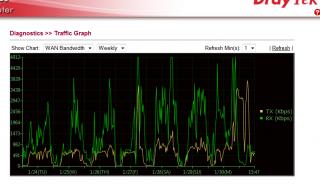
See the waves? its constant. TM enforcing something? the client in router not encrypted I think. when I disable the router torrent and download with my PC using bitcomet the speed is constant maximum so it could be that  This post has been edited by goodseeder: Jan 31 2012, 04:08 PM |
|
|
Feb 2 2012, 01:32 PM
|
|
Senior Member
1,941 posts Joined: Jan 2003
|
Somehow with the new V1.5.2 beta firmware installed, the VPN disconnection no longer appear...
Will have more testing before any further comment! Good start! |
|
|
Feb 4 2012, 12:01 PM
|
|
Junior Member
43 posts Joined: Mar 2011
|
QUOTE(thankyou @ Feb 2 2012, 01:32 PM) Somehow with the new V1.5.2 beta firmware installed, the VPN disconnection no longer appear... thankyou maybe you can help me with somethingWill have more testing before any further comment! Good start! I'm trying to play a game called Left 4 Dead 2 with my friend and this game supports LAN play. I tried to use hamachi, I get an ip like 5.48.7.5 then my friend installed hamachi also, he gets IP: 5.77.1.9 But I can never find him in lobby, after research it appears L4D doesn't allow it. The IP must be the same except last digit. For example: me: 192.168.1.10 my friend: 192.168.1.15 Then it will work. I saw in some forum that people use VPN to play. from my understanding VPN allow other to join my local network right? In vigor2130n how can I let me friend get IP 192.168.1.15 and act like local? |
|
|
Feb 4 2012, 03:27 PM
|
|
Junior Member
261 posts Joined: Sep 2011
|
QUOTE(goodseeder @ Feb 4 2012, 12:01 PM) thankyou maybe you can help me with something can...I'm trying to play a game called Left 4 Dead 2 with my friend and this game supports LAN play. I tried to use hamachi, I get an ip like 5.48.7.5 then my friend installed hamachi also, he gets IP: 5.77.1.9 But I can never find him in lobby, after research it appears L4D doesn't allow it. The IP must be the same except last digit. For example: me: 192.168.1.10 my friend: 192.168.1.15 Then it will work. I saw in some forum that people use VPN to play. from my understanding VPN allow other to join my local network right? In vigor2130n how can I let me friend get IP 192.168.1.15 and act like local? ask ur friend to use win7 vpn wizard... and he need to key in ur ip... can see it from online status in ur vigor router... go to vpn option. enable pptp then add new user.. then put user name and password and give static ip... like u say 192.168.1.15... make sure u tick allow pptp.. i attach pic for u u just need add usr for ur friend.. i actually did same but for sharing folder not vpn but is same gaming time Attached thumbnail(s) 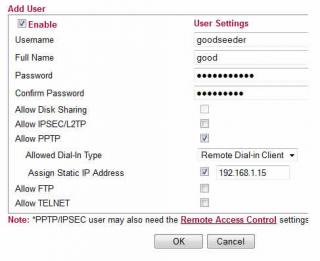
|
|
|
Feb 4 2012, 09:58 PM
|
|
Junior Member
43 posts Joined: Mar 2011
|
QUOTE(izzat80 @ Feb 4 2012, 03:27 PM) can... THANKS a lot ask ur friend to use win7 vpn wizard... and he need to key in ur ip... can see it from online status in ur vigor router... go to vpn option. enable pptp then add new user.. then put user name and password and give static ip... like u say 192.168.1.15... make sure u tick allow pptp.. i attach pic for u u just need add usr for ur friend.. i actually did same but for sharing folder not vpn but is same gaming time  I will try it with my friend tomorrow and see how it goes I will try it with my friend tomorrow and see how it goes |
|
|
Feb 5 2012, 05:20 AM
|

Senior Member
1,820 posts Joined: May 2010 From: Kuala Lumpur
|
Draytek 2130N user reporting in ...
So far Uptime : 30d 11:09:10 Transferred A LOT over LAN (few TB at least), downloading on Usenet and torrents constantly, and perfectly stable. Much more reliable than the original DLink and the TP Link I used after that as a replacement, still happy Might change to the Beta firmware soon |
|
|
Feb 5 2012, 01:09 PM
|
|
Junior Member
43 posts Joined: Mar 2011
|
QUOTE(rjb123 @ Feb 5 2012, 05:20 AM) Draytek 2130N user reporting in ... Yea its great. I sent many emails to support asking about all things I think if I send anymore they will refund and ask for the router back lolSo far Uptime : 30d 11:09:10 Transferred A LOT over LAN (few TB at least), downloading on Usenet and torrents constantly, and perfectly stable. Much more reliable than the original DLink and the TP Link I used after that as a replacement, still happy Might change to the Beta firmware soon But I understand more about networking now. Anyways regarding the beta firmware there are different versions The first file I got when I asked about it was named v2130_r25xx.all Then I asked if there are any updates and they sent me a newer one: v2130_r2623.all And all of them are called 1.5.2beta They also said the final is soon. So keep that uptime counting for now haha |
|
|
|
|
|
Feb 5 2012, 04:51 PM
|
|
Senior Member
1,814 posts Joined: Dec 2008
|
here my thread link http://forum.lowyat.net/index.php?showtopic=2158882&hl=
and my post http://forum.lowyat.net/topic/2168543 that thread see Post #4Post #4 all read i hope u will understand my problem wireless very sad ur vigor 2130n how is wireless u can ping ur router how many ms u go away downstairs like 2bar and 3bar u can ping how many ms for about stable so my router is Linksys WRT610N V2 that no problem downstaris pc desktop signal is 2 bar and 3 bar but internet very fast no problem and my bro pc desktop 10metter++ away but internet very fast no problem i naver test ping i think ping very stable so be lowest no timeour and no 1xxx ms like that pls read both full so pls help me i just asking ping vigor 2130n router ms and internet faster for wireless like that let say so my router is Linksys WRT610N V2 that no problem downstaris pc desktop signal is 2 bar and 3 bar but internet very fast no problem and my bro pc desktop 10metter++ away but internet very fast no problem i naver test ping i think ping very stable so be lowest no timeour and no 1xxx ms i think 1ms or 10ms for downstairs pc desktop signal 2 bar and 3 bar and my bro pc desktop also full signal 5 bar afther my router Linksys WRT610N V2 already death then i bought new router ASUS RT-N16 downstars pc desktop internet very also and my bro pc desktop 10metter++ away internet very slow ping very high  that wifi unstable why that wifi unstable why ur vigor 2130n can u go away to get signal 2bar and 3bar how internet fast or slow about wireless stable ur vigor 2130n how is wireless u can ping ur router how many ms u go away downstairs like 2bar and 3bar u can ping how many ms for about stable pls test it for wireless ping vigor 2130n router ip address show me screenshot |
|
|
Feb 6 2012, 02:18 AM
|
|
Senior Member
1,941 posts Joined: Jan 2003
|
QUOTE(goodseeder @ Feb 5 2012, 01:09 PM) Yea its great. I sent many emails to support asking about all things I think if I send anymore they will refund and ask for the router back lol Actually 2623 is not the latest one. I had mine updated to 2640But I understand more about networking now. Anyways regarding the beta firmware there are different versions The first file I got when I asked about it was named v2130_r25xx.all Then I asked if there are any updates and they sent me a newer one: v2130_r2623.all And all of them are called 1.5.2beta They also said the final is soon. So keep that uptime counting for now haha You can get the latest one from the following link: ftp://ftp.draytek.pl/Seria_2130/Firmware/1.5.2_BETA/ |
|
|
Feb 6 2012, 08:32 AM
|
|
Junior Member
261 posts Joined: Sep 2011
|
QUOTE(goodseeder @ Feb 5 2012, 01:09 PM) Yea its great. I sent many emails to support asking about all things I think if I send anymore they will refund and ask for the router back lol i finally upgrade my router...But I understand more about networking now. Anyways regarding the beta firmware there are different versions The first file I got when I asked about it was named v2130_r25xx.all Then I asked if there are any updates and they sent me a newer one: v2130_r2623.all And all of them are called 1.5.2beta They also said the final is soon. So keep that uptime counting for now haha i installed v2130_r2650.all recevied this morning firmware is oni two days old released but my uptime counter reset... 
|
|
|
Feb 6 2012, 12:54 PM
|
|
Junior Member
43 posts Joined: Mar 2011
|
I was curious to try 2650 so I sent another email
 the guy said: the guy said:QUOTE build 2650 is not public and I only sent it to one person so I think I know who you got this number from. say hi to the old timer! Changes are minimal. Really its the same for users in Malaysia; in recent builds changes mostly concern VOIP, VOIP models are not even imported locally. The code running on your router is exactly the same among these builds. The final will be out soon and you'll be able to download it from official site. lol yea I guess I will just wait fed up with my emails I guess hahaha. Seems he knows you well |
|
|
Feb 6 2012, 04:51 PM
|
|
Junior Member
261 posts Joined: Sep 2011
|
QUOTE(goodseeder @ Feb 6 2012, 12:54 PM) I was curious to try 2650 so I sent another email yes.. i think im first owner here.. i buy long ago standard price not promo and that time i call speak not email the guy said:lol yea I guess I will just wait fed up with my emails I guess hahaha. Seems he knows you well |
|
|
Feb 15 2012, 01:12 AM
|
|
Junior Member
43 posts Joined: Mar 2011
|
L4D2 works like charm! My friends ip in my network became 192.168.1.201
smooth play! Thanks izzat. Unifi symmetrical speed it feels just like LAN play! Much better than hamachi! I guess because this way is direct |
|
|
Feb 15 2012, 03:02 PM
|

Senior Member
603 posts Joined: Dec 2008
|
With over RM800, I'm better off getting an Asus RT-N66U aka the Dark Knight.
Only cost around USD$180-190(not even RM600) Broadcom chipset. Maximum simultaneous connections: http://www.smallnetbuilder.com/lanwan/rout...-max-simul-conn It can do twice as many as the Draytek2130n Built quality is way better coming from the top motherboard manufacturer and superb quality heatsink that is as heavy as a brick. Asus Malaysia provides 1 to 1 replacement as they were challlenged by TP-Link previously. |
| Change to: |  0.0297sec 0.0297sec
 0.97 0.97
 6 queries 6 queries
 GZIP Disabled GZIP Disabled
Time is now: 3rd December 2025 - 12:59 PM |
 Quote
Quote