Outline ·
[ Standard ] ·
Linear+
Samsung Galaxy S i9000 Official Thread V21, Super AMOLED Screen with Gorilla Glass!
|
ronaldkh
|
 Nov 3 2011, 09:33 PM Nov 3 2011, 09:33 PM
|

|
QUOTE(mstr583 @ Nov 3 2011, 09:19 PM) Anyone have step how to flash the thunderbolt??? Abit blur after reading all.. This is how I flash:- 1) Boot into CWM, go to mounts and storage, and mount /system and /data 2) Go to install zip from sdcard 3) Flash restore zip 4) Flash ThunderBolt! zip 5) Flash the addons (there are 3 - pick the one you want) 6) Reboot 7) Go to Script Manager (it's an app which can be found in the market). From there go to bolt_scripts, tick 'Run as root' and 'Run at boot'. Finally tap the 'Run' button. Don't have to remount next time you reboot since you have ticked 'Run at boot'. Am I right?  |
|
|
|
|
|
Harddisk
|
Nov 3 2011, 10:23 PM
|
|
|
Never able to attach photos from my phone. The killing app was too aggressive, keep killing my browser when I choose attachment from Gallery.  Screen on was about 1hr+. Minimal usage today, just a bit of WhatsApp only. Attached thumbnail(s)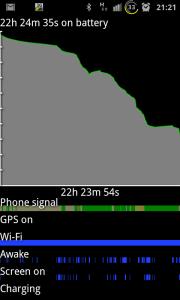
|
|
|
|
|
|
ken2291
|
Nov 3 2011, 10:54 PM
|
|
|
QUOTE(Harddisk @ Nov 3 2011, 09:18 PM) Display time not much. But compared to previous roms, even with similar usage, until around 4pm, battery is red. Can't even last up to 20hrs even with connections to wifi. Now i can just charge once a day only. Hehe u shld try Thunderbolt! Imma flash the latest 1.8.0 later  as long as can last one day enuf liao la  just the right time to charge then use again next day
Added on November 3, 2011, 10:58 pmQUOTE(ronaldkh @ Nov 3 2011, 09:33 PM) This is how I flash:- 1) Boot into CWM, go to mounts and storage, and mount /system and /data 2) Go to install zip from sdcard 3) Flash restore zip 4) Flash ThunderBolt! zip 5) Flash the addons (there are 3 - pick the one you want) 6) Reboot 7) Go to Script Manager (it's an app which can be found in the market). From there go to bolt_scripts, tick 'Run as root' and 'Run at boot'. Finally tap the 'Run' button. Don't have to remount next time you reboot since you have ticked 'Run at boot'. Am I right? QUOTE(pikachu01) How-To
- Wait till Android finishes loading everything.
- Install Script Manager from Market
- Point script manager to the script you placed in the sdcard.
- Run as root.
- Do this at every boot, as mount points are reset to its default as set by the type of your lagfix. Voodoo (from what I am using will set barriers for /data and atime for every mount point except /system, /data, /cache, /dbdata which puts a slight risk at your disk for using atime.
- You can add a widget to your home screen for the script so that you can
activate it easily.
 This post has been edited by ken2291: Nov 3 2011, 10:59 PM This post has been edited by ken2291: Nov 3 2011, 10:59 PM |
|
|
|
|
|
pikachu01
|
Nov 3 2011, 11:31 PM
|
|
|
Ken. Thanks for the promotion  And yes, ThunderBolt! 1.8.0 is out!  |
|
|
|
|
|
Harddisk
|
Nov 3 2011, 11:45 PM
|
|
|
QUOTE(ken2291 @ Nov 3 2011, 10:54 PM) u shld try Thunderbolt! Imma flash the latest 1.8.0 later Might try, worried that it might kills the defending champion battery life. Maybe it was due to the weaker modem in JVT, hence save battery?  |
|
|
|
|
|
ken2291
|
Nov 3 2011, 11:46 PM
|
|
|
QUOTE(pikachu01 @ Nov 3 2011, 11:31 PM) Ken. Thanks for the promotion And yes, ThunderBolt! 1.8.0 is out! good thing deserves one so the memory thing with Talon is solved? |
|
|
|
|
|
ronaldkh
|
Nov 3 2011, 11:49 PM
|
|
|
QUOTE(ken2291 @ Nov 3 2011, 10:54 PM) u shld try Thunderbolt! Imma flash the latest 1.8.0 later as long as can last one day enuf liao la just the right time to charge then use again next day
Added on November 3, 2011, 10:58 pm But someone in XDA said once tick 'Run at Boot', don't have to remount for every reboot and pikachu agreed to that.  Can you clarify this pikachu? |
|
|
|
|
|
pikachu01
|
Nov 3 2011, 11:53 PM
|
|
|
QUOTE(ken2291 @ Nov 3 2011, 11:46 PM) good thing deserves one so the memory thing with Talon is solved? It should be solved. Even the person that encountered memory leak, sherpa25, geokilla also mentioned that it's not so laggy anymore. QUOTE(ronaldkh @ Nov 3 2011, 11:49 PM) But someone in XDA said once tick 'Run at Boot', don't have to remount for every reboot and pikachu agreed to that. Can you clarify this pikachu? Yes, the remount script, only need to tick Run as Root and Run as Boot. It will autorun the script at boot. |
|
|
|
|
|
ronaldkh
|
Nov 3 2011, 11:59 PM
|
|
|
QUOTE(pikachu01 @ Nov 3 2011, 11:53 PM) Yes, the remount script, only need to tick Run as Root and Run as Boot. It will autorun the script at boot. So can skip this step right? Do this at every boot, as mount points are reset to its default as set by the type of your lagfix. Voodoo (from what I am using will set barriers for /data and atime for every mount point except /system, /data, /cache, /dbdata which puts a slight risk at your disk for using atime. |
|
|
|
|
|
pikachu01
|
Nov 4 2011, 12:19 AM
|
|
|
QUOTE(ronaldkh @ Nov 3 2011, 11:59 PM) So can skip this step right? Do this at every boot, as mount points are reset to its default as set by the type of your lagfix. Voodoo (from what I am using will set barriers for /data and atime for every mount point except /system, /data, /cache, /dbdata which puts a slight risk at your disk for using atime.Yup |
|
|
|
|
|
mousepad87
|
Nov 4 2011, 12:58 AM
|
|
|
Run on 2.3.7 ..Cyanogenmod 7 1 o but cant connect to the internet althought already set APN.. Anyone can help me?
|
|
|
|
|
|
lim_kobe2005
|
Nov 4 2011, 01:22 AM
|
Getting Started

|
hi all sifus, i just flash the thunderbolt tweak using these files...
ThunderBolt-CWM i9000 bin files i9000 addon.zip
ThunderBolt-CWM i9000 libsqlite i9000 addon.zip
ThunderBolt-CWM i9000 3G i9000 addon.zip
ThunderBolt-CWM i9000 v1.8.0 Others.zip
is the files correct?
and after flash then my benchmark is not as good as before...i running xxjvt with semaphore kernel....
|
|
|
|
|
|
pikachu01
|
Nov 4 2011, 01:56 AM
|
|
|
QUOTE(lim_kobe2005 @ Nov 4 2011, 01:22 AM) hi all sifus, i just flash the thunderbolt tweak using these files... ThunderBolt-CWM i9000 bin files i9000 addon.zip ThunderBolt-CWM i9000 libsqlite i9000 addon.zip ThunderBolt-CWM i9000 3G i9000 addon.zip ThunderBolt-CWM i9000 v1.8.0 Others.zip is the files correct? and after flash then my benchmark is not as good as before...i running xxjvt with semaphore kernel.... Is your phone for use or for benchmarking? Do you feel your phone to be more smoother? |
|
|
|
|
|
lim_kobe2005
|
Nov 4 2011, 02:28 AM
|
Getting Started
|
just for normal use...haha..can feel the smoothness better than before...just curios about the benchmark score only...
|
|
|
|
|
|
karim_effendy
|
Nov 4 2011, 02:36 AM
|
Getting Started
|
ok before i went through everything, i want to ask, can this be use with miui?
|
|
|
|
|
|
Harddisk
|
Nov 4 2011, 06:38 AM
|
|
|
QUOTE(lim_kobe2005 @ Nov 4 2011, 02:28 AM) just for normal use...haha..can feel the smoothness better than before...just curios about the benchmark score only... Still curious about the rumour that it might corrupt the sqlite db. |
|
|
|
|
|
digilife
|
Nov 4 2011, 07:03 AM
|
|
|
i really jelly you guys can flash your Rom at will anytime, i dare not try and still using stock Rom, anyway wat is the best Rom available now?
|
|
|
|
|
|
nasrulbond
|
Nov 4 2011, 07:54 AM
|
|
|
QUOTE(digilife @ Nov 4 2011, 01:03 AM) i really jelly you guys can flash your Rom at will anytime, i dare not try and still using stock Rom, anyway wat is the best Rom available now? +1 wanna know what are the current hot roms to flash too. any good recommended roms guys? |
|
|
|
|
|
takashiyert
|
Nov 4 2011, 07:56 AM
|
|
|
1) Boot into CWM, go to mounts and storage, and mount /system and /data 2) Go to install zip from sdcard 3) Flash restore zip 4) Flash ThunderBolt! zip 5) Flash the addons (there are 3 - pick the one you want) 6) Reboot 7) Go to Script Manager bro can we use 3 adon files on d step 5..???i choice d 3g one |
|
|
|
|
|
ronaldkh
|
Nov 4 2011, 08:05 AM
|
|
|
QUOTE(takashiyert @ Nov 4 2011, 07:56 AM) 1) Boot into CWM, go to mounts and storage, and mount /system and /data 2) Go to install zip from sdcard 3) Flash restore zip 4) Flash ThunderBolt! zip 5) Flash the addons (there are 3 - pick the one you want) 6) Reboot 7) Go to Script Manager bro can we use 3 adon files on d step 5..???i choice d 3g one You can flash all 3 if you want. |
|
|
|
|



 Quote
Quote





 0.0325sec
 1.64
1.64
 6 queries
 GZIP Disabled