

rooting is taking quite some time using the doomlord method.
cmd window keeps showing sending zerglings and waking.
Rooting your Samsung Galaxy SII (I9100G), also updating/repairing a bricked one
Rooting your Samsung Galaxy SII (I9100G), also updating/repairing a bricked one
|
|
 Dec 10 2011, 09:31 PM Dec 10 2011, 09:31 PM
|
 
Senior Member
843 posts Joined: Apr 2008 
|
rooting is taking quite some time using the doomlord method.
cmd window keeps showing sending zerglings and waking. |
|
|
|
|
|
Dec 10 2011, 09:59 PM
|

Junior Member
9 posts Joined: Dec 2008
|
QUOTE(Holyboy27 @ Dec 10 2011, 09:31 PM) rooting is taking quite some time using the doomlord method. I encountered this before...So I just close it and tried a different method. Use the DZKJ1 kernel (MyGKernel).cmd window keeps showing sending zerglings and waking.  1. Download it from http://forum.xda-developers.com/attachment...65&d=1320102893. Save it somewhere nice, and DO NOT EXTRACT IT. That's not your job  2. Switch off phone 3. Run Odin (Download from http://forum.xda-developers.com/attachment...hmentid=581913) 4. Press Volume Down + Power + Home button (to get into download mode) 5. Phone will start with a warning, select continue by pressing volume up. 6. Plug in phone. Odin should detect it under the section ID:COM 7. You should now make sure only Auto Reboot and F.Reset Time are CHECKED. Everything else should be UNCHECKED. 8. Click PDA, select the .tar file downloaded from step 1. 9. Click on Start 10. Wait....and you are done. Phone is rooted, and you should have CWM installed. (Don't worry if you don't know what this is, but your phone should be rooted). 11. If you don't believe, go to Settings - > About Phone. Scroll down to Kernel Version, you should see ...."blah blah@MyGKernel" Let me know if you need help. This post has been edited by numberslevin: Dec 10 2011, 10:00 PM |
|
|
Dec 10 2011, 10:10 PM
|
|
Senior Member
843 posts Joined: Apr 2008
|
QUOTE(numberslevin @ Dec 10 2011, 09:59 PM) I encountered this before...So I just close it and tried a different method. Use the DZKJ1 kernel (MyGKernel). Thanks! Initially I didn't want to use this method as I was made to understand that this increases binary count?» Click to show Spoiler - click again to hide... « Let me know if you need help. |
|
|
Dec 10 2011, 10:33 PM
|
|
Junior Member
9 posts Joined: Dec 2008
|
Yes, it will increase. But I don't see what the fuss is all about with binary counts. It can always be reset using a USB jig (sold even here on lowyat.net) in less than 5 minutes.
This post has been edited by numberslevin: Dec 10 2011, 10:33 PM |
|
|
Dec 10 2011, 10:40 PM
|
|
Senior Member
843 posts Joined: Apr 2008
|
QUOTE(numberslevin @ Dec 10 2011, 10:33 PM) Yes, it will increase. But I don't see what the fuss is all about with binary counts. It can always be reset using a USB jig (sold even here on lowyat.net) in less than 5 minutes. Ok, gotta wait to download those. While I was searching for rooting methods, I came across this, rooting using SuperOneClick.http://software2tech.com/2011/11/22/the-be...ree/#more-15297 Is it for real? -----------------------------------------Update Rooting using SuperOneClick works. Superuser app was installed. 2.3.6 DXKJ2 This post has been edited by Holyboy27: Dec 10 2011, 10:54 PM |
|
|
Dec 10 2011, 10:54 PM
|
|
Junior Member
9 posts Joined: Dec 2008
|
QUOTE(Holyboy27 @ Dec 10 2011, 10:40 PM) Ok, gotta wait to download those. While I was searching for rooting methods, I came across this, rooting using SuperOneClick. In my case, it didn't work. It seems to be a wrapper application for the zerglings...so if you couldn't root with the zerglings, this would probably not work http://software2tech.com/2011/11/22/the-be...ree/#more-15297 Is it for real? You can try it, but am not responsible if anything happens. hahaQUOTE(Holyboy27 @ Dec 10 2011, 10:40 PM) -----------------------------------------Update In that case, congrats! Rooting using SuperOneClick works. Superuser app was installed.  This post has been edited by numberslevin: Dec 10 2011, 10:56 PM |
|
|
|
|
|
Dec 10 2011, 11:02 PM
|
|
Senior Member
843 posts Joined: Apr 2008
|
Good thing it worked!
|
|
|
Dec 10 2011, 11:26 PM
|

Junior Member
504 posts Joined: May 2011 From: Semenyih, Beranang, Lenggeng 
|
QUOTE(Holyboy27 @ Dec 11 2011, 12:02 AM) Good thing it worked! i am too late to save u from "binary counter" doomsday, u cant be saved now lols..doomlord method is actually easy and working with a little "memory crash" trick. |
|
|
Dec 11 2011, 01:02 AM
|

Junior Member
119 posts Joined: Jul 2006
|
QUOTE(fauzi_91 @ Dec 10 2011, 07:56 PM) can i freeze the pcwdevice,bluetoothavrcp and brcmbluetoothservice? wht is it actually?hmm..every time i fast reboot my phone it keep starting..but i dunno if these drain my batt or not.. If you don't want to freeze but prefer not to have them running in background you can use autostarts app (the one with a car icon ) to turn off this unknown /unwanted apps from starting based on event .you can use this to stop apps from starting up and running in.background and only run when you use them. |
|
|
Dec 11 2011, 01:22 AM
|

Junior Member
100 posts Joined: Nov 2011
|
QUOTE(premk71 @ Dec 11 2011, 01:02 AM) If you don't want to freeze but prefer not to have them running in background you can use autostarts app (the one with a car icon ) to turn off this unknown /unwanted apps from starting based on event .you can use this to stop apps from starting up and running in.background and only run when you use them. owh..i see..will dload it later..thx  This post has been edited by fauzi_91: Dec 11 2011, 01:23 AM |
|
|
Dec 11 2011, 01:58 AM
|
|
Junior Member
209 posts Joined: Oct 2010
|
i cant !!!!!!
Attached thumbnail(s) 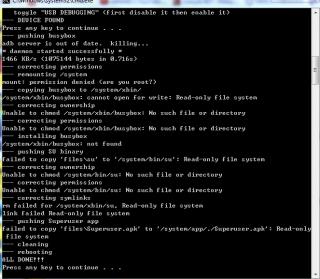
|
|
|
Dec 11 2011, 02:13 AM
|
|
Junior Member
504 posts Joined: May 2011 From: Semenyih, Beranang, Lenggeng
|
QUOTE(steven92 @ Dec 11 2011, 02:58 AM) i cant !!!!!! dont snap, did u read all the posts already? try the "memory crash" method? |
|
|
Dec 11 2011, 02:42 AM
|
|
Junior Member
209 posts Joined: Oct 2010
|
QUOTE(creezalird @ Dec 11 2011, 02:13 AM) dont snap, did u read all the posts already? try the "memory crash" method? I try many time and i sure i follow all the step.........Added on December 11, 2011, 2:48 amCan i knw if i rooted my phone i still can wait samsung release 4.0 and update officially? This post has been edited by steven92: Dec 11 2011, 02:48 AM |
|
|
|
|
|
Dec 11 2011, 02:49 AM
|
|
Junior Member
504 posts Joined: May 2011 From: Semenyih, Beranang, Lenggeng
|
QUOTE(steven92 @ Dec 11 2011, 03:42 AM) I try many time and i sure i follow all the step......... i am not saying the steps on first page only, i said, the "memory crash" theory...where is the OP, he should update the first pageAdded on December 11, 2011, 2:48 amCan i knw if i rooted my phone i still can wait samsung release 4.0 and update officially? yes, rooting is just add on of software, can easily re-stock again and update if the ICS is out This post has been edited by creezalird: Dec 11 2011, 02:52 AM |
|
|
 Dec 11 2011, 02:54 AM Dec 11 2011, 02:54 AM
|
|
Junior Member
12 posts Joined: Dec 2011
|
QUOTE(premk71 @ Dec 10 2011, 07:21 AM) The fastest way is to flash a kernel which has CWM. You can try superatmos kernel v 1.1 or 1.2 or the myGkernel v 1.1.1 ( dont instal v 1.1, but 1.1.1) Bro izzit u meaning just flashing that (MyGKernelV1.1.1_CWM5) and (MyGKernelV0_CWM5) with use original Samsung RecoveryMode??????....Tkns for advise bro..............................These are the links http://forum.xda-developers.com/showthread.php?t=1369977 and http://forum.xda-developers.com/showthread.php?t=1327509 Doomlord gives u root but not CWM. |
|
|
Dec 11 2011, 02:57 AM
|
|
Junior Member
209 posts Joined: Oct 2010
|
QUOTE(creezalird @ Dec 11 2011, 02:49 AM) i am not saying the steps on first page only, i said, the "memory crash" theory...where is the OP, he should update the first page can i knw where to fix the memory crash?yes, rooting is just add on of software, can easily re-stock again and update if the ICS is out |
|
|
Dec 11 2011, 02:59 AM
|
|
Junior Member
504 posts Joined: May 2011 From: Semenyih, Beranang, Lenggeng
|
QUOTE(dolcegabana @ Dec 11 2011, 03:54 AM) Bro izzit u meaning just flashing that (MyGKernelV1.1.1_CWM5) and (MyGKernelV0_CWM5) with use original Samsung RecoveryMode??????....Tkns for advise bro.............................. doomlord method(+memory crash) --> ktool + rooted kernel(ie mygkernel/superatmos) --> CWM + custom rom(ie juffo or superrom) |
|
|
Dec 11 2011, 03:00 AM
|
|
Junior Member
119 posts Joined: Jul 2006
|
QUOTE(steven92 @ Dec 11 2011, 02:42 AM) I try many time and i sure i follow all the step......... Not sure if its worth mentioning since you probably tried it.Reboot your pc.don't connect phone yet.go task manager on pc .kill anything that is related to phone or usb device. On my windows 7 32 bit , there was a process running n***usb ...can't recall the name. Its about access media on usb device or something.read thru all process description .kill anything that relate to phone or usb even if it didn't come from Samsung Then on ur phone open up all apps .gps and stuff.keep them all running .until ram used is about 500 mb .on stock phone without apps it literally means every app running. Then with usb debugging n unknown sources ticked on your phone , stick into usb n run the script as administrator.right click n run as admin (assuming u using later than xp os ) Keep the screen on your phone.just increase the screeout time .I seen it helps not to be doing anything else on ur pc at sane time. It guarantee work . If it doesn't ,unplug usb , don't turn off ur phone . Connect usb again and kill adb process .should have 2 running . And run the script again as admin . Guarantee work . Try it .my first time took 42 tries. But now I succeed evrtytime with memory crash technique |
|
|
Dec 11 2011, 03:01 AM
|
|
Junior Member
504 posts Joined: May 2011 From: Semenyih, Beranang, Lenggeng
|
QUOTE(steven92 @ Dec 11 2011, 03:57 AM) can i knw where to fix the memory crash? Memory Crash : run as many apps inside ur phone as possible, close with home button for every app, check with task manager so that usage at least 500mb out of 0.91gb.Now run doomlord method again. Added on December 11, 2011, 3:04 am QUOTE(premk71 @ Dec 11 2011, 04:00 AM) Not sure if its worth mentioning since you probably tried it. i am lazy to type in details late in the morning..lols..Reboot your pc.don't connect phone yet.go task manager on pc .kill anything that is related to phone or usb device. On my windows 7 32 bit , there was a process running n***usb ...can't recall the name. Its about access media on usb device or something.read thru all process description .kill anything that relate to phone or usb even if it didn't come from Samsung Then on ur phone open up all apps .gps and stuff.keep them all running .until ram used is about 500 mb .on stock phone without apps it literally means every app running. Then with usb debugging n unknown sources ticked on your phone , stick into usb n run the script as administrator.right click n run as admin (assuming u using later than xp os ) Keep the screen on your phone.just increase the screeout time .I seen it helps not to be doing anything else on ur pc at sane time. It guarantee work . If it doesn't ,unplug usb , don't turn off ur phone . Connect usb again and kill adb process .should have 2 running . And run the script again as admin . Guarantee work . Try it .my first time took 42 tries. But now I succeed evrtytime with memory crash technique glad "memory crash" is useful...jizz, where is i9100G, he should update first post. This post has been edited by creezalird: Dec 11 2011, 03:04 AM |
|
|
Dec 11 2011, 03:07 AM
|
|
Junior Member
12 posts Joined: Dec 2011
|
QUOTE(premk71 @ Dec 10 2011, 07:21 AM) The fastest way is to flash a kernel which has CWM. You can try superatmos kernel v 1.1 or 1.2 or the myGkernel v 1.1.1 ( dont instal v 1.1, but 1.1.1) These are the links http://forum.xda-developers.com/showthread.php?t=1369977 and http://forum.xda-developers.com/showthread.php?t=1327509 Doomlord gives u root but not CWM. TKNS premk71 Bro..................... Now I Was can Get fully ClockMode........................................ Thousand Thanks From Your ADVISE............................................Cheer..... When u Free I Belanja U Minum Teh Tarik Ya ...... Wakakakakakaka |
| Change to: |  0.0330sec 0.0330sec
 0.81 0.81
 6 queries 6 queries
 GZIP Disabled GZIP Disabled
Time is now: 11th December 2025 - 01:28 AM |
 Quote
Quote