Welcome Guest ( Log In | Register )

6 Pages  1 2 3 > » Bottom

Outline · [ Standard ] · Linear+

 Rooting your Samsung Galaxy SII (I9100G), also updating/repairing a bricked one

views
     
premk71
post Oct 31 2011, 02:56 AM

Getting Started
**
Junior Member
119 posts

Joined: Jul 2006


Hey guys, my first post here. I been watching this thread quietly . I am thankful for the root tutorial. Its easy but coming from symbian background i had to read this many times properly in order not to screw up. Rooting went well. No problem.Thanks for the tutorial. It seems so much to read up in internet .fortunately i saw this post first before i got gung ho and flash I9100 rom.

I also purchased a USB jig from ebay. Got delivered like a week after i paid . I am happy to report that the binary counter DOES get reset to 0 after using the jig. My phone now says

Custom binary download : No
Current Binary: Samsung_official
Download information successfully erased

For the real melancholics:
The step to use the jig is simple. Switch off your phone. Wait for it to totally switch off... soft key also no more light.
Plug in the USB jig... it goes into ODIN mode and obviously the above mentioned description of binary.

Then I pull out the USB jig and press on power button for a few seconds. Phone boots up as normal.

To do just this: reset to zero, doesnt matter if USB debugging is On or Off. I tried both.

I think all USB jigs are the same, unless the maker made a hash out of making it. If it helps ur phone go into ODIN , it should erase the custom binary number.

cheers.
premk71
post Oct 31 2011, 06:25 AM

Getting Started
**
Junior Member
119 posts

Joined: Jul 2006


QUOTE(waveweaver @ Oct 31 2011, 03:02 AM)
Not Odin mode but goes into downloading mode.
Thanks for the feedback as a few G version user say that the usb jig doesn't work for their phone. Hope your statement and Noobi3 clear ups this confusion :-)
*
Oh. ok... myself too blurr at 3 am..

I just reinsert the jig again.... i see the "green android monster" ( tell me pls if he got a name) , says downloading , dont switch off the target.... op top got all that info about binary and top most is a red line that says "ODIN MODE".....

that's why i call it ODIN Mode..

anyway, its just my confusion with terminologies ... doesnt matter in the end actually. Thanks for this tutorial. Now I have use titanium backup pro to freeze some stuff and using autostarts and juice defender ultimate, I have some semblance of battery life, at least now it can last like 14 hours ++

thanks guys
premk71
post Nov 4 2011, 11:19 AM

Getting Started
**
Junior Member
119 posts

Joined: Jul 2006


QUOTE(toweroak @ Nov 3 2011, 01:00 AM)
lol hello people, hving some doubts about rooting my Galaxy S2...mainly about what someone said earlier in this thread about how you lose all apps once u root...is this true? Would phone contacts also be lost/deleted?

Furthermore, my phone has a baseband version of I9100GDZKH4 and Kernel Version 2.6.35.7 se.infra@SEI-30 #2 and after reading other places, it says that something here needs to match the firmware being flashed...

Also why do you want to reset the binary counter?
*
Dont worry. You can backup all your apps. I used Astro File Manager. You can synchronize all your contacts first. I have unending problem with Samsung Kies and Outlook 2010, so I got this free thing called myphoneexlporer. Using that you can synchronize all your contacts, back em up. So many ways to back up your contacts. U can even use netqin mobile guard.

In my case, I took out my external SD card, i formatted internal memory, I factory reset everything and I started using the post # 1 guideline. Start clean, everything is easier. Then I re sync my contacts and re install my backed up apps. You should be able to follow that post # 1.

I figured since I am only going to do it once, why not?

With root: I am able to install

a) Adfree ( removes adds from apps, some of these apps point to "gadis seksi" kind of links, I cant have my small kid clicking on them right, while playing games?"

b)Autostarts - i can choose which programs start when. There is a lot of programs auto starting on their own. Why ? I dont know,maybe Android feels they will come in handy . I turn off most of them . With this I can turn on apps only when i want them to run and actually exit them when i dont need them anymore.

c)Root Explorer - no use yet for it. Maybe soon.

d) SetCPU - yes I bought this.

e)Titanium Back up Pro - i freeze all the bloat ware and unnecessary stuff like Social Hub, maps, the samsung email client, samsung apps, and tonnes of other things I dont need.

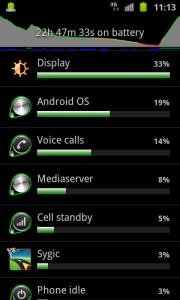
f) I also install Juicedefender but uninstall it based on xda thread for battery saving. By using BetterBatteryStats, I can tweak my apps / uninstall some unnecessary stuff for better battery life. Yesterday with MODERATE use, I can stretch 22 hours 47 mins .


So my take is , dont worry about it. Go for it. Regarding binary counter, you dont want samsung to know you have been installing external firmware right? so if u reset the counter, they wouldnt know. I am not sure if they have any hidden way to know, but the visible way shows u have not install anything that's not official from them. How many times in past years have u visit phone co to get warranty claim? U can buy a jig and reset the counter if this is going to bug u. Otherwise just ignore the counter for now.


Attached thumbnail(s)
Attached Image
premk71
post Nov 5 2011, 06:30 AM

Getting Started
**
Junior Member
119 posts

Joined: Jul 2006


QUOTE(I9100G @ Oct 13 2011, 12:52 PM)
This is the first time I'm writing a tutorial, so please bear with me a little, key? I've had some requests and decided just to write up a simple tutorial. Although I must stress out that flashing your phone might void warranty, and I'm NOT in anyway an expert and I can't guarantee you everything will work out. I'm NOT going to take any responsibility if you permanently bricked your phone. Although my experience says, it is very hard to really brick a Galaxy SII.

Edit: New DZKJ2 firmware is now available, but please find the original kernel-only files first

Need some advice bro. I pulled the firmware from xda ( i think u the one who put up the link to multiupload).
I used Kies to update my firmware, then using the file from multiupload, I extract the zImage and made into a .tar. I flash with the previous rooted kernel...ok... have yellow triange... but when i flash again with the kernel built from extracted zImage, Odin just sit there for some time and not responding, its checking file and nothing happen. So I yank out the cable and after that I get a logo with a phone and pc and says not connecting..... use USB jig also dont go away...

So i put back your multiupload file, and then pit files and I flash again even though got that logo above, success, it come back alive...

Not sure if extract zImage and making a .tar archive from it is right way to do this. I inspect previous stock kernel, its just a rebuild from zImage extract from the K1 firmware. What possibly u think I miss out?

Waa pun pening lo... maybe something fundamental I miss...sorry I am very noob to Android, just 3 weeks.
Anyway here is the kernel file i made...donno if its of use for inspection ..

Any advice is highly appreciated. If its you the same person in xda too, salute. thumbup.gif

http://www.multiupload.com/36PP1WZSUS


Added on November 5, 2011, 7:55 am
QUOTE(premk71 @ Nov 5 2011, 06:30 AM)
Need some advice bro. I pulled the firmware from xda ( i think u the one who put up the link to multiupload).
I used Kies to update my firmware, then using the file from multiupload, I extract the zImage and made into a .tar. I flash with the previous rooted kernel...ok... have yellow triange... but when i flash again with the kernel built from extracted zImage, Odin just sit there for some time and not responding, its checking file and nothing happen. So I yank out the cable and after that I get a logo with a phone and pc and says not connecting..... use USB jig also dont go away...

So i put back your multiupload file, and then pit files and I flash again even though got that logo above, success, it come back alive...

Not sure if extract zImage and making a .tar archive from it is right way to do this. I inspect previous stock kernel, its just a rebuild from zImage extract from the K1 firmware. What possibly u think I miss out?

Waa pun pening lo... maybe something fundamental I miss...sorry I am very noob to Android, just 3 weeks.
Anyway here is the kernel file i made...donno if its of use for inspection ..

Any advice is highly appreciated. If its you the same person in xda too, salute. thumbup.gif

http://www.multiupload.com/36PP1WZSUS
*
ha ha ha noob mistake, need repacking....will read it first

This post has been edited by premk71: Nov 5 2011, 07:55 AM
premk71
post Nov 5 2011, 06:05 PM

Getting Started
**
Junior Member
119 posts

Joined: Jul 2006


QUOTE(fuzore @ Nov 5 2011, 03:33 PM)
so have anyone got the original kernel only for DZKJ2 firmware file yet...
*
Tak ader. None. Still searching.
premk71
post Nov 6 2011, 11:56 AM

Getting Started
**
Junior Member
119 posts

Joined: Jul 2006


Anyone realize better battery life on this DZKJ2?

With unrooted : I have light use with some gmail and friendcast/ web check and SMS and a few mins of angry birds and after 17 hours battery drop only 28%. I have data and background services on.

I cant find complete changelog info which is credible for this 2.3.6 .Anyone seeing better battery life?
premk71
post Nov 6 2011, 03:54 PM

Getting Started
**
Junior Member
119 posts

Joined: Jul 2006


QUOTE(fuzore @ Nov 6 2011, 02:13 PM)
so u alredy flash to DZKJ2, u use kies or odin? found any rooted kernel in the web yet or not?
*
if u read a few posts above, I used both Kies and ODIN. I used kies to update first, then tried to root it, can root laa with the previous chinese kernel, it start up with yellow triangle.

But no stock kernel of this KJ2 ma... so i tried to make one by extract the zImage from stock firmware... but flash with ODIN tak jadi... connection ODIN to phone just stall while flash. I cabut wire and get phone/pc connection error logo. Then I used ODIN to flash back the stock firmware KJ2. Now back to normal. No root.

Still searching for this kernel for KJ2... I read everywhere there is all kind of info about extract kernel ( zImage) from stock firmware, but mostly many point to need to repack and I see tonnes of sites talking about using linux type commands. Haiyo too much to understand in one day. maybe in future , not today cause I am busy.

Just hoping someone else made a stock kernel for this KJ2. So far what I observe is battery life is better a bit ( need more data) and the homescreen got loop around back from back to front . Also some blue shade when u reach the edge of the area in applications and u still try to "pull" with ur fingers. Like "bounce" effect but not physical bounce , just blue shade. I didnt notice this in previous firmware.

Cross finger and hope for kernel.
premk71
post Nov 6 2011, 05:28 PM

Getting Started
**
Junior Member
119 posts

Joined: Jul 2006


QUOTE(gsan @ Nov 6 2011, 05:02 PM)
pls DO NOT flash the kernel from the link above, it will brick your S2... fortunately manage to flashed back to DZKJ1 insecure kernel and my S2 is alive  sweat.gif
*
Written quite clearly that it doesnt work and caused the phone to die. How to remove the post huh? Better remove before more people get hyper and try out... can pengsan one if donno how to unbrick


Added on November 6, 2011, 5:43 pm
QUOTE(gsan @ Nov 6 2011, 05:11 PM)
the homescreen got looping can be removed if you root with mygkernelv0_cwm5.tar (DZKJ1 insecure kernel with CWM)
*
With this mygkernelv0_cvm5.tar , does the wi-fi work?
So it means we just flash this kernel on top of the pre existing KJ2 and we have yellow triangle at startup and everything works well? The yellow triangle of course we remove with the USB jig, right?


This post has been edited by premk71: Nov 6 2011, 05:43 PM
premk71
post Nov 12 2011, 05:33 PM

Getting Started
**
Junior Member
119 posts

Joined: Jul 2006


Confuse confuse.Pening.
I upgrade to 2.3.6. Used mykernel method to root. and used CWM recovery to install the first custom rom ( release yesterday and based on DZKJ1).

In about phone, it says
Android version 2.3.5
Baseband version ....DZKJ2
Kernel version 2.6.3.5 Android-2.3.5@myGKernel # 5
Build number Juffo.DZKJ1

Is the baseband version supposed to show DZKJ2?
Also I tot flashing ROM via CWM will also change the kernel, but seem the kernel is original.

Will ask juffo in xda if there is alternative ways to flash this without CWM.
premk71
post Nov 12 2011, 05:55 PM

Getting Started
**
Junior Member
119 posts

Joined: Jul 2006


QUOTE(EightPhantomz @ Nov 12 2011, 05:42 PM)
I had MyKernel on 2.3.5 before. And last night I tried to upgrade to 2.3.6 but failed. Then I flashed back to DZKI1 kernel and tried to upgrade again. Successful.
Maybe you can try this method.

Now I'm gonna try the new method to root 2.3.6 before flashing to the Juffo's Custom ROM.
*
Thanks man, my phone is working alright, i am about to go do CWM update to the second version of custom ROM based on DZKJ2. I will use the CWM recovery method. I am sure it will work.

Since I have all my data backup, later I will try what you say, flash with Odin a 2.3.6, root it with the new method and then try to get custom ROM on it. Its time to play around and see any different results. Its the learning curve time for me on android. Somethings must try on own to understand what happens and how it works I guess.
Thanks for ur reply.
premk71
post Nov 13 2011, 08:23 AM

Getting Started
**
Junior Member
119 posts

Joined: Jul 2006


QUOTE(loon78a @ Nov 12 2011, 09:08 PM)
haizz.... me also face same problem as your...
anyone know how to help us on this issue?
<[-] Zerglings did not leave interesting stuff>  <--hate this
already try DooMLoRD ROOT V1 and V2 also cannot root my phone

help!! vmad.gif
*
Haiyaaa... me too....
I had reflash all to original DZKJ2 firmware and trying for last 7 hours to do this thing. Same.... unable to chmod, mount: permission denied, zergling didnt leave anything interesting... the whole same things.

I already remove droid explorer which was autostart up on pc, mobilegoservice which also has its version of adb.. and now for the final time I am going to uninstall and reinstall Kies. Geex!

Side note: I am unable to log in to Samsung account after flash back to DZKJ2 ori and also cant access samsung dive in web, anyone else can or its samsung web problem? Is it a must to have samsung account on ur phone to be able to update software via kies , since reflash ori KJ2, Kies says this phone is not supported for firmware updates thru kies. In past it will declare, the version of software is latest blah blah blah...only thing i can think off is samsung account on phone.

Tired, but no root.
premk71
post Nov 13 2011, 09:57 AM

Getting Started
**
Junior Member
119 posts

Joined: Jul 2006


QUOTE(EightPhantomz @ Nov 13 2011, 09:38 AM)
May I suggest a factory reset and redo everything?

Weird as I just upgraded from 2.3.5 rooted to 2.3.6 rooted + mykernel + Juffo's First Custom ROM. All in ONE day.
No problem at all.


Added on November 13, 2011, 9:41 am

Make sure the USB Debugging is UNCHECK. Then try again.
*
Well. I was already rooted with mykernel 1.1.1 and running DZKJ2 and then Juffo Custom ROM v 2. No issues.
Since the new rooting method came out, i decided to try it to see how it works. ( learning something).
I flash back to ori DZKJ2, of course unrooted again. Used the correct pit files and etc. No issue. phone working properly.

But the method of rooting , doesnt go.I have reset phone at least 10 x last night.

So I am back to DZKJ2,mykernel 1.1.1. and Juffo Custom ROM v 2.

1. For the new rooting method, maybe I need to uninstall all Android stuff off the pc, android injector, etc and start with fresh phone with stock DZKJ2 and start again.

2. If someone is on the stock DZKJ2, how to go to Juffo Custom Rom v2 without mykernel 1.1.1 . Can they just flash the custom ROM using ODIN instead of CWM, since Juffo Custom Rom v 2 already based on KJ2 and has root/CWM. Now even with Juffo v2, the kernel is 2.3.5 of mykernel 1.1.1.
Just a learning question. I cant ask yet in xda --- tak cukup syarat for posts.


Sorry I just want to learn something, doesnt matter if its difficult, or semi brick phone a few times.
premk71
post Nov 18 2011, 01:02 AM

Getting Started
**
Junior Member
119 posts

Joined: Jul 2006


After 42 attempts, my stock ROM / Kernel 2.3.6 is rooted with Doomlord v3. Finally.

I always got mount: permission denied.

I have tried reformat phone. Downgrade with ODIN to 2.3.5 and try, upgrade back to 2.3.6 and try. Follow all the tips on Kies uninstall , reinstall, kill processes at task manager, tried on 2 diff laptops, XP and Win7 ult 32 bit., Different USB ports, tried Doomlord V1,V2,V3, with and without the pause, extra pause, tried superoneclick, Tried praying.

I am not sure why, dont kick me, This time the thing that "probably" did it is

a) Only left Kies with adb driver in my C.Uninstall myphoneexplorer, droid explorer, etc. My android SDK is in D:

b) After mount permission failed; the command will come out reboot.....and i had to wait for a long time for the ALL Done to appear. Normally I would yank out the phone and restart manually.Even if I switch it off, it will restart by itself.

c) This time, when mount: Permission Denied came on, and reboot statement at the end, I left the phone attached to USB and was doing my work. And I saw after ~ 10 mins phone restart by itself.

d) I didnt go into task manager to kill ADB.exe, rather, I just re -ran the batch file with admin rights. And bingo it worked.

So if u got chronic case like me, try that. If mount permission denied comes up. Let the command come on, All Done, phone reboot by itself and run again without killing ADB.


Never give up.Never.


premk71
post Nov 24 2011, 10:01 PM

Getting Started
**
Junior Member
119 posts

Joined: Jul 2006


QUOTE(creezalird @ Nov 24 2011, 04:55 PM)
i have the jig already, in the new bootloader, the jig seems to be working for removing the yellow triangle but not the binary counter.

other than jig, method reflashing the stock kernel also ca remove the yellow triangle.

i've extracted the zImage kernel from 2.3.6 and tar the file so the file can be flashed per Odin, and i've asked one of the seniors at XDA and he said my method should be working, but of course i still dont test it myself.
*
Wish you success in the kernel extraction. Many many posts ago, I did the same thing , extract, tar, and end up cause Odin to crash and soft brick my phone with a logo of phone-pc disconnected.
Use jig also cannot get into download mode. Had to reflash with .pit file and DZKI1 firmware all over again. Big Mess.

But maybe you've got the right way to extract zImage and rebuild the kernel. Hoping you have some good discovery. Cheers.
premk71
post Nov 25 2011, 01:45 AM

Getting Started
**
Junior Member
119 posts

Joined: Jul 2006


As for the Juffo's ROM. For those who are curious about it. I have been using v 1 and 2 on and off .

whether u are rooted or not, you need to flash myGkernel 1.1.1 to get the CWM recovery.

Download the Juffo version , e.g v2. Dont unzip. Just move to the SD card and use the CWM recovery to install. You can check out detail instruction at xda. Also there are themes.

xda lists change logs, but for what its worth, the visible things are simply, the battery meter, the removal of SMS logs, and the themes. The rest of changelog are not so noticed by average user.

I tried all the themes, but eventually settled with stock. I also moved the transparent lock screen file manually and now have a good battery meter that resembles the one in v2 without themes. of course the transparent lock screen works. Just reboot.

Is it good or is it bad? I dont know how to answer this. Its ur choice. Try it, if u like use it. No amount of explanation can help dispel ur curiosity.

And for those worried about binary counter and yellow triangle, just forget aboout it ok. Its not a deal to be worried now. Just use the USB jig if u so worried. No matter how I "pusing" and flash here/there/everywhere from 2.3.5 to 2.3.6 and now custom rom, USB jig works to clear up everything. Even if u didnt remove the binary counts, yellow triangle, nothing wrong.

I am newbie and just 1 month old in android,I dont know much, but i can say its quite difficult to permanently brick ur phone, so go ahead and try stuff.

As for the "how to" questions, please just read the 31 pages. The first post is rather important, the rest you can cover fast and will take u 1 hour, but u only need to understand it once. And TRY.


And as for someone who asked if after flash all of this can they update firmware by Kies, yes, you can. If u get message like " your phone is not supported for upgrade via kies", just check if ur CSC is messed up. It was on mine after many flashing and soft brick cycles.
Just type *#272*IMEI NUMBER# and u can choose back XME and install.

Ok.


Added on November 25, 2011, 1:55 am
QUOTE(EightPhantomz @ Nov 23 2011, 11:16 PM)
Good to hear. Others can try this method aswell rather than waiting for DooMLoRD method to work.
*
Yes agreed.

Doomlord method is odd. As my previous post on it, on my Galaxy s2, it took 42 attempts to make the damn thing work on 2.3.6. But using the same laptop, i managed to root Galaxy Tab in 1 attempt. Odd. It is just like the sweet young thing you are trying to chase, interesting and spicy, but sometimes its just not attainable. If it works, it works.

If u are up against the wall, u are better off just flash myGkernel 1.1.1 and use USB jig to get rid of the triangle. Anyway, once u are rooted, u will soon experiment with custom rom and need CWM to install. So that time u will flash myGkernel 1.1.1 anyway. You might as well as do it now and stop pulling ur hair on Doomlord.

This post has been edited by premk71: Nov 25 2011, 01:55 AM

premk71
post Nov 25 2011, 02:03 AM

Getting Started
**
Junior Member
119 posts

Joined: Jul 2006


QUOTE(EightPhantomz @ Nov 25 2011, 01:57 AM)

All in all, I'm happy that its rooted. Cant wait for ICS.
*
You can say that again... ICS...... phew..... my heart skips a beat every time i read "ICS".

rclxub.gif thumbup.gif wub.gif rclxm9.gif notworthy.gif
premk71
post Nov 25 2011, 02:14 AM

Getting Started
**
Junior Member
119 posts

Joined: Jul 2006


QUOTE(skykisser @ Nov 25 2011, 01:56 AM)
Are there anyone out there who is aware if there are any custom roms which has chinese display and input support?
*
Yes, Juffo. I using v2, I see got chinese language. Tried to decipher and use keyboard to write chinese characters, seems it can. Though I dont understand what I am writing.Try it. rclxub.gif
premk71
post Nov 26 2011, 03:17 AM

Getting Started
**
Junior Member
119 posts

Joined: Jul 2006


QUOTE(matted @ Nov 26 2011, 03:01 AM)
thanks your info..i'm used KI1.i already flash mygkernel with k-tool. But still have yellow triangle at boot..i'm realy blur how removed the triangle...what i have to do???
*
Guys, you are going to be using your samsung for some time, at least a few months . Why not just buy a USB jig. Its not expensive. U can even buy from ebay. I bought mine and cost less than RM10. Wait one week it will arrive.
Just use the jig if the Yellow Triangle is bothering you . I understand how it feels. I used jig and no more triangle, binary counter reset and phone says firmware is samsung official. A few bucks is small compared to other accesories that we buy

Or worst case go "borrow" someone's jig.

Or live with the yellow triangle, whats the problem actually? you see it only when u start up the phone.

Let's all be happy that now we have multiple ways to root, and also one custom ROM.

Cheers ok? thumbup.gif
premk71
post Nov 27 2011, 12:43 AM

Getting Started
**
Junior Member
119 posts

Joined: Jul 2006


QUOTE(creezalird @ Nov 26 2011, 06:53 AM)
just need some info, what kernel/bootloader are u using right now in which firmware version? because i read that in new bootloader, usb jig cant be used anymore for resetting binary count.  ohmy.gif
*
I was on stock 2.3.6 dzkj2. Rooted with doomlord after many tries. Then flashed with myGkernel 1.1.1 and now with juffo v 2 .after myGkernel I used the jig to remove yellow triangle.

Flashed juffo via CWM.

My kernel info shows its myGkernel #5. Build shows Juffo. Android version is 2.3.6 .Baseband is DJKJ2. No yellow triangle. Download mode shows no custom binary.

If u still having problem with doomlord may I suggest you remove every application that has adb drivers e.g Droid explorer, sdk, etc. Uninstall kies. Reboot. Install kies.reboot. and try. It should work. I think everytime u stick the phone into the PC, the driver loaded for USB debugging is not coming from kies but one of the other. Probably the only way to be sure. I even uninstalled windows mobile device manager , though its irrelevant.

Like I say it took 42tries for galaxy s2 but only 1try for the tab.

If I have time tonight I might reflash the phone to stock and try root again. Lets see


Added on November 27, 2011, 12:49 amAnyone in penang and unsuccessful in rooting after try many times ,pm me. We can try it together.I ll bring my laptop. I got the jig also .cheers

This post has been edited by premk71: Nov 27 2011, 12:49 AM
premk71
post Nov 27 2011, 03:52 AM

Getting Started
**
Junior Member
119 posts

Joined: Jul 2006


QUOTE(matted @ Nov 27 2011, 03:11 AM)
i'm still using KI1. how to upgrade to KJ2. please show the step???
*
Its simple.

Install Samsung Kies from Samsung website.

http://www.samsung.com/my/support/detail/s...hword=GT-I9100G

Install it. Reboot PC. Open up KIES and connect your phone to KIES but turn off USB Debugging first.On your phone Go to Settings -> Applications -> Development and turn off USB debugging. Then connect your phone to pc.

Let Kies install all the driver and stuff. Make sure you have an internet connection.
Be patient while KIES connects to your phone. Once connected it will open up "BASIC INFORMATION" tab

If u are still on KI1, Kies will show you can update and ask you if u want to proceed. After that just follow the KIES instructions man. Its simple.

I am guessing you never heard of KIES? Its ok...I didnt know about this until last month also.

The above is the official way to update your firmware. You can also try without KIES, but by using your phone. Go to settings -> about Phone -> Software update. Try it.

If u want to update with other ways -- i.e. ODIN -- read the first post. Its as complete as anything. REad it a few times. But if ur goal is just to update firmware and not root or anything, its better you stick with official way.

6 Pages  1 2 3 > » Top
 

Change to:
| Lo-Fi Version
0.0237sec    0.17    7 queries    GZIP Disabled
Time is now: 9th December 2025 - 05:35 AM