Welcome Guest ( Log In | Register )

157 Pages « < 51 52 53 54 55 > » Bottom

Outline · [ Standard ] · Linear+

 Rooting your Samsung Galaxy SII (I9100G), also updating/repairing a bricked one

views
     
creezalird
post Dec 12 2011, 02:18 AM

On my way
****
Junior Member
504 posts

Joined: May 2011
From: Semenyih, Beranang, Lenggeng


QUOTE(premk71 @ Dec 12 2011, 03:14 AM)
Thanks for taking out the misery of responding to same questions over and over again. I just hope people spend some time to read the guide. Seems everyone wants instant root and all goodies and don't wanna read. Thanks
*
hopefully people read..i have already made the guide as simple as possible with less flowery sentences..lols..
as a geek, a more direct word is better...lols
steven92
post Dec 12 2011, 02:28 AM

Getting Started
**
Junior Member
209 posts

Joined: Oct 2010
Yeah my benchmark score is 58XX wakakak!!
premk71
post Dec 12 2011, 05:16 AM

Getting Started
**
Junior Member
119 posts

Joined: Jul 2006


QUOTE(creezalird @ Dec 12 2011, 02:18 AM)
hopefully people read..i have already made the guide as simple as possible with less flowery sentences..lols..
as a geek, a more direct word is better...lols
*
Bro, in your next rev ,can u put in
1. "how to get into download mode" using 3 button or jig for use with ODIN
2. How to get into recovery. For those who really lazy want to search. I bet this question will be asked later.

and next time someone ask a question which been asked before, i think we must avoid answer and tell them "read the guide".

Very good job bro. You da man.
rclxms.gif notworthy.gif rclxms.gif
codefuturama
post Dec 12 2011, 07:04 AM

Getting Started
**
Junior Member
80 posts

Joined: Jul 2009
QUOTE(premk71 @ Dec 12 2011, 05:16 AM)
Bro, in your next rev ,can u put in
1. "how to get into download mode" using 3 button or jig  for use with ODIN
2. How to get into recovery. For those who really lazy want to search. I bet this question will be asked later.

and next time someone ask a question which been asked before, i think we must avoid answer and tell them "read the guide".

Very good job bro. You da man.
rclxms.gif  notworthy.gif  rclxms.gif
*
yes. agree with this part. thanks a lot creezalid. rclxms.gif

n sorry for d question lol. ady read post #1 to #500++. just having slight confusion
so just sticking with malu bertanya sesat jalan, in case shit happen.

nwae thankiess

This post has been edited by codefuturama: Dec 12 2011, 07:17 AM
EightPhantomz
post Dec 12 2011, 08:45 AM

Regular
******
Senior Member
1,766 posts

Joined: Jan 2003
From: Astana


QUOTE(creezalird @ Dec 11 2011, 11:45 PM)
oh, this is MADNESS, every new user seems to be asking the same thing everyday.

i've made a revised guide using reference from the first page and others :

revised guide for i9100G (from updating to rooting) : http://db.tt/jqA10PR5

do spread the guide if anyone found it useful smile.gif

ps : do tell if anyone found mistake or whatsoever, i made that in only a minute..LOLS
*
Kudos for the effort man!!! Two thumbs up!!! thumbup.gif
kahuka
post Dec 12 2011, 11:11 AM

New Member
*
Newbie
1 posts

Joined: Dec 2011
hi. i'm not sure this is the right place to ask, do cwm recovery support gt-9100g?
premk71
post Dec 12 2011, 11:32 AM

Getting Started
**
Junior Member
119 posts

Joined: Jul 2006


QUOTE(kahuka @ Dec 12 2011, 11:11 AM)
hi. i'm not sure this is the right place to ask, do cwm recovery support gt-9100g?
*
Welcome to the forum. I see u register at 10.25 am and this is your first post.So, we'd be gentle.

Please look up a few posts above, there is a link to a guide for I9100G . Please read thru to understand how to get CWM on I9100G.
kldoc
post Dec 12 2011, 12:42 PM

Getting Started
**
Junior Member
87 posts

Joined: Nov 2011
I actually think we need another thread for other topics related to I9100G, things are going a lot too much off-topic because the lack of a dedicated thread.
creezalird
post Dec 12 2011, 01:09 PM

On my way
****
Junior Member
504 posts

Joined: May 2011
From: Semenyih, Beranang, Lenggeng


QUOTE(premk71 @ Dec 12 2011, 06:16 AM)
Bro, in your next rev ,can u put in
1. "how to get into download mode" using 3 button or jig  for use with ODIN
2. How to get into recovery. For those who really lazy want to search. I bet this question will be asked later.

and next time someone ask a question which been asked before, i think we must avoid answer and tell them "read the guide".

Very good job bro. You da man.
rclxms.gif  notworthy.gif  rclxms.gif
*
very much welcome man, it is just getting the nerve when everytime people are asking the same questions LOLS

thanks for the corrections too, i havent noticed that about the download mode. and beside it was 1 o'clock in the morning..haha..wrote it off using notepad++ only..lols

owh and i am not adding the usb jig part, because i dont find it necessary too much at this time. besides the new bootloader already limits the usb jig functionality a bit i think, i do own one, but i never stick it in the butt of my phone..lols

now the updated version : using microsoft words for the fancy stuff. lols. sorting and bolding important words.

hope if any of you have an improvement idea. do tell smile.gif


Added on December 12, 2011, 1:11 pm
QUOTE(kldoc @ Dec 12 2011, 01:42 PM)
I actually think we need another thread for other topics related to I9100G, things are going a lot too much off-topic because the lack of a dedicated thread.
*
sure we need one, but people will always asking the same thing all over again..lols..i think either new thread or the OP update the first post.

This post has been edited by creezalird: Dec 12 2011, 01:14 PM

cy97
post Dec 12 2011, 01:44 PM

Regular
******
Senior Member
1,140 posts

Joined: Dec 2004
Hi guys I rooted my 9100G using DooMLoRD methods n installed some rooted app but never flash it. Just want to know if I were to hard reset , will it be back to original factory state? Do I need to unroot it first by running the script? How do I check the binary count just in case. Tqvm.
creezalird
post Dec 12 2011, 05:33 PM

On my way
****
Junior Member
504 posts

Joined: May 2011
From: Semenyih, Beranang, Lenggeng


QUOTE(cy97 @ Dec 12 2011, 02:44 PM)
Hi guys I rooted my 9100G using DooMLoRD methods n installed some rooted app but never flash it.  Just want to know if I were to hard reset , will it be back to original factory state? Do I need to unroot it first by running the script? How do I check the binary count just in case. Tqvm.
*
check my pdf guide in my signature
cy97
post Dec 12 2011, 06:05 PM

Regular
******
Senior Member
1,140 posts

Joined: Dec 2004
QUOTE(creezalird @ Dec 12 2011, 05:33 PM)
check my pdf guide in my signature
*
Thanks bro
EightPhantomz
post Dec 12 2011, 06:22 PM

Regular
******
Senior Member
1,766 posts

Joined: Jan 2003
From: Astana


QUOTE(creezalird @ Dec 12 2011, 05:33 PM)
check my pdf guide in my signature
*
Glad the PDF saves our lives. LOL.
creezalird
post Dec 12 2011, 06:45 PM

On my way
****
Junior Member
504 posts

Joined: May 2011
From: Semenyih, Beranang, Lenggeng


QUOTE(cy97 @ Dec 12 2011, 07:05 PM)
Thanks bro
*
very much welcome and glad it helped.
i will try to update the guide as frequent as possible so that it will always updated with current problems.
darrez
post Dec 12 2011, 07:54 PM

Getting Started
**
Junior Member
90 posts

Joined: Oct 2006
From: Salak Tinggi, Sepang


a very nice n helpful guide u have there creezalird...thanks.
gilbertarenas
post Dec 12 2011, 10:33 PM

On my way
****
Senior Member
550 posts

Joined: Jun 2009
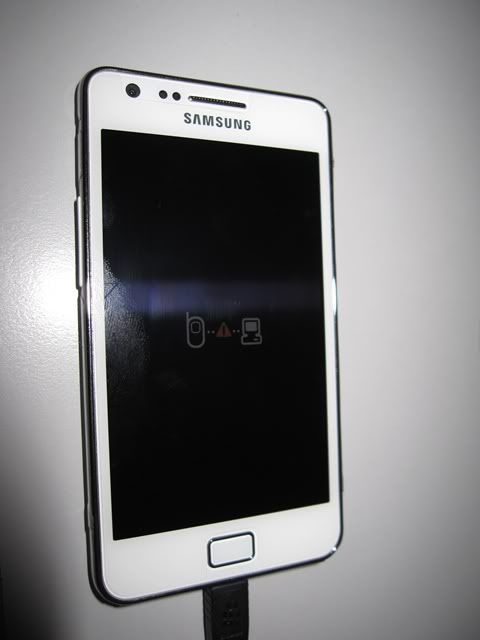
hi all, my phone just got stuck at this, any help ?

user posted image
creezalird
post Dec 12 2011, 10:47 PM

On my way
****
Junior Member
504 posts

Joined: May 2011
From: Semenyih, Beranang, Lenggeng


QUOTE(gilbertarenas @ Dec 12 2011, 11:33 PM)
hi all, my phone just got stuck at this, any help ?

user posted image
*
if i am not mistaken, u need to reflash back stock firmware to remove this.
try get into odin download mode, or if not possible, i think just connect the phone and see if odin detected the phone.
if u are not sure about flashing, download pdf in my signature
premk71
post Dec 12 2011, 11:43 PM

Getting Started
**
Junior Member
119 posts

Joined: Jul 2006


QUOTE(gilbertarenas @ Dec 12 2011, 10:33 PM)
hi all, my phone just got stuck at this, any help ?

user posted image
*
It happened to me many many times.last night also kena .don't worry .

Just reboot your pc. Use task manager to kill kies and all other phone application . Then start odin and connect ur phone . Odin will recognize it.

Then proceed to select the files u wanted to flash originally .wait 20 sec . And press start .

It will work. If it doesn't it means ur drivers got problem .just reinstall back kies ,reboot and repeat all of the above .you can try another usb port on ur pc if u want.

Don't worry its so easy to solve.but first time i did sweat a bit .

I think this happens because kies is still running as background process when u flashing with odin .or odin crash .or u accidently pulled the cable or usb connection loose .


creezalird
post Dec 12 2011, 11:50 PM

On my way
****
Junior Member
504 posts

Joined: May 2011
From: Semenyih, Beranang, Lenggeng


QUOTE(premk71 @ Dec 13 2011, 12:43 AM)
It happened to me many many times.last night also kena .don't worry .

Just reboot your pc. Use task manager to kill kies and all other phone application . Then start odin and connect ur phone . Odin will recognize it.

Then proceed to select the files u wanted to flash originally .wait 20 sec . And press start .

It will work. If it doesn't it means ur drivers got problem .just reinstall back kies ,reboot and repeat all of the above .you can try another usb port on ur pc if u want.

Don't worry its so easy to solve.but first time i did sweat a bit .

I think this happens because kies is still running as background process when u flashing with odin .or odin crash .or u accidently pulled the cable or usb connection loose .
*
u sure encountered everything right? lols, i never had any of those, so kind of without knowledge here..haha
gsan
post Dec 12 2011, 11:52 PM

Electrical RF Engineer
*******
Senior Member
2,471 posts

Joined: Jan 2003

QUOTE(premk71 @ Dec 12 2011, 11:43 PM)
It happened to me many many times.last night also kena .don't worry .

Just reboot your pc. Use task manager to kill kies and all other phone application . Then start odin and connect ur phone . Odin will recognize it.

Then proceed to select the files u wanted to flash originally .wait 20 sec . And press start .

It will work. If it doesn't it means ur drivers got problem .just reinstall back kies ,reboot and repeat all of the above .you can try another usb port on ur pc if u want.

Don't worry its so easy to solve.but first time i did sweat a bit .

I think this happens because kies is still running as background process when u flashing with odin .or odin crash .or u accidently pulled the cable or usb connection loose .
*
here u go http://forum.lowyat.net/topic/2055624 smile.gif

157 Pages « < 51 52 53 54 55 > » Top
 

Change to:
| Lo-Fi Version
0.0177sec    0.18    6 queries    GZIP Disabled
Time is now: 7th December 2025 - 04:53 AM