

HP Pavillion DV6-6XXX series Owners Lounge V4, -162 owners. Y U NO INTEL + AMD CFX!!
HP Pavillion DV6-6XXX series Owners Lounge V4, -162 owners. Y U NO INTEL + AMD CFX!!
|
|
 Dec 10 2011, 10:25 PM Dec 10 2011, 10:25 PM
|
 
Junior Member
50 posts Joined: Dec 2009  
|
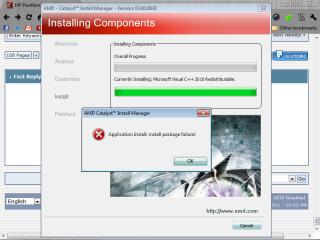
why i got this when installing amd catalyst??
|
|
|
|
|
|
Dec 10 2011, 10:30 PM
|

Senior Member
6,612 posts Joined: Jan 2003 From: Tomorrow
|
I get that too.
Check Control Panel if you already have Microsoft Visual C++ 2010 Redistributable installed. Ignore that error if you did. |
|
|
 Dec 10 2011, 10:39 PM Dec 10 2011, 10:39 PM
|

Junior Member
151 posts Joined: Oct 2011 From: Pahang
|
QUOTE(Acid_RuleZz @ Dec 10 2011, 09:53 PM) Yes, that is the latest HP driver. I experienced this before.. somehow in PES turning ON Anti-aliasing make it have more Alias. That's why i start using Post-AA like FXAA. may i know what is PES 2012 main folder?is it 'img' or just paste those thing into 'Pro Evolution Soccer 2012' folder? Try this.. turn off AA in CCC. Download SMAA Injector and extract all 3 files in d3d9 folder into PES 2012 main folder. Start the game and use "Pause" key to active SMAA. Pause key is FN+Right shift.   |
|
|
Dec 10 2011, 10:49 PM
|
|
Senior Member
6,612 posts Joined: Jan 2003 From: Tomorrow
|
Paste into Pro Evolution Soccer 2012 folder where pes2012.exe located.
|
|
|
Dec 10 2011, 10:54 PM
|
|
Junior Member
151 posts Joined: Oct 2011 From: Pahang
|
QUOTE(Acid_RuleZz @ Dec 10 2011, 10:49 PM) Paste into Pro Evolution Soccer 2012 folder where pes2012.exe located. already done it..working like a boss..the jagged graphic is now better..thanx sifu Acid  |
|
|
Dec 10 2011, 11:38 PM
|
|
Senior Member
6,612 posts Joined: Jan 2003 From: Tomorrow
|
No problem.
 I won't be active so much because kinda busy lately.. playing games.  |
|
|
|
|
|
Dec 11 2011, 12:31 AM
|
|
Junior Member
151 posts Joined: Oct 2011 From: Pahang
|
LOLOLOLOLOLOLOLOL
 |
|
|
Dec 11 2011, 04:59 AM
|

Junior Member
100 posts Joined: Mar 2006
|
QUOTE(moniqee @ Dec 10 2011, 07:59 AM) i'm using the norton internet security.. kinda ok since my laptop has 8gb ram... it maybe heavy but with 8gb ram hardly felt the bulkiness... Yes maam, went to test out the SR80i but it was not up to my expectation. Wanted to go a step higher (SR225i) but Jaben dont have stock. So end up with the 125i. Love the guitar & piano sound of this can. @tajulsans - u use grado SR125i ar? i'm using Audio Technica AD700  Added on December 11, 2011, 5:02 am QUOTE(Acid_RuleZz @ Dec 10 2011, 11:38 PM) No problem. How i wish i can be as "busy" as you.. Being away with no access to games makes me so bored.. I won't be active so much because kinda busy lately.. playing games. This post has been edited by tajulsans: Dec 11 2011, 05:02 AM |
|
|
Dec 11 2011, 11:22 AM
|

Junior Member
87 posts Joined: Jun 2011
|
Can i ask how to clean the dust inside my laptop?
Added on December 11, 2011, 11:23 amCan i ask how to clean the dust inside my laptop? This post has been edited by Momojii: Dec 11 2011, 11:23 AM |
|
|
Dec 11 2011, 12:01 PM
|
|
Newbie
3 posts Joined: Dec 2011
|
is there anyway to turn off the monitor display but leave the comp running? instead of changing the power options to do nothing when closing the lid.
|
|
|
Dec 11 2011, 12:42 PM
|

Senior Member
1,267 posts Joined: Sep 2010 
|
QUOTE(Momojii @ Dec 11 2011, 11:22 AM) Can i ask how to clean the dust inside my laptop? open the plate below ur laptop. use vacuum cleaner and suck wherever location u like  QUOTE(WKhang92 @ Dec 11 2011, 12:01 PM) is there anyway to turn off the monitor display but leave the comp running? instead of changing the power options to do nothing when closing the lid. At power option, click on change plan setting then theres is a setting for turn off display. set to 1min .  |
|
|
Dec 11 2011, 02:26 PM
|
|
Junior Member
87 posts Joined: Jun 2011
|
What plate? You mean the one behind where theres the harddisk one?
This post has been edited by Momojii: Dec 11 2011, 02:26 PM |
|
|
Dec 11 2011, 03:01 PM
|
|
Senior Member
1,267 posts Joined: Sep 2010
|
QUOTE(Momojii @ Dec 11 2011, 02:26 PM) What plate? You mean the one behind where theres the harddisk one? Yea |
|
|
|
|
|
Dec 11 2011, 03:03 PM
|

Senior Member
7,727 posts Joined: Jan 2010 From: Ara Damansara, Petaling Jaya & Batu Pahat, Johor.
|
@Acid pesedit 2.4 is out!!
|
|
|
Dec 11 2011, 04:07 PM
|

Junior Member
423 posts Joined: Jan 2009 From: KL and SeREmban area 
|
if my numpad area, number 8 and / not working, sent to warranty?
|
|
|
Dec 11 2011, 04:16 PM
|
|
Senior Member
7,727 posts Joined: Jan 2010 From: Ara Damansara, Petaling Jaya & Batu Pahat, Johor.
|
QUOTE(jerrywan @ Dec 11 2011, 05:07 PM) if my numpad area, number 8 and / not working, sent to warranty?  fix it won't save ur keyboard. just change whole keyboard. fix it won't save ur keyboard. just change whole keyboard. |
|
|
Dec 11 2011, 04:20 PM
|
|
Junior Member
423 posts Joined: Jan 2009 From: KL and SeREmban area
|
how to change to a new keyboard?sent to hp rite?
my left bottom speaker oso din hear a sound..haih This post has been edited by jerrywan: Dec 11 2011, 04:21 PM |
|
|
Dec 11 2011, 04:27 PM
|
|
Senior Member
7,727 posts Joined: Jan 2010 From: Ara Damansara, Petaling Jaya & Batu Pahat, Johor.
|
did u adjusted the balance sound b4? set back to defaults & test. u never tested the speaker b4 or once u get the lappy on the 1st week???
they will change for u. send to HP® Added on December 11, 2011, 4:30 pm QUOTE(Momojii @ Dec 11 2011, 12:22 PM) Can i ask how to clean the dust inside my laptop? use compressor air or assembly ur lappy (cleaner)Added on December 11, 2011, 11:23 amCan i ask how to clean the dust inside my laptop? Added on December 11, 2011, 4:33 pm QUOTE(FameMoon @ Dec 10 2011, 11:54 PM) already done it..working like a boss..the jagged graphic is now better..thanx sifu Acid http://www.pes-patch.com/ (pick www.pesedit.com) http://pes-smoke-patch.blogspot.com/ use jenkey tools for editing. This post has been edited by ngkhanmein: Dec 11 2011, 04:33 PM |
|
|
Dec 11 2011, 04:34 PM
|
|
Junior Member
423 posts Joined: Jan 2009 From: KL and SeREmban area
|
ic..how long it takes if i send it now?1 week enough?
|
|
|
Dec 11 2011, 04:39 PM
|
|
Senior Member
7,727 posts Joined: Jan 2010 From: Ara Damansara, Petaling Jaya & Batu Pahat, Johor.
|
less than 1 week. should be quite fast cos just change the keyboard very easy but just let them do cause the plastic very soft if u 2 hard it will spoil. learn more them when they change for u. look at it..
|
|
Topic ClosedOptions
|
| Change to: |  0.0240sec 0.0240sec
 0.26 0.26
 6 queries 6 queries
 GZIP Disabled GZIP Disabled
Time is now: 6th December 2025 - 11:47 PM |
 Quote
Quote