

is it possible to upgrade hp dv6 screen resolution from hd to full hd?
HP Pavillion DV6-6XXX series Owners Lounge V4, -162 owners. Y U NO INTEL + AMD CFX!!
HP Pavillion DV6-6XXX series Owners Lounge V4, -162 owners. Y U NO INTEL + AMD CFX!!
|
|
 Oct 25 2011, 05:34 PM Oct 25 2011, 05:34 PM
Return to original view | Post
#1
|
 
Junior Member
50 posts Joined: Dec 2009  
|
is it possible to upgrade hp dv6 screen resolution from hd to full hd?
|
|
|
|
|
|
Oct 25 2011, 05:39 PM
Return to original view | Post
#2
|
|
Junior Member
50 posts Joined: Dec 2009
|
QUOTE(lee_what2004 @ Oct 25 2011, 05:35 PM) Self upgrade, buy the screen panel and the lcd cable.. how about the cost? |
|
|
Nov 12 2011, 12:03 AM
Return to original view | Post
#3
|
|
Junior Member
50 posts Joined: Dec 2009
|
hi there, just wanna ask that hp dv6-6001tx still available or already phased out and if still have where i can get it at penang?
|
|
|
Nov 12 2011, 12:48 AM
Return to original view | Post
#4
|
|
Junior Member
50 posts Joined: Dec 2009
|
QUOTE(Acid_RuleZz @ Nov 12 2011, 12:22 AM) try PM Hikari85 and ask whether she still got some stocks.. or call Thundermatch branch in Penang. thanks for the feedback acid, will do so, I believed chewkl bought it from Thundermatch Penang for a damn good price.. u can try PM him for more info.  i hope this stock still have bcoz just heard from other user that this model already phased out. i hope this stock still have bcoz just heard from other user that this model already phased out. |
|
|
Nov 12 2011, 08:40 PM
Return to original view | Post
#5
|
|
Junior Member
50 posts Joined: Dec 2009
|
QUOTE(ZeneticX @ Nov 12 2011, 05:24 PM) add me to the club @zeneticx, u buy from l0ui3 right?price and specs same as Ikmal91 |
|
|
Nov 12 2011, 08:47 PM
Return to original view | Post
#6
|
|
Junior Member
50 posts Joined: Dec 2009
|
oic, so what price u get? with extra gifts?
|
|
|
|
|
|
Dec 1 2011, 11:52 PM
Return to original view | Post
#7
|
|
Junior Member
50 posts Joined: Dec 2009
|
hi there, just bought my dv6 6001tx, just want to ask ur guys what should i start first on this laptop? very noob here.
|
|
|
Dec 6 2011, 03:32 PM
Return to original view | Post
#8
|
|
Junior Member
50 posts Joined: Dec 2009
|
how to install amd latest driver? just like install other program rite? or must uninstall older driver first?
|
|
|
Dec 6 2011, 04:22 PM
Return to original view | Post
#9
|
|
Junior Member
50 posts Joined: Dec 2009
|
1.Download this HP driver. AMD High-Definition Graphics Driver 2011-11-18 , Version:8.882.2.3000, 338.97M.
Don't install it yet. 2.Download and install DriverSweeper 3.2. 3.Go into Control Panel and uninstall AMD Catalyst Install Manager When uninstall choose this. » Click to show Spoiler - click again to hide... « 4.After that restart and enter Safemode. Use DriverSweeper and tick AMD-Display. Scan and clean. Reboot. <-------- not really neccessary but i hate the feeling of having leftover files in my system. » Click to show Spoiler - click again to hide... « 5.Install the HP AMD driver u download in the 1st step and reboot. Optional: Now you can install any official/unofficial AMD driver on top of HP driver. Your selection will vary depending on the driver source how to know if I've done installing it perfectly? |
|
|
Dec 6 2011, 04:43 PM
Return to original view | Post
#10
|
|
Junior Member
50 posts Joined: Dec 2009
|
QUOTE(Acid_RuleZz @ Dec 6 2011, 04:38 PM) 2 easy ways... driver version is 8.882.2.3000? the latest rite? btw thanks acid..1. Open CCC and check Software tab. 2. Open Device Manager and check the driver version there. Thats your problem for installing the "leaked pre-alpha noncompeleted" driver bro. Find Atiman Uninstaller 6.1.3 in 2nd post and do automatic uninstallation. |
|
|
Dec 8 2011, 09:10 PM
Return to original view | Post
#11
|
|
Junior Member
50 posts Joined: Dec 2009
|
QUOTE(Acid_RuleZz @ Dec 8 2011, 03:53 PM) lol.. there's a few guys that i missed before. acid, if u free do add me on owner list, HP DV6 6001TX, RM 2780 with 8GB ram, Targus Bag, 8GB Thumbdrive, Gaming Mouse & HP Care Pack from l0ui3.  This post has been edited by darkside7: Dec 8 2011, 09:12 PM |
|
|
Dec 9 2011, 03:01 PM
Return to original view | Post
#12
|
|
Junior Member
50 posts Joined: Dec 2009
|
hello there, want to ask, why when im playing pes with this laptop the screen contrast look normal with ac adapter on, but when i disconnect the ac adapter, the contrast change very high..
|
|
|
Dec 9 2011, 03:17 PM
Return to original view | Post
#13
|
|
Junior Member
50 posts Joined: Dec 2009
|
QUOTE(marcus20125 @ Dec 9 2011, 03:13 PM) power management setting i have check power management, no problem with it, it's not power brightness, but change in contrast, very weird.. |
|
|
|
|
|
Dec 10 2011, 03:18 AM
Return to original view | Post
#14
|
|
Junior Member
50 posts Joined: Dec 2009
|
QUOTE(ngkhanmein @ Dec 9 2011, 04:49 PM) how come?? the contrast r nicer when adapter is on w/o battery or w/ battery. if w/ battery the contrast & performance will drop. i just discovered that this problem not just happen when im playing pes, it happen all the time, it's like my contrast was all out of whack, too (way too bright). Adjusting the gamma did nothing - but then when i unplugged the power cord from the laptop, waited a second, and plugged it back in, and it's back to normal. Not sure why... |
|
|
Dec 10 2011, 05:58 PM
Return to original view | Post
#15
|
|
Junior Member
50 posts Joined: Dec 2009
|
QUOTE(ngkhanmein @ Dec 10 2011, 10:59 AM) http://forum.lowyat.net/topic/1074936/+60 update ur mse or use ESET smart security 5! oic, thanx btw, is this situation normal for this laptop?Added on December 10, 2011, 11:00 am set defaults setting on ur power option at control panel. for better contrast is always with the adapter ON. just remove the battery while using adapter during indoor. if outdoor only use battery. |
|
|
Dec 10 2011, 08:11 PM
Return to original view | Post
#16
|
|
Junior Member
50 posts Joined: Dec 2009
|
QUOTE(riziger @ Dec 10 2011, 08:08 PM) Is there a way to on/off the touchpad like how most laptops can? It gets a little irritating when using a real mouse but obv when I don't have a mouse I'd like to activate it easily. there are square icon on ur touchpad, press it twice. |
|
|
Dec 10 2011, 10:25 PM
Return to original view | Post
#17
|
|
Junior Member
50 posts Joined: Dec 2009
|
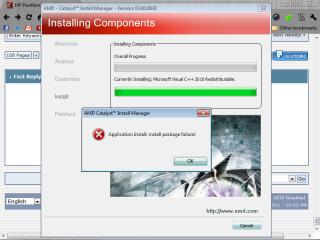
why i got this when installing amd catalyst??
|
|
|
Dec 13 2011, 10:04 PM
Return to original view | Post
#18
|
|
Junior Member
50 posts Joined: Dec 2009
|
@acid and dv6 user here, do you untick display power saving technology in power section under graphic properties?
|
|
|
Dec 13 2011, 10:15 PM
Return to original view | Post
#19
|
|
Junior Member
50 posts Joined: Dec 2009
|
QUOTE(Acid_RuleZz @ Dec 13 2011, 10:04 PM) Not really new tho.. just a souped up HD6770M. i mean in intel graphics and media control..Added on December 13, 2011, 10:05 pm u meant PowerPlay? i didn't. |
|
|
Dec 13 2011, 11:04 PM
Return to original view | Post
#20
|
|
Junior Member
50 posts Joined: Dec 2009
|
QUOTE(lee_what2004 @ Dec 13 2011, 10:26 PM) @darkside7, If that one, untick it, else it will change the display to 40Hz when in battery mode and you might see flicker.. yes i untick it,bcoz before this when on battery the screen colour contrast is not normal, but when i untick it, the screen back to normal and same like when on ac adapter, btw, thanks lee_what. |
|
Topic ClosedOptions
|
| Change to: |  0.0334sec 0.0334sec
 0.39 0.39
 7 queries 7 queries
 GZIP Disabled GZIP Disabled
Time is now: 3rd December 2025 - 04:32 PM |
 Quote
Quote