Welcome Guest ( Log In | Register )

33 Pages « < 10 11 12 13 14 > » Bottom

Outline · [ Standard ] · Linear+

 [Custom ROM] MYGingerB (Android Gingerbread 2.3.7), Our own Commtiva z71 (mi300) Custom ROM

views
     
cklee75
post Nov 7 2011, 04:14 PM

New Member
*
Newbie
7 posts

Joined: Jun 2011
Thanks for the ROM.

How to disable boot animation (thus can boot faster)? I remembered I can disable it in 7.1.0-aPT.

Thx.

This post has been edited by cklee75: Nov 7 2011, 08:17 PM
klvn1818
post Nov 7 2011, 07:13 PM

New Member
*
Junior Member
10 posts

Joined: Oct 2011
[quote=angelictears,Nov 6 2011, 01:41 AM]
try to pull out the battery for a few minutes before trying to enter recovery mode/download mode. The phone will sometimes need several time before it can enter either mode. Although download mode should be available no matter which ROM installed.


Added on November 6, 2011, 2:27 am


erm...sorry, maybe my broken English had make you misunderstand on my situation, actually i able to enter into recovery mode, but due to the 'cal' , 'end cal' & 'enter' button malfunction, its coz me unable to make selection while in the recovery mode screen, the only action can do is scroll up and down...any others mode to flash rom beside download & recovery mode?
TSangelictears
post Nov 7 2011, 08:05 PM

Getting Started
**
Junior Member
158 posts

Joined: Sep 2011


[quote=klvn1818,Nov 7 2011, 07:13 PM]
[quote=angelictears,Nov 6 2011, 01:41 AM]
try to pull out the battery for a few minutes before trying to enter recovery mode/download mode. The phone will sometimes need several time before it can enter either mode. Although download mode should be available no matter which ROM installed.


Added on November 6, 2011, 2:27 am
erm...sorry, maybe my broken English had make you misunderstand on my situation, actually i able to enter into recovery mode, but due to the 'cal' , 'end cal' & 'enter' button malfunction, its coz me unable to make selection while in the recovery mode screen, the only action can do is scroll up and down...any others mode to flash rom beside download & recovery mode?
*

[/quote]

Hmm..does the trackball button also cant be press?
klvn1818
post Nov 7 2011, 09:33 PM

New Member
*
Junior Member
10 posts

Joined: Oct 2011
QUOTE(angelictears @ Nov 7 2011, 08:05 PM)
Hmm..does the trackball button also cant be press?
*
sad to tel...yep...only can be scroll... cry.gif
am cascadia
post Nov 7 2011, 10:15 PM

New Member
*
Junior Member
37 posts

Joined: Sep 2011
angelictears,now im using cm7 eaV6.. can i flash to gaia without downgrade to 2.1 first??

what kernel best for gaia?? for better wifi,battery life and other??

what should i wipe if wanna flash?

can give a step?
GameSky
post Nov 7 2011, 10:30 PM

Nyancat too much
*******
Senior Member
6,381 posts

Joined: Jun 2005
From: meow meow
QUOTE(am cascadia @ Nov 7 2011, 10:15 PM)
angelictears,now im using cm7 eaV6.. can i flash to gaia without downgrade to 2.1 first??

what kernel best for gaia?? for better wifi,battery life and other??

what should i wipe if wanna flash?

can give a step?
*
from my experience, you can flash to the rom from cm7 eav6, but I did a wipe after that nod.gif
am cascadia
post Nov 7 2011, 10:42 PM

New Member
*
Junior Member
37 posts

Joined: Sep 2011
QUOTE(GameSky @ Nov 7 2011, 10:30 PM)
from my experience, you can flash to the rom from cm7 eav6, but I did a wipe after that nod.gif
*
really?? but no lost emei rite??huhu

im just worried.. smile.gif

but how the battery life and wifi?? is this rom more better than ea v6??


ALMAJAN
post Nov 7 2011, 11:34 PM

New Member
*
Newbie
2 posts

Joined: Nov 2011
Hello my dears. I have a little problem with Android Gingerbread 2.3.7 . I just installed in my Orange Boston ... All good until today when I find a big problem. I tried to connection on internet via wifi but surprise : my device don't find any wifi-network . When I had the version 2.1 after activate of my wifi it searched automated for networks but now with v 2.3.7 i activate the wifi than press scan and nothing . Only after a few tries in the down on wi-fi appear the message : being scanning and this message doesnt disappear even if i leave him to search for few hours.

As the room I have CM_7.1stable_full.nb0 + gaia

What I should to do ?

Thank you and sorry for my bad english.

This post has been edited by ALMAJAN: Nov 7 2011, 11:35 PM
terry@android
post Nov 8 2011, 09:29 AM

Getting Started
**
Junior Member
99 posts

Joined: Oct 2011


@ALMAJAN
juz flash other kernel available,u can use either eav6@edgar kernel,others are 2.6.32.9 #11,#20.as for me,the original aosp kernel will mess up my wifi,so i v been using eav6 for a while and nothing happen.

From my test through lots of flashing,there is nothing wrong with different method of flashing but suitability from kernels taking part for those problems.


Added on November 8, 2011, 9:38 am@am cascadia
1) from eav6 do wiping of dalvik,partition cache,and factory reset from recovery
2)flash GAIA and reboot recovery to update recovery and factory reset again,if u stuck at boot,having orientation,wifi,imei,tethering, or any other problems,ready different type of kernels on ur sd and flash one by one until u find it suitable for ur device.
3) dont forget go calibrate ur battery once u find suitable kernel for ur device


Added on November 8, 2011, 9:42 am@klvn 1818
try flashing to phantom sky to reclaim stock recovery and see if ur button still having problems.


Added on November 8, 2011, 9:43 amor do a master reset red+cam+ power


Added on November 8, 2011, 9:44 am@angelictears
do u get my pm,any respond on it?
juz be angry at me smile.gif

This post has been edited by terry@android: Nov 8 2011, 09:44 AM
am cascadia
post Nov 8 2011, 09:49 AM

New Member
*
Junior Member
37 posts

Joined: Sep 2011
[quote=terry@android,Nov 8 2011, 09:29 AM]

Added on November 8, 2011, 9:38 am@am cascadia
1) from eav6 do wiping of dalvik,partition cache,and factory reset from recovery
2)flash GAIA and reboot recovery to update recovery and factory reset again,if u stuck at boot,having orientation,wifi,imei,tethering, or any other problems,ready different type of kernels on ur sd and flash one by one until u find it suitable for ur device.
3) dont forget go calibrate ur battery once u find suitable kernel for ur device

how do i calibrate battery?? i think im good with #20..


terry@android
post Nov 8 2011, 09:53 AM

Getting Started
**
Junior Member
99 posts

Joined: Oct 2011


charge full ur battery,reboot recovery and wipe battery stat,or u can use any callibration software from market;)
annoymous1234
post Nov 8 2011, 10:06 AM

Look at all my stars!!
*******
Senior Member
7,615 posts

Joined: Mar 2009

which phone is compatible with this?
am cascadia
post Nov 8 2011, 10:09 AM

New Member
*
Junior Member
37 posts

Joined: Sep 2011
QUOTE(terry@android @ Nov 8 2011, 09:53 AM)
charge full ur battery,reboot recovery and wipe battery stat,or u can use any callibration software from market;)
*
from ea v6 i flash to gia without any wipe.. after flash then i wipe dalvik+battery stat.. then reboot.. work perfectly..

then i use kernel #20..

u think i should go to v6 again then wipe thing that u say??

or i should leave it like this??

seem system got a bit lagg some times..

and battery drop so quickly..
salimbest83
post Nov 8 2011, 10:20 AM

♥PMS on certain day♥
*******
Senior Member
8,639 posts

Joined: Feb 2006
From: Jelutong Penang


QUOTE(annoymous1234 @ Nov 8 2011, 10:06 AM)
which phone is compatible with this?
*
should support all these variant, rite ts
user posted image
TSangelictears
post Nov 8 2011, 10:32 AM

Getting Started
**
Junior Member
158 posts

Joined: Sep 2011


QUOTE(terry@android @ Nov 8 2011, 09:29 AM)
do u get my pm,any respond on it?
juz be angry at me smile.gif
*
I did biggrin.gif
I am sorry as I can't reply all comment/msg right now sad.gif pretty much busy with college and stuffs sad.gif
Although I can say that I am not mad biggrin.gif your and others feedback are important to me on making this project better and better each release smile.gif
And I will be active here for a while even I am kind of busy, any question can be ask here, although I can't answer all at once smile.gif

I can say that apart from my college, part time work and this project, I am busy on one more thing for the mi300 phone (although I can't be sure if it will be working or not). Hint? MIUI biggrin.gif
salimbest83
post Nov 8 2011, 10:40 AM

♥PMS on certain day♥
*******
Senior Member
8,639 posts

Joined: Feb 2006
From: Jelutong Penang


QUOTE(angelictears @ Nov 8 2011, 10:32 AM)
I did biggrin.gif
I am sorry as I can't reply all comment/msg right now sad.gif pretty much busy with college and stuffs sad.gif
Although I can say that I am not mad biggrin.gif your and others feedback are important to me on making this project better and better each release smile.gif
And I will be active here for a while even I am kind of busy, any question can be ask here, although I can't answer all at once smile.gif

I can say that apart from my college, part time work and this project, I am busy on one more thing for the mi300 phone (although I can't be sure if it will be working or not). Hint? MIUI biggrin.gif
*
MIUI???
seriously... drool.gif drool.gif
sure u wil be the 1st in earth release miui for this phone thumbup.gif

This post has been edited by salimbest83: Nov 8 2011, 10:41 AM
TSangelictears
post Nov 8 2011, 10:46 AM

Getting Started
**
Junior Member
158 posts

Joined: Sep 2011


QUOTE(am cascadia @ Nov 8 2011, 10:09 AM)
from ea v6 i flash to gia without any wipe.. after flash then i wipe dalvik+battery stat.. then reboot.. work perfectly..

then i use kernel #20..

u think i should go to v6 again then wipe thing that u say??

or i should leave it like this??

seem system got a bit lagg some times..

and battery drop so quickly..
*
In my experience, kernel stability depends on hardware as not all devices are the same.
Although if you get a kernel right, you can go for the eav6 as it is the most stable kernel apart from SuperAOSP 8.6 for MYGingerbread ROM. You should give it a try and do it without wipe first biggrin.gif

QUOTE(salimbest83 @ Nov 8 2011, 10:20 AM)
should support all these variant, rite ts
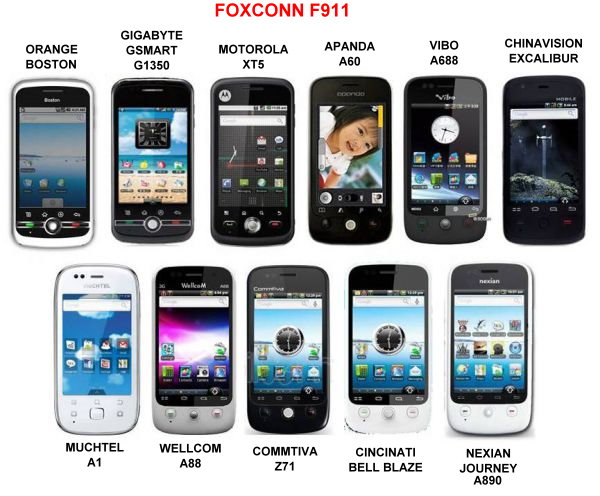
user posted image
*
Indeed, the ROM should work on all the devices listed on the image biggrin.gif
Although some devices might have problems with various kernel (not part of MYGingerbread ROM project for now)
Thanks salimbest83


Added on November 8, 2011, 10:50 am
QUOTE(salimbest83 @ Nov 8 2011, 10:40 AM)
MIUI???
seriously...  drool.gif  drool.gif
sure u wil be the 1st in earth release miui for this phone  thumbup.gif
*
lol, not sure about that.
although this is still under planning (and will not confirm any of it are working or not), MIUI is closed source so it's a bit difficult to work with.
So far all I've got for porting are MDPI apks, and basebands support for the z71 (mi300), other than that I have to make on my own sad.gif
I will try though smile.gif

This post has been edited by angelictears: Nov 8 2011, 10:50 AM

am cascadia
post Nov 8 2011, 11:04 AM

New Member
*
Junior Member
37 posts

Joined: Sep 2011
[quote=angelictears,Nov 8 2011, 10:46 AM]
In my experience, kernel stability depends on hardware as not all devices are the same.
Although if you get a kernel right, you can go for the eav6 as it is the most stable kernel apart from SuperAOSP 8.6 for MYGingerbread ROM. You should give it a try and do it without wipe first biggrin.gif

so thats mean eav6 kernel most stable for gaia?? smile.gif

can give a link to download that kernel..?
klvn1818
post Nov 8 2011, 01:33 PM

New Member
*
Junior Member
10 posts

Joined: Oct 2011
QUOTE(terry@android @ Nov 8 2011, 09:29 AM)


Added on November 8, 2011, 9:42 am@klvn 1818
try flashing to phantom sky to reclaim stock recovery and see if ur button still having problems.

*
erm...the problem is, how am i goin to flash others rom since i was unable enter to the download mode, and cnt perform select options in recovery mode?
cip_bebe
post Nov 8 2011, 05:55 PM

New Member
*
Junior Member
10 posts

Joined: Oct 2011
From: Romania


QUOTE(klvn1818 @ Nov 8 2011, 01:33 PM)
erm...the problem is, how am i goin to flash others rom since i was unable enter to the download mode, and cnt perform select options in recovery mode?
*
I've Recovery v5.0.2.6 on Orange Boston. To select an item just press and hold green button. Now with the green button pressed use trackball to highlits an item, to select just free green button.

33 Pages « < 10 11 12 13 14 > » Top
 

Change to:
| Lo-Fi Version
0.0297sec    0.32    6 queries    GZIP Disabled
Time is now: 3rd December 2025 - 09:03 PM