
Welcome Guest ( Log In | Register )

8 Pages  1 2 3 > » Bottom

Outline · [ Standard ] · Linear+

 [Custom ROM] MYGingerB (Android Gingerbread 2.3.7), Our own Commtiva z71 (mi300) Custom ROM

views
     
TSangelictears
post Oct 2 2011, 07:52 PM, updated 14y ago

Getting Started
**
Junior Member
158 posts

Joined: Sep 2011


MYGingerB Custom ROM project for Commtiva z71 (MI300)

Consider donating to support this project, your stable donation can help me with fixed release schedule, so if you like what you see, donate to support this awesome project smile.gif user posted image

New development blog launched. Check it out here for full updates.
user posted image

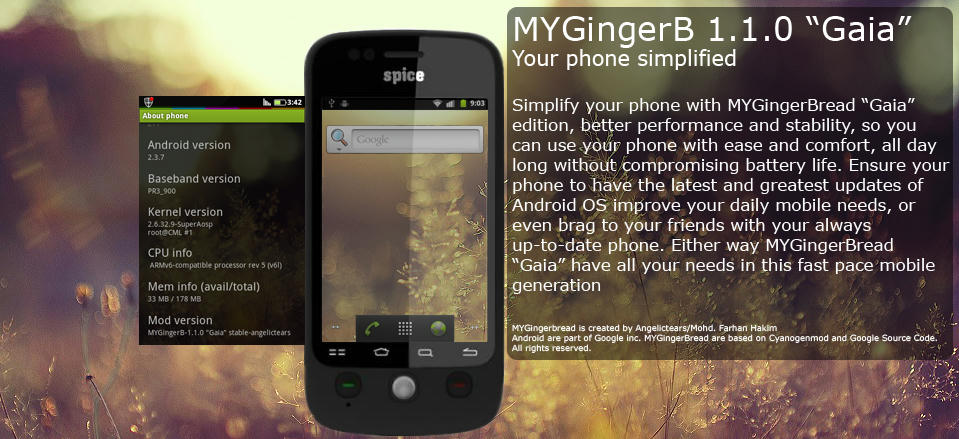
MYGingerB is a project of our very own Gingerbread Custom ROM for MI300 (and other Commtiva z71 clones).
Based on current Cyanogenmod source, it aim to be more user friendly, stable and faster for everyday usage. The ROM is built under Linux (Ubuntu 11.10 32bit) environment, coded using Eclipse under Java Development Kit 6.
Maintain by myself. Other developers are welcomed to joined as well.

Release notes Gaia 2.0.x Beta 2 (note to change)

- Faster system performance, and stable even in OC
- Translucent status bar as default, needed theme that support it.
- Overall changes in multitasking and memory management, no need RAM manager or etc
- ICS animation backport
- Based on Google and Cyanogenmod 7.2 source
- cache tweaks for faster medium performance
- Fixed battery drain issue
- 2.6.35.13 kernel, so wifi tethering and usb tethering enabled
- Full Hardware accelerated UI
- and many more, do note that this is a preview, links below

Release notes 1.1.0 "Gaia" Stable :

- Super fast performance, 25% increase from 1.0.3
- Tweaked memory management, optimized for Mi-300 (Commtiva z71 variant)
- Stable for everyday usage, never worry your phone to let you down.
- 20% increase in battery life (tested on default SuperAOSP 8.6 kernel)
- Better Overclock ratio performance
- New very own splash image, you'll love it
- The Default Gingerbread launcher tweaked to be fast and smooth
- MYGingerBread init.d tweaks included as default
- Internet speed optimized, better speed and streaming capabilities
- 3G signal speed optimization and fixes
- Frequently used apps are now intelligently put to RAM for faster access
- Works and optimized very well to be used with Swapper 2
- Featuring Cell Patch (created by me) so users can update their ROM without data wipe
- More info here

Release notes 1.0.3-Stable :
» Click to show Spoiler - click again to hide... «


Release notes 1.0.2-Stable :

» Click to show Spoiler - click again to hide... «


Release notes 1.0.1-Stable :

» Click to show Spoiler - click again to hide... «


Release notes 1.0-Stable :

» Click to show Spoiler - click again to hide... «


Release notes v1.0-beta (*note to change):

» Click to show Spoiler - click again to hide... «


Download Info below :
Please do not mirror these link, thank you.

Gaia 2.0.x RC - signed
MYGingerBread "Gaia" 1.1.0 stable
MyGingerB 1.0.3-stable-signed (older stable version)
MyGingerB 1.0.2-stable-signed (Discontinued)
MyGingerB 1.0.1 stable-quickfix-signed (discontinued)
MyGingerB 1.0 stable signed (discontinued)
Latest Google apps
MyGingerB 1.0 beta-signed + Google apps (outdated)


Links on how to :
» Click to show Spoiler - click again to hide... «


Notes on things to do after flashing :

If you still have touch screen problem during first boot, try rebooting, if not reflash the ROM via recovery WITHOUT wiping the data, cache, dalvik and battery stat.

Please go to Settings -> Application -> Development
and untick USB debugging and Allow mock location to ensure normal usage.


Proud user of this ROM, post your name in the thread to enlist smile.gif
» Click to show Spoiler - click again to hide... «


Feedbacks are very helpful on improving the ROM

Credit :

- Thanks to all who encourage me in Lowyat.net, even I am new here smile.gif
- Google for Android OS
- SuperAOSP team
- Cyanogenmod Team
- AndroidPT team
- CSL, for this very amazing phone. (I want a job there if I can biggrin.gif )

Malaysian developer FTW
Enjoy thumbup.gif

This post has been edited by angelictears: May 10 2012, 01:53 AM


Attached thumbnail(s)
Attached Image
TSangelictears
post Oct 2 2011, 09:35 PM

Getting Started
**
Junior Member
158 posts

Joined: Sep 2011


QUOTE(lance888 @ Oct 2 2011, 09:32 PM)
where's the link for this cool rom?
*
still under development bro smile.gif
tweaking some little code and compiling it later will take 4 to 6 hours tongue.gif
TSangelictears
post Oct 2 2011, 11:29 PM

Getting Started
**
Junior Member
158 posts

Joined: Sep 2011


QUOTE(taeru @ Oct 2 2011, 10:41 PM)
how is this compared to phantom, any performance difference that we can see???
*
It's hard to say for now, as Phantom is a Froyo rom while CM7 based ROMs are Gingerbread. Performance depends on configuration the ROM applies, for example, Phantom (Froyo) doesn't have OpenGL ES 2 enabled by default, where any Gingerbread have support for it. Same as Gingerbread allows more optimization for ARM platform, especially ARM6+ where Froyo are still better then Enclair but outdated in terms of CPU management.

Although I have to admit Froyo ROMs such as Phantom, uses less memory and more stable then current Gingerbread custom ROMs.

QUOTE(ericmaxman @ Oct 2 2011, 10:48 PM)
Bro, please port to Ideos X5, can?

brows.gif
*
Hehe, I'm sorry bro, CM7 doesn't have Ideos x5 source, even on backport ones.
Although I can compile the ROM according to it's hardware, it won't happen in near future. sad.gif
TSangelictears
post Oct 3 2011, 10:13 AM

Getting Started
**
Junior Member
158 posts

Joined: Sep 2011


QUOTE(ericmaxman @ Oct 3 2011, 07:57 AM)
Looks like I've to save up and buy a Mi300 then.

laugh.gif
*
Hehe.. trade the x5 for my mi300 la.. biggrin.gif
Joking smile.gif anyway if all goes well, I see what I can do about the x5 port smile.gif


Uploading the rom now after an all nighter coding and testing. Hope you guys will enjoy it later smile.gif
TSangelictears
post Oct 3 2011, 10:53 AM

Getting Started
**
Junior Member
158 posts

Joined: Sep 2011


Download links are up biggrin.gif
see the OP for more info and download links.
Thanks for all the support sifus, even though I'ma newbie here biggrin.gif
TSangelictears
post Oct 3 2011, 11:30 AM

Getting Started
**
Junior Member
158 posts

Joined: Sep 2011


QUOTE(tahawk @ Oct 3 2011, 11:15 AM)
my gosh.. just download n flash to eav5 yesterday.. xlarat nak donlod lagi.. berukbond reach the limit.. tomoror going to kk.. can copy via pendrive??
*
I know your pain sad.gif
Sure thing but I won't confirm if I'm "turun" or not. If I am, can flash it on the spot also biggrin.gif
TSangelictears
post Oct 3 2011, 12:24 PM

Getting Started
**
Junior Member
158 posts

Joined: Sep 2011


QUOTE(gocke55014 @ Oct 3 2011, 12:04 PM)
TS, is it because of the openGL ES 2 that scrolling in gingerbread is really smooth compared to froyo, even in phantom rom?.. i cant really stand the stuttering when scrolling when using froyo, thats why i'd rather stick with gb even tho it really sucks the juice
*
TS?
Gingerbread does have almost all of it's ui hw accelerated. So it is much smoother then froyo. Even its launcher are hw accelerated. About battery life, it does consume a little more, but after a week usage after battery stat eipe, u will notice a little improvements, juice defender are also recommended smile.gif
TSangelictears
post Oct 3 2011, 01:17 PM

Getting Started
**
Junior Member
158 posts

Joined: Sep 2011


QUOTE(MarkedOne @ Oct 3 2011, 12:40 PM)
What is this kernel thing?
Never flashed my spice..so I don't know much  tongue.gif
Does flashing to your custom ROM automatically update/change this kernel,or do I have to find and update it manually?Any guide or info about this would be great  biggrin.gif
*
Every ROM update have it's own kernel built in and will be installed automatically upon flashing.
Kernel is a basic low level code/software that allows the very basic of OS operations, basically kernel is a software that sit between the OS itself and the hardware. Meaning both will not work if there are no kernel. This applies to every OS whether in phones or PC.

There are some custom kernels for Android, that are available on the net. For example SuperAOSP and Ubuntu #3 EA kernel. Although the process is simple enough by flashing via recovery mode, it is advice able to only flash kernels that are compatible with your device.
TSangelictears
post Oct 3 2011, 03:43 PM

Getting Started
**
Junior Member
158 posts

Joined: Sep 2011


QUOTE(miloy2k @ Oct 3 2011, 02:12 PM)
downloading and installing it now.. smile.gif

eh why after install, got spice logo looping o.o
*
hmm..that's weird..they're supposed to be no csl logo on boot.. that could be caused from incomplete flash..try and reflash again with data and cache wipe..if that fails, try to flash 2.1 rom, stock or firetrap 2.1 and reflash mygingerb again..
TSangelictears
post Oct 3 2011, 08:14 PM

Getting Started
**
Junior Member
158 posts

Joined: Sep 2011


QUOTE(ericmaxman @ Oct 3 2011, 07:46 PM)
TS = Thread Starter = You

laugh.gif
*
I see sweat.gif
Hehe, I'm still new here so didn't know the terms here. Thanks bro smile.gif
Will keep it in mind.
TSangelictears
post Oct 3 2011, 11:25 PM

Getting Started
**
Junior Member
158 posts

Joined: Sep 2011


QUOTE(taeru @ Oct 3 2011, 09:01 PM)
bro sorry for the question but can i use this rom for mi310 or mi320???
*
Apparently no, sorry bro sad.gif
There are several cause for this, one is I don't know if the chipset are the same as the mi300 or not, as Mi300 uses MSM7x27 SURF. The optical trackpad driver are missing, as mi300 uses trackball, and other factors such as internal ROM installation space.


TSangelictears
post Oct 3 2011, 11:45 PM

Getting Started
**
Junior Member
158 posts

Joined: Sep 2011


Agreed, some report on my battery usage for MyGingerB 1.0 (seriously, i need to renamed that on the next release, suggestion? tongue.gif )

It lasted 17hours before reaching the limit of 5% shut down. So yeah, it lasted the whole working day at least, typical, if not better then other smartphones with GB out there biggrin.gif
TSangelictears
post Oct 4 2011, 01:15 AM

Getting Started
**
Junior Member
158 posts

Joined: Sep 2011


QUOTE(wkkm007 @ Oct 4 2011, 12:01 AM)
Well done rclxms.gif Keep it up thumbup.gif
Mi300 now @ market how much?
wah 2.3.7 drool.gif
*
Thanks bro biggrin.gif
It is safe to say that it sells from rm480 to rm500 retail,without promo. Other members will have an accurate answer for that I believe smile.gif
TSangelictears
post Oct 4 2011, 10:17 AM

Getting Started
**
Junior Member
158 posts

Joined: Sep 2011


QUOTE(ralph_d @ Oct 4 2011, 09:40 AM)
tried your rom, looks promising.. but me touchscreen doesn't work

rolled back sad.gif
*
Owh about that, have you imported any keyboard with titanium backup?
I believe that with the new kernel (2.6.35.x) doesn't compatible with any keyboard calibration data, same have happened to other 2.3.7 based rom on other phones sad.gif .
The best way would be wipe data,cache and dalvik without reflashing, and walla the touch is working again(it happened to me also sweat.gif ).

Be sure to not import any data from any keyboard app, or any app that included hardware control permission.

TSangelictears
post Oct 4 2011, 11:07 AM

Getting Started
**
Junior Member
158 posts

Joined: Sep 2011


QUOTE(ralph_d @ Oct 4 2011, 10:45 AM)
i can't even touch the droid on startup... so never import nothing or whatsoever sad.gif
*
It seems that there are some leftover data after flash. Try and boot into recovery and wipe /data, cache and dalvik (in the advance menu), if again failed, try and reflash with wiping all the above before flashing.

The 2.6.35.x kernel is giving problems post installation for some device, randomly, sad.gif
Since most of other Gingerbread rom using the 2.6.32.x, which is still a froyo kernel, most hardware data (calibration and such) will have problem.

Thanks for the feedback bro biggrin.gif will include fix on next release (stable)


QUOTE(GameSky @ Oct 4 2011, 10:51 AM)
nice one, won't have to use 'foreign' rom after this nod.gif
*
nod.gif
Thanks to your thread I finally convinced to bought this phone brows.gif
TSangelictears
post Oct 4 2011, 01:56 PM

Getting Started
**
Junior Member
158 posts

Joined: Sep 2011


QUOTE(gocke55014 @ Oct 4 2011, 01:00 PM)
gingerbread's UI is fully hw accelerated right? but why is the 3d game performance still not that good compared to froyo? is it possible to tweak it to match froyo 3d game performance.. ive tried chainfire3d but still cant get it to be smooth especially 3d racing game like raging thunder

p/s: if u change ur rom name to something that include 1malaysia najib will give u a job for sure, hahahahaha...
*
Gingerbread reacts to hardware differently then Froyo, again, some games, most of it currently are optimized for Froyo. While this is not noticeable in high end hardware, low to mid range phone hardware do notice it, like our mi300 for example. Nothing can be done except to wait for Google to fix this. Even the kernel's wakelock issue in Gingerbread haven't been solve officially. Most of the fix are from open source developers in xda-dev.
We also have to wait for Qualcomm to release a better driver for MSM7x27's Adreno 200.

In a nut shell, Gingerbread UI is silky smooth because it is optimized for Gingerbread, same as Gingerbread launcher port to froyo will not work smooth because the lack of HW accelerated and are not optimized for Froyo.


QUOTE(PCXpert @ Oct 4 2011, 01:23 PM)
touchscreen doesn't work on my phone too..  sad.gif
so, do i've to go back to stock rom b4 flashing to this rom?
*
For ppl who have touchscreen issue, try and flash this hotfix, the hotfix will be included in stable release later on, but since there'e much to do with it, I'll uploaded the kernel with touch driver fix (seems I messed it up from compiling process sweat.gif sorry guys) download it here

Flash it with recovery mode, be sure to wipe data, cache, dalvik and battery stat. A must for new Gingerbread kernel.

QUOTE(miloy2k @ Oct 4 2011, 01:24 PM)
hi TS, can you make an .nbo version for the firmware?
*
Currently not possible bro sad.gif
There's a lot of work to do if i want to convert the rom to nb0.
Flashing via recovery are more safer then SUT (nb0 flash)

Although I will try to make on as a backup later on smile.gif
TSangelictears
post Oct 4 2011, 04:38 PM

Getting Started
**
Junior Member
158 posts

Joined: Sep 2011


Updated the OP with stable download links biggrin.gif
keep on giving feedback guys, thanks smile.gif
TSangelictears
post Oct 4 2011, 09:21 PM

Getting Started
**
Junior Member
158 posts

Joined: Sep 2011


QUOTE(PCXpert @ Oct 4 2011, 09:05 PM)
the touchscreen also doesnt on my phone with the stable release..  sad.gif
*
Hm, sorry to hear that bro sad.gif
Did you install the Google app after first boot or before first boot?
Can you try below real quick..tell me the result.

Try flashing the google apps before first boot, meaning, in recovery mode, after flashing the ROM, then immediately flash the google apps zip file, before reboot that is. If that fixes it, I'll make a quick fix for it later on.

IF you have flash the google apps zip file before first boot, then I will also make a quick fix for it.

thanks bro biggrin.gif
TSangelictears
post Oct 4 2011, 11:10 PM

Getting Started
**
Junior Member
158 posts

Joined: Sep 2011


QUOTE(PCXpert @ Oct 4 2011, 10:36 PM)
hm.. i've tried both way, b4 first boot n also after first boot. no change.
n i also flash the fix kernel that u upload it just now but still no change.. sad.gif
thnx 4 the hard work bro..  biggrin.gif
*
How about not flashing google apps at all.
Well, I've uploaded a fix, seems like the SetupWizard.apk are conflicting when there's no google app framework installed. I've replaced it with default provision.apk as default first boot, hopefully that will fix the issue.. Check the OP for download links.
Sorry for the inconvenience bro sad.gif

QUOTE(Zaffar @ Oct 4 2011, 10:47 PM)
Whoa, so hard being a cooker eh? soldier on my fren, waiting for d stable release...
*
Yeah, it's hard to cooked something as simple as Gingerbread tongue.gif
Every developer have it's up and down, that's why in the law of computers, there's no perfect code exist smile.gif
I'm just confuse why it work fine on my phone, while some don't. sad.gif
Thank you for the encouragement bro, biggrin.gif will be strong to the end icon_rolleyes.gif

This post has been edited by angelictears: Oct 4 2011, 11:20 PM
TSangelictears
post Oct 5 2011, 08:27 PM

Getting Started
**
Junior Member
158 posts

Joined: Sep 2011


MyGingerB 1.0.2 uploaded, more info on OP. biggrin.gif

8 Pages  1 2 3 > » Top
 

Change to:
| Lo-Fi Version
0.0393sec    0.81    7 queries    GZIP Disabled
Time is now: 1st December 2025 - 09:14 PM