Welcome Guest ( Log In | Register )

26 Pages « < 18 19 20 21 22 > » Bottom

Outline · [ Standard ] · Linear+

Enterprise Networking Mikrotik Routers (RouterBoard & RouterOS), User and owner discussion group

views
     
soonwai
post Jan 14 2021, 01:29 PM


********
All Stars
11,456 posts

Joined: Oct 2007
From: KL


QUOTE(shahie @ Jan 14 2021, 06:14 AM)
Hi...

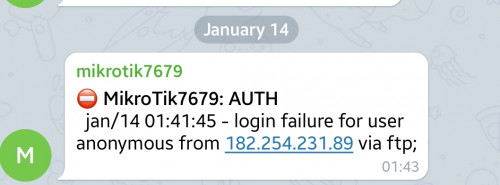
suddenly received the notification from my mikrotik at home, someone tried to login on mine.

user posted image

is this normal or risk when enabling remote login features? or just strengthen the password la?
*
That's normal. There're tons of bots scanning all the time.

Can use good username/password, port knocking or totally turn off services or use VPN. Of course last option will still expose one service.

Then pray no vulnerabilities discovered.
soonwai
post Jan 20 2021, 12:26 PM


********
All Stars
11,456 posts

Joined: Oct 2007
From: KL


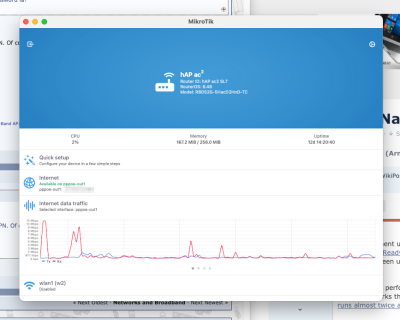
Finally we have native Mikrotik client for Mac. Well, kind of.
user posted image
soonwai
post Jan 21 2021, 09:09 PM


********
All Stars
11,456 posts

Joined: Oct 2007
From: KL


QUOTE(maxiscool @ Jan 21 2021, 08:52 PM)
How to get this?
*
From the Apple App Store. It's just the iPad version which the new M1 Macs can install.
soonwai
post Jan 21 2021, 10:05 PM


********
All Stars
11,456 posts

Joined: Oct 2007
From: KL


QUOTE(heidarren @ Jan 21 2021, 09:24 PM)
U got the M1 MacBook d? Rich....🤩🤩
*
I got the Mac Mini, cheap, relatively speaking lah.
soonwai
post Jan 23 2021, 05:39 PM


********
All Stars
11,456 posts

Joined: Oct 2007
From: KL


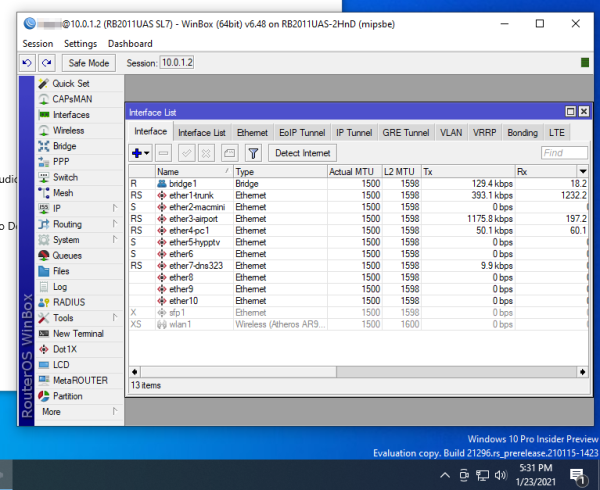
Not sure if this will interest anyone but winbox64 is running fine under Windows 10 arm64. Tested on MacOS 11.1 Mac Mini M1.

user posted image
Win10 needs to be updated to latest build for x86-64 emulation.

soonwai
post Jan 30 2021, 05:13 PM


********
All Stars
11,456 posts

Joined: Oct 2007
From: KL


QUOTE(murks @ Jan 30 2021, 09:35 AM)
Hi. I'm currently running a hAP AC2 with unifi, and I've noticed that multicast (IPTV) packets are "bleeding" over to all my LAN ports

...
*
Do you have IGMP snooping enabled on your iptv bridge? Try disabling it. What version RouterOS are you running? I remember having a similar problem with one particular version of ROS but I forgot which.

This post has been edited by soonwai: Jan 30 2021, 05:15 PM
soonwai
post Feb 2 2021, 02:17 AM


********
All Stars
11,456 posts

Joined: Oct 2007
From: KL


QUOTE(murks @ Jan 31 2021, 07:35 AM)
Thanks for the advice. I read the link, and kinda understand it in theory, but will need to play around to see how it can work
*
Here's a real life example from my hAP AC2. Do note that I'm not 100% sure if this is the correct way to do it but it works. Any comments or corrections highly appreciated.

• vlan50 is my LAN.
• ether2-trunk is the trunk for both vlan600 (hypptv) and vlan50 (LAN). It goes to another Mikrotik downstairs where the STB is. For education purposes, the router downstairs uses the switch chip to handle the VLANs instead of bridge vlans.

CODE
/interface bridge port
add bridge=bridge1 interface=ether1-wan1
add bridge=bridge1 interface=ether2-trunk1
add bridge=bridge1 interface=ether3 pvid=50
add bridge=bridge1 interface=ether4 pvid=50
add bridge=bridge1 interface=ether5 pvid=50
add bridge=bridge1 interface=wlan1 pvid=50
add bridge=bridge1 interface=wlan2 pvid=50

/interface bridge vlan
add bridge=bridge1 tagged=ether2-trunk1,bridge1 untagged=ether3,ether4,ether5 vlan-ids=50
add bridge=bridge1 tagged=ether1-wan1,ether2-trunk1,bridge1 vlan-ids=600


This post has been edited by soonwai: Feb 2 2021, 02:19 AM
soonwai
post Feb 3 2021, 01:57 AM


********
All Stars
11,456 posts

Joined: Oct 2007
From: KL


winbox64 works great with Crossover 20 and Mac mini M1 macOS 11.2. This is probably the easiest way to get winbox running on Apple silicon. However Crossover is not free.

Will test with WINE later.

This post has been edited by soonwai: Feb 3 2021, 01:59 AM
soonwai
post Feb 4 2021, 06:11 PM


********
All Stars
11,456 posts

Joined: Oct 2007
From: KL


Synchroweb currently having CNY promo. eg: hAC ac2 RM270. Check their FB.
soonwai
post Mar 6 2021, 11:01 AM


********
All Stars
11,456 posts

Joined: Oct 2007
From: KL


QUOTE(perseides @ Mar 6 2021, 09:36 AM)
Need help. I setup my mikrotik hap a 2 according to this wiki:
https://wiki.mikrotik.com/wiki/Mikrotik_and...y_arpee/soonwai but still unable to connect to unifi.

It seems the OS is slightly different but I think I'd set everything according to this guide but I still cannot connect to the net. Any suggestion?
*
Are you using UniFi? The steps for VLAN and PPPoE should be the same. Don't follow the HyppTV steps as it uses master and slave ethernet which RouterOS doesn't use anymore.

I can no longer edit the Mikrotik wiki so I'll post any updates to the guide that's here in this forum. https://forum.lowyat.net/index.php?showtopic=4202122

Can you post your current router config? Do a /export.
soonwai
post Mar 6 2021, 03:38 PM


********
All Stars
11,456 posts

Joined: Oct 2007
From: KL


QUOTE(perseides @ Mar 6 2021, 03:34 PM)
...
/interface pppoe-client
add add-default-route=yes disabled=no interface=ether1 name=pppoe-out2 password=[removed for privacy] use-peer-dns=yes user=[removed for privacy]
...
*
Interface for pppoe client should be vlan500.
soonwai
post Mar 6 2021, 03:58 PM


********
All Stars
11,456 posts

Joined: Oct 2007
From: KL


QUOTE(perseides @ Mar 6 2021, 03:47 PM)
Wow that's quick.
Thank you very much. I'm not sure how I set it as ether1 but I do noticed that I have 2 pppoe-out2..?
I'm trying to reset the thing and redo it. Will update here again once i done it.
*
No problem. Just keep pppoe-out1 and delete pppoe-out2. Did you happen to run QuickSet twice? Maybe that's where the pppoe-out2 came from. Usually it's not a good idea to run QuickSet more than once. It does weird things some times.

Setup is so much easier now. QuickSet does most of the hard work already. We just need to add vlan 500 and point pppoe client to it.
soonwai
post Mar 6 2021, 04:03 PM


********
All Stars
11,456 posts

Joined: Oct 2007
From: KL


QUOTE(perseides @ Mar 6 2021, 03:59 PM)
Yeap. You're right on point. I think i ran quickset twice cos I thought the I typed the wrong password or smth wrong so I set it again.
Thanks for your help!
*
I looked at the /export again. Actually your pppoe-out1 is correct already. Just need to delete pppoe-out2. Have fun.
soonwai
post Mar 6 2021, 04:24 PM


********
All Stars
11,456 posts

Joined: Oct 2007
From: KL


For those on M1 Macs, nrlquaker-winbox 3.27.1 is working.

CODE
macminim1 ~ % brew info nrlquaker-winbox
nrlquaker-winbox: 3.27.1
https://github.com/nrlquaker/winbox-mac/
/opt/homebrew/Caskroom/nrlquaker-winbox/3.27.1 (124B)
From: https://github.com/Homebrew/homebrew-cask/blob/HEAD/Casks/nrlquaker-winbox.rb
==> Name
Winbox-mac
==> Description
MikroTik Winbox
==> Artifacts
Winbox-mac.app (App)
==> Analytics
install: 743 (30 days), 2,008 (90 days), 8,638 (365 days)

soonwai
post Mar 6 2021, 08:30 PM


********
All Stars
11,456 posts

Joined: Oct 2007
From: KL


QUOTE(perseides @ Mar 6 2021, 06:39 PM)
Can anyone explain why routerOS use 192.168.88.1 as default IP while other router brands usually use 192.168.1.1? Is there any difference?
*
Just a number. No reason really but chinese ppl will sure like. LOL.
soonwai
post Mar 6 2021, 08:41 PM


********
All Stars
11,456 posts

Joined: Oct 2007
From: KL


QUOTE(perseides @ Mar 6 2021, 08:37 PM)
Thanks. So this means I can change the router ip range to 192.168.1.2 - 192.168.1.255 right? This shouldn't be breaking anything within the routeros?

Because I have a raspi4 with openmediavault and pi hole on docker which I think had configured the ip range specifically to that particular range. Using the default router OS ip range most likely is gonna break something on the raspi.
*
Can, no problem. You can change the IP address to anything. Remember to change the dhcp pool also.
soonwai
post Apr 11 2021, 04:20 AM


********
All Stars
11,456 posts

Joined: Oct 2007
From: KL


QUOTE(lala_cai @ Mar 27 2021, 03:05 AM)
Hi guys, any wired router to recommend?
Using Unifi 800mbps and vpn.
if have PoE out will be better
*
hAP AC2 is quite good. It’ll route around 750Mbps without Fasttrack but it doesn’t have PoE out. This is what I’m using atm.

If Fasttrack is going to be used all the time then the Hex S that gaara suggested is perfect. I had the Hex (same but no SFP nor PoE) for awhile and it was a great router.

Next up is a big jump in price, RB4011. RB3011 also can but personally I’ll skip this one.

This post has been edited by soonwai: Apr 11 2021, 04:21 AM
soonwai
post Jun 4 2021, 10:46 PM


********
All Stars
11,456 posts

Joined: Oct 2007
From: KL


QUOTE(rodyeo @ Jun 4 2021, 09:35 PM)
Hi! MikroTik Malaysia Gurus,

I need some tips how to get my MikroTik RB750Gr3 (home router) on TMnet Unifi 300Mbps Fiber Internet via PPPoE at ether1 main link to failover to ether2 backup link via neighbour relatives wifi link via MikroTik RBD52G (Router-Bridge) CPE Router mode on wifi 5G link configuration.

Thanks

Rodyeo
*
I had something like this:

UniFi30#1 ------ RB2011(my router) ------ hAP Lite ---{wifi}--- Asus RT-N2D1(Neighbour) ------ UniFi30#2

Guides that I used:
Mikrotik Dual WAN PCC Load Balancing
Mikrotik Wiki: PCC

Mine was PCC load balancing but if you can load balancing, you can also do failover.

Ori post here: https://forum.lowyat.net/index.php?showtopi...post&p=83909578
soonwai
post Nov 7 2021, 12:38 PM


********
All Stars
11,456 posts

Joined: Oct 2007
From: KL


QUOTE(go626201 @ Nov 7 2021, 12:49 AM)
Emm actually i not sure,i just follow soonwai 's tutorial to use IPv6 on ROS6,but currently the same way on ROS7 is not working,waiting Mikrotik to fix it.
*
Getting RB5009 soon. Later I check how to configure IPv6 or why it doesn’t work. I also follow the guides previously posted.
soonwai
post Nov 26 2021, 08:14 PM


********
All Stars
11,456 posts

Joined: Oct 2007
From: KL


QUOTE(Oltromen Ripot @ Nov 26 2021, 04:48 PM)
Home use. Wireless feature unnecessary as I wire-backhaul to 2 Deco M9 Plus.

I am looking into automated failover from primary (1) Unifi (dial out PPPoE) to secondary (2) Huawei B618.

Questions:

(1) I see all Mikrotik 5-port routers have dedicated 1-port WAN. Does this mean I cannot use additional port (s) to achieve multi-WAN?

(2) Mikrotik routers can handle fibre vlan? (already have tp-link vlan switch to (un)tag vlan500 if necessary)

(3) Mikrotik routers can handle DHCPv4? DHCPv6 and/or similar?

(4) Mikrotik routers can do DDNS to any provider? (i use cloudns)

(5) Mikrotik routers have firewall to prevent intrusion from outside?

(6) Mikrotik have access to command line? Is it linux? Can install packages? to run any command?

(7)n Which Mikrotik router is capable of handling 1Gbps fibre? (for future-proof). The Hex?
(w/ tp-link vlan switch, i was already able to use huawei b618 to prioritise  dial to unifi and failover to lte-a network. however i was disappointed that the gigabit wan and lan port on b618 was only able to max 171Mbps regardless fibre or lte-a. all cables used during test are CAT6e. replacing b618 back to tm-supplied router was able to get back ~500Mbps as subscribed, so test wasn't influenced by wifi speed.)
*
(1) Any interface can be configured as WAN. Even the wifi interface. You can have 4 WAN and 1 LAN if you like.
(2) VLAN, yes.
(3) DHCPv4, yes. The DHCPv6 server in RouterOS 6.x can only give out prefixes not addresses.
(4) Yes, if the provider has some sort of API for updating DNS records.
(5) Comes with a preconfigured but very basic firewall. Up to you to config.
(6) SSH and telnet. RouterOS is based on Linux but cannot install 3rd party packages.
(7) Hex can handle 1Gbps only with Fasttrack running (Mikrotik's term for NAT acceleration). If no Fasttrack, probably RB3011 or RB4011 and above.

This post has been edited by soonwai: Nov 26 2021, 08:16 PM

26 Pages « < 18 19 20 21 22 > » Top
 

Change to:
| Lo-Fi Version
0.0874sec    0.37    7 queries    GZIP Disabled
Time is now: 3rd December 2025 - 12:56 AM