

Did you confirm that is ExpressCard slot? Look bigger though. Can you check mPCIe port? They usually located at the bottom, near RAM/HDD.
DIY Vidock / egpu, transform ur laptop into gaming machine
DIY Vidock / egpu, transform ur laptop into gaming machine
|
|
 Jan 18 2012, 11:39 PM Jan 18 2012, 11:39 PM
|
 
Senior Member
826 posts Joined: Jan 2009  
|
Did you confirm that is ExpressCard slot? Look bigger though. Can you check mPCIe port? They usually located at the bottom, near RAM/HDD.
|
|
|
|
|
|
Jan 19 2012, 08:54 AM
|

Senior Member
643 posts Joined: Dec 2006 From: In your Heart 
|
How about acer ferrari one?
|
|
|
Jan 19 2012, 11:17 AM
|

Junior Member
53 posts Joined: Jan 2007
|
Nah confirmed bottom has no ports at all, and yeah its an expresscard 54 thts why its big... So i guess i wont be able to do it eh
|
|
|
Jan 19 2012, 12:43 PM
|
|
Senior Member
826 posts Joined: Jan 2009
|
QUOTE(Swordsmen @ Jan 19 2012, 08:54 AM) How about acer ferrari one? eGPU will work on x1 link only using mPCIe port that currently occupied by Wifi card. QUOTE(ssassassa9 @ Jan 19 2012, 11:17 AM) Nah confirmed bottom has no ports at all, and yeah its an expresscard 54 thts why its big... So i guess i wont be able to do it eh Did you open the RAM/HDD compartment? Now we need to find out whether your notebook can do x2 link or not. |
|
|
Jan 19 2012, 01:10 PM
|
|
Junior Member
53 posts Joined: Jan 2007
|
QUOTE Did you open the RAM/HDD compartment? Now we need to find out whether your notebook can do x2 link or not. Oh I didn't, so I have to unscrew the little screw and open up the compartment into the HDD eh, alright will do it right now. EDIT: Oh well no luck, after unscrewing I don't see any ports 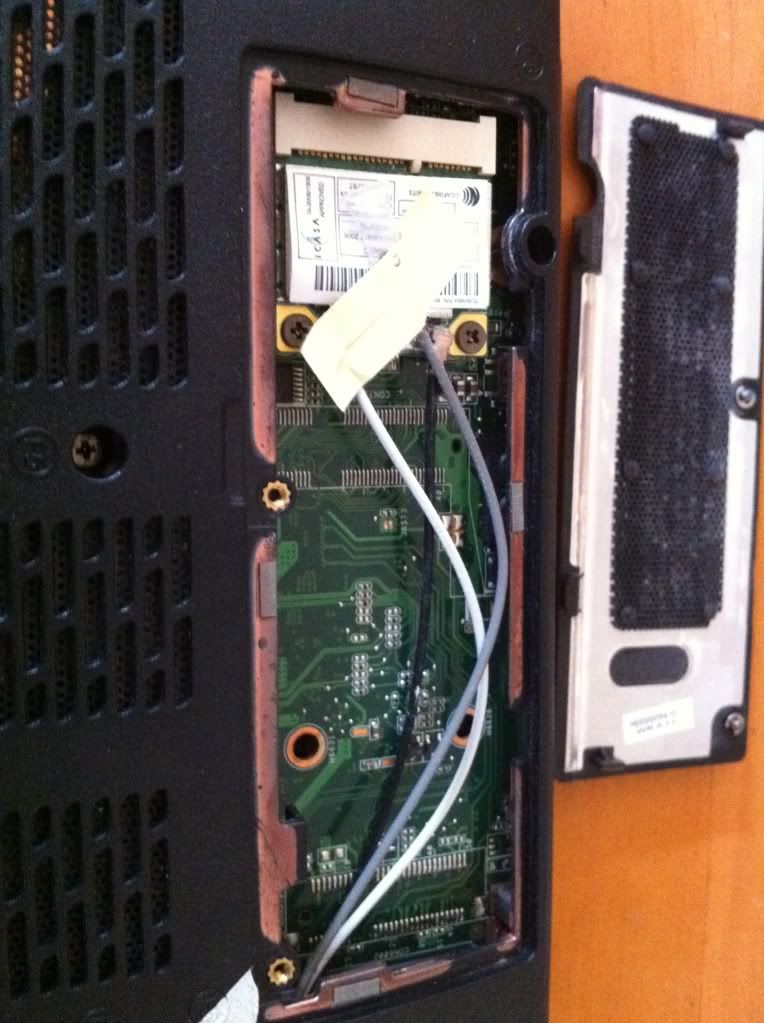 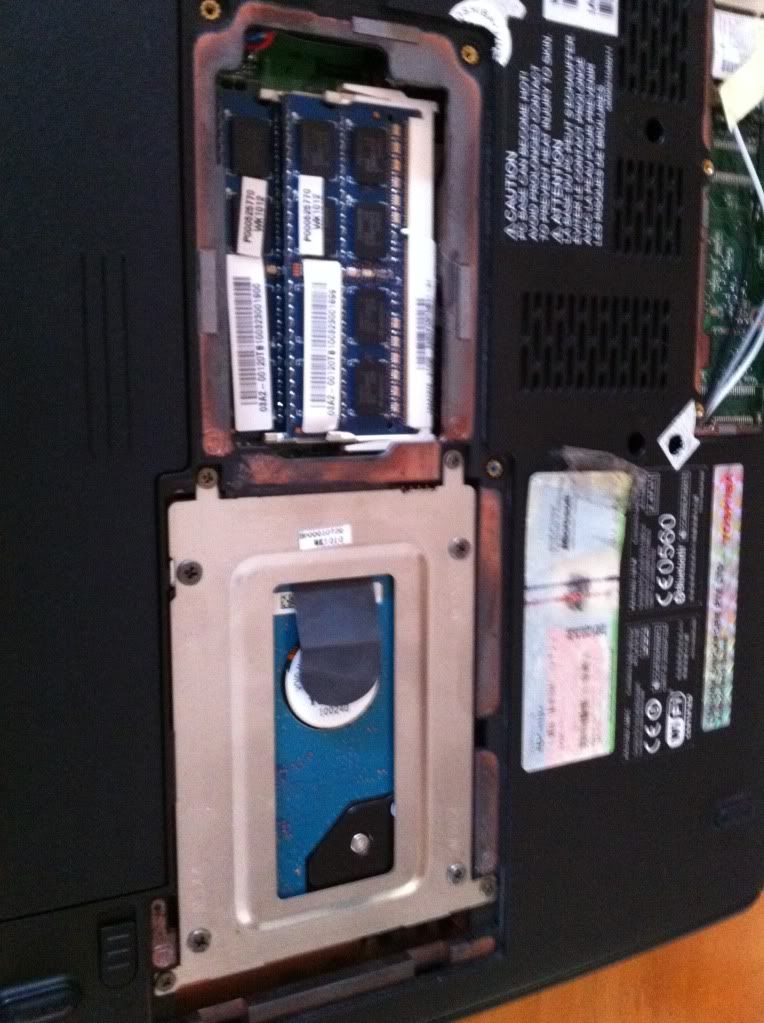 So, I have a expresscard slot, HDMI, eSATA, 2 usb, earphone/mic jack... Would any of these be useful though I doubt they are. This post has been edited by ssassassa9: Jan 19 2012, 01:33 PM |
|
|
Jan 19 2012, 02:51 PM
|
|
Senior Member
826 posts Joined: Jan 2009
|
First picture show Wifi card connected to mPCIe port. Please check in AIDA64 what is the PCIe port number for Wifi card.
BTW, check out post #15 in this thread:- http://forum.lowyat.net/index.php?showtopi...post&p=45078530 |
|
|
|
|
|
Jan 19 2012, 03:20 PM
|
|
Junior Member
53 posts Joined: Jan 2007
|
This is what I got from AIDA64, I suppose that the "empty" port is the one ExpressCard one. Does this mean I have to remove my wifi card in order to perform a x2 link? Sorry for being such a newbie keep asking questions, I'm really new to all these computer stuff... Really appreciate your help.
 |
|
|
Jan 19 2012, 04:09 PM
|
|
Senior Member
826 posts Joined: Jan 2009
|
Please see "PCIe x2 link" requirement at post #15: http://forum.lowyat.net/index.php?showtopi...post&p=45078530
Your Wireless card is at PCIe port#2. This show, x2 link setup is not possible on your notebook because card reader is at PCIe port#1 & it's integrated (not removable). Even if ExpressCard is at PCIe port #3 or port#4, x2 link is not applicable on your notebook. This confirm you can only do x1 link setup. eGPU will not be able to perform best on your notebook. This post has been edited by kizwan: Jan 19 2012, 04:11 PM |
|
|
Jan 19 2012, 05:25 PM
|
|
Junior Member
53 posts Joined: Jan 2007
|
Ahh, thr goes all my hope in an eGPU...
EDIT: Why does it have to be in proper numbers tho, eh 1,2 3,4 5,6 This post has been edited by ssassassa9: Jan 19 2012, 08:12 PM |
|
|
Jan 19 2012, 09:44 PM
|
|
Senior Member
826 posts Joined: Jan 2009
|
Because that is how Intel design the chipset. It's explained in chipset datasheets.
|
|
|
Feb 20 2012, 04:08 AM
|
|
Junior Member
9 posts Joined: Jul 2011
|
kizwan, can my laptop handle egpu?
this is my spec Compaq CQ36-110tx -2.26 GHz Intel Core i5-430M -ATI Mobility Radeon HD 4550 switchable -1 ExpressCard/34 slot and how many TOLUD do i have? 
anybody here with this laptop had done this? thank you. |
|
|
Feb 20 2012, 01:22 PM
|

Senior Member
3,304 posts Joined: Mar 2006 From: Chicago(Port25)
|
QUOTE(afif900 @ Feb 20 2012, 04:08 AM) kizwan, can my laptop handle egpu? Have u actually read the previous posts? It has specified how to identify the mPCI-E Port on ur laptop and whether will it support or not.this is my spec Compaq CQ36-110tx -2.26 GHz Intel Core i5-430M -ATI Mobility Radeon HD 4550 switchable -1 ExpressCard/34 slot and how many TOLUD do i have?
anybody here with this laptop had done this? thank you. |
|
|
Feb 20 2012, 02:32 PM
|
|
Senior Member
826 posts Joined: Jan 2009
|
QUOTE(afif900 @ Feb 20 2012, 04:08 AM) kizwan, can my laptop handle egpu? Your notebook have switchable graphics (Intel HD Graphics + ATI Mobility Radeon HD 4550)? If your notebook have active Intel HD Graphics, then you can do x1.Opt setup using Nvidia Fermi desktop graphic card. Since your notebook have ExpressCard slot, you can use PE4L-EC2C (or here). If you buy from Harmonic Inversion (HIT), you'll get free copy of eGPU Setup 1.x software.this is my spec Compaq CQ36-110tx -2.26 GHz Intel Core i5-430M -ATI Mobility Radeon HD 4550 switchable -1 ExpressCard/34 slot and how many TOLUD do i have?
anybody here with this laptop had done this? thank you. x1.Opt is referring to Optimus setup. This setup required active Intel HD Graphics & Nvidia Fermi desktop graphic card. Optimus provide PCIe data compression which boost performance via PCIe x1 link. In addition to acceleration support on internal LCD, you will get better performance when using external monitor. According to your screenshot, first PCI bus with 8 digits memory address is 0xC0000000. This means TOLUD is 3GB. So, you can use eGPU with 4GB or more RAM. |
|
|
|
|
|
Feb 20 2012, 04:11 PM
|

Senior Member
925 posts Joined: Apr 2011
|
laptop had become desktop!! but good effort anyway
|
|
|
Feb 20 2012, 08:50 PM
|
|
Junior Member
9 posts Joined: Jul 2011
|
oMG!! can't wait to try this..but first i need to collect some money first...thank you Kizwan!
|
|
|
Apr 8 2012, 06:59 PM
|

Senior Member
2,006 posts Joined: Sep 2007 
|
any where to get this locally? shop? thanks
|
|
|
Apr 12 2012, 11:40 AM
|

Junior Member
13 posts Joined: Apr 2012
|
hi kizwan, can my laptop handle egpu?
Model = Dell Studio 1555 CPU = Intel Core 2 Duo processor P8600 2.4GHz GPU = 512MB Ati Radeon 4570 (discreet with the Mobo) RAM = 3gb I have ExpressCard Slot 34mm |
|
|
Apr 12 2012, 09:11 PM
|
|
Senior Member
826 posts Joined: Jan 2009
|
QUOTE(benjaminl133 @ Apr 12 2012, 11:40 AM) hi kizwan, can my laptop handle egpu? Yes. In fact, your notebook support x2 link setup.Model = Dell Studio 1555 CPU = Intel Core 2 Duo processor P8600 2.4GHz GPU = 512MB Ati Radeon 4570 (discreet with the Mobo) RAM = 3gb I have ExpressCard Slot 34mm This is screenshot of PCIe ports when eGPU is connected to ExpressCard slot (PCIe port 4):- http://forum.notebookreview.com/attachment...es-untitled.png This is screenshot of PCIe ports after moving wireless card to another empty mPCIe port (PCIe port 3):- http://forum.notebookreview.com/attachment...s-port3open.png So, you can do x2 link setup using PCIe port 3 (mPCIe port) + PCIe port 4 (ExpressCard). You also can do x2 link setup using WWAN port (PCIe port 1) + WLAN port (PCIe port 2). I believe Dell Studio 1555 PCIe ports arrangement is similar to Dell Studio 1557/1558. See my eGPU setup. |
|
|
Apr 12 2012, 11:59 PM
|
|
Junior Member
13 posts Joined: Apr 2012
|
Hi Kizwan,
thanks for the advice  which u recommend to connect with is more easier and faster? i scare it will lag and alot other complication as studio 1555 spec is lower than 1557/1558 i would like to connect with ati 6850 graphic card- what is the watt power supply require? izzit 500w i need your help to provide me the link or prescription onto which to buy don't wana spend money onto part that not necessary is the setup and installation difficult? i can't find any ppl post on youtube EGPU how to setup step by step what i understand is from PCIE 16x adaptor connect to graphic card ->Connect the GPU to the ExpressCard ->Get a PSU powering your graphics card is this step correct? will it auto configure to port 3? i don't know how to configure it to port 3 (mPCIe port) + what is the next step after plugin from express slot to notebook, do i need to install any driver? hmph alot to learn |
|
|
Apr 13 2012, 01:20 AM
|
|
Senior Member
826 posts Joined: Jan 2009
|
Depend on the games. Some games required a lot of bandwidth while some are not. Considering your notebook specification, with x2 link setup, eGPU will perform roughly 80% from their actual performance.
HD 6850 TDP is 127W. TDP is not the actual graphic processor power consumption. Usually the actual power consumption is lower than TDP. However, power consumption can easily exceed TDP when you overclock & running power virus; Furmark is one of the example of power virus. It is not actually a virus but they're called by that name because of they can make GPU to consumed a lot of power than regular use. So, we can use TDP as our guideline when choosing power supply. For TDP 127W, you can use 130W - 140W AC adapter but you'll need to modified the connector because GPU use 6-pin/8-pin PCIe power connector(s). ATX PSU is recommended for eGPU. For TDP 127W: (127W * 10%) + 127W = 139.7W Calculated with 10% margin, the power supply you looking for can supply at least ~140W on the +12V lane. On the PSU, there is a sticker with writing on it where you should see +12V, +5V, etc. Look for the amperage (current) value for +12V. 140W / 12V = ~12A So, the PSU should have at least 12A on +12V lane. Look like you need PE4H + two PM3N or PE4H + EC2C (ExpressCard) + PM3N. You also need to buy two cables (default package only come with one cable). I like to think eGPU is for enthusiast; who like to see what their notebook can do. Your notebook should be able to boot with eGPU connected. I mean, connect everything, power ON eGPU & power ON notebook. Then you just need to install the graphic card driver. For x2 link setup, you will need to buy DIY eGPU Setup 1.x software ( http://forum.notebookreview.com/6295529-post641.html ). Before you proceed, you will need to identify the PCIe ports. Install AIDA64. Go to Motherboard >> Chipset >> "South Bridge". Look where your WLAN device (broadcom) is connected to. Write down the PCIe port number. Then shutdown your notebook & open the HDD/memory compartment. Look for empty mPCIe port(s). Moved the WLAN card to another mPCIe port(s), boot your notebook & check in AIDA64 the PCIe port number for the WLAN card now. This process is important because you will know the PCIe port numbers for all of the mPCIe port(s). Remember for x2 link, you will need either PCIe port 1 + port 2 OR PCIe port 3 + port 4. Again, this is for enthusiast. It can be difficult & overwhelming for some people. |
| Change to: |  0.0216sec 0.0216sec
 1.05 1.05
 6 queries 6 queries
 GZIP Disabled GZIP Disabled
Time is now: 15th December 2025 - 11:13 PM |
 Quote
Quote