Welcome Guest ( Log In | Register )

7 Pages « < 2 3 4 5 6 > » Bottom

Outline · [ Standard ] · Linear+

 DIY Vidock / egpu, transform ur laptop into gaming machine

views
     
nick93
post Oct 18 2011, 03:12 PM

New Member
*
Junior Member
23 posts

Joined: Oct 2011


QUOTE(kizwan @ Oct 18 2011, 03:07 PM)
Because you topup to RM first then convert to USD. That is why it is advisable to topup straight to USD. You need to topup again until enough. smile.gif Also make sure you put correct home address in your PayPal account.
*
alahai....thats mean i need to withdraw and topup it again...so have to wait 2-3 business day.... cry.gif cry.gif
kizwan
post Oct 18 2011, 03:14 PM

BÖw DÖwn TÖ LÖrd PringlËs
*****
Senior Member
826 posts

Joined: Jan 2009


You didn't use the online topup?
nick93
post Oct 18 2011, 03:16 PM

New Member
*
Junior Member
23 posts

Joined: Oct 2011


only mol point....not paypal...
kizwan
post Oct 18 2011, 03:22 PM

BÖw DÖwn TÖ LÖrd PringlËs
*****
Senior Member
826 posts

Joined: Jan 2009


QUOTE(nick93 @ Oct 18 2011, 03:12 PM)
alahai....thats mean i need to withdraw and topup it again...so have to wait 2-3 business day.... cry.gif  cry.gif
*
No need to withdraw the money from your PayPal account. Only need to add more money until the total is at least USD 93.

Please explain how you use mol point to topup PayPal.

This post has been edited by kizwan: Oct 18 2011, 03:22 PM
nick93
post Oct 18 2011, 03:25 PM

New Member
*
Junior Member
23 posts

Joined: Oct 2011


no...im topup using my bank account...but mol point same with paypal....if topup....minimum is RM50 OR USD50...but im only need USD3...i hope after 2-3 days i can use paypal without limit....btw....thank a lot bcoz helping me on this issue...i will follow your instruction to setup eGPU...and i will post my laptop with eGPU pic after i get all that stuff....thank you again biggrin.gif biggrin.gif


Added on October 19, 2011, 6:30 pm@kizwan

how long i have to wait until i can use my paypal?

This post has been edited by nick93: Oct 19 2011, 06:30 PM
kizwan
post Oct 20 2011, 12:23 PM

BÖw DÖwn TÖ LÖrd PringlËs
*****
Senior Member
826 posts

Joined: Jan 2009


@nick93,

I'm not sure. I'm still waiting reply from my friend.
nick93
post Oct 20 2011, 12:37 PM

New Member
*
Junior Member
23 posts

Joined: Oct 2011


do you know who want to sell second hand PE4H/PE4L kit in this forum?i already found one person but he already sell it...
kizwan
post Oct 21 2011, 11:13 PM

BÖw DÖwn TÖ LÖrd PringlËs
*****
Senior Member
826 posts

Joined: Jan 2009


@nick93,

I don't know what is wrong with your account. I think you'll need to call PayPal & explain the problem. Just say you want to buy product using PayPal balance, not credit card.
nick93
post Oct 22 2011, 01:58 AM

New Member
*
Junior Member
23 posts

Joined: Oct 2011


its ok...i already link my debit card....one question..did pe4l-pm3n package come with mini hdmi or it sold separately?just wondering...
kizwan
post Oct 22 2011, 02:11 AM

BÖw DÖwn TÖ LÖrd PringlËs
*****
Senior Member
826 posts

Joined: Jan 2009


The mini-HDMI cable is included in the PE4L-PM3N package.

This post has been edited by kizwan: Oct 22 2011, 02:12 AM
lawtm
post Oct 30 2011, 10:54 PM

Asus G53SX-IX113V i7-2670QM (4 core)-2.2GHz (Turbo up to 2.9) NV
******
Senior Member
1,215 posts

Joined: Sep 2008
From: Selangor


i interest on it also my laptop spec is
Model:Asus A42D
Spec:
CPU:AMD athlon II 2cores P320 2.1G
RAM:2GB DDR3
GPU:ATI RADEON HD 5470 1GB
anyone can help or i direct look out vidock GC?
kizwan
post Oct 30 2011, 11:37 PM

BÖw DÖwn TÖ LÖrd PringlËs
*****
Senior Member
826 posts

Joined: Jan 2009


QUOTE(lawtm @ Oct 30 2011, 10:54 PM)
i interest on it also my laptop spec is
Model:Asus A42D
Spec:
CPU:AMD athlon II 2cores P320 2.1G
RAM:2GB DDR3
GPU:ATI RADEON HD 5470 1GB
anyone can help or i direct look out vidock GC?
*
Your notebook doesn't have ExpressCard slot & most probably only have one mPCIe slot. So, you won't get good performance from eGPU since you can only do x1 link setup. Only with x2 or x1.Opt (Opt = with Optimus) will deliver good performance. x2 link required two mPCIe ports or [ExpressCard + mPCIe] with either these combination [PCIe port#1 & port#2] OR [PCIe port#3 & port#4] OR [PCIe port#5 & port#6]. x1.Opt (with Nvidia Fermi desktop graphic card) required either only one mPCIe port or ExpressCard slot with the notebook must have either Intel GMA 4500MHD or Intel HD Graphics or Intel HD 3000. Opt=Optimus provide PCIe data compression which will boost performance over PCIe x1 link. In term of performance; x1.Opt > x2.

This post has been edited by kizwan: Oct 30 2011, 11:40 PM
santagirl
post Nov 14 2011, 03:57 AM

New Member
*
Junior Member
4 posts

Joined: Jun 2009
hi i would like to know my laptop is applicable..
Model = Sony Cw 28
CPU = Intel Core i5 M 520 Processor
GPU = Nvidia GT 330m
RAM = 4gb ddr3
I have ExpressCard Slot i think


Added on November 14, 2011, 4:02 amowh.. im wondering if it can be in my laptop screen instead of getting a monitor


This post has been edited by santagirl: Nov 14 2011, 04:02 AM
ssassassa9
post Jan 18 2012, 12:15 AM

Getting Started
**
Junior Member
53 posts

Joined: Jan 2007


QUOTE(kizwan @ Oct 17 2011, 01:22 PM)
PE4H kit = USD91 + USD22 (postage) = RM360
ATiAMD Radeon HD 6570 = RM230
Total = RM590 (excluding power supply)

Radeon HD 6570 power requirement 60W (GDDR5) or 44W (DDR3). So, you can use 12V/75W or 12V/80W AC adpater.

External monitor requirement is depend on your notebook specification. Please post your notebook model/brand & specification.
*
I have a Toshiba M900, can you help me out please?
kizwan
post Jan 18 2012, 05:29 PM

BÖw DÖwn TÖ LÖrd PringlËs
*****
Senior Member
826 posts

Joined: Jan 2009


QUOTE(santagirl @ Nov 14 2011, 03:57 AM)
hi i would like to know my laptop is applicable..
Model = Sony Cw 28
CPU = Intel Core i5 M 520 Processor
GPU = Nvidia GT 330m
RAM = 4gb ddr3
I have ExpressCard Slot i think


Added on November 14, 2011, 4:02 amowh.. im wondering if it can be in my laptop screen instead of getting a monitor
*
QUOTE(ssassassa9 @ Jan 18 2012, 12:15 AM)
I have a Toshiba M900, can you help me out please?
*
What is the full specification? Does it have switchable graphics? I can only see both notebook have discrete graphic card but they are not useful for eGPU.

The reason why I asked for switchable graphics because if your notebook have it, then your notebook have either active Intel GMA 4500MHD or Intel HD Graphics. If your notebook have any of the Intel GPU then you will be able to utilized ~80% of Nvidia Fermi graphic card performance on your notebook & you will be able to get acceleration on internal LCD. Of course, you will have much better performance if you use external monitor.

If your notebook have 34mm/54mm ExpressCard slot, that will be good too because you can connect eGPU via ExpressCard slot.

If your notebook don't have the Intel GPU I mentioned earlier, then you can't utilized eGPU unless if your notebook can do x2 link setup. x2 link setup will require connecting eGPU to two PCIe ports, either two mPCIe ports or ExpressCard+mPCIe. x2 only possible with either of these PCIe ports arrangement:-
- PCIe port#1 & #2
OR
- PCIe port#3 & #4
OR
- PCIe port#5 & #6

ssassassa9
post Jan 18 2012, 07:23 PM

Getting Started
**
Junior Member
53 posts

Joined: Jan 2007


@kizwan, ah crap I have a nvidea geforce 310M, and I do not have PCIe ports only have an expresscard 54... This means I wont be able to use an eGPU?
kizwan
post Jan 18 2012, 07:32 PM

BÖw DÖwn TÖ LÖrd PringlËs
*****
Senior Member
826 posts

Joined: Jan 2009


You can use eGPU using mPCIe port. I'm sure at least one mPCIe port available on your notebook.

Now, since your notebook doesn't have active Intel HD Graphics, to get best performance from eGPU, you need to do x2 link setup. Your next task is to find out how many mPCIe port(s) available.
ssassassa9
post Jan 18 2012, 08:04 PM

Getting Started
**
Junior Member
53 posts

Joined: Jan 2007


mPCIe port is the express card port right, the one tht normally laptops tht have it got some plastic card-like thingy which is inserted into it. If thts the case, I only have one..
kizwan
post Jan 18 2012, 09:10 PM

BÖw DÖwn TÖ LÖrd PringlËs
*****
Senior Member
826 posts

Joined: Jan 2009


Please take a picture & post it here.

If only one mPCIe port available, then definitely you can't optimized eGPU due to limited bandwidth. Graphic card will perform better with x2 link.

FYI, instead graphic card, you also can connect sound card using this method. You know, if you want to connect desktop sound card to your notebook, like this.

This post has been edited by kizwan: Jan 18 2012, 09:14 PM
ssassassa9
post Jan 18 2012, 11:31 PM

Getting Started
**
Junior Member
53 posts

Joined: Jan 2007


QUOTE(kizwan @ Jan 18 2012, 09:10 PM)
Please take a picture & post it here.

If only one mPCIe port available, then definitely you can't optimized eGPU due to limited bandwidth. Graphic card will perform better with x2 link.

FYI, instead graphic card, you also can connect sound card using this method. You know, if you want to connect desktop sound card to your notebook, like this.
*
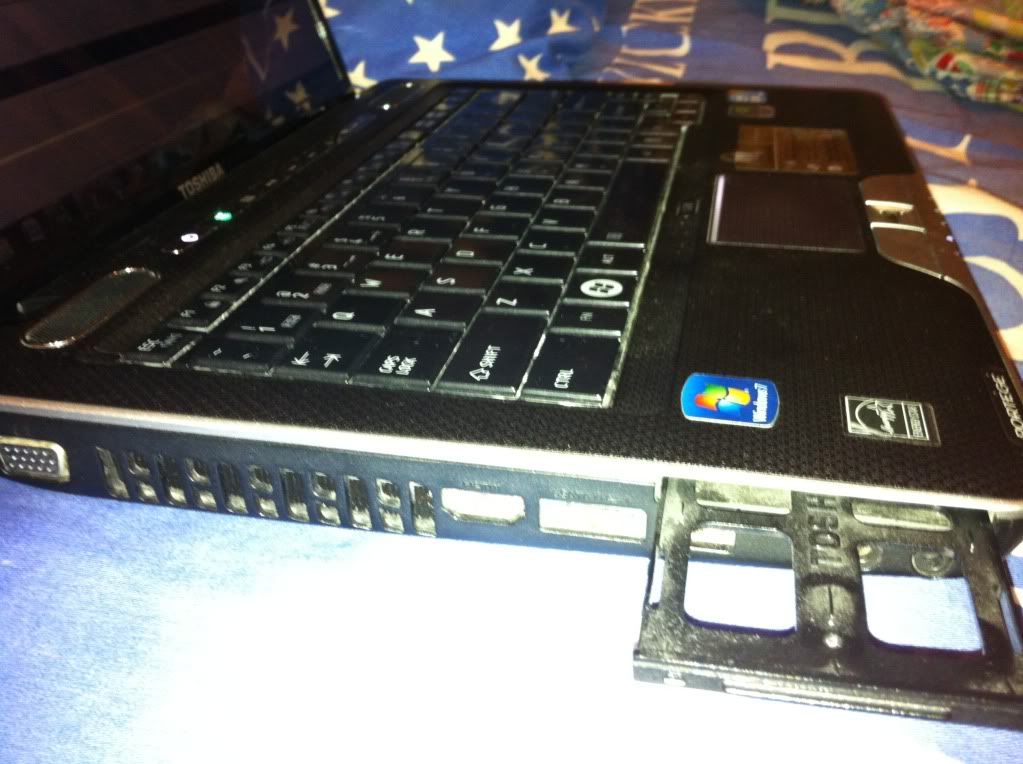
Here are all the ports I have, on the other side I have a USB, charger and LAN port. Not ports at the front, back and bottom.

user posted image

7 Pages « < 2 3 4 5 6 > » Top
 

Change to:
| Lo-Fi Version
0.0221sec    0.41    6 queries    GZIP Disabled
Time is now: 15th December 2025 - 01:30 AM