


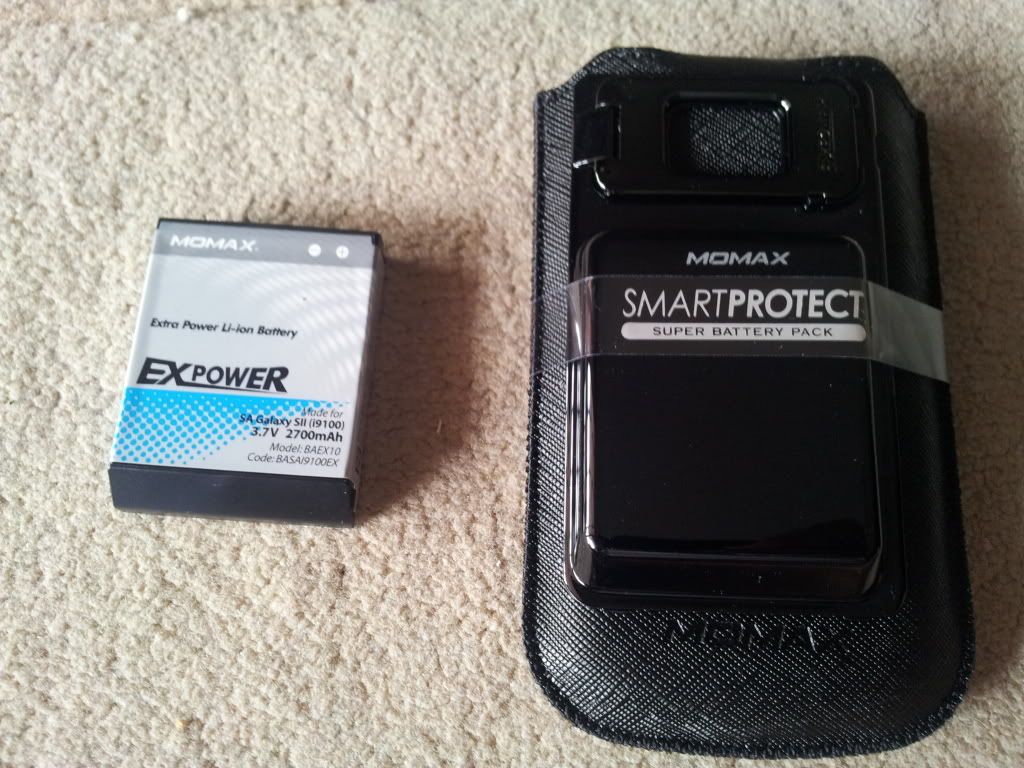
..my new purchase, but the battery quiet heavy la...
SAMSUNG GALAXY S II Official thread V13, NEW Users - be SMART user :read page 1
|
|
 Sep 12 2011, 02:58 PM Sep 12 2011, 02:58 PM
|
 
Junior Member
153 posts Joined: Feb 2005 
|
..my new purchase, but the battery quiet heavy la... |
|
|
|
|
|
Sep 12 2011, 03:10 PM
|

Junior Member
187 posts Joined: Sep 2009
|
QUOTE(desmondk @ Sep 12 2011, 02:54 PM) what brightness do u all put? mind to share with me? mine is 0 most of the time.. if outdoor, i have toggle to set to 50% or 100% or auto.. but seldom use 100% display -> screen mode is normal..  |
|
|
Sep 12 2011, 03:10 PM
|
|
Newbie
0 posts Joined: Sep 2011
|
QUOTE(benny888 @ Sep 12 2011, 02:13 PM) Flash through recovery Meaning reboot into recovery mode, then choose the miui zip file.. rite?ps.. i'm using liten'ing rom 6.2 |
|
|
Sep 12 2011, 03:15 PM
|

Senior Member
7,037 posts Joined: Apr 2006 
|
Okay, finished tweaking VR 2.4.2 to my orange liking, next up, clearing bloatware with TiBu. Mmmmmm fun.
@sorethroat: welcome to the club buddy. Enjoice. This post has been edited by Eiraku: Sep 12 2011, 03:16 PM |
|
|
Sep 12 2011, 03:16 PM
|

All Stars
10,873 posts Joined: Apr 2009
|
QUOTE(madlocke @ Sep 12 2011, 03:10 PM) mine is 0 most of the time.. 0 can see ah? Mine normally at about 20 - 30% brightness at Dynamic setting indoor and outdoor.if outdoor, i have toggle to set to 50% or 100% or auto.. but seldom use 100% display -> screen mode is normal.. This post has been edited by antt00: Sep 12 2011, 03:17 PM |
|
|
Sep 12 2011, 03:18 PM
|
|
Senior Member
7,044 posts Joined: Nov 2007
|
QUOTE(madlocke @ Sep 12 2011, 03:10 PM) mine is 0 most of the time.. i m using stock ROM. dun recall being able to go below 10%. min is 10% for me. i use this most of them time except when i go outdoor. when outdoor, i use auto.if outdoor, i have toggle to set to 50% or 100% or auto.. but seldom use 100% display -> screen mode is normal.. update1: sorry, my bad... the bar dun even have percentage. i think the 10% i mentioned earlier was from widgetsoid. This post has been edited by mydragoon: Sep 12 2011, 03:25 PM |
|
|
|
|
|
Sep 12 2011, 03:19 PM
|

Senior Member
613 posts Joined: Nov 2009
|
what is dynamic setting?
|
|
|
Sep 12 2011, 03:22 PM
|
|
All Stars
10,873 posts Joined: Apr 2009
|
QUOTE(desmondk @ Sep 12 2011, 03:19 PM) what is dynamic setting? Setting > Display > Screen Mode |
|
|
Sep 12 2011, 03:25 PM
|

Junior Member
175 posts Joined: Apr 2007
|
hi all.. my wife and i both now using Galaxy S 2.. awesome phone i have to say. was on galaxy s before this. last friday rooted and flashed villian rom 2.4.2 following the guide posted in the 1st page, and all going silky smooth. battery is awesome too compared to galaxy s (maybe the phone is still very new). will be reading the posts here from time to time to get myself updated on whatever thats happening for Galaxy S 2 as well as learning tips and tricks! thanks all!
|
|
|
Sep 12 2011, 03:26 PM
|
|
Senior Member
7,044 posts Joined: Nov 2007
|
QUOTE(antt00 @ Sep 12 2011, 03:22 PM) Setting > Display > Screen Mode i think should be:Setting > Display > Background effect. should have: dynamic, normal and movie. |
|
|
Sep 12 2011, 03:27 PM
|

Senior Member
3,221 posts Joined: Sep 2008 From: KL
|
QUOTE(mydragoon @ Sep 12 2011, 03:26 PM) i think should be: its screen mode. ntg wrongSetting > Display > Background effect. should have: dynamic, normal and movie. |
|
|
Sep 12 2011, 03:31 PM
|
|
Senior Member
7,044 posts Joined: Nov 2007
|
QUOTE(Fallenangelz @ Sep 12 2011, 03:27 PM) its screen mode. ntg wrong i dun have that wor... diff rom, i guess? |
|
|
Sep 12 2011, 03:32 PM
|
|
All Stars
10,873 posts Joined: Apr 2009
|
QUOTE(mydragoon @ Sep 12 2011, 03:31 PM) i dun have that wor... diff rom, i guess? I think it is the same thing la. |
|
|
|
|
|
Sep 12 2011, 03:33 PM
|
|
Senior Member
3,221 posts Joined: Sep 2008 From: KL
|
QUOTE(mydragoon @ Sep 12 2011, 03:31 PM) i dun have that wor... diff rom, i guess? urs is virgin rom? then mayb the name is diff between virgin n custom rom  This post has been edited by Fallenangelz: Sep 12 2011, 03:33 PM |
|
|
Sep 12 2011, 03:38 PM
|
|
Junior Member
187 posts Joined: Sep 2009
|
QUOTE(mydragoon @ Sep 12 2011, 03:26 PM) i think should be: stock rom call it backgrd effect.. some (or is it all ??) custom rom call it screen mode..Setting > Display > Background effect. should have: dynamic, normal and movie. both oso nothing wrong..  Added on September 12, 2011, 3:42 pm QUOTE(mydragoon @ Sep 12 2011, 03:18 PM) i m using stock ROM. dun recall being able to go below 10%. min is 10% for me. i use this most of them time except when i go outdoor. when outdoor, i use auto. widgetsoid can set to 1% which is ~ 0% lah.. need to use custom level.. i also use widgetsoid one.. update1: sorry, my bad... the bar dun even have percentage. i think the 10% i mentioned earlier was from widgetsoid. This post has been edited by madlocke: Sep 12 2011, 03:42 PM |
|
|
Sep 12 2011, 03:44 PM
|
|
All Stars
10,873 posts Joined: Apr 2009
|
QUOTE(Fallenangelz @ Sep 12 2011, 03:33 PM) urs is virgin rom? then mayb the name is diff between virgin n custom rom I dun think rom cookers will change this. Probably just difference in some words in gingerbread 2.3.3 and 2.3.4. Why are we discussing this?  This post has been edited by antt00: Sep 12 2011, 03:57 PM |
|
|
Sep 12 2011, 03:46 PM
|
 
Elite
27,801 posts Joined: Jun 2007 From: Johor
|
QUOTE(1234554321 @ Sep 12 2011, 03:10 PM) Meaning reboot into recovery mode, then choose the miui zip file.. rite? Before that at recovery :ps.. i'm using liten'ing rom 6.2 clear cache partition, clear data/factory rest at Advanced: clear dalvik cache Than only flash the mui zip file Added on September 12, 2011, 3:46 pm QUOTE(mydragoon @ Sep 12 2011, 03:26 PM) i think should be: Till now, I still cannot see any difference in these 3 modesSetting > Display > Background effect. should have: dynamic, normal and movie. This post has been edited by benny888: Sep 12 2011, 03:46 PM |
|
|
Sep 12 2011, 03:47 PM
|
|
Senior Member
7,044 posts Joined: Nov 2007
|
QUOTE(madlocke @ Sep 12 2011, 03:38 PM) Added on September 12, 2011, 3:42 pm widgetsoid can set to 1% which is ~ 0% lah.. need to use custom level.. i also use widgetsoid one.. Added on September 12, 2011, 3:50 pm QUOTE(benny888 @ Sep 12 2011, 03:46 PM) Added on September 12, 2011, 3:46 pm Till now, I still cannot see any difference in these 3 modes dynamic colour is very bright/ hot. normal = normal la.. movie... i think the colours are dimmed down... not that bright. update1: but honestly, i am happy with what i saw in the normal sample photo. so left it at the normal setting. i guess dynamic could be the DEMO mode on TVs. everything is so vibrant and rich. This post has been edited by mydragoon: Sep 12 2011, 03:51 PM |
|
|
Sep 12 2011, 04:05 PM
|
 
Staff
30,735 posts Joined: Jan 2003
|
question...my "format sd card" option is greyed out...means cannot do.
samsung purposely done? so can only format the card in windows? or am i missing something? |
|
|
Sep 12 2011, 04:06 PM
|
|
All Stars
10,873 posts Joined: Apr 2009
|
QUOTE(Everdying @ Sep 12 2011, 04:05 PM) question...my "format sd card" option is greyed out...means cannot do. Need to unmount first then only can format.samsung purposely done? so can only format the card in windows? or am i missing something? |
|
Topic ClosedOptions
|
| Change to: |  0.0203sec 0.0203sec
 1.01 1.01
 6 queries 6 queries
 GZIP Disabled GZIP Disabled
Time is now: 20th December 2025 - 07:22 PM |
 Quote
Quote