Outline ·
[ Standard ] ·
Linear+
Picture of nice cable management.., - Post ur pics. No cacings pls
|
Thrust
|
 Oct 21 2007, 04:44 PM Oct 21 2007, 04:44 PM
|

|
QUOTE(Doom @ Oct 21 2007, 04:23 PM) good job there, it would be better with the PSU cables sleeved or like u said ..modular PSU ... I know nuts about sleeving  Actually my cable management is still quite messy especially new the PSU where the SATA cables are all bunched together. |
|
|
|
|
|
Doom
|
Oct 21 2007, 05:01 PM
|
|
|
hmm u can't do anything with those excessive cables .... you could just fold them nicely and tie it up with a strap or cable tie then chuck it in a closed area...
btw because the angle of photo that u taken can't shows the route that u used to manage ur cables, so it's hard to provide further tips ....
however it's still a fairy good job ..
|
|
|
|
|
|
seanl
|
Oct 26 2007, 01:07 AM
|
|
|
|
|
|
|
|
|
capriodimitri
|
Oct 30 2007, 11:04 PM
|
Getting Started

|
[attachmentid=320656]
This is my latest cable management. I route most of the cable to other side and hide most cable. Try sleeve casing cable myself, 1st attempt. Please comment, thanks.
|
|
|
|
|
|
mADmAN
|
Oct 30 2007, 11:21 PM
|
|
|
|
|
|
|
|
|
Doom
|
Oct 31 2007, 01:26 AM
|
|
|
hahah .. great work but could be further improve ..
Sleeve the remaining cables (PSU and power connectors)if possible since SilverStone left it out ...
Other than that, time to grab SATA drives my friend .. it would make the cable arrangement really neat and less air restrictive .. although won't affect ur current setup much thanks to the nice intake fan at the rom slot ...
Anyway do u really need dual rom, if there's only one then u could add another fan into the rom slot to provide more air ....
|
|
|
|
|
|
mADmAN
|
Oct 31 2007, 03:02 AM
|
|
|
QUOTE(Doom @ Oct 31 2007, 01:26 AM) hahah .. great work but could be further improve .. Sleeve the remaining cables (PSU and power connectors)if possible since SilverStone left it out ... Other than that, time to grab SATA drives my friend .. it would make the cable arrangement really neat and less air restrictive .. although won't affect ur current setup much thanks to the nice intake fan at the rom slot ... Anyway do u really need dual rom, if there's only one then u could add another fan into the rom slot to provide more air .... sleeving damn malas la...kakkaka....been planning to do it since the GT7.......but sooooooooooooo malas. planning to get SATA drives...but right now very pokai. somemore not sure which one to get oso...plus im also looking for sata drives with labelflash (not lightscribe). and only one drive has it and its not on sale in malaysia as far as i know  sometimes i need dual drives la...sometimes only.... but its useful when its there la. not planning to add another fan to the rom slot....so doesnt really matter much This post has been edited by mADmAN: Oct 31 2007, 03:03 AM |
|
|
|
|
|
qwerty79
|
Oct 31 2007, 11:16 PM
|
|
|
My rig. Before  After  Still don't know how to hide those IDE cable and all the external I/O wire + sata cable. The power cable is very short so cannot hide behind the board. |
|
|
|
|
|
xtorm
|
Nov 1 2007, 01:03 AM
|
|
|
lazy to make a hole behind my board...so this is the best cheapo cable management i can manage  tidy up the messy 20 to 24pin converter  how abt my 2 sata drive?  here's the result  a close up   this is how messy the back is  |
|
|
|
|
|
Doom
|
Nov 1 2007, 02:08 AM
|
|
|
A nice shortcut to manage cables ... if only it comes with color rather than transparent ..
It would high the messy colors of different wires ..... but still a creative way to get it done..
|
|
|
|
|
|
seanl
|
Nov 1 2007, 03:02 AM
|
|
|
QUOTE(xtorm @ Nov 1 2007, 01:03 AM) lazy to make a hole behind my board...so this is the best cheapo cable management i can manage that's very neat and clean, but may i suggest that you can push ur HDDs further up front is possible? it will look cleaner if the cables are hidden within the HDD cage, or mount it in reverse so the sata and power cable face the front of the casing.. nice work. |
|
|
|
|
|
xtorm
|
Nov 1 2007, 01:41 PM
|
|
|
doom yalor....tot of painting them b4...but it would probably crack anyway... compliment from some 1 who did lots of cable arrangement is nice  thx QUOTE(seanl @ Nov 1 2007, 03:02 AM) that's very neat and clean, but may i suggest that you can push ur HDDs further up front is possible? it will look cleaner if the cables are hidden within the HDD cage, or mount it in reverse so the sata and power cable face the front of the casing.. nice work. hmmm thts the max i can put it in, there is a 120mm fan in front  but good sugestion tho thx. btw the huge gap between the hdd is to let the air in  thx, learn some thing today |
|
|
|
|
|
RokXIII
|
Nov 2 2007, 10:54 PM
|
|
|
I'm just take out all the components inside the case, and clean the whole case, then rearrange again the cables. I know it might not be a good cable management, but I think this is the best I can do. Any opinions are welcome! » Click to show Spoiler - click again to hide... « |
|
|
|
|
|
gengstapo
|
Nov 3 2007, 04:34 AM
|
|
|
QUOTE(RokXIII @ Nov 2 2007, 10:54 PM) I'm just take out all the components inside the case, and clean the whole case, then rearrange again the cables. I know it might not be a good cable management, but I think this is the best I can do. Any opinions are welcome! » Click to show Spoiler - click again to hide... « comel sehh..  if only i can do cable management to my rig, shall be nice.. plus air ventilation should be improved  |
|
|
|
|
|
Doom
|
Nov 3 2007, 09:21 PM
|
|
|
|
|
|
|
|
|
jchou87
|
Nov 3 2007, 09:27 PM
|
Getting Started
|
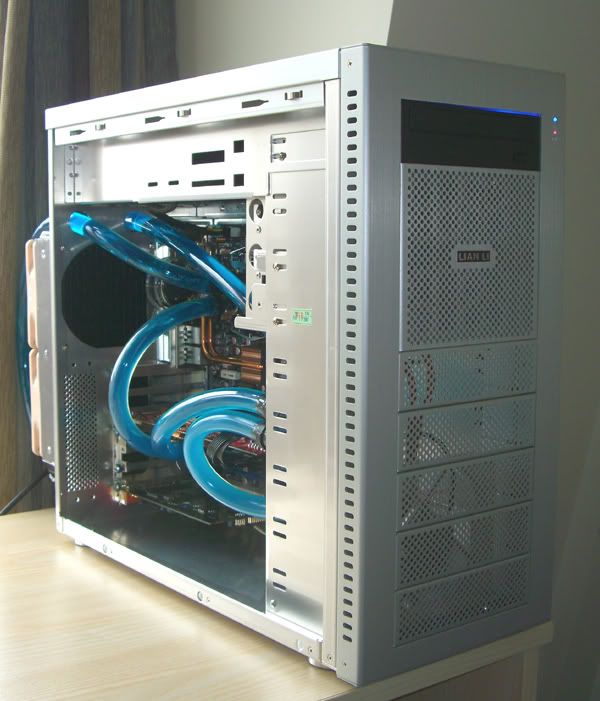
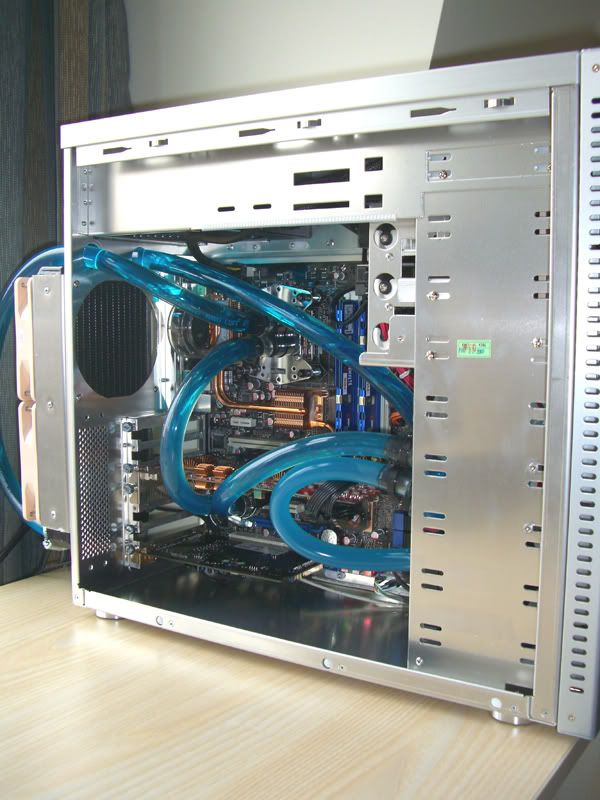
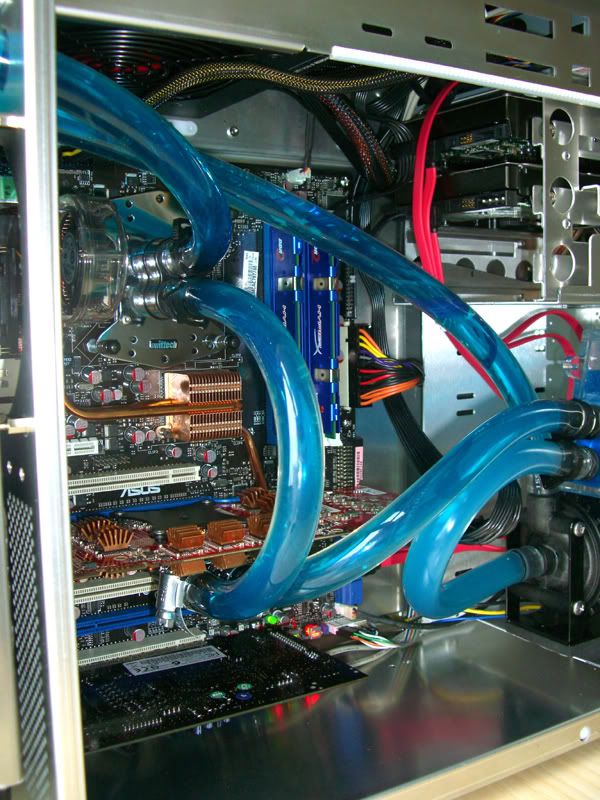
QUOTE(Doom @ Nov 3 2007, 09:21 PM) My new setup .... rate and critic it » Click to show Spoiler - click again to hide... « So u have unleashed your casing bro? Lian Li PCA16 is really cool with the WC setup. Then again thumbs up for nice casing and nice WC setup |
|
|
|
|
|
Doom
|
Nov 3 2007, 09:35 PM
|
|
|
Still waiting for your setup as well men ... hahaha
|
|
|
|
|
|
Bigblock
|
Nov 4 2007, 03:01 AM
|
|
|
QUOTE(Doom @ Nov 3 2007, 09:35 PM) Still waiting for your setup as well men ... hahaha Doom's setup is alwayz clean and professional looking...can see tht.. |
|
|
|
|
|
Doom
|
Nov 4 2007, 07:17 AM
|
|
|
thanks for the compliment, still working on the tubing coz it's just not wise to route it out side of the case in such a long length ..
hopefully could get it done and be a happy user ... hahha ..
Have to concentrate on study .... no modding ..
|
|
|
|
|
|
gengstapo
|
Nov 4 2007, 02:10 PM
|
|
|
QUOTE(Doom @ Nov 4 2007, 07:17 AM) thanks for the compliment, still working on the tubing coz it's just not wise to route it out side of the case in such a long length .. hopefully could get it done and be a happy user ... hahha .. Have to concentrate on study .... no modding .. wahh u doom always show nice internal management of ur rig i like the lubang2 front bay.. can pc-a10 used the bay? |
|
|
|
|



 Quote
Quote





 0.0342sec
 0.36
0.36
 6 queries
 GZIP Disabled